
Let AI agents run your board over the REST API: authentication, scopes, and safe writes
An AI agent that can read your board is easy to feel good about. An AI agent that can write to it is where you should slow down. The moment a model can create issues, move cards, and edit fields, one bad prompt or one loop bug can churn through your project. This is a guide to wiring an agent into Utter over the REST API so it can do useful work without that risk hanging over you.
The short version: give the agent its own key, scope that key to the smallest set of writes it actually needs, and make its mutations idempotent so a retry never doubles up. Nothing exotic. Just the boring discipline that keeps a helpful agent from becoming an expensive one.
The auth model, stated plainly
Utter authenticates the API with a bearer token. You mint an API key, and every request carries it as Authorization: Bearer <key>. There is no OAuth dance for a server-to-server agent, no session cookie, no password.
curl https://utter.ae/api/v1/workspaces/acme/projects/WEB/issues \
  -H "Authorization: Bearer utp_live_XxXxXxXxXxXxXxXxXxXxXxXxXxXxXxXx"
A key is a string; whoever holds it can act as that key. That is the whole model, and it means the interesting decisions are about what a key is allowed to do, not how you present it.
Two things about a key are worth internalizing before you hand one to an agent.
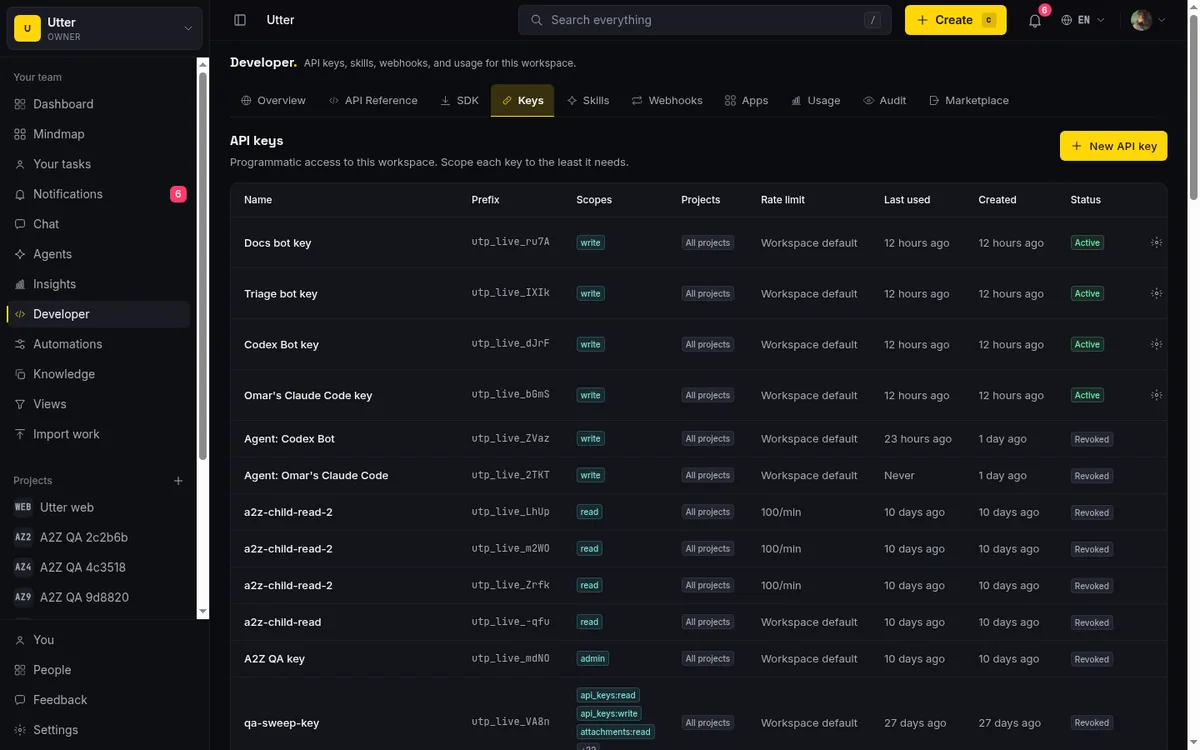
First, a key inherits the workspace role of the person who created it, and scopes can only narrow that ceiling. They never widen it. If a member creates a key, that key can never do something the member could not do by hand, no matter which scopes you tick. So the first lever is who mints the key. Make an agent's key from an account with the role the agent should have, not from an owner account out of convenience.
Second, a key can be pinned to specific projects. A key with a project allow-list simply cannot see or touch anything outside that list. If your agent only works one project, pin it there and the rest of the workspace is invisible to it.
You create keys in the workspace developer settings, and the full surface is documented at /developer. The key is shown once at creation; store it in your secret manager, not in the repo.
Scopes: read broadly, write narrowly
Utter scopes come in two shapes. There are coarse parents (read, write, admin) and granular per-resource scopes (issues:read, issues:write, comments:write, labels:write, and so on). A granular write implies the matching read, so issues:write already carries issues:read. The coarse write fans out to the member-level write scopes across resources.
Here is the design decision that matters for agents. The coarse write scope deliberately does not include the admin-tier writes. Editing workspace settings, managing members, managing forms and automations, rotating API keys, wiring webhooks: none of those ride along with write. They are reachable only through the explicit granular scope (workspaces:write, members:write, and friends) or through the coarse admin scope.
flowchart TD
    W[write scope] --> I[issues:write]
    W --> C[comments:write]
    W --> L[labels:write]
    AD[admin scope] --> T[admin tier writes]
    T --> WS[workspaces:write]
    T --> M[members:write]
    W -. never reaches .-> T
This is intentional. A key that can file bugs should not be one prompt-injection away from editing your billing or minting more keys.
So think about the agent's job and scope to exactly that:
- An agent that triages incoming bugs and moves them across columns needs
issues:write. Addcomments:writeif it should leave a note,labels:writeif it applies labels. That is it. - A read-only reporting agent that summarizes progress needs
read, or even justissues:read. It should never hold a write scope at all. - An agent that only manages one project gets its key pinned to that project on top of the scopes above.
Resist the reflex to grant admin "so it works." An over-scoped key is the single most common way an agent integration turns into an incident. If a call comes back with a forbidden error, that is the scope system doing its job; widen the one scope the endpoint names, not the whole grant.
Moving a card and filing an issue
The write surface follows the product's shape: workspaces contain projects, projects contain issues. To create an issue you POST to the project's issues collection with issues:write:
curl -X POST https://utter.ae/api/v1/workspaces/acme/projects/WEB/issues \
  -H "Authorization: Bearer $UTTER_API_KEY" \
  -H "Content-Type: application/json" \
  -H "Idempotency-Key: $(uuidgen)" \
  -d '{
    "type": "bug",
    "title": "Checkout button unresponsive on Safari",
    "priority": "high",
    "labels": ["triage"]
  }'
To move a card, you PATCH the issue and change its status. The PATCH is a sparse merge, so you send only the fields you want to change and leave the rest alone. Moving WEB-42 from in progress to in review is one small PATCH that sets the status; nothing else on the issue is disturbed.
curl -X PATCH https://utter.ae/api/v1/workspaces/acme/projects/WEB/issues/WEB-42 \
  -H "Authorization: Bearer $UTTER_API_KEY" \
  -H "Content-Type: application/json" \
  -H "Idempotency-Key: $(uuidgen)" \
  -d '{"status": "in_review"}'
const res = await fetch(
"https://utter.ae/api/v1/workspaces/acme/projects/WEB/issues/WEB-42",
{
method: "PATCH",
headers: {
Authorization: `Bearer ${process.env.UTTER_API_KEY}`,
"Content-Type": "application/json",
"Idempotency-Key": crypto.randomUUID(),
},
body: JSON.stringify({ status: "in_review" }),
}
);
const issue = await res.json();import os, uuid, requests
res = requests.patch(
"https://utter.ae/api/v1/workspaces/acme/projects/WEB/issues/WEB-42",
headers={
"Authorization": f"Bearer {os.environ['UTTER_API_KEY']}",
"Idempotency-Key": str(uuid.uuid4()),
},
json={"status": "in_review"},
)
issue = res.json()That sparse-merge behavior is a quiet safety feature. An agent that means to change one field cannot accidentally blank out a description or reassign an owner just because it forgot to include those fields in the body. It sends the delta; the server keeps the rest.
A full read-act-verify pass over the wire:
sequenceDiagram
    participant A as Agent
    participant U as Utter REST API
    A->>U: GET .../issues?status=... (issues:read)
    U-->>A: the column, as JSON
    A->>U: PATCH .../issues/WEB-42 with the status delta + Idempotency-Key
    U-->>A: the updated record, validated on write
    A->>U: retry after a timeout, same Idempotency-Key
    U-->>A: same result, no duplicate card
The full set of operations (roughly 150 across issues, comments, labels, custom fields, saved views, docs, forms, automations, and more) is listed in the API reference. If you are still deciding between calling REST directly and running the agent through the MCP server, we wrote a separate piece on choosing MCP or the REST API; this guide assumes you are calling REST.
Safe writes: idempotency is not optional for agents
Humans click a button once. Agents retry. A network blip, a timeout, a framework that re-runs a failed step: any of these can send the same "create issue" call twice, and without protection you get two identical cards. Utter handles this with an idempotency key.
Attach an Idempotency-Key header to any mutating request. It is a string you choose (a UUID per logical operation works well). The first request with a given key runs the handler and caches the response. A retry with the same key and the same body replays the cached response instead of running again, so the create happens once no matter how many times the agent fires it. The replay window is 24 hours.
Two edge cases are worth knowing because they show up in real agent loops:
| You send | You get back | What it means |
|---|---|---|
| Same key, same body | The cached response, replayed | Safe retry; the write ran once |
| Same key, different body | 409 idempotency_violation |
Your key generation is buggy; two operations shared a key |
| Same key while the first request is still in flight | 409 conflict |
The original is still running; wait and retry |
Both 409s are features. They turn a class of silent duplication bugs into loud, catchable errors.
The practical rule: generate one idempotency key per intended action, set it on every write, and treat a 409 as a signal about your own retry logic rather than a transient error to hammer through.
Rate limits and revocation
Keys are rate limited per key, per minute, so a runaway loop hits a ceiling instead of your whole workspace. You can also set a lower per-key limit when you create the key, which is a cheap way to cap an experimental agent.
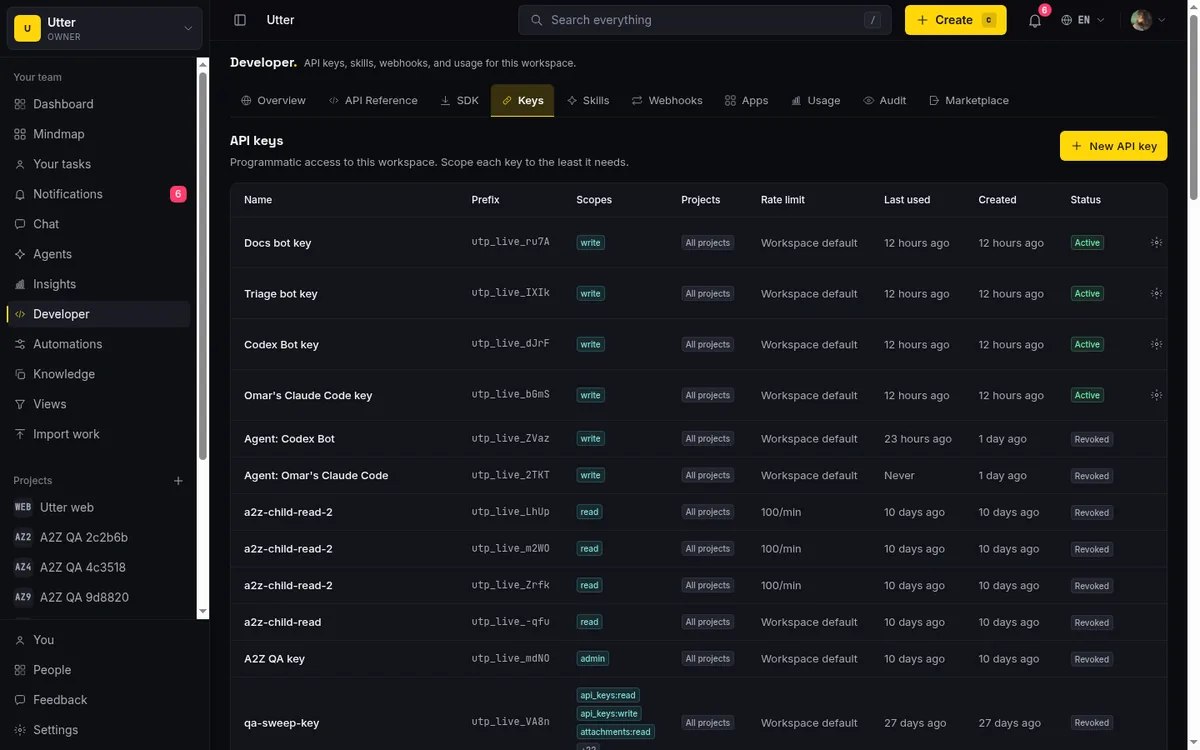
Because each agent has its own key, revocation is surgical. If an agent misbehaves, revoke its key and only that agent stops; every other integration keeps running. This is the real payoff of one-key-per-agent: the blast radius of any single key is exactly one agent, and killing it is a single action in the developer settings.
An honest limit or two
This model is deliberately simple, and simple has edges. There is no fine-grained per-field permission; scopes are per resource, not per attribute. If you need an agent that can edit an issue's status but provably never its assignee, the API cannot express that today, and you would enforce it in your own code before the call. Auth is also bearer-token only for programmatic access, which means key hygiene is on you: store them in a secret manager, rotate them, and never log the full token.
None of that changes the core recipe, which holds up well: separate key per agent, least-privilege scopes, project pinning where it fits, idempotency keys on every write. Do those four things and an agent can run your board without keeping you up at night.
Ready to try it? Open the developer settings to mint a scoped key, and keep the API reference next to your editor while you wire it up.
Frequently asked questions
How do I let an AI agent run my board over the Utter REST API without risking the workspace?
Give the agent its own API key, scope that key to the smallest set of writes it actually needs, pin it to the projects it works on, and put an idempotency key on every write so a retry never doubles up. A key can never do more than the workspace role of the person who created it, so mint the agent's key from an account with the role the agent should have.
What API scopes does an AI agent need?
Match the scopes to the job: an agent that triages bugs and moves cards needs issues:write, plus comments:write or labels:write only if it comments or labels, while a read-only reporting agent needs just read or issues:read. The coarse write scope deliberately excludes admin-tier writes like workspace settings, members, webhooks, and API keys, so a key that can file bugs is not one prompt injection away from editing your billing or minting more keys.
How do I stop an agent from creating duplicate issues when it retries?
Send an Idempotency-Key header on every mutating request, one key per intended action. The first request runs and its response is cached; a retry with the same key and body replays the cached response instead of running again, with a 24 hour replay window. Reusing a key with a different body returns a 409 idempotency_violation, which turns a silent duplication bug into a loud, catchable error.
What happens if an agent misbehaves or runs away?
Keys are rate limited per key, per minute, so a runaway loop hits a ceiling instead of your whole workspace, and you can set a lower per-key limit when you create a key for an experimental agent. Because each agent has its own key, revoking that key stops only that agent while every other integration keeps running. If you are still choosing between calling REST directly and running the agent through the MCP server, see choosing MCP or the REST API.
Related reading
Onboard an AI agent like a new hire: identity, access, and a first task
You already know how to bring on a new hire. Do the same for an AI agent: give it an identity, scoped access, one small task, a review, and an offboarding path.
July 15, 2026 · 8 min read

Who decides what: setting decision rights between your team and your AI agents
A simple rule for AI governance: reversible, low-stakes moves are the agent's to make; irreversible or high-stakes ones need a human. How to draw the line.
July 15, 2026 · 7 min read
How to use the rest api
Get an Utter API key and use the project management REST API to list, create, and update issues safely, with scopes, idempotency keys, and rate limits explained.
July 15, 2026 · 16 min read

How to use AI agents in Utter: connect them, assign work, and follow their sessions
A start-to-finish walkthrough: connect an agent, scope its key, assign it issues, and watch its sessions, without giving up control of the board.
July 15, 2026 · 11 min read

Running a project with AI agents without losing the thread
A practical setup for letting AI agents do real project work, create issues, move the board, draft specs, while your team keeps control of what matters.
July 11, 2026 · 5 min read

What is agentic project management? A plain-language guide with a working example
A copilot waits for your prompt. An agent acts on an event. Here is the perceive-plan-act-check loop explained, with one real end-to-end run inside Utter.
June 11, 2026 · 11 min read

AI agent governance for project teams: seven controls your tracker can enforce
Governance for AI agent teams is not a policy PDF. Seven controls your tracker can enforce, from identity to offboarding, and what tooling cannot fix.
July 15, 2026 · 10 min read

How to give an AI agent human-in-the-loop approval before it changes your issues
Build an approval gate for AI agents in Utter: let the agent triage into a Needs review column, a human moves it forward, and transition rules stop skips.
May 20, 2026 · 9 min read
Give your AI agent a knowledge base: connect your docs so it answers from your project, not the internet
How to give an AI agent access to your company docs, so it grounds answers in your workspace instead of guessing, using RAG exposed through MCP.
June 5, 2026 · 8 min read

How to manage a team of AI agents without losing track of what they're doing
Running several AI agents at once? The day-to-day of a fleet: a roster, live sessions, instant delegation, per-field permissions, and verified work.
July 15, 2026 · 16 min read
أضف تعليقًا
ابدأ النقاش.