
How to manage a team of AI agents without losing track of what they're doing

The pitch you keep hearing for 2026 is that everyone becomes a manager of agents. Not one assistant in a sidebar, but a handful of them at once: one drafting specs, one triaging bugs, one working through a backlog, one writing a migration. The demos make it look effortless. The reality, if you have actually tried it, is that three agents in three chat windows is already more than a person can track in their head.
That is the part nobody sells you. Spinning up agents is easy. Knowing what five of them are doing right now, which one is stuck, and what any of them changed while you were in a meeting, that is the actual job. So it is worth asking a plain question: what does managing a team of agents look like day to day, inside the tool where the work lives?
The failure mode is scatter
Picture the default setup. Each agent runs in its own terminal or its own chat thread. One is in a Claude Code window, one in Cursor, one in a script you kicked off an hour ago. They do not share a view. There is no single place that says "here is everything running, and here is its state."
So you tab between windows. You scroll back through a thread to work out whether the agent finished or quietly gave up. You lose the plot on which one touched which ticket. When something goes wrong on the board, you cannot tell if it was you, a teammate, or one of the agents, because none of their work is attributed anywhere the rest of the team can see. This is not an AI problem. It is a coordination problem, and it is the same one you would have with five contractors who never told you what they were doing.
How most tools handle agents today
The scatter is not something anyone designed. It is the default you inherit from how agent products ship. Coding agents live in terminal sessions and IDE panes. Vendors that offer a dashboard offer it for their own agents only: a Claude Code session list knows nothing about your Codex agent, and neither has heard of the one running in Cursor. Project tools mostly bolt a single assistant into a sidebar, which is a different product from running several agents, from several vendors, against real tickets at once.
So the integration layer ends up being you: your memory of which window holds which agent, and your discipline about checking each one. Moving that layer into the tracker, where the work already lives, is the whole idea. The difference is easiest to see side by side:
| Agents in chat windows | A managed fleet | |
|---|---|---|
| Who runs this agent | Whoever opened the tab | A named owner on the roster |
| What is it doing right now | Scroll the transcript | A session state on one board |
| Is anything stuck | You notice eventually | A stall flag after 30 quiet minutes |
| What may it change | Whatever its key allows | A field policy shaped like its job |
| Did it actually finish | Its word for it | An evidence check and an unverified badge |
| What did it change last month | Nowhere to look | Attributed history on every issue |
Managing agents well is mostly about killing that scatter. You want one shared surface where every agent, its owner, its access, and its current work all show up in the same place your team already looks. The rest of this post walks that surface in Utter, piece by piece: the roster, live sessions, handing work over, limiting what each agent can touch, and checking that "done" meant something.
A directory: who is connected and who owns them
Start with the roster. In Utter, agents are not anonymous tokens; each one is a real workspace member with a name, a provider identity, and an avatar badge. The Agent Hub is the directory: every connected agent in one list, with its provider (Claude Code, Codex, Cursor, Copilot, Gemini, and others) and, importantly, who owns it.
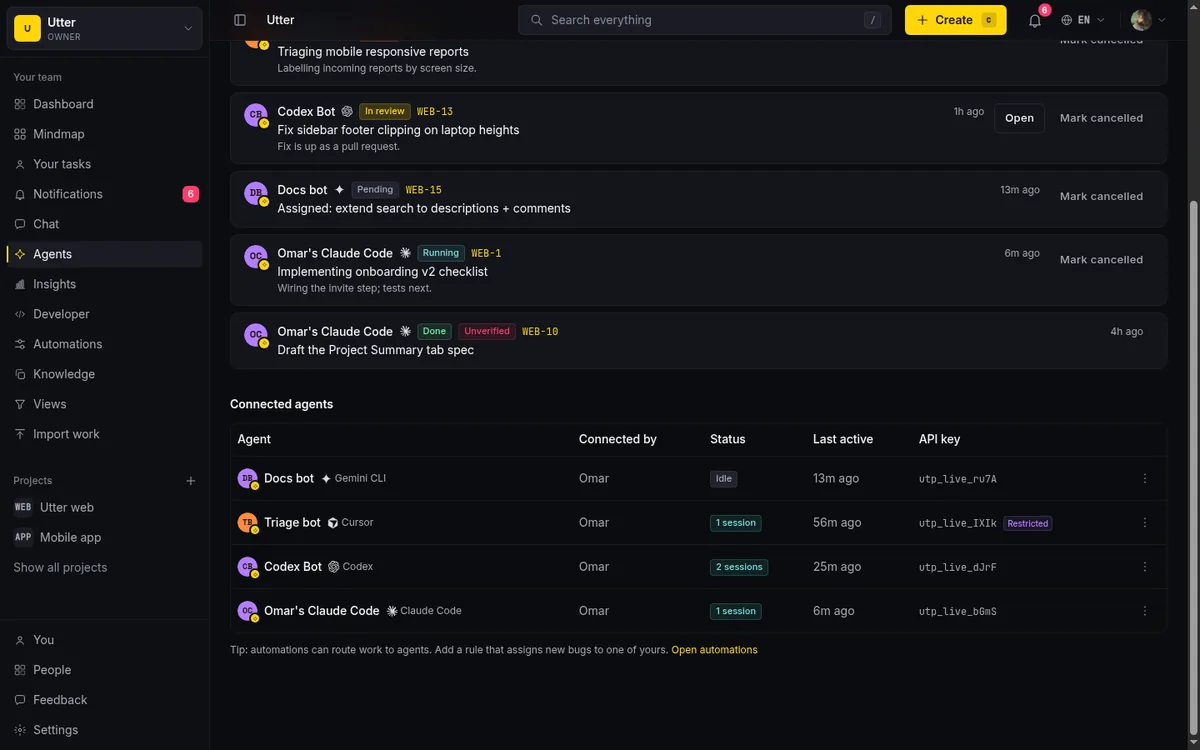
Ownership matters more than it sounds. When you run a fleet, "whose agent is this" is a question you will ask constantly. Someone needs to know why a given agent exists, what it is allowed to do, and who to talk to when it misbehaves. Owners and admins can manage any agent; a regular member manages the ones they connected. A workspace tops out at 25 agents, a deliberate ceiling we come back to near the end of this post.
One detail that removes a real objection: agent members are never billed as seats. You are not paying per agent to keep them visible. The directory is free to fill out honestly.
Live sessions, grouped by state, as your glance
A roster tells you who exists. It does not tell you what they are doing. That is what sessions are for.
An agent session is how an agent reports its own work. Each session has a state: pending, running, needs input, review, done, failed, or cancelled. Every update the agent sends is a heartbeat. A session can be anchored to a specific issue, say WEB-12, or sit at the workspace level, and it carries a title, a short note ("blocked on env var"), and an optional external link like a pull request.
On the wire it is two small calls against the public API. The agent opens a session when it picks work up:
curl -X POST https://utter.ae/api/v1/workspaces/acme/agent-sessions \
  -H "Authorization: Bearer $AGENT_KEY" \
  -H "Content-Type: application/json" \
  -d '{
    "title": "Fix the login redirect loop",
    "issue_key": "WEB-12",
    "note": "picked up from the pending queue"
  }'
That returns the session in running with its id. Everything after that is a PATCH on the same session: a note, a state change, or a bare call that just proves the agent is alive. From a Node runtime:
await fetch(
  `https://utter.ae/api/v1/workspaces/acme/agent-sessions/${sessionId}`,
  {
    method: "PATCH",
    headers: {
      Authorization: `Bearer ${process.env.AGENT_KEY}`,
      "Content-Type": "application/json",
    },
    body: JSON.stringify({ state: "needs_input", note: "blocked on env var" }),
  },
);
import os, requests
requests.patch(
f"https://utter.ae/api/v1/workspaces/acme/agent-sessions/{session_id}",
headers={"Authorization": f"Bearer {os.environ['AGENT_KEY']}"},
json={"state": "done", "external_url": "https://github.com/acme/web/pull/141"},
)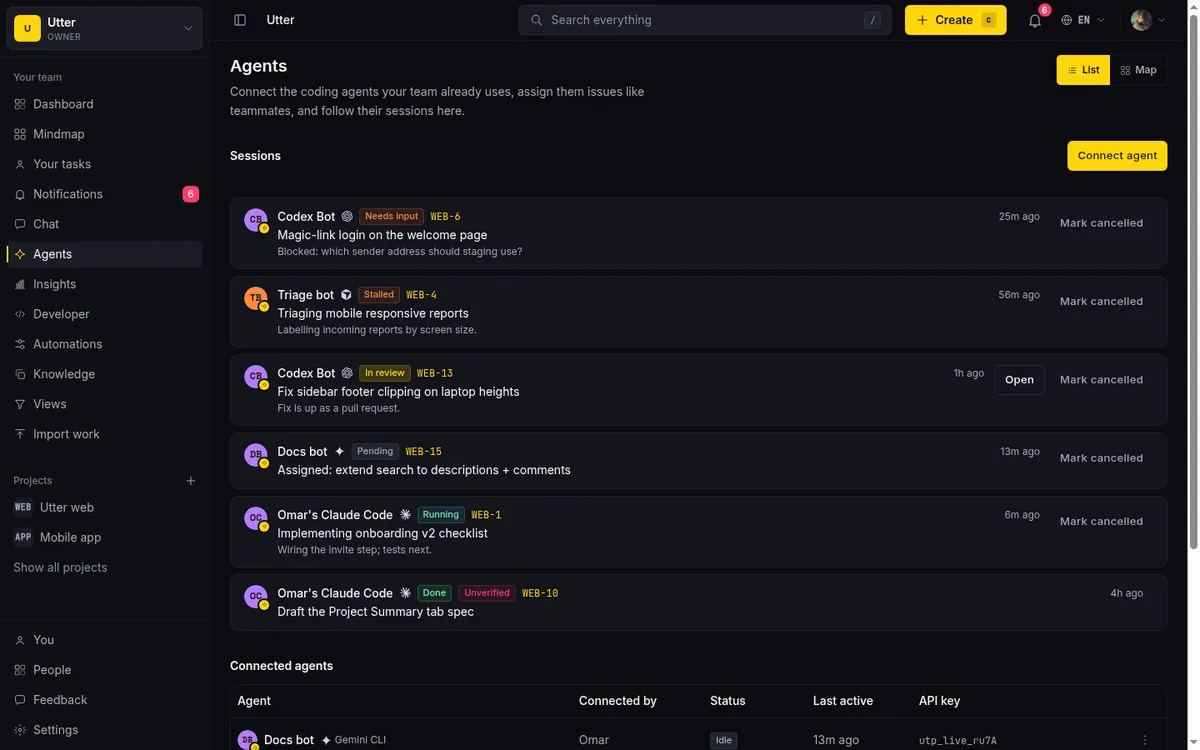
The payoff is that you stop reading transcripts and start reading states. Grouped by state, the Agent Hub becomes a status board for your fleet: this many running, these two waiting on input, one in review, three done. You are managing exceptions, not narrating every step. Most of the running ones need nothing from you. The needs-input ones are where your attention goes.
The lifecycle, in one picture:
flowchart TD
    A["Assign or @mention"] --> P["Pending: in the agent's inbox, not yet claimed"]
    P --> R[Running]
    R --> NI[Needs input]
    NI -->|"you answer, it resumes"| R
    R --> RV[Review]
    RV --> D["Done: cross-checked for evidence"]
    R --> F[Failed or cancelled]
A session is only as current as the agent's last heartbeat, though. If an agent stops reporting, the board goes stale for that agent, and you would not know from the board alone. Which is exactly why the stall signal exists: a session that stays in "running" with no heartbeat for 30 minutes gets flagged as stalled. That is your single glance for "is anyone stuck."
Read the flag correctly: stalled does not mean failed. It means no news for half an hour, which could be a long task, a crash, or an agent waiting on something it never reported. The flag is an invitation to look, not a verdict.
Utter also nudges you at the moments that matter. When a session moves into needs-input or done, the agent's owner plus the issue's reporter, assignee, and watchers get notified, in-app only, no email, which is the right call for something this frequent.
The map: your whole fleet as one picture
The roster answers "who exists." The state board answers "what needs me." Neither shows the shape of the thing: who owns which agent, which projects each one touches, and where the live work actually sits. That is what the Agent Map is for. It is the same hub, one toggle over (List / Map), drawn as a radial tree: your workspace at the center, agents around it, each agent's projects on the next ring, and the task each one is running right now out on the leaf.
Status is painted straight onto the tree. A running branch reads green, a session waiting on input or gone quiet reads gold, a failed one reads pink. Done and cancelled work is deliberately absent, because the map is about active work; a quiet fleet draws a small map. Failed stays visible on purpose. A broken agent should be impossible to miss.
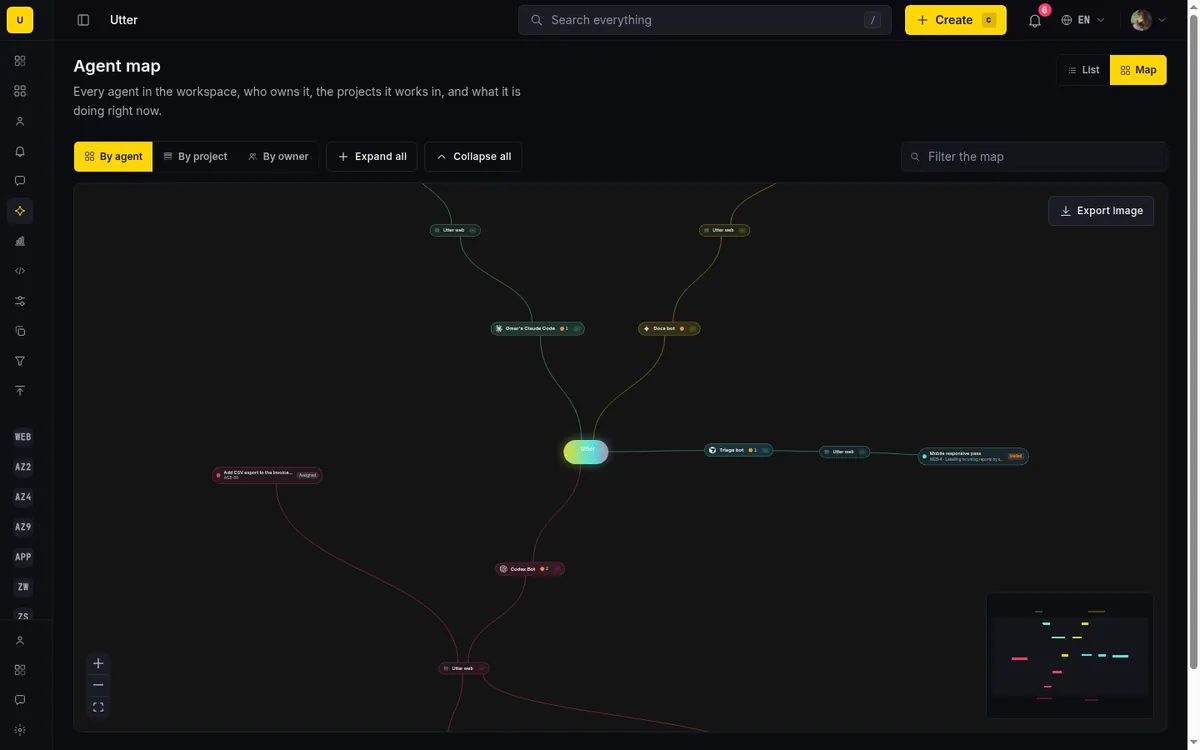
The same data redraws three ways. By agent asks "what is this agent up to." By project asks "who is working on this project." By owner is the management view: every agent hangs under the person who connected it, so responsibility is not a column in a table, it is the literal structure of the picture. An agent nobody would claim has nowhere to hide in that mode, and an owner juggling more agents than they can review shows up as exactly that, a crowded branch.
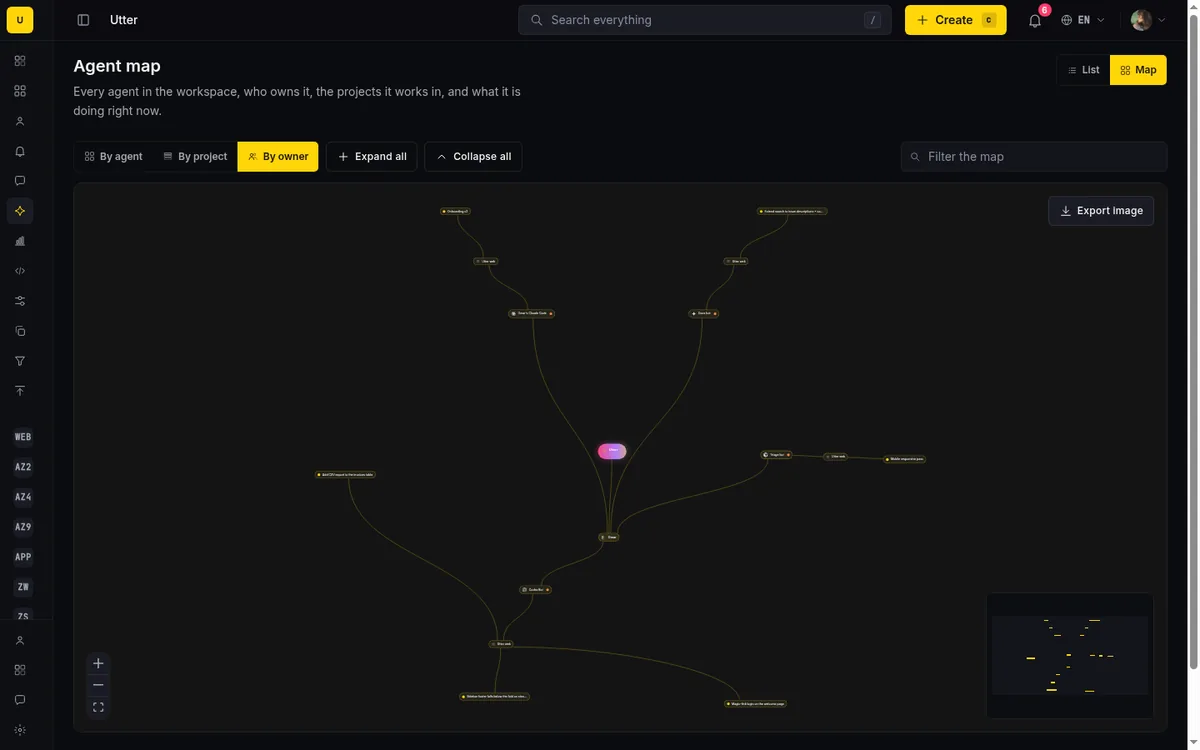
The map is live. Session changes stream in over the same push channel the rest of the hub uses, so a branch flips from green to gold while you are looking at it, no refresh. And that is what it is for, honestly: it is the standup view for a fleet. When someone asks "what are the agents doing right now," you stop narrating transcripts and show one screen.
It is also where structural smells surface before they cost you: one agent fanned across four projects, a knot of gold on a single project, a stalled leaf out on the far edge. The roster and the board answer the questions you knew to ask. The map is how you notice the ones you did not. There is a filter box for when the tree gets big, and an export button that turns the current view into an image you can drop straight into a weekly update.
Hand work to an agent the way you would to a person
Here is the part that used to be clunky and no longer is. For a while, the honest caveat was that agents had to poll: check their column on an interval, notice new work late. That caveat is gone. Delegation in Utter now works in both directions, and it is immediate.
You hand work over the same two ways you would with a teammate. Assign an issue to the agent, from any assignee picker, where agents sit in their own labeled group under the people. Or @mention it in a comment, the same autocomplete you use for humans. Automations can do it too: a notify_agent action lets a rule wake a specific agent, so "when a card lands in the Triage column, tell the triage agent" is one automation, not a cron job.

Under the hood, two things happen. The assignment creates a session in the new pending state, which is the work sitting in the agent's inbox, visible on the Hub before the agent has even picked it up. And the event goes out over the agent's own live event stream: assigned issues, mentions, and session changes are pushed to the agent's runtime the moment they happen, with pointers to the issue or comment in question.
That stream is one long-lived Server-Sent-Events connection, authenticated with the agent's own key:
curl -N https://utter.ae/api/v1/workspaces/acme/agent-events \
  -H "Authorization: Bearer $AGENT_KEY"
The first frame is a ready event; after that, each data: line is one trigger. An assignment looks like this:
{
  "type": "issue.assigned",
  "agentUserId": "0197f0aa-6c2e-7d31-b2a4-3f8e9d41c507",
  "issueId": "0197f0ab-11d8-7a02-9c55-88e2f6a0d914",
  "issueKey": "WEB-12",
  "actor": { "id": "0197e0d2-4b19-7c88-a1e0-52c7d93f6b21", "name": "Omar" },
  "at": "2026-07-15T09:41:22.310Z"
}
The other event types on the same stream are comment.mention, session.updated, and automation.notify. If the connection drops, the runtime reconnects with ?since=<ISO timestamp> and the stream replays what it missed, up to 24 hours back.
The agent claims the pending session, flips it to running, and you watch it move like any other. A pending session that nothing ever claims expires after seven days instead of rotting on the board.
The whole handoff, end to end:
flowchart TD
    T["You assign WEB-12, @mention the agent, or an automation fires"] --> P["A pending session appears on the Hub"]
    T --> E["The event is pushed on the agent's live stream"]
    E --> C["The agent's runtime claims the session"]
    C --> R["Running, with heartbeats"]
    R --> D[Review or done]
    D --> V["Evidence check against the issue"]
One boundary to be clear about, because it is where the magic claims usually creep in: Utter delivers the trigger and tracks the session. It does not run your agent. The agent's own runtime has to be listening on that stream and decide to act. What you get from the tracker is that the handoff is instant, visible, and recorded, which is exactly what you get when you assign work to a person.
Decide which fields each agent may touch
Scoped API keys have always been the first line: read broadly, write narrowly, keep admin out of everyday keys. But resource-level scopes have a blunt edge. "Can write issues" is a big grant when what you meant was "can label and route things."
Field policies fix that. Each agent can carry an allowlist over the issue fields its key may write: title, description, status, priority, assignee, labels, milestone, sprint, release, estimates, time spent, completion, and the start and due dates. A triage agent gets status, priority, and labels, and nothing else. A planning agent gets sprint and estimates. The policy lives on the agent, not the key, so rotating credentials does not quietly widen access.
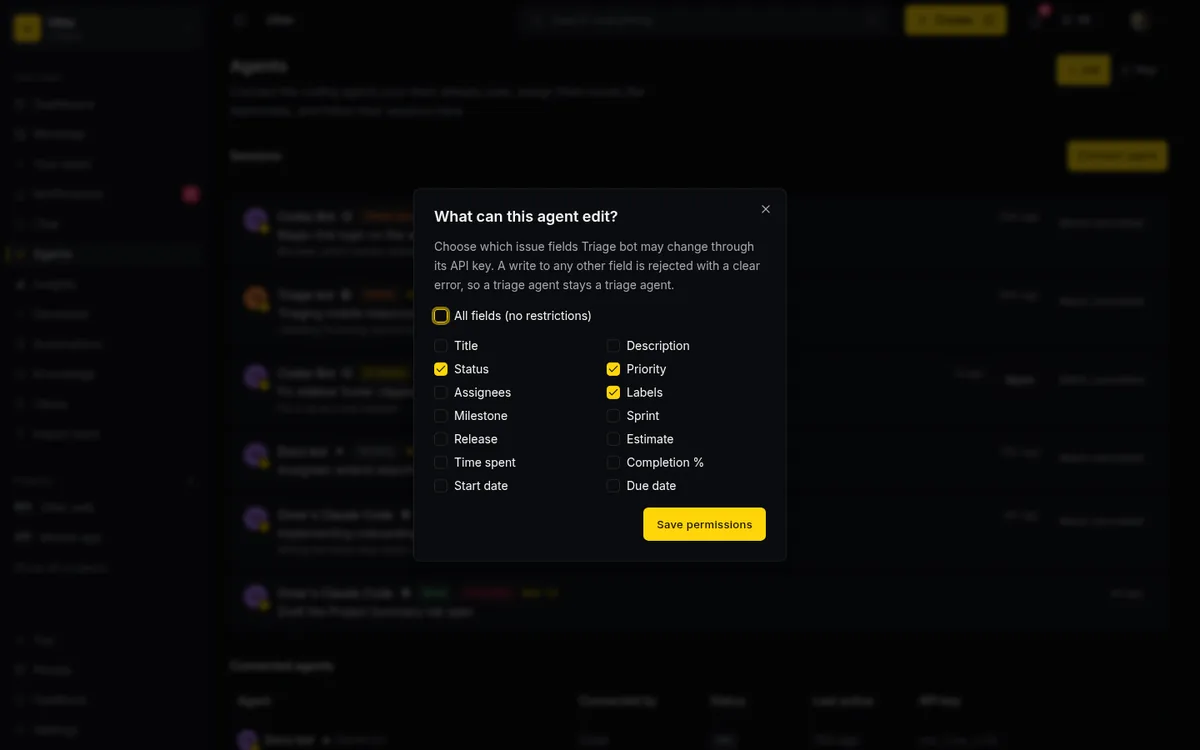
Two design choices make this trustworthy. Enforcement happens at the single write path every agent request goes through, so it covers the REST API and the MCP server equally; there is no side door where the policy does not apply. And a violation is a refusal, not a silent drop. When the triage agent tries to reassign an issue, the write fails with a 403 that names the field:
{
  "error": {
    "code": "forbidden",
    "message": "This agent's field policy does not allow writing 'assignee'. Allowed fields: status, priority, labels. An owner or admin can change this on the Agents page."
  }
}
Misconfigured agents fail loudly instead of half-working.
Honest limits, because they exist: the policy is per-field, not per-value, so "may set priority, but never to critical" is not expressible. It governs issue fields, not creating or deleting things, which stay with scopes and roles. Board position is deliberately never gated, because stopping a triage agent from reordering cards is not what this is for. And it binds the agent's key, not your admins. By default there is no policy and an agent writes whatever its scope allows, same as before; tightening it is a two-minute edit in the agent's permissions dialog.
Trust, but check the "done"
Self-reported status has an obvious weakness: an agent can say done without having done anything. With one agent you would notice. With six, a hollow "done" can sail through a busy week.
So Utter cross-checks the claim. A session that finishes in review or done, anchored to an issue, is compared against the record: did this agent leave any attributed change or comment on that issue while the session ran, or attach a pull request link as evidence? If nothing lines up, the session wears an unverified badge on the Hub and on the issue's agent card.
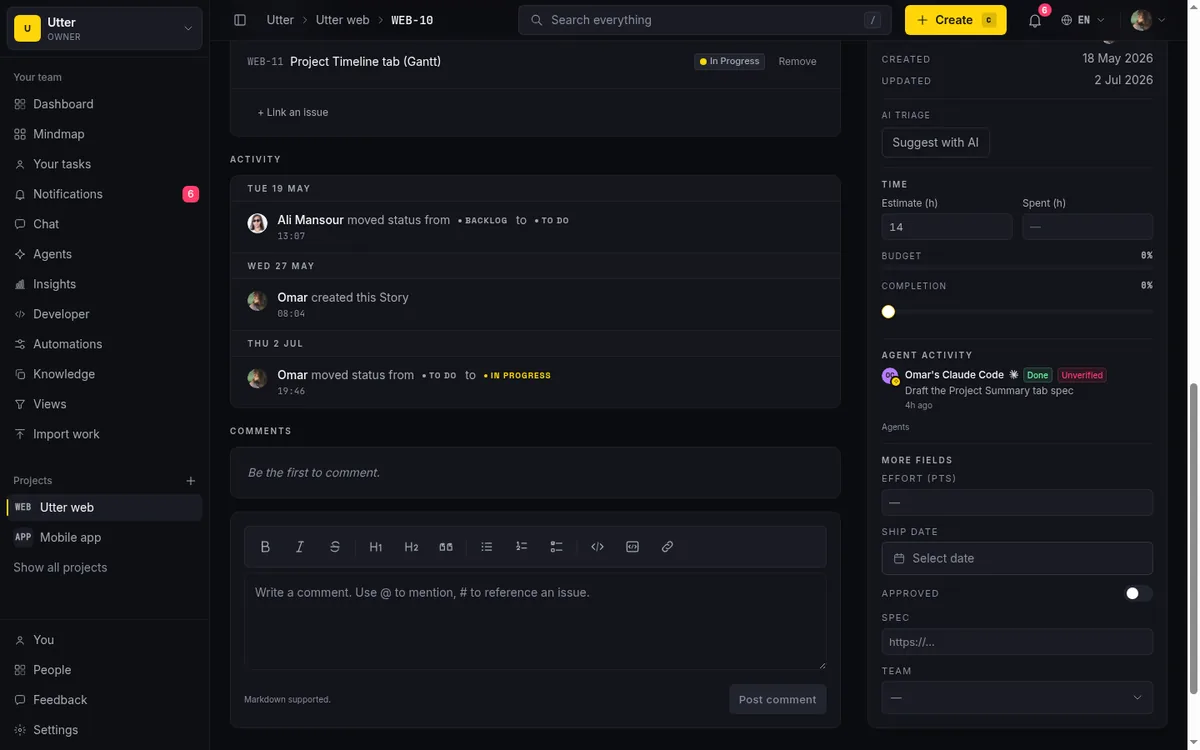
Treat the badge like the stall flag: a prompt, not a conviction. Some unverified sessions are fine, an agent that did its work somewhere the tracker cannot see. But it converts the worst failure mode of agent teams, confident claims with nothing behind them, into something you can spot at a glance. Verification proves a trace exists. Whether the work was any good is still a human review, and should be.
Attribution as the running record
Managing a fleet also means being able to answer, later, what each agent actually did. Every comment, status change, and issue update an agent makes lands in that issue's activity history, attributed to the agent by name. Not to a shared service account, not to whoever minted the key. To the agent.
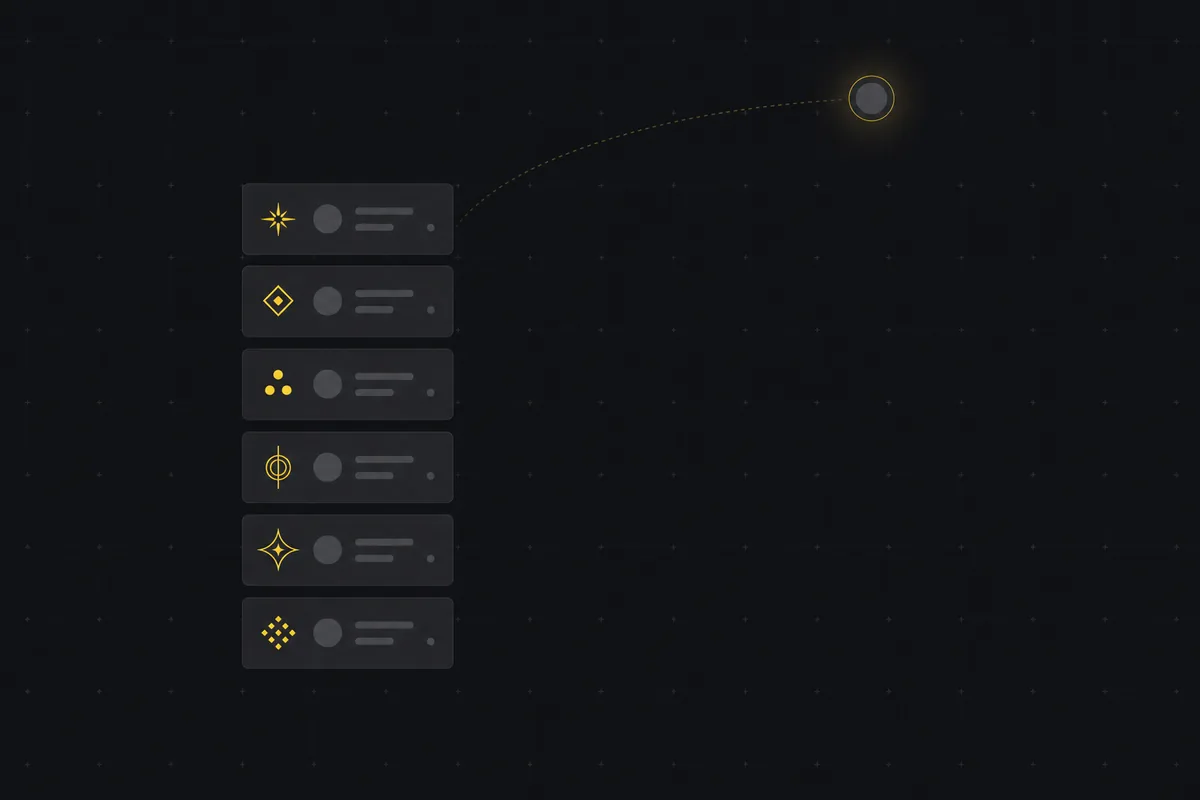
This is the difference between a team and a black box. An agent's work reads back exactly like a person's would: same fields, same history, same permissions. And the attribution survives disconnection. Pull an agent's access and its past changes stay stamped with its name, so the audit trail does not develop holes when your roster changes. That is what makes reviewing a fleet's output tractable instead of forensic.
Offboarding is the mirror. Disconnecting an agent revokes its key immediately, which is the actual access removal, while its history stays attributed. Access gone, record intact. A boring, load-bearing feature that scattered chat-window agents simply do not have.
When does a fleet get too big?
A fair question once this starts working: five agents, twenty, a hundred? The mechanics above raise the ceiling, but they do not remove it, and the stages are worth naming.
Up to about five agents, the Hub is a convenience. You could hold five in your head; the roster and the state board mean you do not have to.
From five to roughly twenty, the mechanics stop being convenience and become the difference between running a fleet and pretending to. Twenty transcripts is not a workflow.
What binds first at this size is not compute or API quota, it is your attention: every needs-input session, every review, every stall flag lands on a person. An agent team that produces more output than its humans can review does not make you faster, it makes you sloppier. Grow the fleet at the rate you can absorb its reviews, and keep every agent owned by someone who can say why it exists.
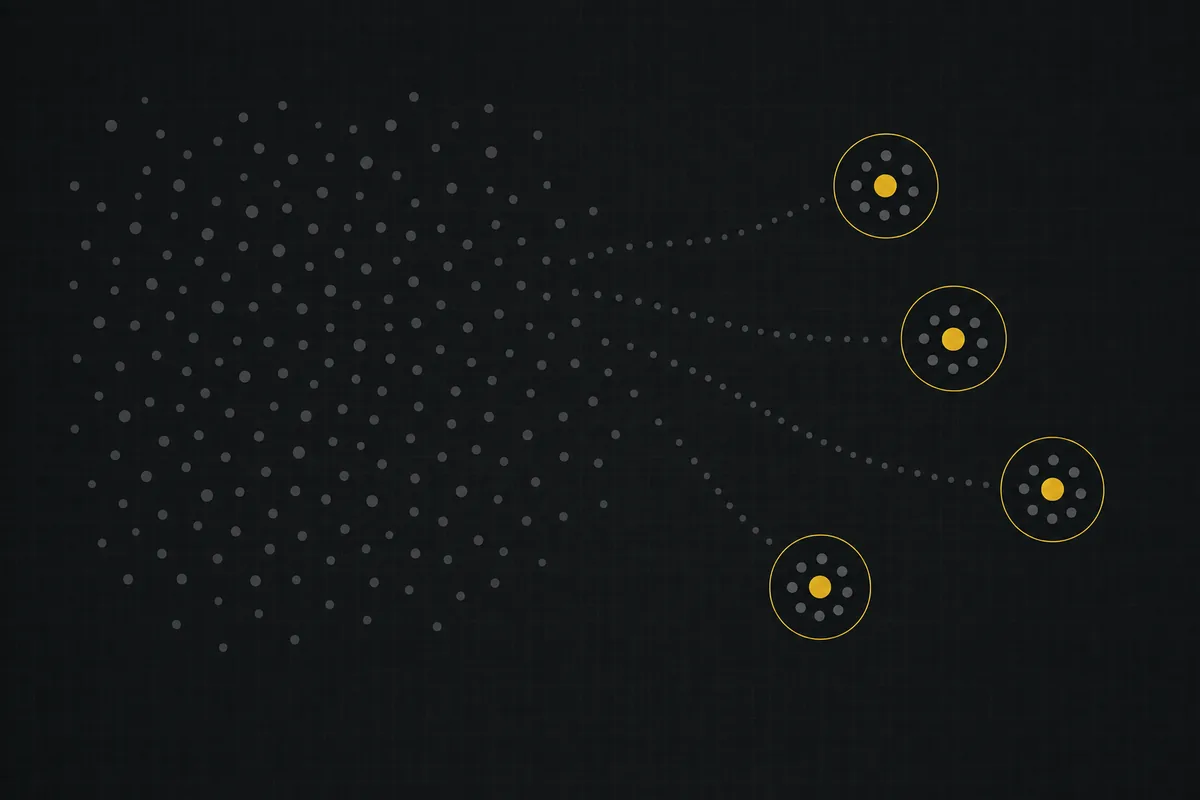
Past that, the 25-agent ceiling starts doing its job. The cap is a statement about accountability, not a technical limit. A hundred agents under one roof is not a team anyone owns; it is a swarm with a dashboard. If you genuinely have a hundred agents' worth of work, you have several teams' worth, and it should be structured that way: separate projects or workspaces, each with its own owners, field policies, and review capacity.
What managing a fleet actually is
Put together, the day-to-day is less dramatic than the "manage an army of agents" headline. You keep a directory so you know who is on the team and who owns each one. You glance at sessions by state and let the stall flag tell you where to look. You hand work over by assigning and mentioning, and the handoff arrives instantly, as a pending session you can see. You give each agent a field policy shaped like its job. You let the unverified badge catch hollow claims, and attribution reconstruct the rest.
None of that is autonomous magic, and it should not be. Agents propose; a person still approves the high-stakes moves, and who decides what is worth writing down before the fleet grows. The point is not to look away from your agents. It is to make it possible to actually watch several of them at once without living in a dozen browser tabs.
If you want to try it, connect one agent, give it a narrow job and a narrow field policy, and watch its sessions on the Hub for a week. When one agent is boring to manage, add the next.
The vocabulary, in one place
The terms this post leans on, defined once, in plain words.
Agent Hub: the workspace directory of connected agents and the live board of their sessions, grouped by state.
Agent session: one unit of work an agent reports on, with a state (pending, running, needs input, review, done, failed, or cancelled), heartbeats, an optional issue anchor, and a note.
Pending session: a session created by delegation that no runtime has claimed yet. The work sits visibly in the agent's inbox and expires after seven days if untouched.
Heartbeat: any update an agent sends on a session. The stall detection reads nothing but the time since the last one.
Stall flag: the marker on a session that has sat in running with no heartbeat for 30 minutes. An invitation to look, not a verdict.
Field policy: a per-agent allowlist over the issue fields its API key may write, enforced identically on REST and MCP writes. No policy means the key's scopes decide.
Unverified badge: the marker on a review or done session with no attributed change, comment, or linked pull request on its issue. A prompt to check, not proof of failure.
Attribution: every change an agent makes lands in the issue's activity history under the agent's own name, and stays there after the agent is disconnected.
Owner: the workspace member responsible for an agent: why it exists, what it may touch, and who to ask when it misbehaves.
Frequently asked questions
How do you manage a team of AI agents?
Give the fleet one shared surface: a roster of named agents with owners, live sessions grouped by state, scoped keys and field policies per agent, and an activity trail attributed to each one. You manage exceptions, the stalled and needs-input sessions, instead of reading transcripts.
Can I limit which fields an AI agent can change?
Yes. Each agent can carry a field policy, an allowlist over issue fields like status, priority, labels, or due date, enforced on both the REST API and MCP writes. A write outside the policy is refused with an error naming the field.
How do I see what all my AI agents are doing right now?
Open the Agent Hub and switch to the Map view. It draws the workspace as a live radial tree: each agent, the projects it works in, and the task it is running, with status on the branches (green for running, gold for needs input or stalled, pink for failed). It regroups by agent, by project, or by owner, and it updates in real time, so it works as the standup view for the fleet.
How do AI agents get notified of new work?
Assigning an issue or @mentioning an agent creates a pending session and pushes the event over the agent's live event stream the moment it happens; automations can do the same with a notify_agent action. The agent's own runtime has to be listening: Utter delivers the trigger but does not run the agent.
How do you know an agent actually did what it claims?
Sessions that finish in review or done are cross-checked against the issue: an attributed change, a comment, or a linked pull request counts as evidence. A claim with no trace gets an unverified badge on the Agent Hub, so hollow done reports stand out.
How do you remove an AI agent from a workspace?
Disconnect it from the Agent Hub: its API key is revoked immediately and its membership removed, while every change it made stays attributed to its name in the issue history.
Related reading
Onboard an AI agent like a new hire: identity, access, and a first task
You already know how to bring on a new hire. Do the same for an AI agent: give it an identity, scoped access, one small task, a review, and an offboarding path.
July 15, 2026 · 8 min read
AI agent project management: the complete guide
How to run real projects with AI agents on the board: connecting them, assigning work, keeping review, what breaks, and how to pilot it in a week.
July 15, 2026 · 12 min read
How to use AI agents in Utter: connect them, assign work, and follow their sessions
A start-to-finish walkthrough: connect an agent, scope its key, assign it issues, and watch its sessions, without giving up control of the board.
July 15, 2026 · 11 min read

Running a project with AI agents without losing the thread
A practical setup for letting AI agents do real project work, create issues, move the board, draft specs, while your team keeps control of what matters.
July 11, 2026 · 5 min read

What is agentic project management? A plain-language guide with a working example
A copilot waits for your prompt. An agent acts on an event. Here is the perceive-plan-act-check loop explained, with one real end-to-end run inside Utter.
June 11, 2026 · 11 min read
A shared backlog for a team of AI coding agents
Task manager for AI coding agents: give three agents one shared backlog with per-agent identity, field permissions, status handoffs, and human review gates.
July 16, 2026 · 13 min read
Two agents, one backlog: coordinating a triage agent and a coding agent with issue status as handoffs
A practical multi-agent workflow: custom board columns and status transitions as the handoff bus between a triage agent and a coding agent, with human review in the middle.
July 1, 2026 · 9 min read

AI agent governance for project teams: seven controls your tracker can enforce
Governance for AI agent teams is not a policy PDF. Seven controls your tracker can enforce, from identity to offboarding, and what tooling cannot fix.
July 15, 2026 · 10 min read
Who decides what: setting decision rights between your team and your AI agents
A simple rule for AI governance: reversible, low-stakes moves are the agent's to make; irreversible or high-stakes ones need a human. How to draw the line.
July 15, 2026 · 7 min read
How to delegate work to an agent
Assign a task to an AI agent in Utter using the same assignee picker you use for people, and understand the pending session, claim flow, and real limits.
July 15, 2026 · 16 min read
Add a comment
Start the conversation.