
AI agent governance for project teams: seven controls your tracker can enforce

Somewhere in the past year your team crossed a line, or is about to. An AI agent stopped suggesting things and started doing them: filing tickets, moving cards, commenting on work, opening pull requests. The moment that happens, "AI governance" stops being a slide from a vendor deck and turns into concrete questions. Which of these actors can do what? Who checks the work? Who did this, and can we turn it off?
Most writing about AI governance does not help with those questions. It is aimed at a compliance office: risk registers, review boards, acceptable-use policies, a PDF that gets signed and filed. Meanwhile the thing being governed holds an API key and is moving tickets while you sleep.
Our position: for a project team, governance is not a document. It is defaults, enforced by the tools where agents do their work. A policy nobody's tracker enforces is a wish. If your rule says agents never close issues without review, and the tracker happily accepts the status write, you do not have a rule. You have a hope with a signature on it.
Disclosure before the playbook: we make Utter, a project tracker where AI agents work as named team members, so the examples are concrete and the bias is stated up front. The controls themselves are portable. Any tool that can hold them will do; whether yours can hold them is the thing to check.
Seven controls follow. Each exists because of a specific failure, and each faces the same test: does the tool enforce it, or does it only live in a prompt? Where we have written a full post on a control, the link goes deep and the section here stays short.
1. Identity: every agent is a named member
Give every agent its own identity in the tracker. A name, a profile, its own credentials. Never a shared "bot" account, and never a borrowed human login.
The failure this prevents is anonymity. With one shared account, four agents write as a single actor. When a priority changes overnight, the log says the bot did it; you cannot tell which agent, and you cannot shut one down without shutting down all of them. Attribution is the foundation the other six controls stand on. Review, monitoring, and audit all assume you can tell your agents apart.
Enforcement means refusing to mint shared credentials in the first place. In Utter an agent joins as a real workspace member with a profile and an agent badge. It shows up in the assignee picker and in activity under its own name, and since agents never count as billed seats, the cost argument for one shared account is gone. The longer case for per-agent identity is in the audit trail post.
2. Scoped access: one key per agent, sized to the job
Each agent holds its own API key, scoped to the least access its job needs, and revocable on its own.
This control is about blast radius. A triage agent holding an admin-grade key can delete the project it was only supposed to label issues in. Worse, a shared token turns your only off switch into "everything at once," so in practice nobody pulls it, and the agent that misbehaved on Tuesday is still running on Friday because cutting it off would cut off everything else too.
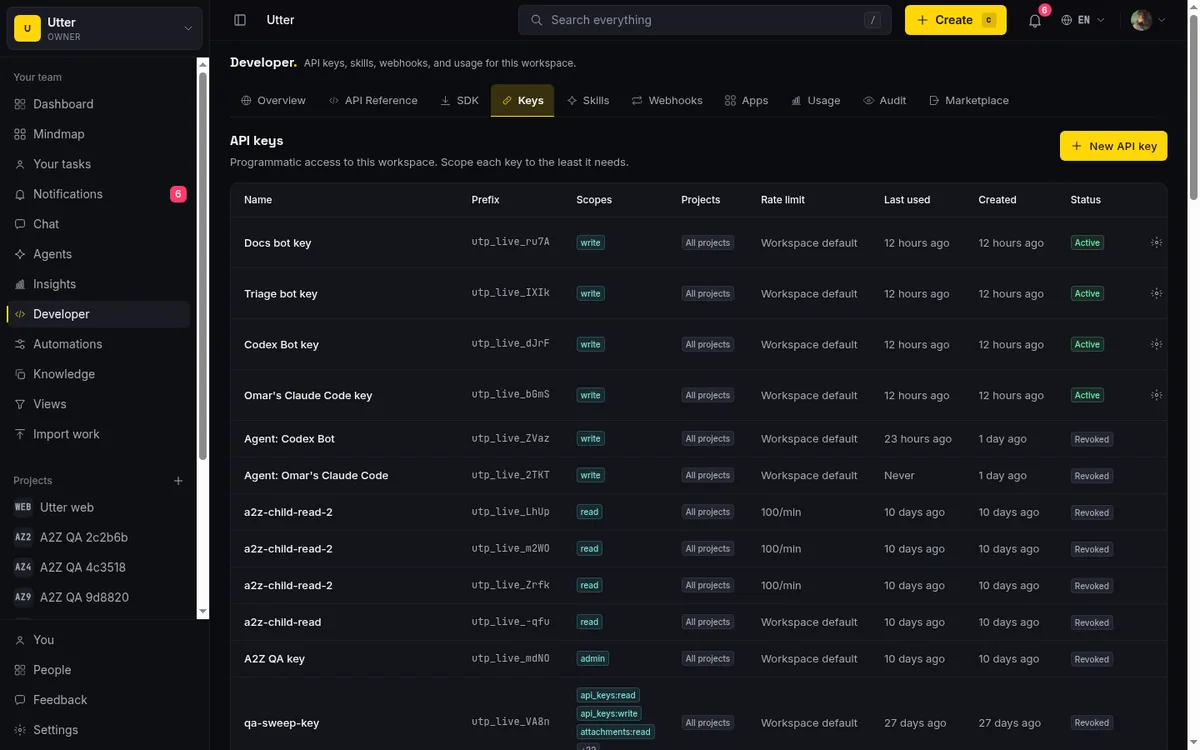
The tracker enforces this through its key system. Utter keys carry scopes, and the plain write scope is deliberately separated from admin, so granting "can create and edit issues" does not quietly include "can change settings or delete a project." Revoking a key removes exactly one agent, and it is a single call:
curl -X DELETE "https://utter.ae/api/v1/workspaces/acme/api-keys/KEY_ID" \
  -H "Authorization: Bearer $UTTER_API_KEY"
{ "data": { "id": "KEY_ID", "revoked": true } }The working rule is read broadly, write narrowly. A job that labels and comments gets a key that labels and comments.
3. Decision rights: agents make the cheap calls, humans make the expensive ones
Decide, explicitly and in advance, which moves an agent may commit alone and which require a person. The clean version is two questions:
- Can this be undone easily?
- If it goes wrong, how much does it hurt?
Reversible and low-stakes belongs to the agent. Irreversible or high-stakes belongs to a human.
Without this split, the failure arrives looking correct. The agent closes an epic that seemed done, or moves the date on a committed release, or edits something a customer sees. Each is one API call. Teams that skip the decision usually end up making it right after the incident, which is the most expensive possible time.
Roles and scopes draw the coarse line, since a member-level agent cannot touch settings any more than a member can. Review gates, next, draw the fine one. The full framework, with a concrete list of which tracker moves fall on which side, is in the decision rights post.
4. Review gates the workflow itself enforces
For the moves you flagged as high-stakes, the pattern is: the agent prepares and parks, a human commits. And the gate has to live in the workflow, not the prompt. A "Needs review" column the agent lands in, plus transition rules that make skipping it impossible.
flowchart LR
  A[In progress] --> B[Needs review]
  B --> C{Human checks}
  C -->|approve| D[Done]
  C -->|send back| A
  A -. refused by workflow rules .-> D
The failure here is the silent commit. An agent instructed to always stop for review will mostly stop for review. Mostly is not a control. The move from In progress straight to Done at 2am happens exactly once before you learn the difference between an instruction and a constraint.
This is where tracker choice matters most. In Utter, workflow transition rules are enforced on every status write path, including the REST API and the first-party MCP server, so a forbidden move fails for an agent the same way it fails for a person. Here is the status write an agent would make, in three languages:
curl -X POST \
  "https://utter.ae/api/v1/workspaces/acme/projects/WEB/issues/WEB-42/transition" \
  -H "Authorization: Bearer $UTTER_API_KEY" \
  -H "Content-Type: application/json" \
  -d '{"status": "done"}'
const res = await fetch(
"https://utter.ae/api/v1/workspaces/acme/projects/WEB/issues/WEB-42/transition",
{
method: "POST",
headers: {
Authorization: `Bearer ${process.env.UTTER_API_KEY}`,
"Content-Type": "application/json",
},
body: JSON.stringify({ status: "done" }),
},
);import os, requests
res = requests.post(
"https://utter.ae/api/v1/workspaces/acme/projects/WEB/issues/WEB-42/transition",
headers={"Authorization": f"Bearer {os.environ['UTTER_API_KEY']}"},
json={"status": "done"},
)If the project's workflow says Done is only reachable through Needs review, that call does not succeed with a warning. It fails:
{
  "error": {
    "code": "validation",
    "message": "Workflow blocks this transition: \"In progress\" cannot move to \"Done\".",
    "details": {
      "code": "workflow_transition_blocked",
      "from": "In progress",
      "to": "Done"
    }
  }
}
The write is refused, not discouraged. The full recipe (review column, landing automation, transition rules, scoped key) is in the human-in-the-loop approval post.
5. Monitoring: know what your agents are doing right now
You need live visibility into each agent's state. Which one is working, which one is waiting on a human, which one has gone quiet.
What this catches is silence. A stuck agent looks identical to a working one from the outside; both are quiet. Governance discussions fixate on agents doing the wrong thing, but the quieter and more common cost is an agent doing nothing while everyone assumes it is busy, discovered at 5pm when the board has not moved since lunch.
Utter's mechanism is the session. Every agent run reports a state, a short status note, and usually a pull request link, anchored to the issue it concerns. The states form a small lifecycle:
stateDiagram-v2
  [*] --> pending: issue assigned
  pending --> running: agent claims it
  running --> needs_input: blocked on a human
  needs_input --> running
  running --> review: PR ready
  review --> done
  running --> failed
  running --> cancelled
  done --> [*]
  failed --> [*]
  cancelled --> [*]
The agent keeps its session honest with one call. Any PATCH counts as a heartbeat, and the same call carries the state change and the note:
curl -X PATCH "https://utter.ae/api/v1/workspaces/acme/agent-sessions/SESSION_ID" \
  -H "Authorization: Bearer $UTTER_API_KEY" \
  -H "Content-Type: application/json" \
  -d '{"state": "review", "note": "opened PR #42", "external_url": "https://github.com/acme/web/pull/42"}'
A running session that goes 30 minutes without a heartbeat is flagged as stalled, which converts invisible silence into a visible prompt to go look.
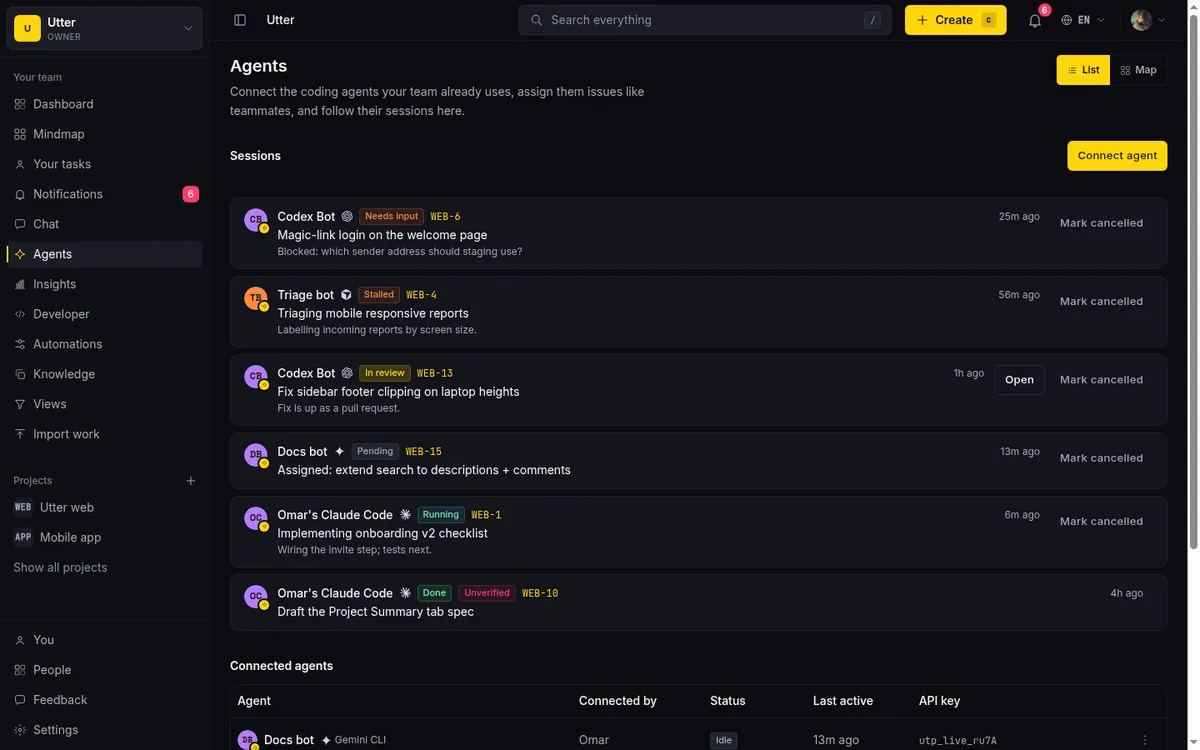
Reading those signals is covered in the stuck agent post; doing it across several agents at once is its own discipline.
6. Audit: a record that survives the agent
Every change an agent makes should be recorded, attributed to that specific agent, and kept, including after the agent is disconnected.
The failure is unanswerable history. Six months from now someone will ask why an issue was reprioritized in March. If the answer is a name with a timestamp and a session for context, that is a two-minute lookup. If the agent is long gone and the trail collapsed into "unknown user," your history has a hole exactly where the risky actor used to be.
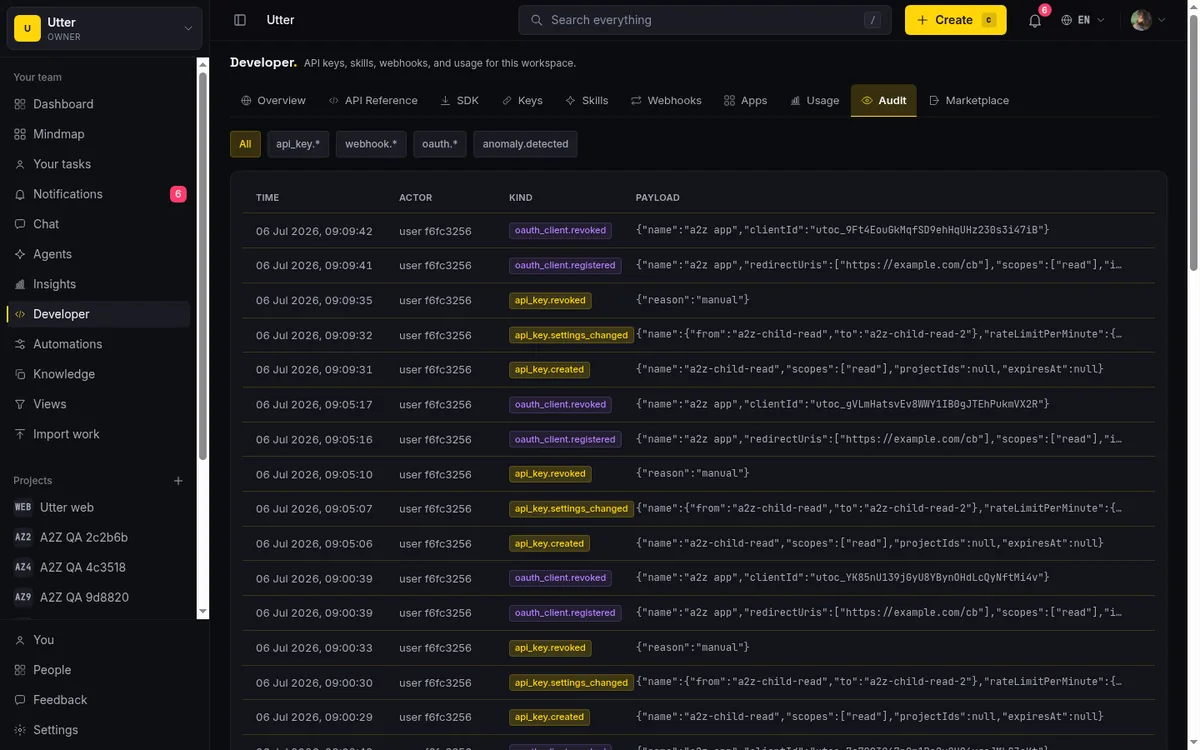
Durable attribution is a property of the identity model, not a report you export later. In Utter the activity history records each change as the named agent that made it, and the record stays attributed after the agent is disconnected. What the trail does and does not capture, per-resource rather than per-field, is laid out in the audit trail post.
7. Lifecycle: onboard deliberately, offboard completely
Agents should arrive through a ramp (identity, scoped access, one small checkable task, a review) and leave through a real exit: key revoked, membership removed, open work reassigned, record kept.
This prevents the zombie agent. A key minted for a pilot in February, still live in July, attached to an agent nobody owns anymore. Orphaned credentials are a classic security problem with people, and agents reproduce it faster, because they are easier to create than hires and much easier to forget.
Make connect and disconnect first-class operations with owners. In Utter, agent management is gated by role: owners and admins manage any agent in the workspace, while a member manages the ones it connected. Disconnecting revokes the key and removes the membership in one motion, and the history stays attributed. The whole arc is in onboarding an agent like a new hire.
What tooling governance does not solve
A playbook that claims completeness should not be trusted, so here is what these controls do not cover.
Model quality. Controls bound damage; they do not create competence. A perfectly governed agent can still write a confidently wrong spec into the review column, and a person still has to catch it there. If your reviewers rubber-stamp whatever lands in the column, the gate is furniture.
Prompt injection. An agent that reads issue descriptions, comments, or web pages can be steered by what it reads. Scopes and transition rules limit what a hijacked agent can do inside the tracker, which is a real mitigation and a good reason to keep write access narrow. They do not stop the hijack. Treat content the agent ingests as untrusted input, especially anything the public can submit.
Administrators. Every control above is editable by whoever holds admin. An owner who hands an agent an admin-scoped key, or deletes the transition rules on a Friday, has switched the system off. Tooling governs agents. Governing the governors is an organizational problem, and no tracker feature substitutes for it.
Other surfaces. The tracker governs what agents do in the tracker. The same agent probably has a shell, a repo, maybe deploy credentials. Each surface needs its own version of these controls; the board is one place your agent acts, not all of them, and the trail here will not show you what happened somewhere else.
The Monday afternoon baseline
For a team of five, here is the minimum that holds, doable in an afternoon.
- Retire the shared bot account. Connect each agent as a named member instead.
- Mint one key per agent,
writescope, noadmin. Note where each key lives. - Add a Needs review column, and set transition rules so Done is only reachable through it.
- Write the decision-rights split on one page. The two questions (reversible? how badly can it hurt?) cover most cases.
- Give each agent one narrow job, scoped like a pilot, and read the activity log at the end of each week for the first month.
No committee, no framework adoption, nothing to purchase. This will not be complete, and it does not need to be. It takes the failures that hit small teams first (anonymous writes, silent commits, zombie keys) and makes them structurally hard instead of merely discouraged.
The pattern to keep as you grow is the one this whole post argues: when a rule starts to matter, move it out of the prompt and into the tool. We built Utter so these controls are defaults rather than a project: named agents, scoped keys, transition rules, live sessions, and a trail that outlasts its authors. If you want to see them in one place, the AI tour is the short version.
Frequently asked questions
What is AI agent governance?
AI agent governance is the set of rules that decide what an AI agent may do on its own, who reviews its work, and how its actions are tracked, enforced where the agent works rather than in a policy document. For a project team that means identity, scoped access, decision rights, review gates, monitoring, audit, and lifecycle controls held by the tracker itself.
Do small teams really need AI agent governance?
Yes, scaled to their size. A five-person team does not need a review board; it needs named agents instead of a shared bot account, one scoped key per agent, and a review column with transition rules, which takes about an afternoon to set up.
What should an AI agent never be allowed to do?
Anything irreversible or customer-visible without a human committing it: deleting or archiving work, closing epics or releases, changing dates on committed promises, editing permissions or workflow rules, and messaging customers. An agent can prepare all of these; a person should make the final move.
How do you audit an AI agent's work?
Give each agent its own identity and API key so every change is attributed to that specific agent in the activity history, then review the trail alongside its session records, which carry the run's title, status, and linked pull request. The mechanics are in our audit trail guide.
Is AI agent governance a compliance requirement?
It depends on your industry and jurisdiction; for most software teams today it is an operational discipline rather than a named legal mandate. Regulated teams should treat agent actions like any other audited system activity, and everyone else should keep the trail anyway, because you will want it the first time something goes wrong.
Related reading

Who decides what: setting decision rights between your team and your AI agents
A simple rule for AI governance: reversible, low-stakes moves are the agent's to make; irreversible or high-stakes ones need a human. How to draw the line.
July 15, 2026 · 7 min read

What an AI issue tracker actually is, and how to pick one
Most tools that say AI issue tracking mean a summarize button. A five-part checklist for what the label should mean, plus the failure modes to test in a pilot.
July 15, 2026 · 8 min read
Onboard an AI agent like a new hire: identity, access, and a first task
You already know how to bring on a new hire. Do the same for an AI agent: give it an identity, scoped access, one small task, a review, and an offboarding path.
July 15, 2026 · 8 min read

How to manage a team of AI agents without losing track of what they're doing
Running several AI agents at once? The day-to-day of a fleet: a roster, live sessions, instant delegation, per-field permissions, and verified work.
July 15, 2026 · 16 min read

Keep an audit trail of everything your AI agents change
Once agents can write to your tracker, a shared bot account makes every change anonymous. Here is how per-agent identity keeps the trail readable.
July 15, 2026 · 8 min read
Let AI agents run your board over the REST API: authentication, scopes, and safe writes
A developer guide to giving an AI agent a scoped Utter API key so it can move cards and file issues without a big blast radius.
June 26, 2026 · 7 min read

How to automate project management with AI, and what to leave manual
The right order to automate project management with AI: reporting first, intake second, execution agents last, and the decisions that should stay human.
July 15, 2026 · 8 min read

Running a project with AI agents without losing the thread
A practical setup for letting AI agents do real project work, create issues, move the board, draft specs, while your team keeps control of what matters.
July 11, 2026 · 5 min read
AI agent project management: the complete guide
How to run real projects with AI agents on the board: connecting them, assigning work, keeping review, what breaks, and how to pilot it in a week.
July 15, 2026 · 12 min read

What is agentic project management? A plain-language guide with a working example
A copilot waits for your prompt. An agent acts on an event. Here is the perceive-plan-act-check loop explained, with one real end-to-end run inside Utter.
June 11, 2026 · 11 min read
Add a comment
Start the conversation.