
AI agent project management: the complete guide
AI agents can now hold a real seat on a project team. Not as a chat window you paste tickets into, but as workers that pick up an issue, do the work, report progress on the ticket, and hand it back for review. Making that arrangement productive instead of chaotic is a project management problem, and this guide covers the whole of it: what agents can genuinely do inside a tracker, how they connect, how to assign and review their work, which tools support this today, and what goes wrong when teams skip the boring parts.
We build a project tracker with agent support, so we have an obvious interest here. We also run our own product this way every day, which is where most of the specifics below come from, including the failures.
What is AI agent project management?
AI agent project management is running a project where some of the workers are software agents: coding agents like Claude Code, Codex, or Cursor, or task-specific agents you build yourself. The humans and the agents share one backlog, one board, and one set of statuses. Work gets assigned to whoever suits it, a person or an agent, and everything anyone does is attributed and reviewable in the same place.
The important word is management. The novelty is not that a model can write code or draft a spec; it has been able to do that for a while. The novelty is treating that capability as capacity you can plan around: estimating it, assigning to it, reviewing its output, and tracking it on the same board as everyone else.
Teams that get value from agents run them inside the process. Teams that struggle usually run them beside it, in chat threads and terminal sessions that leave no trace in the tracker, so nobody can say afterwards what the agent did or why.
If you want the shorter conceptual version of this argument, we wrote one: what agentic project management is. This guide is the operational sequel.
What can an AI agent actually do in a project tracker?
More than most teams let it. The obvious first job is execution: assign a well-shaped bug or task to a coding agent and it works the issue, comments its progress, and moves the status when it is done or stuck. That alone is useful, but the tracker jobs around execution are often the better starting point because they are lower risk:
Triage is the clearest win. New issues arrive half-formed, from forms, from support, from teammates in a hurry. An agent that reads each new issue, sets a type and priority, adds labels, points out likely duplicates, and routes it to the right person removes a chore nobody misses. We described a working setup in AI issue triage that assigns and prioritizes.
Reporting is the second. An agent that reads the board and writes the weekly status update produces something more accurate than the version a human writes from memory on Friday afternoon, because it actually reads every ticket. Summarizing long comment threads, preparing handoff notes, and drafting release notes are the same shape of work: reading a lot of project state and writing a little prose.
Grooming is the quiet one. Stale issues, missing acceptance criteria, tickets with no estimate, epics whose children are all done: an agent can sweep for these on a schedule and either fix them or flag them.
Then there is execution itself, which deserves its own sections, because assigning real work to an agent is where process starts to matter.
How do agents connect to a project management tool?
Three ways, and most teams end up using two of them.
| Path | Built for | How it runs |
|---|---|---|
| MCP | Interactive work, a person steering an agent | The agent calls tracker tools mid-task |
| REST API | Scheduled jobs, webhooks, services | Scripts with a scoped key you rotate and audit |
| Installed skill | Coding agents you use every day | One install, then the agent knows your tracker |
MCP, the Model Context Protocol, is the conversational path. Your tracker runs an MCP server; agent clients like Claude Code or Cursor connect to it and get tools for reading and writing issues, searching, and commenting. The agent decides mid-task when to call them. The spec is young and clients vary in quality, but it has become the default answer, and most serious trackers now ship a server. The client side is one config stanza pointing at the server, with an API key as a bearer token. Utter's, for example:
{
  "mcpServers": {
    "utter-product": {
      "url": "https://utter.ae/api/mcp/v1/",
      "headers": { "Authorization": "Bearer YOUR_API_KEY" }
    }
  }
}
The REST API is the programmatic path. Scheduled jobs, webhooks that trigger a script, services that file or update issues: anything that runs without a person present belongs on the API, with a scoped key you can rotate and audit. It is boring in the way infrastructure should be boring. The request an execution agent makes most often is "what is assigned to me." In Utter's API that is one call, in whatever language your agent runs:
curl -H "Authorization: Bearer $UTTER_API_KEY" \
  "https://utter.ae/api/v1/workspaces/acme/projects/WEB/issues?assignee=me&status=in_progress"
const res = await fetch(
"https://utter.ae/api/v1/workspaces/acme/projects/WEB/issues?assignee=me",
{ headers: { Authorization: `Bearer ${process.env.UTTER_API_KEY}` } },
);
const { data: issues } = await res.json();import os, requests
r = requests.get(
"https://utter.ae/api/v1/workspaces/acme/projects/WEB/issues",
params={"assignee": "me"},
headers={"Authorization": f"Bearer {os.environ['UTTER_API_KEY']}"},
)
issues = r.json()["data"]And when the agent finishes, it hands the issue back and says what it did, on the ticket where the record lives:
curl -X PATCH -H "Authorization: Bearer $UTTER_API_KEY" \
  -H "Content-Type: application/json" \
  "https://utter.ae/api/v1/workspaces/acme/projects/WEB/issues/WEB-214" \
  -d '{ "status": "in_review" }'

curl -X POST -H "Authorization: Bearer $UTTER_API_KEY" \
  -H "Content-Type: application/json" \
  "https://utter.ae/api/v1/workspaces/acme/projects/WEB/issues/WEB-214/comments" \
  -d '{ "body_md": "Fix pushed. Tests green. Ready for review." }'
If you are unsure which path a given integration wants, the test is simple, and we wrote it up in MCP or REST API for your agent: conversation goes over MCP, automation goes over the API.
Installable skills are the third path, and the newest: a package of instructions and endpoints that a coding agent installs once, after which it knows how to work your tracker without you re-explaining it in every session. Think of it as onboarding documentation the agent actually reads.
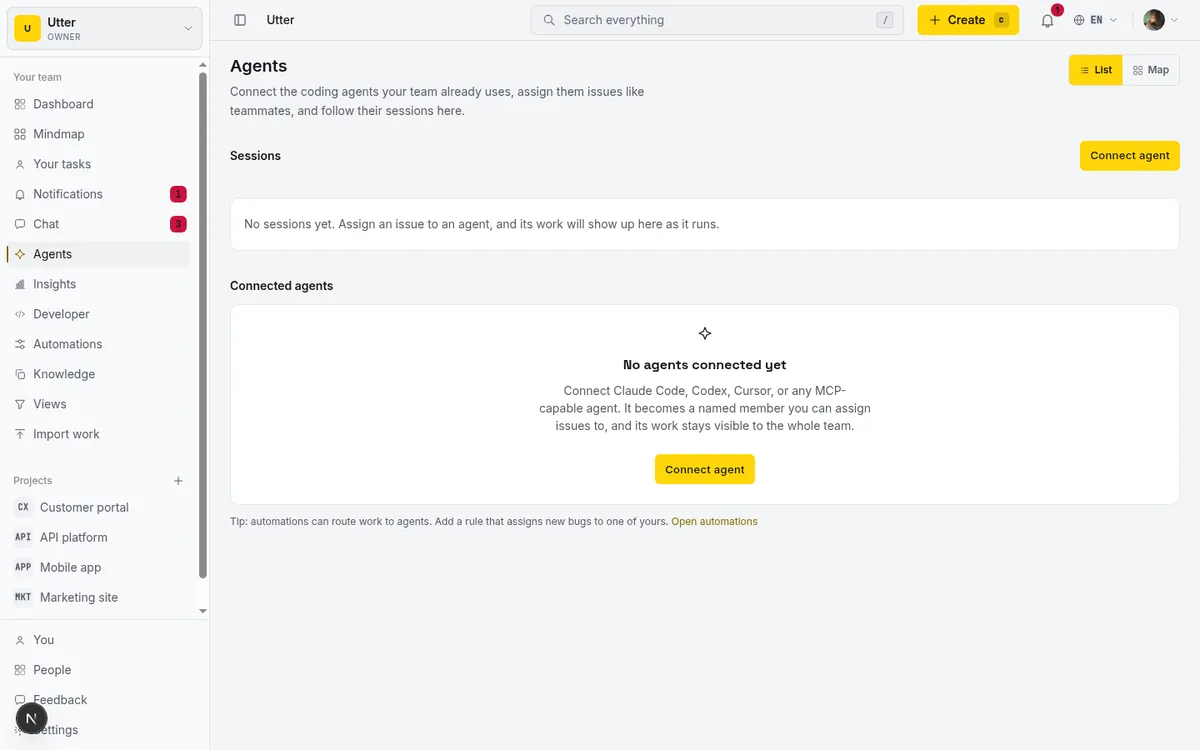
Whatever the transport, the connection question that matters more is identity, which is the next section.
How do you assign work to an agent without losing control?
Give the agent a name. This sounds cosmetic and is actually the whole game.
An agent that connects through some shared integration token is a ghost: its changes appear under an app name or, worse, under whichever human created the token. You cannot assign anything to it, you cannot filter the activity log to it, and when two agents run at once you cannot tell their work apart. Every control you might want later depends on the agent being a distinct member of the workspace, with its own profile, its own credentials, and its own name in every picker and every audit row.
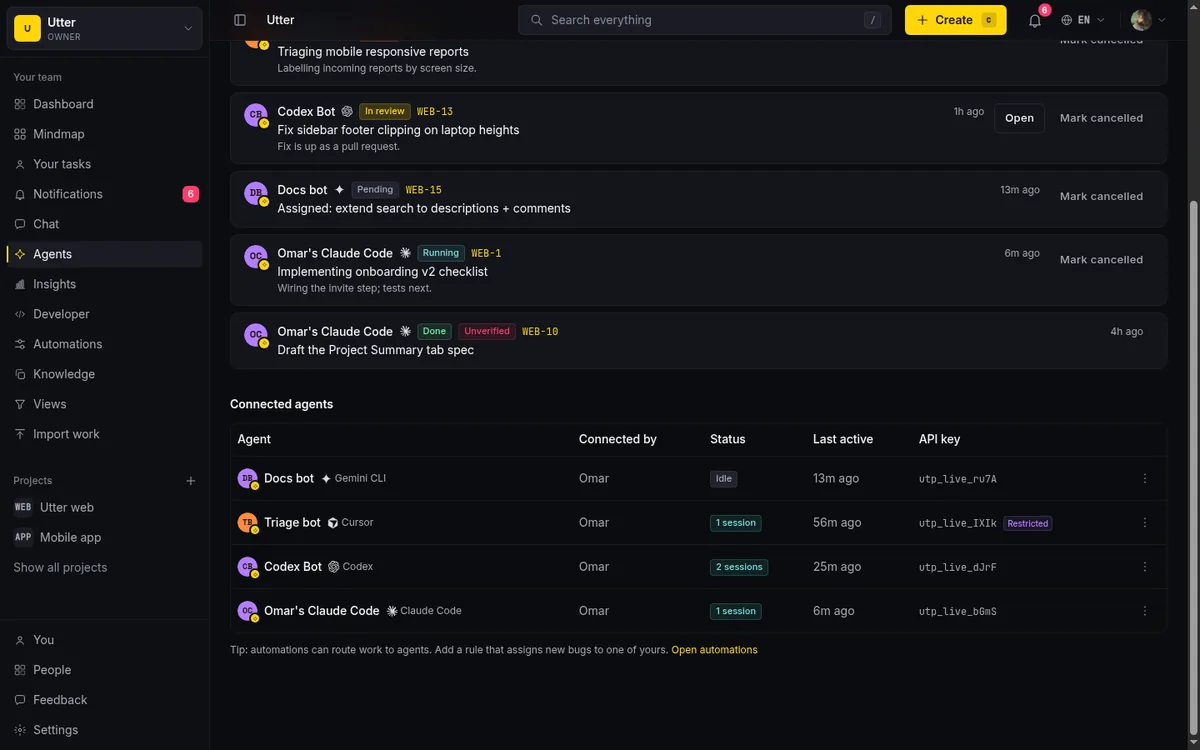
Once agents are named members, assignment stops being special. An issue is assigned to "Claude Code" the same way it would be assigned to a person. The board shows who, human or agent, owns what. Workload views mean something. And the agent's runs can be tracked as sessions on the issue itself: started, working, blocked, needs review, done. That session view is what turns "I think the agent is doing something" into "the agent has been blocked on WEB-214 for forty minutes."
Scope the credentials like you would for a contractor:
- Read scopes for reporting agents.
- Write scopes only where the agent genuinely writes.
- Admin scopes almost never.
And decide up front which transitions an agent may make on its own: moving an issue to "in review" is safe almost everywhere; moving it to "done" should usually remain a human act. We keep a human approval on anything outward-facing or destructive, and we wrote about where to draw that line in human-in-the-loop approval for AI agents.
Drawn once, the control loop that keeps several agents from becoming chaos:
flowchart TD
    H["You assign issues, same picker as people"] --> A1["Triage agent"]
    H --> A2["Coding agent"]
    A1 --> S1["Session on the issue: running, then review"]
    A2 --> S2["Session on the issue: running, then review"]
    S1 --> G["'Needs review' column"]
    S2 --> G
    G --> OK["A human approves the status move"]
    OK --> D["Done, attributed to the agent in the history"]
How should you write issues that agents can execute?
Like you should have been writing them for humans. The difference is that agents make the cost of vague tickets visible immediately.
A person who picks up "fix the login weirdness" walks over and asks you what you meant. An agent either asks, if it is a good one, or guesses, and its guess compounds through an entire session before anyone notices. So the issues you hand to agents need what a well-run team already wanted:
- a specific problem statement
- acceptance criteria that can be checked
- links to the relevant code or docs
- a definition of done that includes the boring parts, like tests and changelog entries
Two additions matter specifically for agents. First, context links beat context prose: an agent can follow a link to a doc, a related issue, or a previous discussion, so linking the history is cheaper than restating it and stays current. Give the agent a searchable knowledge base and it will pull what it needs; we covered that pattern in give your AI agent a knowledge base. Second, state the boundaries explicitly. "Do not touch the billing module" is a sentence a human would infer from tribal knowledge. Agents do not have tribal knowledge. Write it down.
The payoff runs backwards, too: the discipline agents force on your tickets makes them better for humans. Several teams have told us the most measurable effect of their agent pilot was that issue quality went up.
How do you keep agent work reviewable?
Attribution, sessions, and small batches.
Attribution means every comment, transition, and edit carries the agent's name in the activity history, forever. If your setup cannot answer "which changes on this issue were made by the agent," fix that before scaling anything. Review cannot depend on chat scrollback, because chat scrollback disappears and the tracker does not.
Sessions mean the agent's work has visible shape: when it started, what state it is in, whether it is waiting on you. A run that is "blocked" for hours should show up the same way a stuck teammate does, on the ticket where the work lives, not buried in a terminal you closed.
stateDiagram-v2
    [*] --> Started
    Started --> Working
    Working --> Blocked: waiting on input
    Blocked --> Working: unblocked
    Working --> Review: agent hands back
    Review --> Working: bounced
    Review --> Done: human approves
    Done --> [*]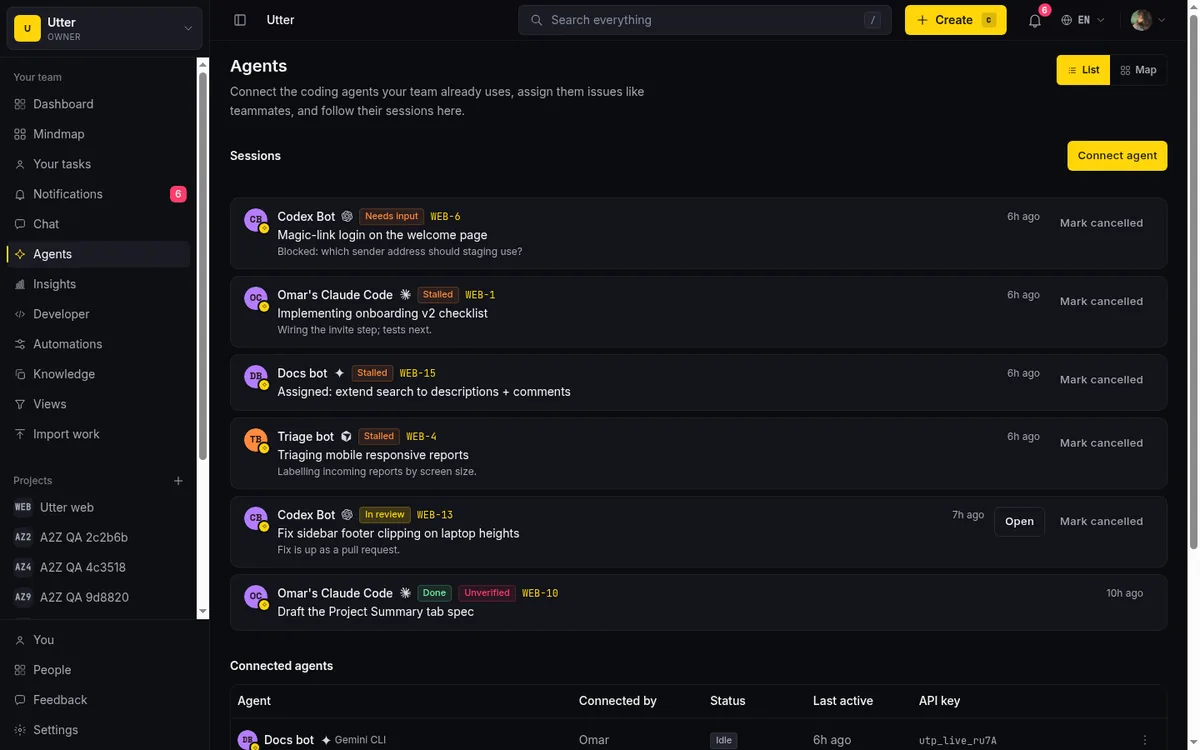
Small batches mean the unit of agent work stays reviewable by one person in one sitting. An agent that quietly rewrites forty files across three issues has produced something nobody will actually review; approval becomes theater. Keep issues small, keep sessions scoped to an issue, and route the output through the same review gate as human work: a pull request, an "in review" column, a named human approver. When two agents hand work to each other, run the handoff through issue statuses rather than direct agent-to-agent channels, so the board stays the source of truth. We described that pattern in coordinating two agents with status handoffs.
Which project management tools support AI agents today?
Honestly: most of the big ones are moving, at different speeds and from different directions.
Atlassian ships AI features across Jira and a remote MCP server, so agents can reach Jira from outside. Linear has agent integrations and a first-party MCP server, and its overall polish is real. Asana and Monday have gone furthest on built-in AI assistants inside their own UIs. If you want the field surveyed by one specific capability, we keep a list of project management tools with a first-party MCP server.
Where the products differ most is the identity model, and it is worth interrogating whichever tool you evaluate on exactly this: can an agent be a named member with its own attribution, or does it work through an integration layer under someone else's name? Can you see agent sessions on the issue? And what does an agent cost, because on strict per-seat pricing, an agent that holds a seat is another paid user.
Utter, our tool, was built for this model from the start: agents join as named members with profiles, their sessions are visible on the ticket, they connect over a first-party MCP server or a REST API that covers the whole product, and agent members are never billed as seats. We have written direct comparisons against the two tools we get asked about most, Utter vs Jira and Utter vs Linear, and both credit the other side's genuine strengths, because pretending Jira's workflow engine or Linear's speed do not exist would not help you.
How do you run a first pilot, in one week?
Small, real, and reviewed. A shape that has worked repeatedly:
Pick one project and two jobs: one tracker job (triage or the weekly summary) and one execution job (small bugs from a curated label). Resist starting with a headline feature; you are piloting the process, not the model.
- Day 1. Set up identity: create the agent as a named member, scope its key, connect it over MCP.
- Day 2. Write the operating rules into the project doc: which labels it may pick up, which transitions it may make, who reviews its output, what it must never touch.
- Days 3 to 5. Run it on maybe ten issues. The agent comments its progress on each ticket, moves work to review, and a named human approves or bounces every result.
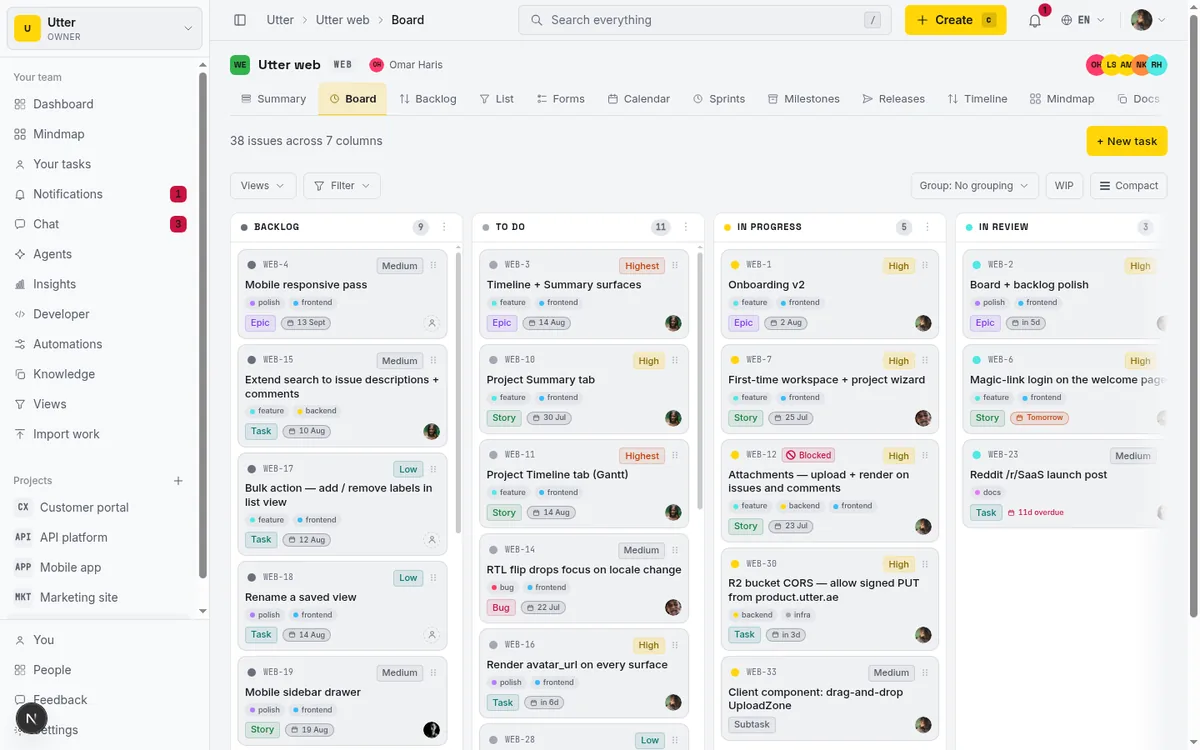
Then read the record. Because everything went through the tracker, the review is concrete: how many issues it completed, how many bounced and why, where it got blocked, what it cost in review time. That record, not anyone's enthusiasm, tells you whether to widen the label, add a second agent, or stop. Teams that skip the record end the pilot with opinions instead of data.
What goes wrong, and how do you avoid it?
Four failures account for most of the mess.
Unattributed work is the original sin: an agent acting under a shared token leaves changes nobody can trace. It feels fine for a week, then something breaks and the audit trail points at a person who was asleep. Named agents fix this structurally.
Runaway scope is the coding-agent classic. The issue said "fix the date parsing" and the diff touches nineteen files, because the agent kept finding things to improve. Boundaries in the ticket, small batches, and a reviewer empowered to bounce oversized diffs without reading them are the countermeasures.
Stale context produces confident nonsense: an agent working from an outdated doc, or an issue whose comments contradict its description. The fix is unglamorous: keep docs in the same system the agent reads, link them from issues, and let the agent search current state instead of feeding it snapshots.
Silent failure is the sneaky one. A scheduled agent stops working, and nothing tells you, because no human notices the absence of triage. This is what session states are for: a run that is blocked or stalled should be visible on the board, and an agent that has not run should be conspicuous somewhere a human actually looks.
None of these are model problems. They are management problems, which is good news, because management problems have known fixes.
Where is this heading?
Toward ordinariness. The pattern already visible on teams that run this well is that "assign it to the agent" is said in the same tone as "assign it to Sam," and the interesting decisions have moved up a level: which work is worth doing at all, what does done mean, is the review bar right. Those were always the real project management questions. Agents just make the execution layer cheaper and the process layer impossible to fake.
If you want to try the arrangement on real work, Utter gives every new team 14 days of Pro on their first workspace, no card. Create a project, connect a coding agent as a named member over MCP or the API, and run the one-week pilot above on your own backlog. The record it leaves will tell you more than any guide, including this one.
Frequently asked questions
What is AI agent project management?
It is running a project where some of the workers are software agents, coding agents like Claude Code, Codex, or Cursor, sharing one backlog, one board, and one set of statuses with the humans. Work goes to whoever suits it, a person or an agent, and everything anyone does is attributed and reviewable in the same place.
How do AI agents connect to a project management tool?
Three ways: MCP for interactive work where a person is steering the agent, the REST API for scheduled jobs and services that run without a person present, and installable skills the agent sets up once. The test from MCP or REST API for your agent is simple: conversation goes over MCP, automation goes over the API.
How do you assign work to an AI agent without losing control?
Give the agent a name: make it a distinct member of the workspace with its own profile and credentials, so its work is attributed, its runs show as sessions on the issue, and assignment works like it does for a person. Scope its credentials like a contractor's, and keep moves like marking an issue "done" as a human act, per human-in-the-loop approval for AI agents.
Which project management tools support AI agents today?
Most of the big ones are moving: Atlassian ships AI features and a remote MCP server so agents can reach Jira from outside, Linear has agent integrations and a first-party MCP server, and Asana and Monday have gone furthest on built-in assistants. The question to ask any tool is the identity model: can an agent be a named member with its own attribution and visible sessions, or only an integration acting under someone else's name? There is a running list of tools with a first-party MCP server.
Related reading

What is agentic project management? A plain-language guide with a working example
A copilot waits for your prompt. An agent acts on an event. Here is the perceive-plan-act-check loop explained, with one real end-to-end run inside Utter.
June 11, 2026 · 11 min read
What is an AI project manager? What one actually does today
A plain definition of the AI project manager: the three things the term means, a week of real work on a live board, and the parts only a human can hold.
July 15, 2026 · 8 min read

What an AI issue tracker actually is, and how to pick one
Most tools that say AI issue tracking mean a summarize button. A five-part checklist for what the label should mean, plus the failure modes to test in a pilot.
July 15, 2026 · 8 min read

How to manage a team of AI agents without losing track of what they're doing
Running several AI agents at once? The day-to-day of a fleet: a roster, live sessions, instant delegation, per-field permissions, and verified work.
July 15, 2026 · 16 min read

Will AI agents replace project managers? What actually changes
Agents already handle the mechanical parts of project management. The judgment part is harder, and it is not going anywhere. An honest look at the shift.
July 15, 2026 · 7 min read

Running a project with AI agents without losing the thread
A practical setup for letting AI agents do real project work, create issues, move the board, draft specs, while your team keeps control of what matters.
July 11, 2026 · 5 min read

Why we gave Utter an MCP server, and what it changes
What the Model Context Protocol is in plain terms, why a project tracker is a good fit for it, and how an agent picks up your workspace without any glue code.
July 11, 2026 · 5 min read
How to use AI agents in Utter: connect them, assign work, and follow their sessions
A start-to-finish walkthrough: connect an agent, scope its key, assign it issues, and watch its sessions, without giving up control of the board.
July 15, 2026 · 11 min read

Which project management tools actually ship a first-party MCP server
Having AI features is not the same as shipping an MCP server. Here is how to tell first-party from community-built from none, with an honest checklist.
June 22, 2026 · 9 min read
Can an AI run your standup?
Mostly yes, and your team will thank you. What an agent can compile from the board, what still needs a human, and how to set up an async AI standup.
July 15, 2026 · 6 min read
Add a comment
Start the conversation.