
Which project management tools actually ship a first-party MCP server

Almost every project tracker now has an "AI" badge on its pricing page. A summarizer here, a "write my ticket for me" button there. That is a different thing from letting an AI agent run your project, and the gap between the two is bigger than the marketing lets on.
If you want an agent, Claude or Cursor or something you built yourself, to actually create issues, move them across the board, and read the backlog it is working from, the question to ask is narrower than "does this tool have AI." It is: does this tool ship a Model Context Protocol server, and did the vendor build it themselves?
This is a young keyword and a young space. So this post is meant to be the plain reference: what "first-party MCP server" means, the three tiers you will find when you go looking, and a checklist you can run against any tool before you trust an agent with it.
AI features and an MCP server are not the same thing
An AI feature is something the vendor built for a human to click. It runs inside their product, on their terms. Useful, but closed. You cannot point your own agent at it.
An MCP server is the opposite shape. It exposes the tool's actions as a set of tools an outside AI client can discover and call. The agent asks the server "what can you do here," gets a machine-readable list back, and starts working, with no wrapper written by you and no per-endpoint prompt to keep in sync.
| AI feature | MCP server | |
|---|---|---|
| Who drives it | A human clicking a button | Any AI client you connect |
| Where it runs | Inside the vendor's UI | Your agent, against their data |
| What it exposes | One canned action | A discoverable tool list |
| Can you extend it | No | Yes, it is the integration point |
The tell is simple. Can you add the tool to your own AI client and have it create and update work on your behalf? If yes, there is an MCP server (or something like it) underneath. If the only AI is a button inside their app, there is not. A summarize button and an agent that runs your sprint are not on the same spectrum.
First-party vs community-built vs none
When you search for a tool's MCP support, you land in one of three tiers. They are not equal, and the difference matters most on the day something breaks.
flowchart TD
    A[Tool claims AI support] --> B{Ships an MCP server?}
    B -->|no| N[Tier 3: none]
    B -->|yes| C{Built by the vendor?}
    C -->|yes| F[Tier 1: first party]
    C -->|no| G[Tier 2: community wrapper]
First-party. The vendor builds and runs the MCP server as part of the product. It tracks the real data model, it ships with the same release as the API, and when the vendor adds a field or an endpoint, the agent sees it without you doing anything. Auth is the vendor's own auth, so scopes and permissions mean what they mean everywhere else. This is the tier you want, because the person who owns the data owns the integration.
Community-built. Someone outside the company wrapped the public API in an MCP server and put it on GitHub. This can be genuinely good, and for some tools it is the only option. But you are now depending on a volunteer to keep pace with a product they do not control.
When the API changes, the wrapper lags. When it has a bug, you file an issue and wait. When the maintainer moves on, you inherit it. The auth story is usually a personal API token pasted into a config file, with whatever scope that token happened to have. Fine for a solo experiment, harder to defend on a team.
None. The tool has AI features but no way for your agent to reach in. You can screen-scrape, or drive the UI with a browser automation, or hand-write against the REST API if there is one. All of that is the exact glue code MCP was invented to delete. If a tool is in this tier and you need agents, it is a tool you will fight.
Most trackers today are in the second or third tier. That is not a knock on them. The spec is new, and building a first-party server is real work that competes with everything else on the roadmap. It just means "has AI" on the box tells you almost nothing about whether your agent can do a day's work there.
The honest evaluation checklist
Before you wire an agent into any tool, run these four checks. They separate a real MCP integration from a demo.
1. Read and write coverage. A read-only server is a search box for robots. Handy, but it cannot run a project. The useful question is whether the agent can do the full loop: create an issue, comment on it, change its status, set a field, and read the result back. Ask what fraction of the product's actions are exposed as tools. If the tool list is five read operations, the agent can look but not touch.
You do not have to take a vendor's word for it. Every MCP server answers a tools/list call, so you can count the tools yourself before you connect anything. Against Utter's server, that probe looks like this:
curl -X POST "https://utter.ae/api/mcp/v1/" \
  -H "Authorization: Bearer $UTTER_API_KEY" \
  -H "Content-Type: application/json" \
  -d '{"jsonrpc": "2.0", "id": 1, "method": "tools/list"}'
const res = await fetch("https://utter.ae/api/mcp/v1/", {
method: "POST",
headers: {
Authorization: `Bearer ${process.env.UTTER_API_KEY}`,
"Content-Type": "application/json",
},
body: JSON.stringify({ jsonrpc: "2.0", id: 1, method: "tools/list" }),
});
const { result } = await res.json();
console.log(result.tools.length, "tools");import os
import requests
res = requests.post(
"https://utter.ae/api/mcp/v1/",
headers={"Authorization": f"Bearer {os.environ['UTTER_API_KEY']}"},
json={"jsonrpc": "2.0", "id": 1, "method": "tools/list"},
)
print(len(res.json()["result"]["tools"]), "tools")Read the names that come back. Abbreviated, a healthy response from Utter's server looks like this:
{
  "jsonrpc": "2.0",
  "id": 1,
  "result": {
    "tools": [
      { "name": "who_am_i", "description": "The identity behind the current API key." },
      { "name": "search", "description": "Search issues and docs across the workspace." },
      { "name": "list_issues", "description": "List issues in a project." },
      { "name": "get_issue", "description": "Issue detail." },
      { "name": "create_issue", "description": "Create an issue." },
      { "name": "update_issue", "description": "Update an issue." },
      { "name": "transition_issue", "description": "Move an issue to a new status." }
    ]
  }
}
That is seven of over 180 tools in total, filtered by your key's scopes. The tell is the verbs: create_issue and transition_issue are the difference between an agent that can run a project and one that can only look at it. If nothing in the list creates or updates anything, you have found a search box.
2. Hierarchy preservation. Real project data is a tree, not a flat list. Workspaces contain projects, projects contain issues, issues have subtasks and parent links and labels and custom fields. A thin wrapper often flattens all of that into "here are some tickets," and the agent loses the structure it needs to reason.
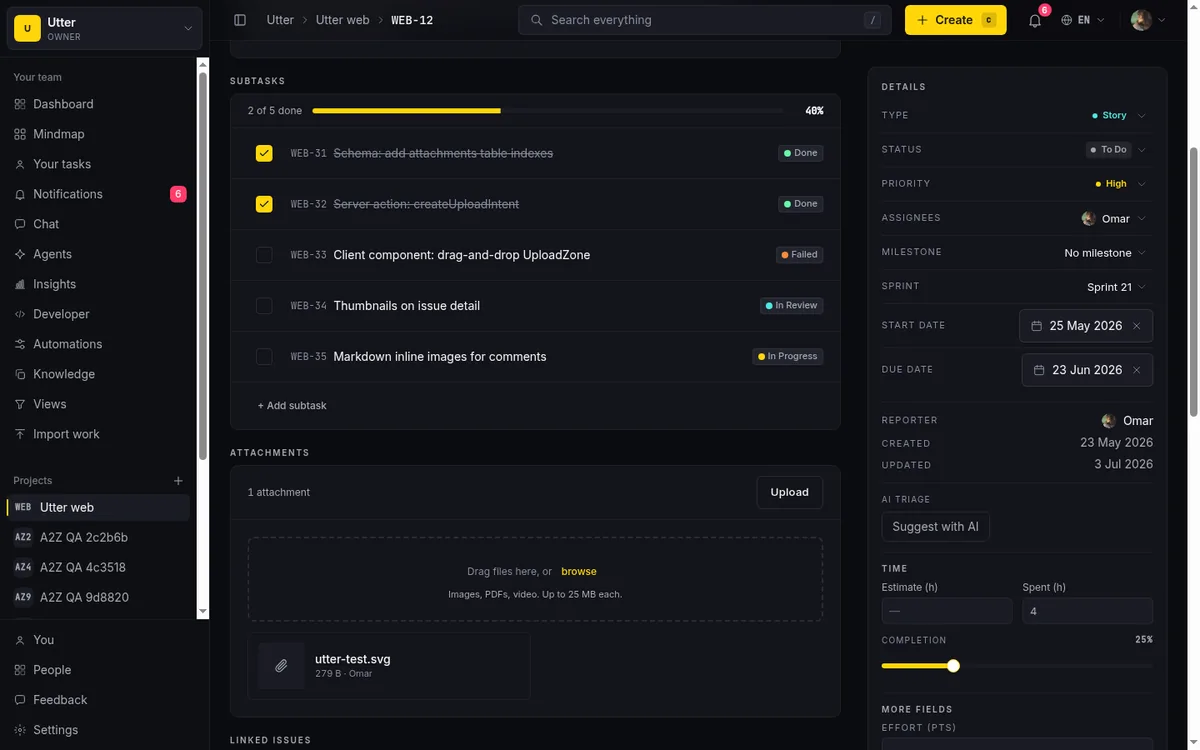
Check that the server exposes the actual model: that an agent can create a subtask under the right parent, respect an epic, and not orphan work. If the hierarchy does not survive the trip through the tool, the agent will make a mess that a human has to untangle.
3. Scoped auth. This is the one people skip and regret. An agent with a write-capable key can do damage if the key is broader than the job. The safe pattern is a separate key per agent, with a scope narrowed to exactly what that agent should touch. An agent that files bugs from a form does not need permission to close sprints or change workspace settings.
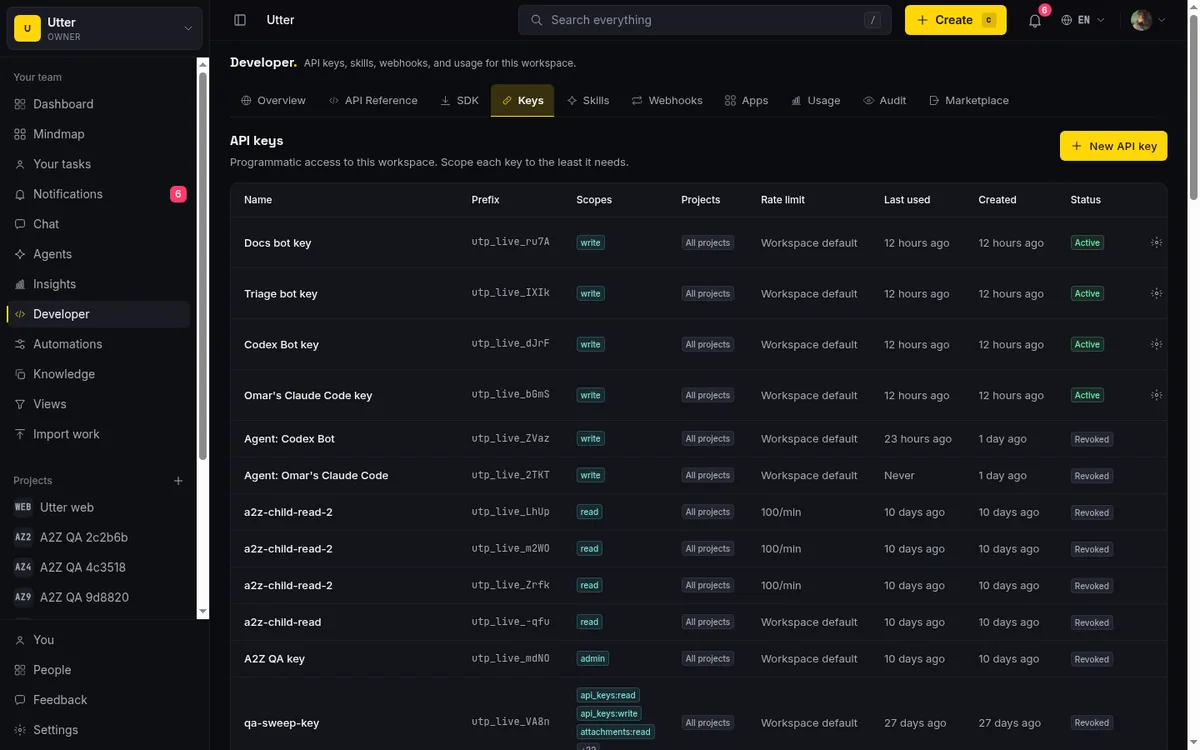
Ask whether the server supports per-key scopes, whether the tool list the agent sees is filtered to its scopes, and whether you can revoke one key without disturbing the rest. "Paste your personal token" fails this test.
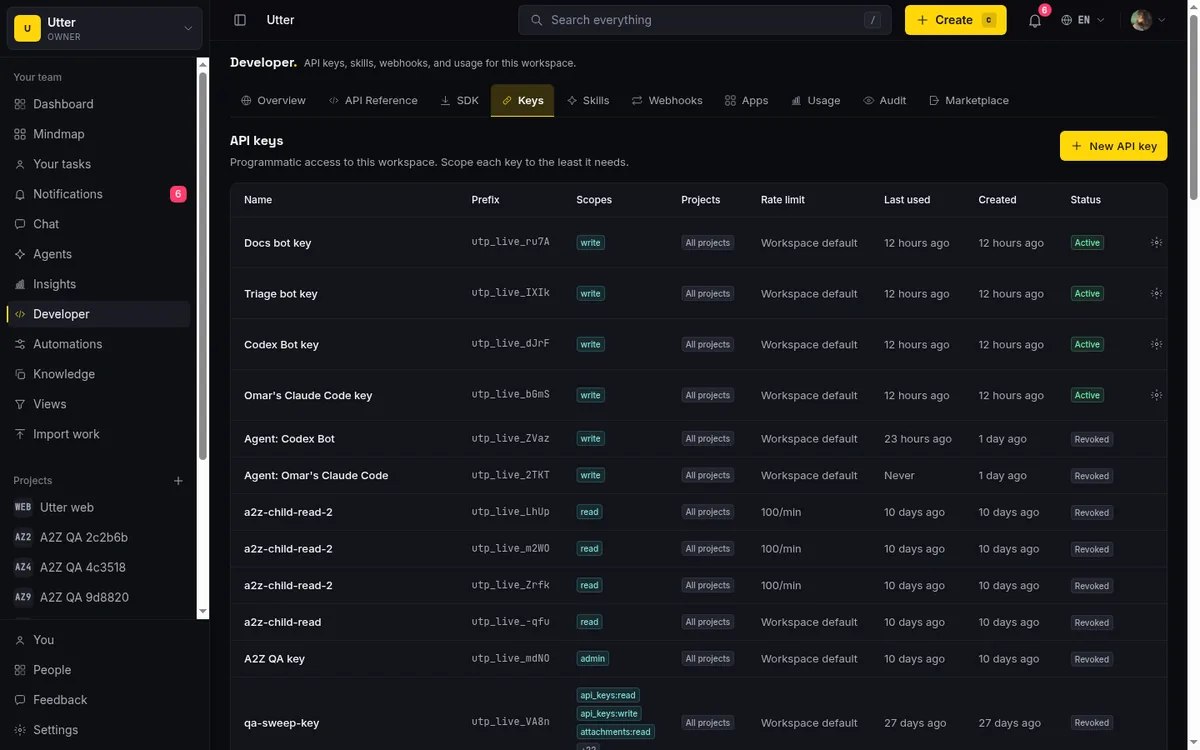
4. Rate limits and revocation. An agent in a loop can hammer an endpoint far faster than a human ever would. You want a per-key rate limit so one misbehaving agent cannot degrade the workspace for everyone, and you want to be able to pull a key the moment something looks off. A server with no throttle and no per-agent revocation is a server you cannot safely leave running unattended.
Run those four against any tool and the tiers sort themselves out fast.
Where Utter sits, plainly
We built a first-party MCP server into Utter, and it is meant to pass its own checklist.
On coverage, the tools are generated from the same registry that defines the public REST API, which is over 180 operations. So the agent's toolset is not a hand-picked subset that drifts, it is the API surface, kept in step by construction. Add an endpoint and the tool shows up. Change a field and the description the model reads updates with it. When an agent calls a tool, the MCP layer dispatches the same REST request in process, so there is no second pipeline for auth, scopes, or rate limits to fall out of sync:
sequenceDiagram
    participant Agent
    participant MCP as MCP server
    participant REST as REST pipeline
    Agent->>MCP: tools/list
    MCP-->>Agent: tools filtered to the key's scopes
    Agent->>MCP: tools/call create issue
    MCP->>REST: same request, in process
    REST-->>MCP: issue created
    MCP-->>Agent: result
On hierarchy, the tools speak the real model, workspaces to projects to issues to subtasks, with parent links, labels, and custom fields intact. Containment rules that hold for a human hold for the agent too: a subtask needs a parent, an epic cannot be parented under another epic. Here is the same rule visible on the REST side, where a subtask is created under its parent by key:
curl -X POST "https://utter.ae/api/v1/workspaces/your-team/projects/WEB/issues" \
  -H "Authorization: Bearer $UTTER_API_KEY" \
  -H "Content-Type: application/json" \
  -d '{"type": "subtask", "title": "Write the migration", "parent": "WEB-12"}'
The agent works inside the same structure your team sees, not a flattened copy of it.
On auth, keys are scoped. Utter has coarse scopes (read, write, admin) and per-resource ones (issues, comments, labels, and so on), and the tool list an agent sees is filtered to the scopes its key holds. Mint a separate key per agent, grant only what it needs, revoke one without touching the others. Each key also carries its own configurable per-minute rate limit, so an agent stuck in a loop is capped, not a workspace-wide outage.
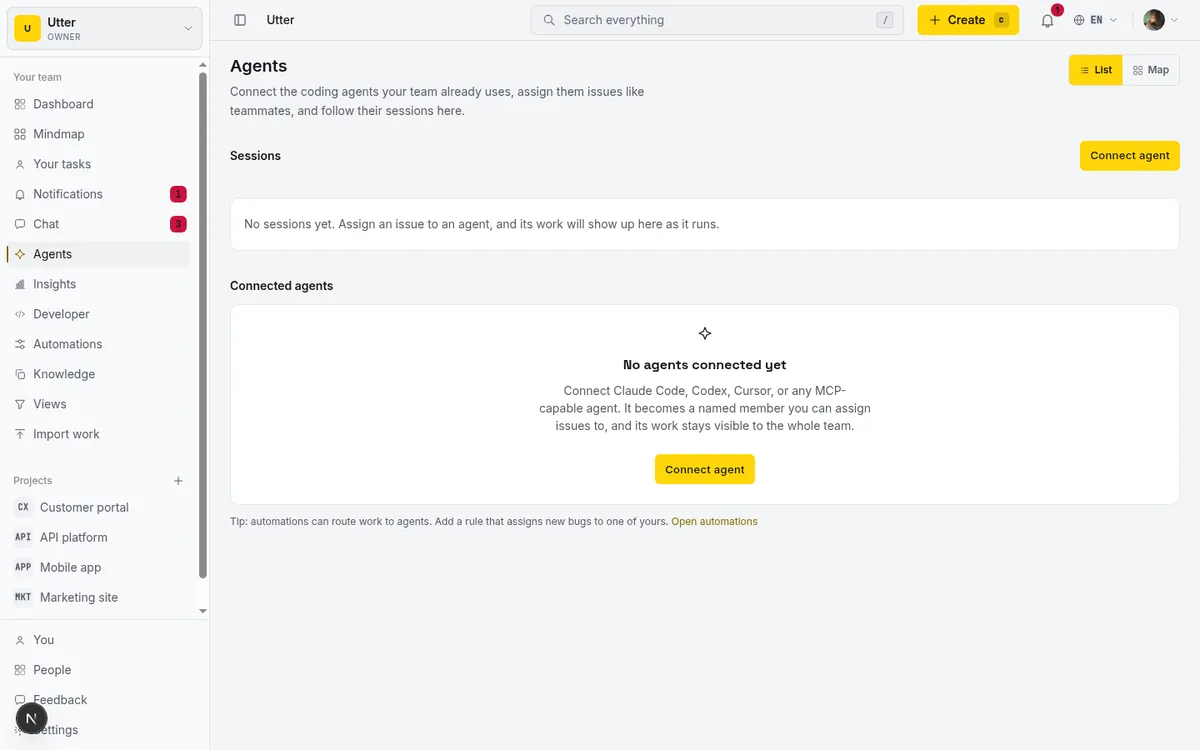
Connecting a client takes one command in Claude Code:
claude mcp add utter-product https://utter.ae/api/mcp/v1/ \
  --header "Authorization: Bearer $UTTER_API_KEY"
Or a few lines in Cursor's ~/.cursor/mcp.json:
{
  "mcpServers": {
    "utter-product": {
      "url": "https://utter.ae/api/mcp/v1/",
      "headers": { "Authorization": "Bearer YOUR_API_KEY" }
    }
  }
}
We are not going to pretend this is finished or that MCP is settled. The spec is still moving, client support is uneven, and the security model is something you have to take seriously rather than assume. We think the answer to a moving spec is to keep the REST API as the source of truth and treat MCP as the convenience layer on top, not a second system to keep in sync. For clients that do not speak MCP yet, the same workspace is reachable through that REST API and through an installable skill bundle. Same capabilities, more than one front door.
What to do with this
If your team is going to put agents to work, do not shop by the AI badge. Find out whether the tool ships an MCP server, whether the vendor built it, and then run the four checks: coverage, hierarchy, scoped auth, rate limits. A tool can be excellent for humans and still leave your agent stuck at the door.
If you want to see what a first-party server looks like when you hold it to that bar, the developer docs have the setup and the full tool list. Point one agent at a real project with a narrow, scoped key and watch where it lands. That is the honest way to tell the tiers apart.
Frequently asked questions
Which project management tools have a first-party MCP server?
Very few. Most trackers today sit in the community-built or no-MCP tiers (see the 2026 audit), while Utter ships a first-party MCP server whose tools are generated from the same registry as its REST API, over 180 operations.
Is an AI feature the same as an MCP server?
No. An AI feature is something the vendor built for a human to click inside their product; an MCP server exposes the tool's actions so an outside AI client can discover and call them. The tell: can you add the tool to your own AI client and have it create and update work on your behalf?
What is the difference between a first-party and a community-built MCP server?
A first-party server is built and run by the vendor as part of the product: it tracks the real data model, ships with the same release as the API, and uses the vendor's own auth and scopes. A community-built server is a wrapper someone outside the company put on GitHub; it can be genuinely good, but it lags API changes, auth is usually a pasted personal token, and if the maintainer moves on you inherit it.
How do you evaluate an MCP server before trusting an agent with it?
Run four checks: read and write coverage (the agent can create, comment, change status, set fields, and read the result back), hierarchy preservation (subtasks, parent links, labels, and custom fields survive the trip), scoped auth (a separate key per agent, narrowed to the job), and rate limits with per-key revocation. A read-only tool list or a "paste your personal token" auth story fails the test.
Related reading

Why we gave Utter an MCP server, and what it changes
What the Model Context Protocol is in plain terms, why a project tracker is a good fit for it, and how an agent picks up your workspace without any glue code.
July 11, 2026 · 5 min read

The MCP audit: which project tools can AI agents actually use? (July 2026)
We audited the MCP servers of 13 project management tools: who has one, what agents can really do, the call caps, and the gaps nobody mentions.
July 15, 2026 · 7 min read
AI agent project management: the complete guide
How to run real projects with AI agents on the board: connecting them, assigning work, keeping review, what breaks, and how to pilot it in a week.
July 15, 2026 · 12 min read

Should your agent use MCP or the REST API?
MCP and a REST API solve overlapping problems for AI agents. Here is a plain guide to when each one is the right call, and why you often want both.
July 12, 2026 · 5 min read

What an AI issue tracker actually is, and how to pick one
Most tools that say AI issue tracking mean a summarize button. A five-part checklist for what the label should mean, plus the failure modes to test in a pilot.
July 15, 2026 · 8 min read

What is agentic project management? A plain-language guide with a working example
A copilot waits for your prompt. An agent acts on an event. Here is the perceive-plan-act-check loop explained, with one real end-to-end run inside Utter.
June 11, 2026 · 11 min read
The best AI project management software in 2026, honestly ranked
Eight AI project management tools ranked with a stated lens: what the AI really does, what it costs on top of the seat price, and who each one fits.
July 15, 2026 · 10 min read
What is an AI project manager? What one actually does today
A plain definition of the AI project manager: the three things the term means, a week of real work on a live board, and the parts only a human can hold.
July 15, 2026 · 8 min read

How to use AI agents in Utter: connect them, assign work, and follow their sessions
A start-to-finish walkthrough: connect an agent, scope its key, assign it issues, and watch its sessions, without giving up control of the board.
July 15, 2026 · 11 min read

Will AI agents replace project managers? What actually changes
Agents already handle the mechanical parts of project management. The judgment part is harder, and it is not going anywhere. An honest look at the shift.
July 15, 2026 · 7 min read
Add a comment
Start the conversation.