
The best AI project management software in 2026, honestly ranked

Every list of the best AI project management software says the same thing: each tool "uses AI to work smarter." Almost none of them tell you what the AI actually does, whether it can do work on its own, or what it costs once you read past the seat price. This one does.
Disclosure up front: we make Utter, one of the tools below. Rather than pretend to be neutral, we ranked with a stated lens. First, can AI do real work in the tool, not just summarize it? Second, what does the assistive AI give you day to day? Third, what does all of it cost on top of the seat price? Where Utter loses on that lens, we say so.
The distinction most lists miss
Two very different things get sold as "AI project management," and telling them apart will save you money.
Assistive AI is features for humans. Summarize this thread. Draft a description. Answer a question about the workspace. Every vendor has this now, the quality gap is shrinking, and it is usually metered or sold as an add-on.
Agent support is structural. Can an external AI agent, a coding agent like Claude Code or one you built yourself, actually work your board? That question breaks into three concrete checks:
- Is there an MCP server or a full API, so an agent can read and write issues directly? We tested the market on exactly this in our MCP audit of 13 tools.
- Does the agent get its own identity, so its changes are attributed to it rather than to whichever human lent it an API key?
- Can you put a review gate in front of it, so a person approves before work is called done?
flowchart TD
    A["AI in a tracker"] --> B["Assistive AI"]
    A --> C["Agent support"]
    B --> B1["Summaries and drafting"]
    B --> B2["Metered or sold as an extra"]
    C --> C1["MCP server or full API"]
    C --> C2["Agent has its own identity"]
    C --> C3["Review gate before Done"]
Assistive AI makes your team a bit faster. Agent support changes who is on the team. If you only want the first, most tools below will do and you should choose on price. If you want the second, the field narrows fast. The longer version of this argument is in what agentic project management actually means.
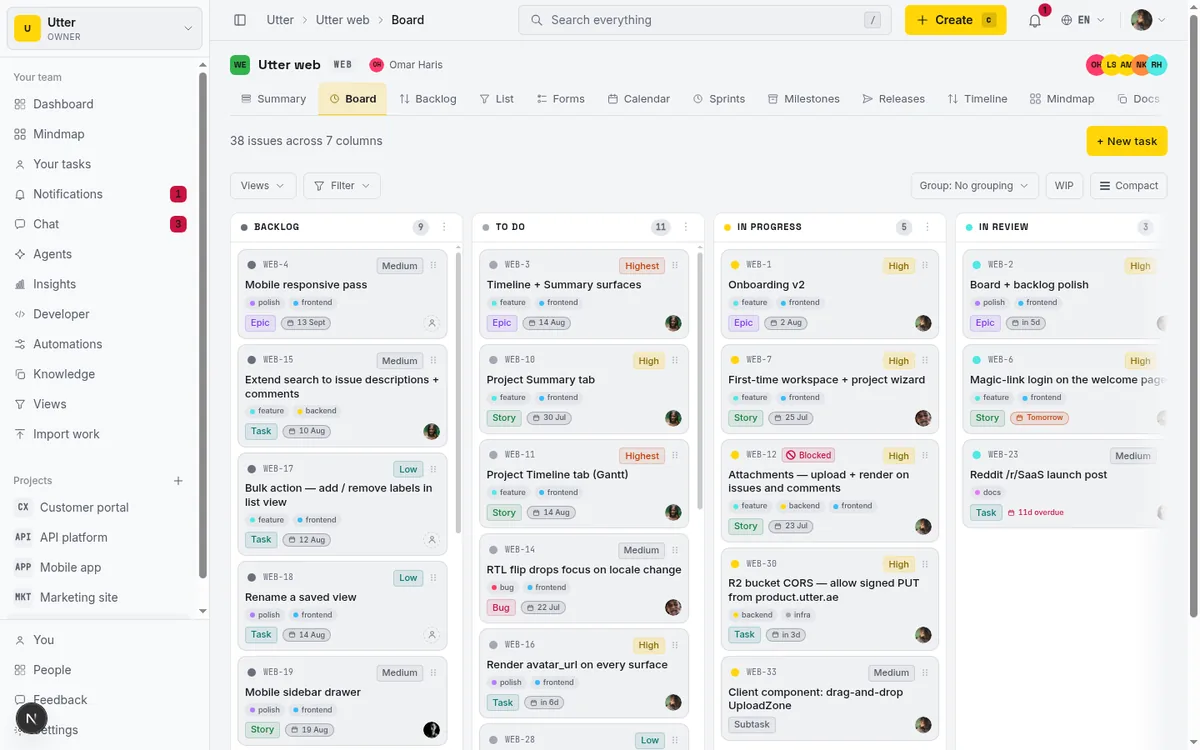
Prices below are per user per month on annual billing, taken from public pricing pages as of July 2026.
1. Utter: best for teams putting agents to work on the board
Ours, so calibrate accordingly. Utter is a calm tracker, boards, sprints, backlog, docs, forms that create issues, automations, team chat, a mind map, custom fields and custom board columns, built around the idea that AI agents are team members rather than integrations.
The agent side is the whole pitch. There is a first-party MCP server and a REST API that covers the entire product, over 180 operations. This is what checking the board looks like from the agent's side, the same request in whichever language your agent speaks:
curl "https://utter.ae/api/v1/workspaces/acme/projects/WEB/issues?status=in_review" \
  -H "Authorization: Bearer $UTTER_API_KEY"
const res = await fetch(
"https://utter.ae/api/v1/workspaces/acme/projects/WEB/issues?status=in_review",
{ headers: { Authorization: `Bearer ${process.env.UTTER_API_KEY}` } },
);
const { data } = await res.json();import os, requests
res = requests.get(
"https://utter.ae/api/v1/workspaces/acme/projects/WEB/issues",
params={"status": "in_review"},
headers={"Authorization": f"Bearer {os.environ['UTTER_API_KEY']}"},
)
issues = res.json()["data"]Agents join as named members with profiles and scoped API keys. Every change an agent makes is attributed to that agent in the audit trail, and you can watch its live session on an issue while it works. Human control is structural rather than polite: review columns and workflow transition rules mean an agent can move a ticket to "In review" but only a person can move it to "Done."
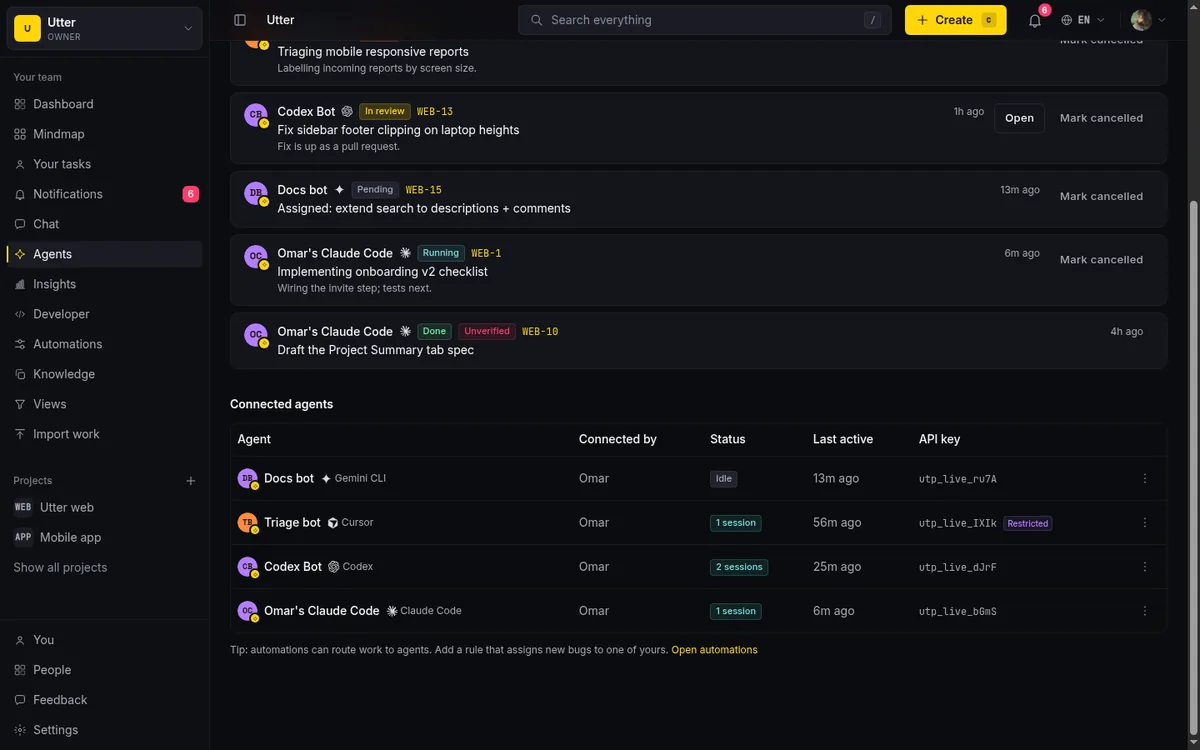
The assistive side is deliberately modest: AI issue triage and a weekly AI digest, running on a monthly credit grant included in every plan. There is no meeting notetaker and no image generator, and we are fine with that.
Pricing is the other argument. Pro is $3 per builder per month, Business is $6. Viewers are free with no cap, and agents never count as billed seats. The free plan takes unlimited members and up to 5 active projects. Business adds OIDC SSO, SAML, and SCIM.
The honest part: we are the youngest tool on this list. The integration ecosystem is the smallest, there is no plugin marketplace, and the product ships in English and Arabic only (with full RTL, which almost nobody else bothers to do). If you need a decade of enterprise edge cases, that is Jira's territory, not ours.
2. Linear: best for engineering teams that want polish and agents
Linear is the most serious non-Utter answer to the agent question. Linear for Agents lets agents join a workspace as members you can @mention, assign issues to, and get comments from, and Linear ships a first-party MCP server. The agent APIs are still marked as a developer preview in Linear's docs, so expect the surface to keep moving.
The product itself is the best-feeling tracker on this list. Fast, keyboard-first, opinionated about cycles and triage.
The catch is cost shape: $10 per user with everyone a paid seat, and a free plan that caps you at 250 non-archived issues, which a working team burns through in weeks. If budget is not the constraint and your whole company thinks like an engineering org, pick Linear and be happy. The tradeoffs against us are in Utter vs Linear, and if the seat price is the sticking point, start with who actually pays in a Linear alternative.
3. Jira with Rovo: best if you are already inside Atlassian
Atlassian's AI layer is Rovo: chat, search, and agents across Jira and Confluence, plus an official remote MCP server that went GA in early 2026 and connects Jira to Claude, Cursor, VS Code, and other MCP clients over OAuth. That is a real agent story, not a press release.
The pricing is credit-shaped. Rovo is included with Jira plans as a monthly credit allowance per seat, 25 credits on Standard, 70 on Premium, 150 on Enterprise, pooled across the organization. As of May 2026 Atlassian says it is not yet billing for usage above the allowance and has promised notice plus an explicit opt-in before that changes, which is a polite way of saying the meter exists and will matter later. Rovo Dev, the coding agent, is separate at $20 per developer per month with 2,000 credits.
Jira's seat price is $7.91, and Jira is still Jira: the deepest workflow engine in the category, and the most administration. If you are on Atlassian today, turn on Rovo and the MCP server before you buy anything new. If you are not, weigh the weight before you sign; we lay it out in Utter vs Jira, and the per-seat math across the whole field is in what Jira alternatives actually cost.
4. ClickUp with Brain: best all-in-one, if you do the AI math
ClickUp at $7 is one of the cheapest capable trackers, and the everything-app breadth is real: tasks, docs, whiteboards, chat. Brain, the AI, is a separate add-on at $9 per user per month, with an Everything AI tier at $28 that adds a notetaker and image generation. Priced per member, the AI can cost more than the tracker: a 20-person workspace pays $140 a month for ClickUp and $180 for Brain.
Brain itself is broad. Chat over your workspace, writing help, AI fields and automations. If your team will use it daily, the bundle is decent value; if only three people will, you are buying it for twenty. Compare the base products in Utter vs ClickUp.
5. Notion with Notion AI: best for docs-first teams
Notion stopped selling AI as an add-on and folded it into the Business plan at $20 per user per month; Free and Plus get a trial-level taste. For that you get the things Notion is genuinely good at: AI search across your docs, meeting notes, and agents that work inside pages and databases.
As a project tracker, Notion is still a database you assemble yourself. That is freedom on day one and maintenance forever after, and the agile machinery, sprints, burndowns, triage, stays DIY. If your work is documents first and the tracker is a sidecar, $20 all-in is fair pricing. If the board is the center of your day, look elsewhere.
6. Monday with monday AI: best for ops teams that think in spreadsheets
Monday's boards still demo better than anyone's, and ops teams like building on them. The AI moved to a credit meter in May 2026: paid plans carry monthly allocations, 1,000 credits on Basic, 2,000 on Standard, 3,000 on Pro, and new customers buy credits alongside seats at roughly a cent per credit on annual billing. Where the credits go is the familiar assistive set: summaries, drafting, columns that fill themselves.
Seats are $9, and the old caveat stands: features you assumed were included often live a tier up. Budget for Pro, then add the credit line, and compare that total against the tools above; the direct comparison is in Utter vs Monday.
7. Asana with AI Studio: best for automating cross-team workflows
Asana treats AI as a metered utility, which is at least transparent. AI Studio, its workflow-automation product, runs on credits: plans include a monthly allotment per account, not per seat (50,000 on Starter, 75,000 on Advanced, 200,000 on Enterprise), and heavier use means the Plus add-on at $150 per month for another 100,000 credits, with a larger annual-only Pro tier above that.
AI Studio is aimed at letting business teams build AI steps into intake and routing without engineers, and that focus is its real strength. But you are paying the category's highest seat price, $10.99, plus a utility bill, for a tracker whose engineering story is the weakest of the top five here. Best for mixed marketing and ops teams with automation appetite. The head-to-head is in Utter vs Asana.
8. Motion: best for individuals who want AI to run the calendar
Motion is a different animal: an AI scheduler that plans your day and reflows it when things slip, with project management attached. Pro AI is $19 per seat billed monthly, about $13 on annual billing, with a monthly AI credit allowance per seat. There is no free plan, just a 7-day trial.
For a solo consultant or a three-person team drowning in meetings, it earns its price. As a system of record for a product team, it is not trying to be that, and you should not make it try.
How to choose
Decide which AI you actually want. If it is summaries and drafting, buy on price and fit; ClickUp and Notion bundle the most. If it is agents doing work, the shortlist is Utter, Linear, and Jira with Rovo, because those are the ones with first-party MCP servers, agent identity, and review mechanics today. If you want the buying criteria as a checklist, we wrote one in how to pick an AI issue tracker.
Then price the AI, not the seat:
| Tool | Seat price | The AI bill on top |
|---|---|---|
| ClickUp | $7 | $9 per user for Brain |
| Notion | $20 | AI included |
| Asana | $10.99 | Credit meter; $150 per month past the allotment |
| Monday | $9 | Credits bought alongside seats |
| Jira | $7.91 | Rovo credits included but capped per tier |
| Linear | $10 | Agents are the story rather than an AI add-on |
| Motion | About $13 annual | The AI is the product |
| Utter | $3 per builder | Viewers and agents free; monthly AI credit grant included |
Finally, check the accountability mechanics before you commit. If an agent writes to your board under a borrowed human key with no review gate, you will stop trusting the board, and a tracker nobody trusts is expensive at any price. The mechanics you are checking for look like this:
sequenceDiagram
    participant Agent
    participant Board
    participant Human
    Agent->>Board: Writes under its own identity
    Agent->>Board: Moves ticket to In review
    Board->>Human: Notifies the reviewer
    Human->>Board: Approves and moves to Done
Pilot for two weeks with one project and one agent, then read the audit trail and see whether it tells you who did what.

If the agent side is why you came, see how agents work in Utter, or start on the free plan via pricing. Coming from one of the tools above? The migration guide covers the import. Viewers are free, agents are free, and builders are $3, so the pilot costs almost nothing to run.
Frequently asked questions
What is the best AI project management software in 2026?
It depends on which AI you mean. For assistive features like summaries and drafting, ClickUp and Notion bundle the most per dollar; for AI agents doing real work on the board with their own identity and review gates, Utter and Linear are the tools built for it, with Jira's Rovo close behind for Atlassian shops.
What is the difference between AI features and AI agent support?
AI features assist a human inside the app: summarize, draft, answer questions. Agent support is structural: an external agent can work the board itself through an MCP server or API, under its own identity, with attribution and human review gates. Our guide to AI agent project management walks through it.
Do AI features cost extra on top of the seat price?
Usually. ClickUp Brain is a $9 per user add-on, Monday and Asana meter AI in credits, Notion requires its $20 Business plan, and Jira includes a capped monthly Rovo credit pool per seat. Utter includes a monthly AI credit grant in every plan and never bills agents as seats.
Can AI fully run a project without a human?
No. Agents are good at scoped execution: triage, drafting, moving well-defined work forward. Priorities, tradeoffs, and final review still need a person, which is why review columns and workflow transition rules matter more than any chat feature.
Related reading

The MCP audit: which project tools can AI agents actually use? (July 2026)
We audited the MCP servers of 13 project management tools: who has one, what agents can really do, the call caps, and the gaps nobody mentions.
July 15, 2026 · 7 min read
AI agent project management: the complete guide
How to run real projects with AI agents on the board: connecting them, assigning work, keeping review, what breaks, and how to pilot it in a week.
July 15, 2026 · 12 min read
What is an AI project manager? What one actually does today
A plain definition of the AI project manager: the three things the term means, a week of real work on a live board, and the parts only a human can hold.
July 15, 2026 · 8 min read

Looking for a Linear alternative? Start with who pays
Where teams leaving Linear actually go, Jira, ClickUp, Asana, GitHub Projects, Utter, and the seat math and agent support that should drive the choice.
July 12, 2026 · 8 min read

Jira alternatives in 2026: what you actually pay per seat
Six Jira alternatives compared honestly: Linear, ClickUp, Asana, Monday, Trello, and Utter, with real per-seat math and where each one actually fits.
July 11, 2026 · 8 min read

Which project management tools actually ship a first-party MCP server
Having AI features is not the same as shipping an MCP server. Here is how to tell first-party from community-built from none, with an honest checklist.
June 22, 2026 · 9 min read
What you can run in Utter without extra tools
A straight, capability-forward tour of the jobs Utter covers in its core, from a light help desk to integrations, estimation, and roadmaps, and when to pair a dedicated tool.
July 16, 2026 · 8 min read

What an AI issue tracker actually is, and how to pick one
Most tools that say AI issue tracking mean a summarize button. A five-part checklist for what the label should mean, plus the failure modes to test in a pilot.
July 15, 2026 · 8 min read

Will AI agents replace project managers? What actually changes
Agents already handle the mechanical parts of project management. The judgment part is harder, and it is not going anywhere. An honest look at the shift.
July 15, 2026 · 7 min read

What is agentic project management? A plain-language guide with a working example
A copilot waits for your prompt. An agent acts on an event. Here is the perceive-plan-act-check loop explained, with one real end-to-end run inside Utter.
June 11, 2026 · 11 min read
Add a comment
Start the conversation.