
How to tell when an AI agent is stuck (and what to do about it)
Here is the annoying thing about running an agent on real work: a stuck agent and a working agent look identical from the outside. Both are quiet. One is grinding through a hard problem. The other is looping on the same failed step, or waiting on a value it will never get, or hung on a call that timed out three hours ago. You cannot tell which by staring at the board, and the usual way you find out is that you check in at 5pm and nothing has moved since lunch.
We build a project tracker that agents use every day, and this is the failure people underestimate. Not the agent making a wrong change. The agent making no change and you not knowing. A wrong change shows up in the activity log. Silence shows up nowhere, until you go looking.
Why silence is the hard case
A person who is blocked tells you. They drop a message, they flag the ticket, they ask. An agent that is blocked does whatever its loop tells it to do, which is often nothing visible: it keeps polling an endpoint, retries a command, waits for input on a prompt no human is watching. From your side, the ticket just sits in its column.
So the real problem is not "is the agent smart enough." It is observability. You need the agent to report what it is doing, in a place you already look, in terms you can act on. Without that, every quiet agent is a coin flip between busy and dead, and you resolve the flip by wasting an afternoon.
Make the agent say what it is doing
In Utter the mechanism for this is an agent session. A session is the agent's own running status report. It has a state, and the states are deliberately plain:
running: the agent is working.needs_input: it hit something it cannot decide alone and is asking a human.review: it thinks it is finished and wants a person to look before this counts as done.done,failed,cancelled: terminal. The run is over.
The first three tell you where a live agent actually is, and the whole machine fits in one picture:
stateDiagram-v2
    [*] --> running
    running --> needs_input: blocked on a human
    needs_input --> running: unblocked
    running --> review: PR ready
    review --> done
    running --> failed
    running --> cancelled
    done --> [*]
    failed --> [*]
    cancelled --> [*]
A session can be anchored to a specific issue, like WEB-12, and a project, or it can sit at the workspace level for work that is not one ticket. Either way it shows up in two places: on the Agent Hub, where you see every agent's live state at once, and on the issue itself, so the status lives next to the work it describes. You do not go hunting. You open the thing you were already going to open, and the agent's state is right there.
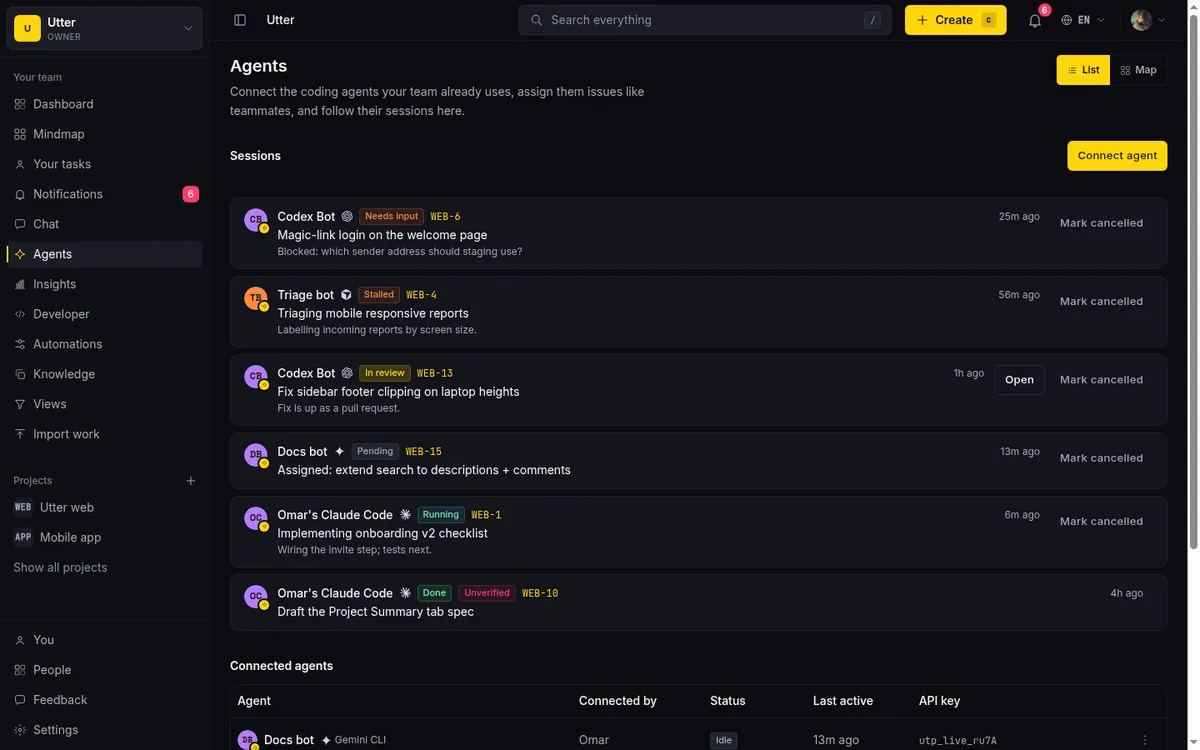
Two fields on the session do a lot of quiet work. There is a note, a short status line the agent writes, something like "blocked on env var" or "waiting for staging deploy." And there is an external URL, usually a pull request link, so when an agent says it is in review you can click straight through to what it built. A state tells you the category. The note and the URL tell you the specifics, which is the difference between "something is wrong" and "I know exactly what to unblock."
Opening a session is one API call when the agent picks up a ticket:
curl -X POST "https://utter.ae/api/v1/workspaces/utter/agent-sessions" \
  -H "Authorization: Bearer utp_live_..." \
  -H "Content-Type: application/json" \
  -d '{
    "title": "Fix flaky auth test",
    "issue_key": "WEB-39",
    "note": "reproducing the failure locally"
  }'
The response is the session the rest of the team now sees, state and note included:
{
  "id": "019e7a31-...",
  "agent_name": "Omar's Claude Code",
  "agent_kind": "claude",
  "state": "running",
  "title": "Fix flaky auth test",
  "note": "reproducing the failure locally",
  "external_url": null,
  "issue_key": "WEB-39",
  "last_activity_at": "2026-07-15T14:02:11Z"
}
The stall signal, and what it honestly means
States handle the cases where the agent knows its own situation. The harder case is the agent that does not know it is stuck, the one hung on a call or spinning on a step, still technically "running" and reporting nothing new.
For that, every session update counts as a heartbeat. Any PATCH on the session bumps its last_activity_at, so as long as the agent is making progress, it keeps touching the session. The same call carries the note, a state change, or the PR link, whichever the moment needs:
curl -X PATCH "https://utter.ae/api/v1/workspaces/utter/agent-sessions/SESSION_ID" \
  -H "Authorization: Bearer utp_live_..." \
  -H "Content-Type: application/json" \
  -d '{"state": "needs_input", "note": "blocked on env var STRIPE_KEY"}'
await fetch(`https://utter.ae/api/v1/workspaces/utter/agent-sessions/${sessionId}`, {
method: "PATCH",
headers: {
Authorization: "Bearer utp_live_...",
"Content-Type": "application/json",
},
body: JSON.stringify({ note: "tests passing, opening the PR" }),
});import requests
requests.patch(
f"https://utter.ae/api/v1/workspaces/utter/agent-sessions/{session_id}",
headers={"Authorization": "Bearer utp_live_..."},
json={"state": "review", "external_url": "https://github.com/acme/web/pull/42"},
)If a running session goes 30 minutes with no heartbeat, Utter marks it stalled.
Be clear-eyed about what that flag is. A stall is not proof the agent failed. It means no heartbeat for half an hour, which is a prompt to look, not a verdict. Maybe the agent is legitimately deep in a long-running build. Maybe it died. The stall signal does not know the difference, and it does not pretend to. Its whole job is to convert invisible silence into a visible "you should check this now," so the discovery happens in minutes instead of at end of day.

And here is a limit worth stating plainly: this is a periodic signal, not a live push. Utter does not stream a real-time feed of every keystroke. Stall detection is a threshold crossed after the fact. Thirty minutes of quiet is the trigger because it is long enough to not fire on every slow step and short enough that a genuinely dead run does not rot for hours. If you want the moment-by-moment truth of what a model is doing, that lives in the agent's own runtime. What Utter gives you is the thing that actually matters for keeping a project moving: a reliable "this run stopped reporting" that reaches you without you polling for it.
You get told, you do not have to watch
You should not have to sit on the Agent Hub refreshing. When a session moves into needs input or done, Utter notifies the people who care: the agent's owner, and the issue's reporter, assignee, and watchers. So the person waiting on a ticket learns the moment the agent is blocked on it, or the moment it finishes, without babysitting a dashboard.
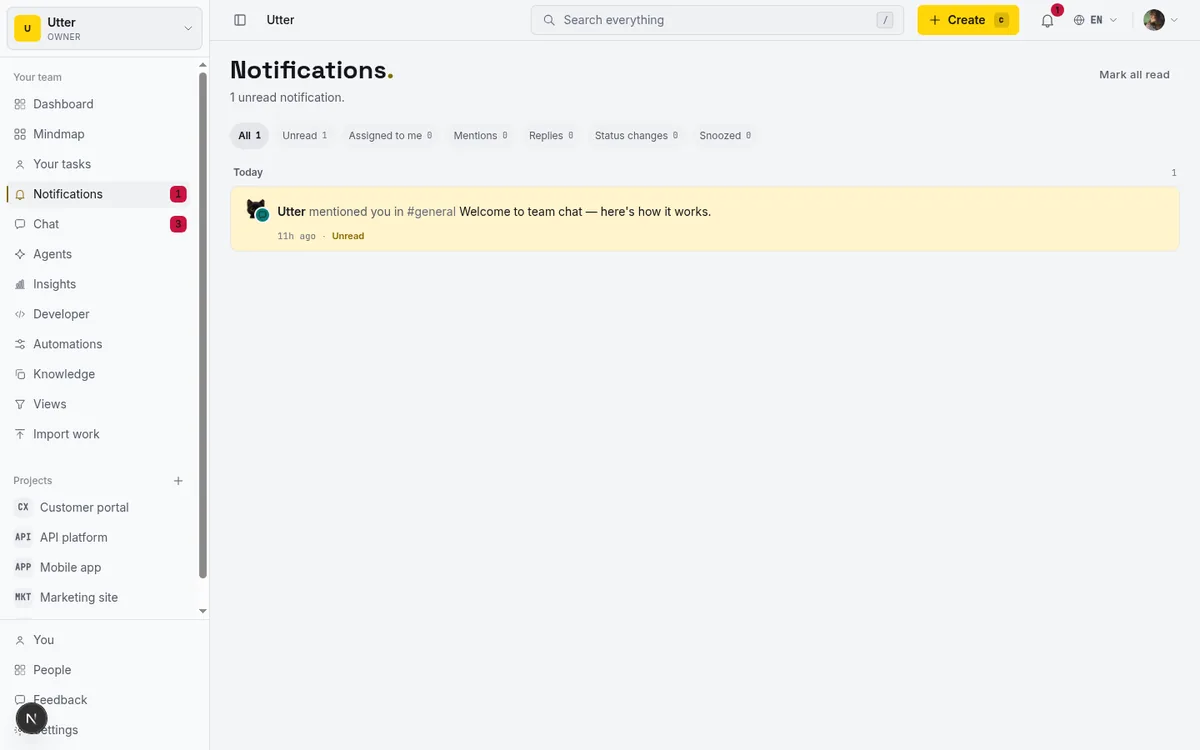
One honest note on these: they are in-app notifications, not email. The idea is that agent status belongs in the same notification stream as everything else happening in your workspace, next to mentions and assignments, not scattered into your inbox. If you live in the app, you see it. If you were hoping for an email ping when an agent stalls at 2am, that is not what this is.
What to actually do when one stalls
The signal is only useful if you know the moves. When a session shows stalled, or sits in needs input longer than you would like, here is the short checklist.
Read the note first. The agent very often already told you why it stopped. "Blocked on env var" is a two-minute fix, not a mystery. If there is an external URL, open it; a stalled review session with a PR link usually means the work is done and the human step is the bottleneck, not the agent.
Then decide among three responses. If it is genuinely blocked and the fix is on your side, unblock it, give it the value, set the secret, answer the question, and let it resume. If the run has gone bad or the approach was wrong, cancel the session; cancelled is terminal and clean, and you are not left wondering. And if the work still needs doing but this agent is not the one to do it, reassign the issue. The assignee picker groups people and agents in separate sections, so handing a stuck ticket to a teammate, or to a different agent, is the same move you already know.
The checklist, drawn:
flowchart TD
    S["Session stalled, or waiting in needs input"] --> N["Read the note and any linked PR first"]
    N -->|"blocked on your side"| U["Unblock it and let it resume"]
    N -->|"the run went bad"| C["Cancel the session"]
    N -->|"wrong agent for the job"| RA["Reassign the issue to a person or another agent"]
If you run several agents and want the sweep in one query, the same API lists every live session, newest activity first, so the ones that have gone quiet sort to the bottom:
curl "https://utter.ae/api/v1/workspaces/utter/agent-sessions?state=running" \
  -H "Authorization: Bearer utp_live_..."
None of this is exotic. It is the same instinct you would apply to a person who went quiet on a task: find out why, then unblock, drop it, or hand it off. The only new part is that the agent needed a mechanism to go quiet-but-legible instead of just quiet.
The point
An agent you cannot see is an agent you cannot trust, and trust is the whole game. Start narrow, watch the sessions, and widen the leash only when the quiet stops making you nervous. The states, the note, the stall flag, and the notifications exist so that "is it working or is it stuck" stops being a question you answer by losing an afternoon.
If you are already running an agent on real tickets, open the Agent Hub and watch one session end to end. That is the fastest way to feel the difference between a quiet agent and a stuck one.
Frequently asked questions
How can you tell if an AI agent is stuck?
Not by watching it: a stuck agent and a working agent are both quiet. You need the agent to report its own state through a session, plus a stall flag that marks any running session with no heartbeat for 30 minutes, so silence turns into a visible prompt to check instead of a 5pm discovery.
What states can an agent session be in?
Seven in total, but agents only ever set six of them. A session begins as pending when work is assigned and is waiting for the agent to pick it up (the system sets that one, never the agent). Then running, needs input, review, done, failed, and cancelled, and the last three are terminal. Running means it is working, needs input means it is asking a human, and review means it thinks it is finished and wants a person to look before it counts as done.
Does a stalled session mean the agent failed?
No. Stalled means a running session went 30 minutes without a heartbeat, which is a prompt to look, not a verdict. The agent may be deep in a long build or it may have died, and the flag does not pretend to know which.
What should you do when an agent stalls?
Read the session note first, since the agent often already said why it stopped, and open the external URL if there is one; a stalled review session with a PR link usually means the human step is the bottleneck. Then pick one of three moves: unblock it and let it resume, cancel the session if the run went bad, or reassign the issue to a teammate or a different agent.
Related reading
Can an AI run your standup?
Mostly yes, and your team will thank you. What an agent can compile from the board, what still needs a human, and how to set up an async AI standup.
July 15, 2026 · 6 min read

How to manage a team of AI agents without losing track of what they're doing
Running several AI agents at once? The day-to-day of a fleet: a roster, live sessions, instant delegation, per-field permissions, and verified work.
July 15, 2026 · 16 min read
What an AI issue tracker actually is, and how to pick one
Most tools that say AI issue tracking mean a summarize button. A five-part checklist for what the label should mean, plus the failure modes to test in a pilot.
July 15, 2026 · 8 min read

Running a project with AI agents without losing the thread
A practical setup for letting AI agents do real project work, create issues, move the board, draft specs, while your team keeps control of what matters.
July 11, 2026 · 5 min read
Two agents, one backlog: coordinating a triage agent and a coding agent with issue status as handoffs
A practical multi-agent workflow: custom board columns and status transitions as the handoff bus between a triage agent and a coding agent, with human review in the middle.
July 1, 2026 · 9 min read

What is agentic project management? A plain-language guide with a working example
A copilot waits for your prompt. An agent acts on an event. Here is the perceive-plan-act-check loop explained, with one real end-to-end run inside Utter.
June 11, 2026 · 11 min read
How to scope an AI agent's first job so the pilot doesn't die
Most first AI agent projects fail on scope, not model quality. Here is how to pick a first job narrow and checkable enough to actually ship.
July 15, 2026 · 8 min read
AI agent project management: the complete guide
How to run real projects with AI agents on the board: connecting them, assigning work, keeping review, what breaks, and how to pilot it in a week.
July 15, 2026 · 12 min read

AI agent governance for project teams: seven controls your tracker can enforce
Governance for AI agent teams is not a policy PDF. Seven controls your tracker can enforce, from identity to offboarding, and what tooling cannot fix.
July 15, 2026 · 10 min read
Keep an audit trail of everything your AI agents change
Once agents can write to your tracker, a shared bot account makes every change anonymous. Here is how per-agent identity keeps the trail readable.
July 15, 2026 · 8 min read
Add a comment
Start the conversation.