
Why we gave Utter an MCP server, and what it changes

If you have wired an AI assistant into a real tool before, you know the tax. You write a wrapper around the API, describe every endpoint to the model in a prompt, keep that description in sync as the API changes, and handle auth by hand. Do it for three tools and you have a small, brittle integration project on your hands.
The Model Context Protocol exists to kill that tax. Here is what it is and why we built one for Utter.
MCP in plain terms
MCP is a standard way for an AI client to discover and call the tools a service offers, without anyone hand-writing the glue. The service runs an MCP server that lists its tools and how to call them. The client, say Claude or Cursor, reads that list and can use the tools right away.
The comparison people reach for is a USB port. Before it, every device had its own cable. After it, you plug in and it works. MCP is trying to be that for AI-to-service connections: one shape that a model already understands, instead of a bespoke adapter per tool.
That is the whole idea. It is not magic, and it is early. But the direction is right, and a project tracker turns out to be one of the clearer places it pays off.
Why a tracker is a good fit
An agent doing real work needs somewhere to write down what it is doing. Not in a chat log that scrolls away, but in a place the whole team already looks: the backlog, the board, the issue with the acceptance criteria.
Without that, agent output is trapped. The model writes a great plan and it lives in a conversation nobody else opens. With a tracker on the other end, the plan becomes issues, the work becomes status changes, and the record becomes something a human can audit later. The tracker is the shared memory.
So the useful move is not "let the agent read your tickets." It is "let the agent run the project the same way a teammate would," and have every action land in the same place, attributed, with the same permissions.
What it looks like in practice
Utter runs a first-party MCP server. In an MCP-native client you add it once with your API key, and the tools show up: create an issue, move it across the board, comment, set custom fields, search the backlog, read what is done and what is still open.
In Claude Code, adding it is one line:
claude mcp add utter-product https://utter.ae/api/mcp/v1/ \
  --header "Authorization: Bearer $UTTER_API_KEY"
In Cursor, the same thing goes in ~/.cursor/mcp.json:
{
  "mcpServers": {
    "utter-product": {
      "url": "https://utter.ae/api/mcp/v1/",
      "headers": { "Authorization": "Bearer YOUR_API_KEY" }
    }
  }
}
You do not have to type either by hand. The developer settings page generates the snippet for Claude Code, Cursor, and VS Code with your key already in place.
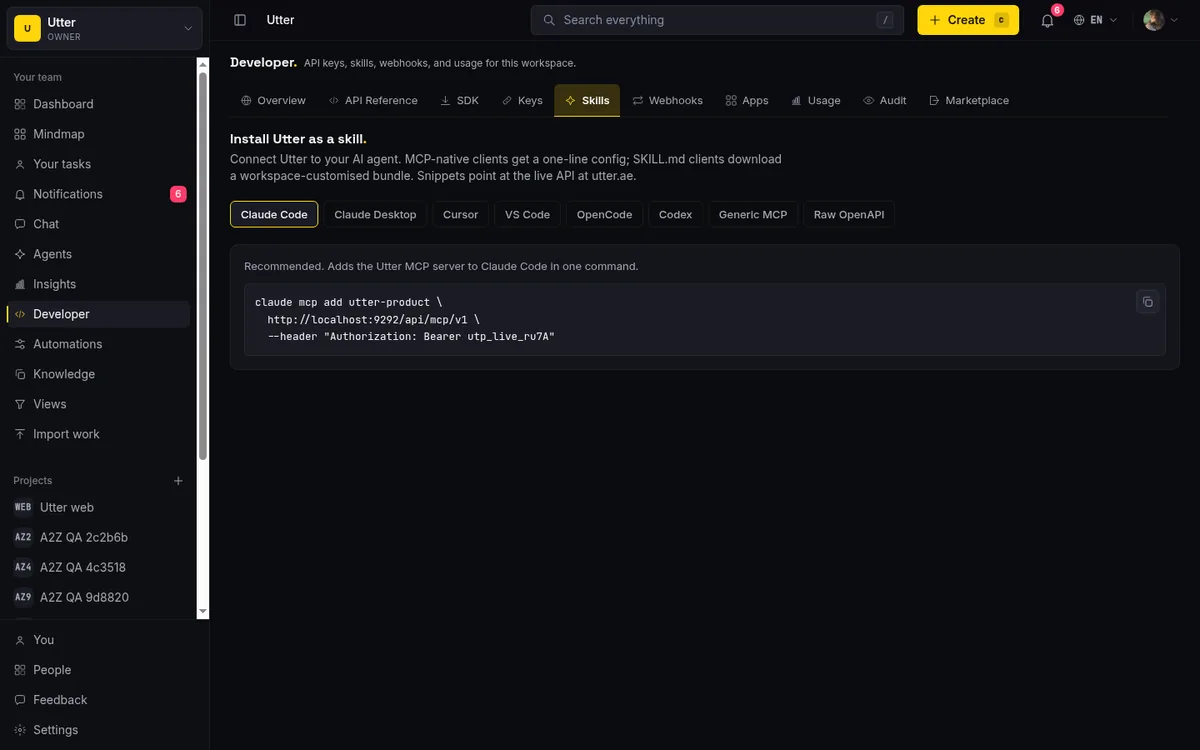
From there the client discovers the tools by itself. Their names are derived from the REST spec, so they read like the API: list_projects, create_issue, transition_issue, list_issue_comments, who_am_i. When your agent decides to file a bug, what actually crosses the wire is one JSON-RPC call. You can send the same call yourself with curl:
curl -X POST https://utter.ae/api/mcp/v1 \
  -H "Authorization: Bearer $UTTER_API_KEY" \
  -H "Content-Type: application/json" \
  -d '{
    "jsonrpc": "2.0",
    "id": 1,
    "method": "tools/call",
    "params": {
      "name": "create_issue",
      "arguments": { "slug": "acme", "key": "WEB", "title": "Fix login redirect", "type": "bug" }
    }
  }'
const res = await fetch("https://utter.ae/api/mcp/v1", {
method: "POST",
headers: {
Authorization: `Bearer ${process.env.UTTER_API_KEY}`,
"Content-Type": "application/json",
},
body: JSON.stringify({
jsonrpc: "2.0",
id: 1,
method: "tools/call",
params: {
name: "create_issue",
arguments: { slug: "acme", key: "WEB", title: "Fix login redirect", type: "bug" },
},
}),
});
console.log(await res.json());import os
import requests
res = requests.post(
"https://utter.ae/api/mcp/v1",
headers={"Authorization": f"Bearer {os.environ['UTTER_API_KEY']}"},
json={
"jsonrpc": "2.0",
"id": 1,
"method": "tools/call",
"params": {
"name": "create_issue",
"arguments": {"slug": "acme", "key": "WEB", "title": "Fix login redirect", "type": "bug"},
},
},
)
print(res.json())There is no wrapper to maintain. When we add an endpoint, it appears in the tool list. When we change a field, the description the model sees updates with it. The client does not need a new release for any of that. And every tools/call re-enters the same REST pipeline internally, so auth, scopes, and rate limits are checked once, in one place:
sequenceDiagram
    participant C as MCP client
    participant M as MCP server
    participant R as REST v1 pipeline
    C->>M: tools/list
    M-->>C: tools your key allows
    C->>M: tools/call create_issue
    M->>R: same bearer key, same checks
    R-->>M: issue created
    M-->>C: result
For clients that do not speak MCP yet, the same workspace is reachable two other ways: the plain REST API, and an installable skill bundle that ships a SKILL.md describing your actual projects, keys, and conventions. Same capabilities, three front doors, so you are not stuck waiting for your tool of choice to add support.
flowchart LR
    A[Agent via MCP] --> P[One REST pipeline]
    B[Script via REST] --> P
    S[Agent via skill bundle] --> P
    P --> W[Your workspace]
The honest caveats
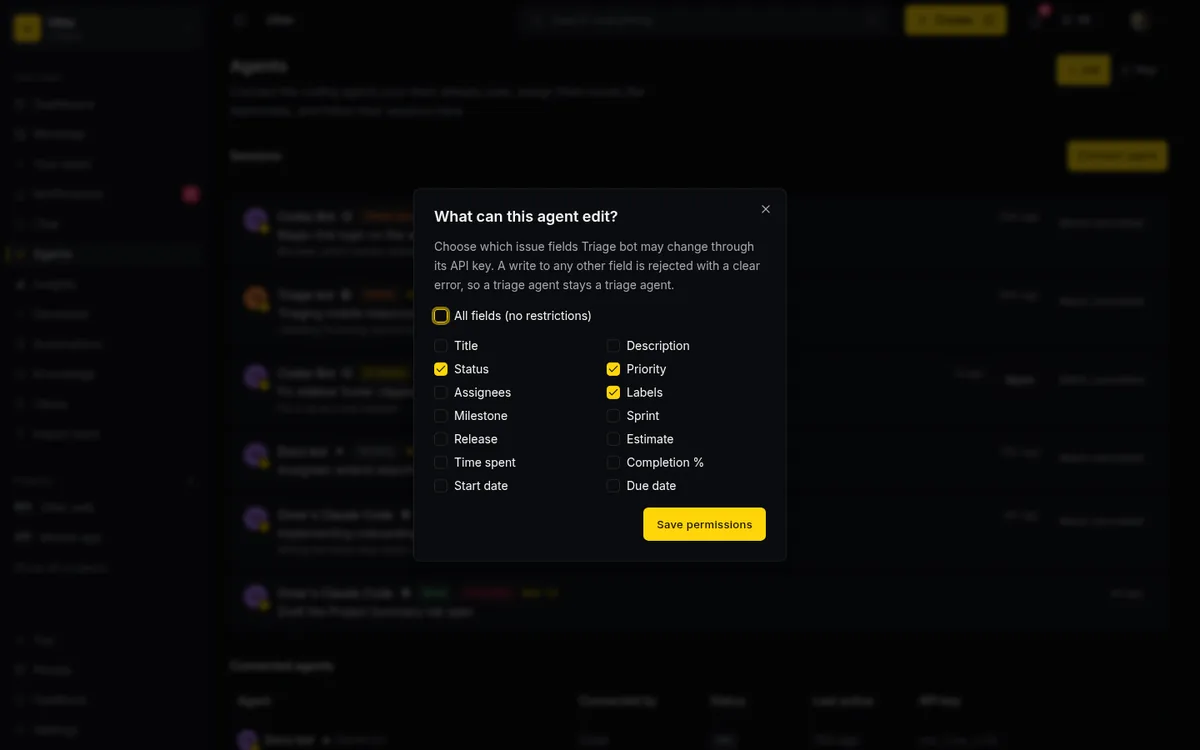
MCP is young. The spec is still moving, client support is uneven, and the security model is something you have to take seriously rather than assume. An agent with a write-capable key can do damage if you hand it the wrong scope.
So we default to per-agent keys and let you grant only the tools an agent actually needs. The tool list an agent sees is already filtered to its key's scopes: read the whole board, write only where it should act. Here is an abbreviated tools/list response, the shape the client reads on connect:
{
  "jsonrpc": "2.0",
  "id": 1,
  "result": {
    "tools": [
      { "name": "who_am_i", "description": "The identity behind the current API key." },
      { "name": "search", "description": "Search issues and docs across the workspace." },
      { "name": "list_issues", "description": "List issues in a project." },
      { "name": "get_issue", "description": "Issue detail." },
      { "name": "create_issue", "description": "Create an issue." },
      { "name": "update_issue", "description": "Update an issue." },
      { "name": "transition_issue", "description": "Move an issue to a new status." }
    ]
  }
}
That is seven of the tools; there are over 180 in total, and the ones a given key actually sees are filtered to its scopes, so a read-only key never gets create_issue or transition_issue back at all.
We also do not think MCP replaces the API. It sits on top of it. The REST surface is still the source of truth, still what you reach for in a script or a CI job. MCP is the convenience layer for agents that support it, not a second system to keep in sync.
Why it matters now
More of the work landing in project tools is going to come from agents, not just people typing into a form. When that is true, the tools that assumed a human on every action start to feel wrong. The ones that treat an agent as a first-class participant, with a key, a scope, and a clean protocol, are the ones that will not need re-plumbing in a year.
That is the bet behind Utter's MCP server. If you want to try it, add the server to your MCP client with a scoped key and point one agent at a real project. Worst case, you learn where the rough edges are. Best case, you stop writing glue code.
Frequently asked questions
Why does a project tracker need an MCP server?
Because an agent doing real work needs somewhere to write down what it is doing, not a chat log that scrolls away but the backlog and board the whole team already looks at. Over MCP, the agent's plan becomes issues, its work becomes status changes, and every action lands attributed, under the same permissions a teammate would have.
What is MCP in plain terms?
The Model Context Protocol is a standard way for an AI client to discover and call the tools a service offers, without anyone hand-writing glue code: the service runs an MCP server that lists its tools, and a client like Claude or Cursor reads that list and uses them right away. The usual comparison is a USB port: one shape a model already understands instead of a bespoke adapter per tool.
Does MCP replace the REST API?
No, it sits on top of it. The REST surface is still the source of truth and still what you reach for in a script or a CI job; MCP is the convenience layer for agents that support it, not a second system to keep in sync.
Is it safe to give an AI agent write access over MCP?
Only with scoped credentials: an agent with a write-capable key can do damage if you hand it the wrong scope. MCP is young, the spec is still moving, and client support is uneven, so Utter defaults to per-agent keys and lets you grant only the tools an agent actually needs: read the whole board, write only where it should act.
Related reading

Should your agent use MCP or the REST API?
MCP and a REST API solve overlapping problems for AI agents. Here is a plain guide to when each one is the right call, and why you often want both.
July 12, 2026 · 5 min read

How to use AI agents in Utter: connect them, assign work, and follow their sessions
A start-to-finish walkthrough: connect an agent, scope its key, assign it issues, and watch its sessions, without giving up control of the board.
July 15, 2026 · 11 min read

Which project management tools actually ship a first-party MCP server
Having AI features is not the same as shipping an MCP server. Here is how to tell first-party from community-built from none, with an honest checklist.
June 22, 2026 · 9 min read

What is agentic project management? A plain-language guide with a working example
A copilot waits for your prompt. An agent acts on an event. Here is the perceive-plan-act-check loop explained, with one real end-to-end run inside Utter.
June 11, 2026 · 11 min read
AI agent project management: the complete guide
How to run real projects with AI agents on the board: connecting them, assigning work, keeping review, what breaks, and how to pilot it in a week.
July 15, 2026 · 12 min read
Give your AI agent a knowledge base: connect your docs so it answers from your project, not the internet
How to give an AI agent access to your company docs, so it grounds answers in your workspace instead of guessing, using RAG exposed through MCP.
June 5, 2026 · 8 min read

The MCP audit: which project tools can AI agents actually use? (July 2026)
We audited the MCP servers of 13 project management tools: who has one, what agents can really do, the call caps, and the gaps nobody mentions.
July 15, 2026 · 7 min read
Onboard an AI agent like a new hire: identity, access, and a first task
You already know how to bring on a new hire. Do the same for an AI agent: give it an identity, scoped access, one small task, a review, and an offboarding path.
July 15, 2026 · 8 min read
Cursor task management: give the agent a shared board over MCP
Cursor task management usually means a local Task Master or .cursor/rules file. Connect Cursor to a shared board over MCP so the agent reads issues, claims work, and reports sessions humans can review.
July 16, 2026 · 12 min read
Claude Code task management: give your agent a real tracker, not a markdown file
Give Claude Code persistent, attributed task management by connecting a real tracker over MCP instead of a markdown file. Honest comparison to Task Master, as of July 2026.
July 16, 2026 · 12 min read
أضف تعليقًا
ابدأ النقاش.