
Cursor task management: give the agent a shared board over MCP
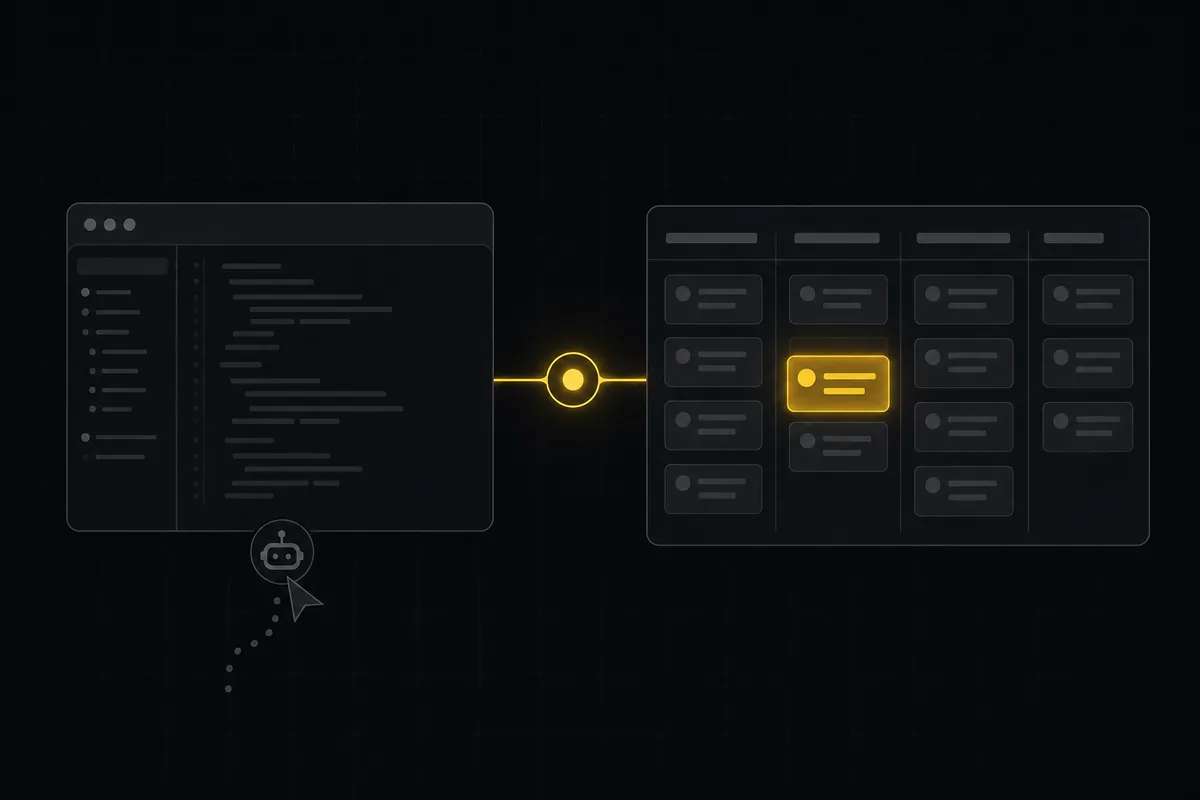
If you open a Cursor project today and ask its agent to plan a feature, Cursor task management usually means one of two things: you installed Task Master and it writes tasks into a .taskmaster/ directory, or you hand-wrote a .cursor/rules file with a PM-worker prompt and let the agent keep a running list in the repo. Both work. Both live in a branch on your machine. And both fall apart the second a teammate, a PM, or a second agent needs to see what the agent is actually doing, because the tasks are a file nobody else has checked out.
What most people searching for "Cursor task management" actually want is not a better JSON file. It is for Cursor's agent to track its work somewhere that persists and that other people can watch. The pitch of this post, up front: connect Cursor to a real tracker over MCP, so the agent reads issues from a shared board, claims work you delegated to it, and reports its sessions in a place humans can review. The agent still runs inside Cursor. The board lives somewhere everyone can see it.
What Cursor devs use for task management today
Let me be fair about the baseline, because it is genuinely good.
The dominant tool is Task Master AI (the claude-task-master project, around 27,900 GitHub stars as of July 2026). It is "an AI-powered task-management system you can drop into Cursor, Lovable, Windsurf, Roo, and others." You install it with npm install -g task-master-ai, run task-master init --rules cursor, and it wires itself into Cursor two ways: a set of .cursor/rules that teach the agent how to work with tasks, and an MCP server that exposes task operations as callable tools. Point it at a PRD you drop in .taskmaster/docs/prd.txt and it parses that into a task list the agent can pick from, expand, and mark done.
The tool exposes its operations as MCP tools in three sizes so you can trade capability against context budget: Core (7 tools, roughly 5,000 tokens), Standard (15 tools, roughly 10,000 tokens), and All (36 tools, roughly 21,000 tokens), selectable via a TASK_MASTER_TOOLS setting. Licensing is MIT with a Commons Clause: free for personal, commercial, and academic use, you just cannot resell it or run it as a hosted service. It needs at least one of your own model API keys (Anthropic, OpenAI, Gemini, and so on), except when you drive it through Claude Code or the Codex CLI over OAuth, where no separate key is required.
Beyond Task Master, plenty of teams skip the tool entirely and hand-roll it: a .cursor/rules file that defines a planner-then-executor pattern, and the agent keeps its checklist in a markdown or JSON file in the repo. Cruder, but zero dependency.
Here is the honest read: for a solo developer in a single repo, this is a good setup. The tasks sit next to the code, the agent has full context, and there is nothing external to configure or pay for. If that is you, you may not need anything past this section. The rest of the post is about the specific point where the file-based model stops being enough.
Where the file-based model breaks: persistence and team visibility
The failure is not that Task Master is bad. It is that two properties it was never designed to have start to matter the moment more than one person or one agent is involved. Task Master is repo-local by design, and that design has two consequences.
First, persistence. The .taskmaster directory is a file in a branch. If that working copy is gone, if you are on a different machine, if the branch was never pushed, the task state is gone with it. There is no server holding the canonical list. The "database" is your filesystem, scoped to whichever checkout you happen to be in.
Second, team visibility. A PM cannot open a board and see what the agent is doing. A teammate cannot glance at a column and know the agent picked up the auth refactor an hour ago and is still on it. There is no shared destination for that status to live. The information exists, but only inside one person's editor, in a file format meant for the agent, not for a human skimming progress.
Then there is the multi-agent case, which is becoming normal fast. Say you run two Cursor sessions on the same repo, or a Cursor agent plus a Claude Code agent working different tickets. They have no common place to claim work. Nothing stops both from grabbing the same task, or from doing overlapping edits, because "the task list" is a local artifact each one reads and writes independently. They collide, or they duplicate.
Worth calling out plainly, because it is easy to misread: this is a destination gap, not a Cursor capability gap. Cursor is not failing to do something here. The tasks just have nowhere shared to live. Which is exactly why the fix is not a different editor.
Cursor already speaks MCP, so the gap is the destination
The common assumption is "Cursor can't reach a hosted tracker." That is false, and it is worth correcting head-on before you go looking for a plugin that does not need to exist.
Cursor supports MCP natively. Not partially. The docs mark both Tools and Resources as Supported, and it handles stdio, SSE, and Streamable HTTP transports, with SSE and Streamable HTTP working for local or remote servers and multiple users. You configure MCP servers in .cursor/mcp.json inside a project, or ~/.cursor/mcp.json globally. So a remote, HTTP-based tracker on the other end of an MCP connection is squarely within what Cursor already does out of the box. The transport is there.
The honest caveat, stated plainly: MCP in Cursor is a paid-tier feature. As of July 2026, MCP support (alongside skills, hooks, and Cloud Agents) is listed among what the Pro plan adds over the free Hobby tier. Cursor's pricing as of July 2026 is Hobby free (no card, limited Agent requests and Tab completions), Pro at $20/month, Pro+ at $60/month, Ultra at $200/month, and Teams at $40/user/month, with 20% off on annual billing. If you are on the free Hobby plan, you cannot wire up MCP at all. That is a real gate and you should know it before you plan around it.
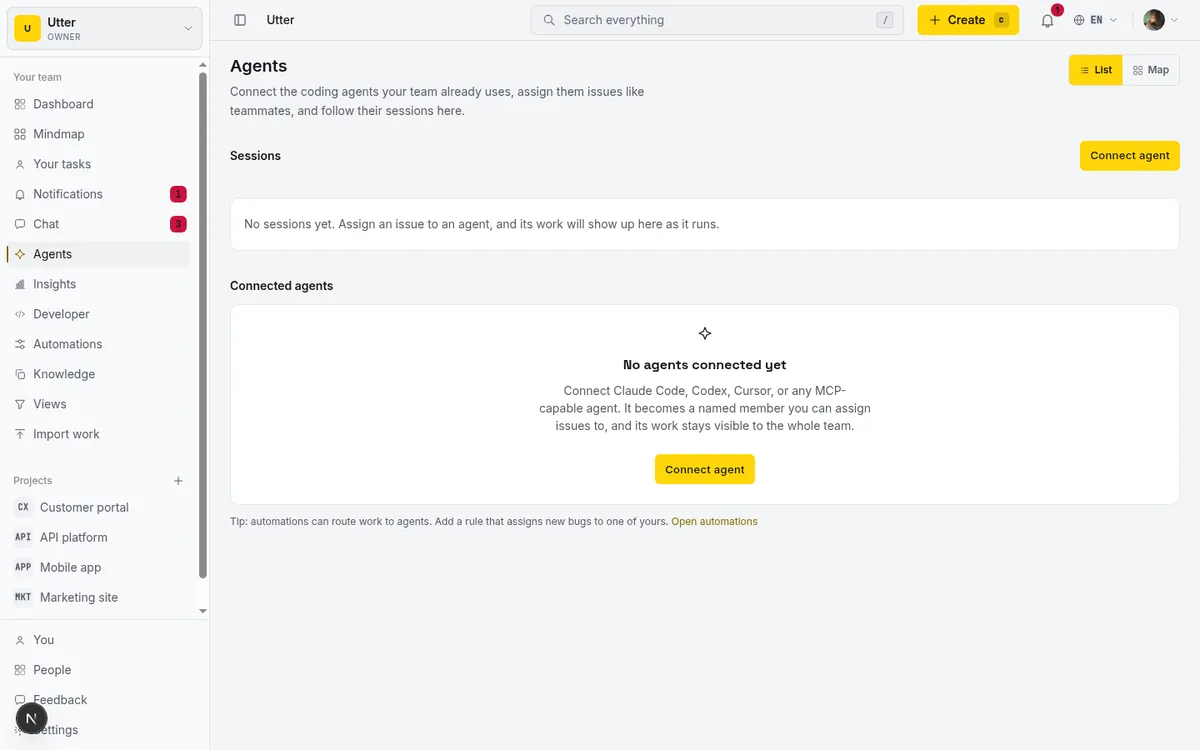
So the missing piece is not a transport inside Cursor. It is what sits on the other end of that transport: a board that is persistent, multi-agent aware, and reviewed by humans. That is the thing worth choosing carefully.
What to look for in a tracker the agent writes to
If you are going to point an agent at a shared board, evaluate the board like a buyer, not like a fan of any one product. Here is the checklist that actually matters, and how Utter meets each one, stated as fact so you can hold it against any alternative.
1. An MCP endpoint that shares auth with the REST API, with tools that do not drift. You do not want a hand-maintained set of MCP tools that lag behind the real API. Utter ships a first-party MCP server at POST /api/mcp/v1 over Streamable HTTP (JSON-RPC 2.0), authenticated with the same bearer API key as the REST surface. A tools/call re-enters the REST pipeline in-process, so MCP adds no parallel auth, scope, or rate-limit logic. The tool catalogue is generated one-tool-per-REST-operation from the OpenAPI registry, so the agent's tools never drift from the API, and tools/list is filtered by the key's scopes. The v1 REST surface exposes over 180 operation paths, so the tool set is broad but mechanically derived, not curated by hand.
2. The agent is a real member with attribution, not an anonymous script. When the agent moves a ticket, you want a name on it. A connected agent in Utter is a real workspace member (users.is_agent) with a profile and an API key whose creator is the agent user. That authorship is the attribution: activity traces back to the agent, not to a shared service account.
3. Agents do not burn paid seats. Charging per agent the way you charge per human kills the whole idea. Utter's countEditorSeats filters out agents (eq(isAgent, 0)), so a connected agent never bills an editor seat, unlike a human editor.
4. A session lifecycle humans can watch. You want to see the agent move through states, not guess. Utter models sessions as a real state machine: pending, running, needs_input, review, done, failed, cancelled. A running session with no heartbeat for 30 minutes renders as stalled, derived at read time, so a silently dead agent shows up as stalled rather than looking busy forever.
5. Per-agent field permissions. You may want the agent to move status and set estimates but never touch the assignee. Utter's field_policy_json is an allowlist over 14 issue-field tokens (title, description, status, priority, assignee, labels, milestone, sprint, release, estimate, spent, completion, start_at, due_at), enforced at a single API write choke point that covers REST, transition, and MCP. Be honest about what this is: it is per-field, not per-value (you cannot say "may set status to In Progress but not Done"), and it guards the agent's own key, not a human admin. It is a useful boundary, not full value-level RBAC.
6. A way to flag a session that claims done with nothing to show. Agents sometimes report completion having produced nothing. Utter derives a read-time "unverified" badge that flags a review or done session with no attributed activity or comment on its issue, so an empty "done" surfaces to humans instead of passing silently.

None of these are exotic. They are just the difference between "the agent edits a file" and "the agent participates in the board your team already uses."
Task Master vs a shared board over MCP: the honest comparison
Here is the decision laid out. Every fact below is from the research, and prices and limits are stated as of July 2026.
| Task Master (in Cursor) | Shared board over MCP (Utter) | |
|---|---|---|
| Where state lives | Local .taskmaster/ directory in the repo |
Hosted workspace, server-side |
| Team-visible | No, it is a file in a branch | Yes, humans open the board |
| Multi-agent claim | No shared claim, each reads local files | pending session claimed on start |
| MCP transport | Yes (MCP server + .cursor/rules) |
Yes (POST /api/mcp/v1, Streamable HTTP) |
| Attribution | File-based, no member identity | is_agent member, key authorship |
| Cost model | Free, bring your own model keys | Free plan for humans, agents free, editor seats $3 Pro / $6 Business per month |
| License | MIT + Commons Clause, open source | Hosted SaaS |
| Best for | Solo dev, tasks in-repo, zero external dependency | Team plus humans reviewing agents |
The call, made plainly: Task Master is the right tool if you are a solo developer who wants your tasks living in the repo with no external dependency and no account to manage. It is free, open source, and it does that job well. A shared board wins when a human or a second agent needs to see and review the work, not just when the agent needs a scratchpad. Different jobs. Pick by whether anyone other than the agent needs to watch.
Connect Cursor to the board in one config file
The wiring is a single file. Utter's Skills tab generates a ready-to-paste block for ~/.cursor/mcp.json:
{
  "mcpServers": {
    "utter-product": {
      "url": "https://utter.ae/api/mcp/v1",
      "headers": {
        "Authorization": "Bearer <your-api-key>"
      }
    }
  }
}
Cursor is a first-class option in that Skills tab, sitting alongside Claude Code, Claude Desktop, VS Code, Codex, opencode, a generic MCP config, and raw OpenAPI, so you copy the Cursor variant rather than translating a generic example. Cursor is also a first-class agent kind in the Agent Hub, with its own logo, so a connected Cursor agent is recognized as Cursor rather than a generic bot.
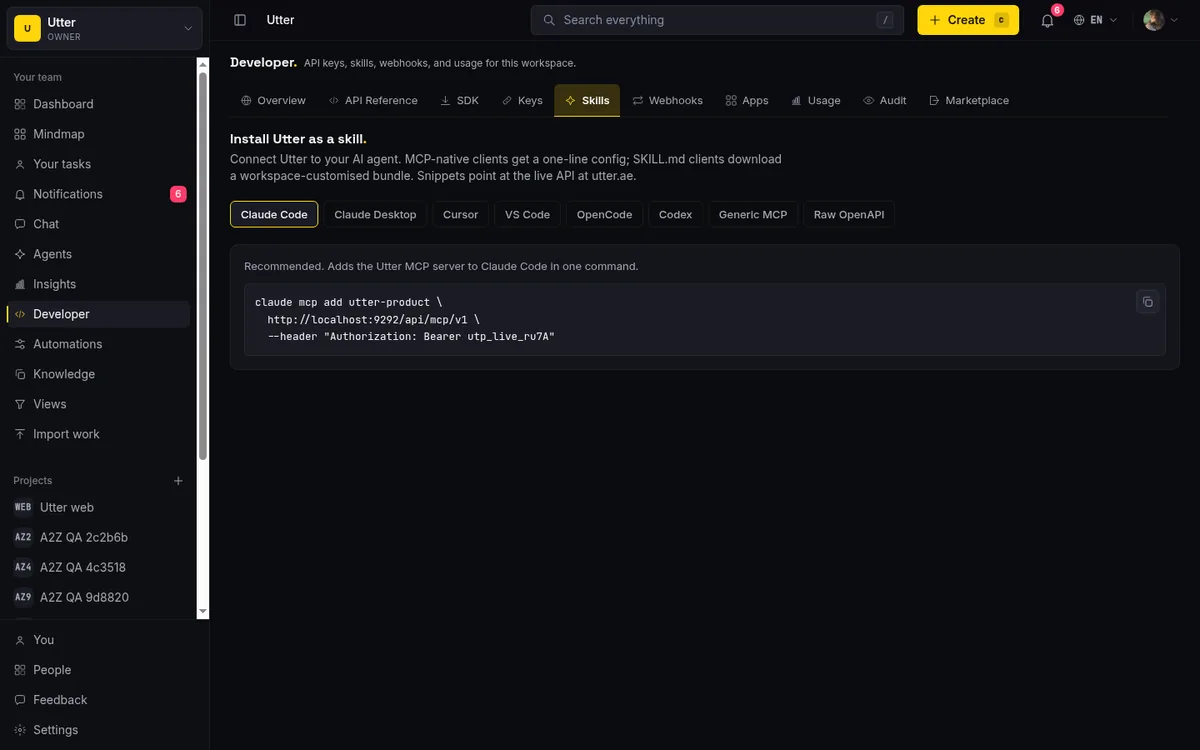
Two practical notes. You sign in to Utter with magic-link auth (no passwords), and the API key comes from the developer area, scoped to what you want the agent to touch. And to be exact about what this connection is: it is a shared board the agent reads and writes over MCP. Utter does not run your Cursor agent. The agent runs in Cursor as it always has. Utter is the destination on the other end of the MCP connection, not a host for the model.
What the agent actually does: read issues, claim work, report sessions
Here is the runtime loop. The agent lists its assigned or open issues, claims a delegated session, does the work in Cursor, then closes the session in a terminal state with a link to what it produced.
Delegation is the nice part. When you assign an issue to the agent, Utter auto-creates a pending session for it. The agent never enters pending itself, it only leaves it: calling startAgentSession claims that pending row and flips it to running instead of creating a duplicate. So "assign the ticket to the agent" and "the agent picks it up" are two halves of the same session, not two competing records. A worker sweep auto-cancels pending sessions the agent never claims, so an ignored delegation does not sit on the hub forever.
First, list the issues the agent should look at (here, everything currently in the in-progress status for the WEB project, assigned to the calling agent):
curl "https://utter.ae/api/v1/workspaces/acme/projects/WEB/issues?status=in_progress&assignee=me" \
  -H "Authorization: Bearer $UTTER_API_KEY"
const res = await fetch(
"https://utter.ae/api/v1/workspaces/acme/projects/WEB/issues?status=in_progress&assignee=me",
{ headers: { Authorization: `Bearer ${process.env.UTTER_API_KEY}` } },
);
const issues = await res.json();import os, requests
res = requests.get(
"https://utter.ae/api/v1/workspaces/acme/projects/WEB/issues",
params={"status": "in_progress", "assignee": "me"},
headers={"Authorization": f"Bearer {os.environ['UTTER_API_KEY']}"},
)
issues = res.json()The response is a plain list of issue resources:
{
  "data": [
    {
      "id": "018f...c2",
      "key": "WEB-142",
      "url": "https://utter.ae/w/acme/p/web/WEB-142",
      "type": "task",
      "title": "Refactor auth token refresh",
      "status": "in_progress",
      "status_name": "In progress",
      "priority": "high",
      "assignees": ["018f...ab"]
    }
  ]
}
Then the agent claims its delegated session and starts working. Starting a session against the issue claims the pending row created on assignment:
curl -X POST "https://utter.ae/api/v1/workspaces/acme/agent-sessions" \
  -H "Authorization: Bearer $UTTER_API_KEY" \
  -H "Content-Type: application/json" \
  -d '{"title":"Refactor auth token refresh","issue_key":"WEB-142"}'
const start = await fetch(
"https://utter.ae/api/v1/workspaces/acme/agent-sessions",
{
method: "POST",
headers: {
Authorization: `Bearer ${process.env.UTTER_API_KEY}`,
"Content-Type": "application/json",
},
body: JSON.stringify({ title: "Refactor auth token refresh", issue_key: "WEB-142" }),
},
);
const session = await start.json();start = requests.post(
"https://utter.ae/api/v1/workspaces/acme/agent-sessions",
headers={"Authorization": f"Bearer {os.environ['UTTER_API_KEY']}"},
json={"title": "Refactor auth token refresh", "issue_key": "WEB-142"},
)
session = start.json()The session comes back in running, carrying the agent's identity and the issue it is anchored to:
{
  "data": {
    "id": "018f...9d",
    "agent_id": "018f...ab",
    "agent_name": "Cursor agent",
    "agent_kind": "cursor",
    "state": "running",
    "title": "Refactor auth token refresh",
    "note": null,
    "external_url": null,
    "issue_id": "018f...c2",
    "issue_key": "WEB-142",
    "started_at": "2026-07-16T09:12:04.000Z",
    "last_activity_at": "2026-07-16T09:12:04.000Z",
    "ended_at": null
  }
}
When the work is done, the agent PATCHes the session to a terminal state and drops the PR link in external_url. Setting state to a terminal value like review, done, or failed stamps ended_at, and entering needs_input, review, done, or failed notifies the humans in-app (the agent's owner plus the issue's reporter, assignee, and watchers):
curl -X PATCH "https://utter.ae/api/v1/workspaces/acme/agent-sessions/018f...9d" \
  -H "Authorization: Bearer $UTTER_API_KEY" \
  -H "Content-Type: application/json" \
  -d '{"state":"review","external_url":"https://github.com/acme/web/pull/318"}'
await fetch(
"https://utter.ae/api/v1/workspaces/acme/agent-sessions/018f...9d",
{
method: "PATCH",
headers: {
Authorization: `Bearer ${process.env.UTTER_API_KEY}`,
"Content-Type": "application/json",
},
body: JSON.stringify({
state: "review",
external_url: "https://github.com/acme/web/pull/318",
}),
},
);requests.patch(
"https://utter.ae/api/v1/workspaces/acme/agent-sessions/018f...9d",
headers={"Authorization": f"Bearer {os.environ['UTTER_API_KEY']}"},
json={"state": "review", "external_url": "https://github.com/acme/web/pull/318"},
)The session lifecycle, end to end:
flowchart LR
  A[assigned: pending] --> B[running]
  B --> C[needs_input]
  C --> B
  B --> D[review]
  B --> E[done]
  B --> F[failed]
  D --> E
Humans watch all of this from the sessions list, where each row shows the agent, the issue, the state, and whether it went quiet.
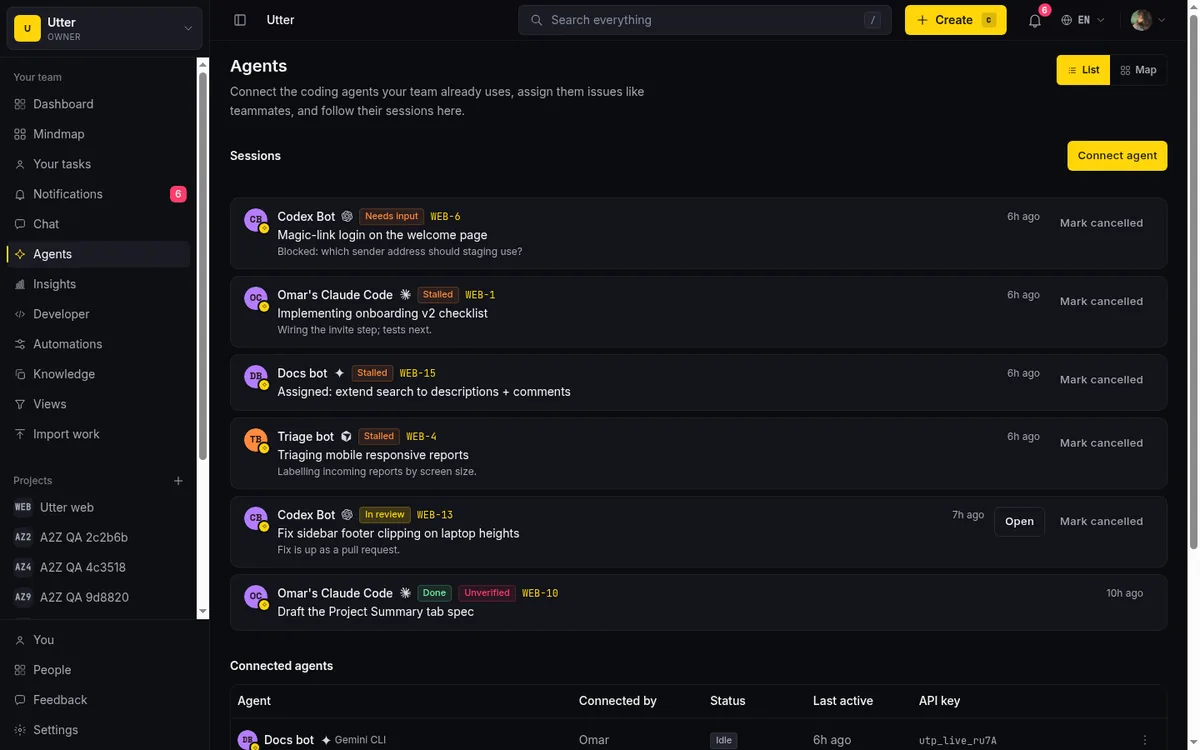
One thing to be precise about so you do not plan around a feature that is not there: the real-time push goes into the app's SSE stream, for the humans watching the board. It does not push back into Cursor over MCP. Utter's MCP server advertises listChanged: false and has no server-initiated notifications in v1, so the GET /api/mcp/v1 SSE channel is a keep-alive, not a live feed into the editor. The agent learns about new work by asking (listing its issues), the same way any polling client would. Humans get the live updates; the agent pulls.
When to stay file-based (and when not to)
I am not going to tell you to switch if you should not.
Stay with Task Master or a .cursor/rules setup if you are solo, in a single repo, want zero external dependency, and nobody else needs to watch the agent. It is free, it is open source (MIT with Commons Clause), you bring your own model keys, and it keeps everything next to the code. For that shape of work it is genuinely the better fit, and adding a hosted board would just be overhead you do not need.
Move to a shared board when the situation changes in one of a few concrete ways: a PM or teammates need live visibility into what the agent is doing, you run more than one agent and need them to claim work without colliding, you want attribution and human review of agent output, or you simply want the agent writing to the same board the humans already use so there is one source of truth.
And be clear-eyed about cost, because "free plan" does not mean "free team." As of July 2026, Utter's Free plan is $0 and humans on it are fine, and connected agents and viewers are always free. But editor seats cost money: Pro is $3 per editor seat per month ($30/year), Business is $6 per editor seat per month ($60/year). The Free plan is feature-complete on capability, not crippled (sprints, timeline, integrations, reporting, and AI are on every plan; Free caps sit at 128 MB storage, 5 active projects, 1 MB per-file upload, 2 automation rules, 1,000 import rows, and 25 AI credits a month), but a growing team of human editors is a paid team. If your only "members" are agents and a couple of viewers, it stays free. If ten engineers all edit, it does not. Plan around that honestly.
If a shared board is where you are headed, the natural next steps are connecting the agent, choosing MCP vs the REST API, delegating work to it, and installing it as an agent skill. If you came here from the Claude side, the Claude Code task management walkthrough is the sibling to this one.
Frequently asked questions
Does Cursor support MCP for task management?
Yes. Cursor supports MCP natively, including both tools and resources, over stdio, SSE, and Streamable HTTP, configured in .cursor/mcp.json per project or ~/.cursor/mcp.json globally (as of July 2026). That means it can call an external task tracker's MCP tools directly. The catch is that MCP is a paid-tier feature, so you need at least a Pro plan to use it.
Can Cursor's agent write to Jira, Linear, or a hosted issue tracker?
Yes, if the tracker exposes an MCP server (or a REST API the agent can call). Because Cursor speaks MCP over remote HTTP transports, any hosted tracker with an MCP endpoint is reachable. Utter, for example, exposes POST /api/mcp/v1 with the same bearer key as its REST API, so the agent reads and writes issues and sessions there.
Is Task Master good enough, or do I need a real tracker?
For a solo developer in one repo, Task Master is good enough and often the better choice: tasks live in the repo, it is free (bring your own model keys), and it is open source. You need a real tracker when someone other than the agent (a PM, a teammate, a second agent) needs to see or review the work, because Task Master's state is a local file, not a shared board.
What is the best Task Master alternative for a team using Cursor?
The relevant alternative is not another local task file, it is a hosted board the agent writes to over MCP, so humans and multiple agents share one source of truth. Look for one where the agent is a real member with attribution, does not cost a paid seat, and has a session lifecycle you can watch. Utter is built around exactly that.
Do connected Cursor agents count as paid seats?
In Utter, no. A connected agent is a member flagged is_agent, and seat counting excludes agents, so a connected Cursor agent never bills an editor seat. Human editors do cost seats ($3 Pro / $6 Business per month, as of July 2026); viewers and agents are free.
Can I stop the agent from changing certain fields on an issue?
Yes, per agent. Utter's field policy is an allowlist over 14 issue fields (status, priority, assignee, estimate, and so on), enforced at the single API write path that covers REST, transition, and MCP. It is per-field, not per-value, and it applies to the agent's own key, so treat it as a field boundary rather than full value-level access control.
Does connecting Cursor over MCP push updates back into the Cursor editor in real time?
No. The agent pulls (it lists its issues when it wants work). Utter's MCP server advertises listChanged: false and sends no server-initiated notifications in v1, so its SSE channel is a keep-alive. The real-time push goes into Utter's own app SSE for the humans watching the board, not back into Cursor.
Is MCP in Cursor available on the free plan?
No. As of July 2026, MCP support is listed among the features the paid Pro plan ($20/month) adds over the free Hobby tier. A free Hobby user cannot wire up an MCP server, so budget for at least Pro if connecting a tracker over MCP is the goal.
Related reading

Claude Code task management: give your agent a real tracker, not a markdown file
Give Claude Code persistent, attributed task management by connecting a real tracker over MCP instead of a markdown file. Honest comparison to Task Master, as of July 2026.
July 16, 2026 · 12 min read
A shared backlog for a team of AI coding agents
Task manager for AI coding agents: give three agents one shared backlog with per-agent identity, field permissions, status handoffs, and human review gates.
July 16, 2026 · 13 min read

Why we gave Utter an MCP server, and what it changes
What the Model Context Protocol is in plain terms, why a project tracker is a good fit for it, and how an agent picks up your workspace without any glue code.
July 11, 2026 · 5 min read
AI agent project management: the complete guide
How to run real projects with AI agents on the board: connecting them, assigning work, keeping review, what breaks, and how to pilot it in a week.
July 15, 2026 · 12 min read

How to manage a team of AI agents without losing track of what they're doing
Running several AI agents at once? The day-to-day of a fleet: a roster, live sessions, instant delegation, per-field permissions, and verified work.
July 15, 2026 · 16 min read

What is agentic project management? A plain-language guide with a working example
A copilot waits for your prompt. An agent acts on an event. Here is the perceive-plan-act-check loop explained, with one real end-to-end run inside Utter.
June 11, 2026 · 11 min read

Which project management tools actually ship a first-party MCP server
Having AI features is not the same as shipping an MCP server. Here is how to tell first-party from community-built from none, with an honest checklist.
June 22, 2026 · 9 min read

Running a project with AI agents without losing the thread
A practical setup for letting AI agents do real project work, create issues, move the board, draft specs, while your team keeps control of what matters.
July 11, 2026 · 5 min read

What an AI issue tracker actually is, and how to pick one
Most tools that say AI issue tracking mean a summarize button. A five-part checklist for what the label should mean, plus the failure modes to test in a pilot.
July 15, 2026 · 8 min read

Will AI agents replace project managers? What actually changes
Agents already handle the mechanical parts of project management. The judgment part is harder, and it is not going anywhere. An honest look at the shift.
July 15, 2026 · 7 min read
Add a comment
Start the conversation.