
Asana alternatives that cost less and speak agent

The moment usually arrives with an invoice. A team grows from six to eight people, someone adds two more editors the next quarter, and the Asana line item stops looking like it tracks headcount. If you are searching for Asana alternatives, there is a decent chance you are not unhappy with the product. You are looking at what it costs as the team grows, and you have noticed the bill moves in steps that do not match how many people you actually added.
Here is the mechanic that catches people. Asana sells seats in increments, not per exact person. Between 2 and 5 users you add seats one at a time, up to 30 users you add them in blocks of 5, and up to 100 you add them in blocks of 10 (per Asana's own pricing FAQ, as of July 2026). So a 7-person team pays for 10 seats. A 12-person team pays for 15. On top of that you are paying $10.99 per user per month on Starter or $24.99 on Advanced (billed annually, as of July 2026). None of that is a trick. It is just how the plan is packaged, and it means your bill rounds up.
This is a re-evaluation post for someone who likes Asana and wants to know what the growing-team math looks like next to a cheaper option. The second thing pulling people toward that look is where the AI lives. Asana's AI sits in a chat sidebar, and its AI Teammates are a sales-led paid add-on. The alternative weighed here, Utter, bills $3 per builder seat with viewers and agents free, and puts agents in as real members rather than a metered assistant. Both facts matter, and both get the honest treatment below.
What actually gets expensive on Asana as you grow
The trigger for most of these searches is not a feature gap. It is cost scaling faster than headcount.
Start with the seat mechanic, because it is the part people miss until they see the renewal. Asana's pricing FAQ spells it out: between 2 and 5 total users you add seats in increments of 1, up to 30 total users in increments of 5, and up to 100 total users in increments of 10 (as of July 2026). Worked out with real numbers:
- A 7-person team cannot buy 7 seats. The next valid tier above 5 is 10, so you pay for 10.
- A 12-person team lands between the 10 and 15 marks, so you pay for 15.
- Cross into the 30-to-100 band and you buy in tens, so 31 people is a 40-seat bill.
Now layer the per-seat price on top. Starter is $10.99 per user per month billed annually, or $13.49 billed monthly. Advanced is $24.99 per user per month billed annually, or $30.49 monthly (all as of July 2026). So that 7-person team on Starter is really paying for 10 seats at $10.99, and the three empty seats are just gone.
The free tier changed too. Asana's free Personal plan is now capped at up to 2 users for new accounts (as of July 2026). Accounts created before November 12, 2025 keep a Legacy Personal Plan with up to 10 seats (this last point comes from third-party reporting, not Asana's official pricing page, so treat it as corroboration rather than a guarantee). If you started on Asana's generous old free tier and remember it fitting a small team, a new workspace will not behave the same way.
To be fair about it: this is packaging, not a bait and switch. Plenty of tools bundle seats. But when you are the one adding people one and two at a time, the rounding is exactly the thing that makes the bill feel disconnected from the team. That is the number the rest of this post weighs alternatives against.
What to look for in an Asana alternative when the team is growing
Before any tool names get involved, here is what to actually check. These apply to any alternative, not just the one this post happens to compare.
- How seats are counted. Per exact person, or bundled and rounded up? A per-person model with a minimum of one is predictable. A tiered model can be cheaper per seat and still cost more because of the rounding. Read the pricing FAQ, not the headline price.
- Whether non-editors are free, and who counts as one. Almost every tool lets read-only people in cheaply. The real question is whether that free tier covers your internal stakeholders (a manager who just watches, a teammate in another department) or only external guests from outside your company.
- How AI is billed. Three common shapes: baked into the per-seat price, a shared per-account credit pool, or a separate add-on you contact sales for. Each has a very different cost curve as usage grows.
- Whether AI agents have their own identity. If you plan to connect coding agents or automation, does the agent get its own login and its own cost line, or does it act as a human through that person's OAuth session and inherit their access?
- The migration path and what it drops. Every importer loses something. Find out what before you commit, not after.
- The depth features you actually use. Portfolios, goals, workload, timeline, reporting. If you lean on them, a cheaper tool that lacks them is not cheaper, it is a downgrade. Trading a bill for missing capability is a bad trade.
One honest note so the criteria are not misleading. Asana Starter and above already include unlimited free guests for external collaborators who do not count against your user total (as of July 2026). So "free collaborators" on its own is table stakes for external people. The distinction worth checking is whether internal non-editors are also free, because that is where the models diverge.
Asana vs Utter: the honest pricing and feature comparison
Here is the side by side. Asana figures are as of July 2026 from its pricing page; Utter figures come from its plan configuration. Read the prose under the table before you draw conclusions, because the table does not tell the whole story.
| Asana Free | Asana Starter | Asana Advanced | Utter Free | Utter Pro | Utter Business | |
|---|---|---|---|---|---|---|
| Price per seat | $0 | $10.99/user/mo (annual) | $24.99/user/mo (annual) | $0 | $3/editor/mo or $30/yr | $6/editor/mo or $60/yr |
| How seats count | up to 2 users (new accounts) | tiered, rounds up | tiered, rounds up | no editor cap (capacity-limited) | exactly 1 per editor, min 1 | exactly 1 per editor, min 1 |
| Viewers / non-editors | n/a | unlimited free guests (external only) | unlimited free guests (external only) | viewers free for anyone | viewers free for anyone | viewers free for anyone |
| AI credits | none | 50K/mo per billing account | 75K/mo per billing account | 25/mo per workspace | 5,000/mo per workspace | 20,000/mo per workspace |
| Timeline / Gantt | no | yes | yes | yes | yes | yes |
| Reporting dashboards | no | yes | yes | yes | yes | yes |
| Forms | no | yes | yes | yes | yes | yes |
| Portfolios / goals / workload | no | no | yes | no equivalent | no equivalent | no equivalent |
A few things the table cannot say on its own.
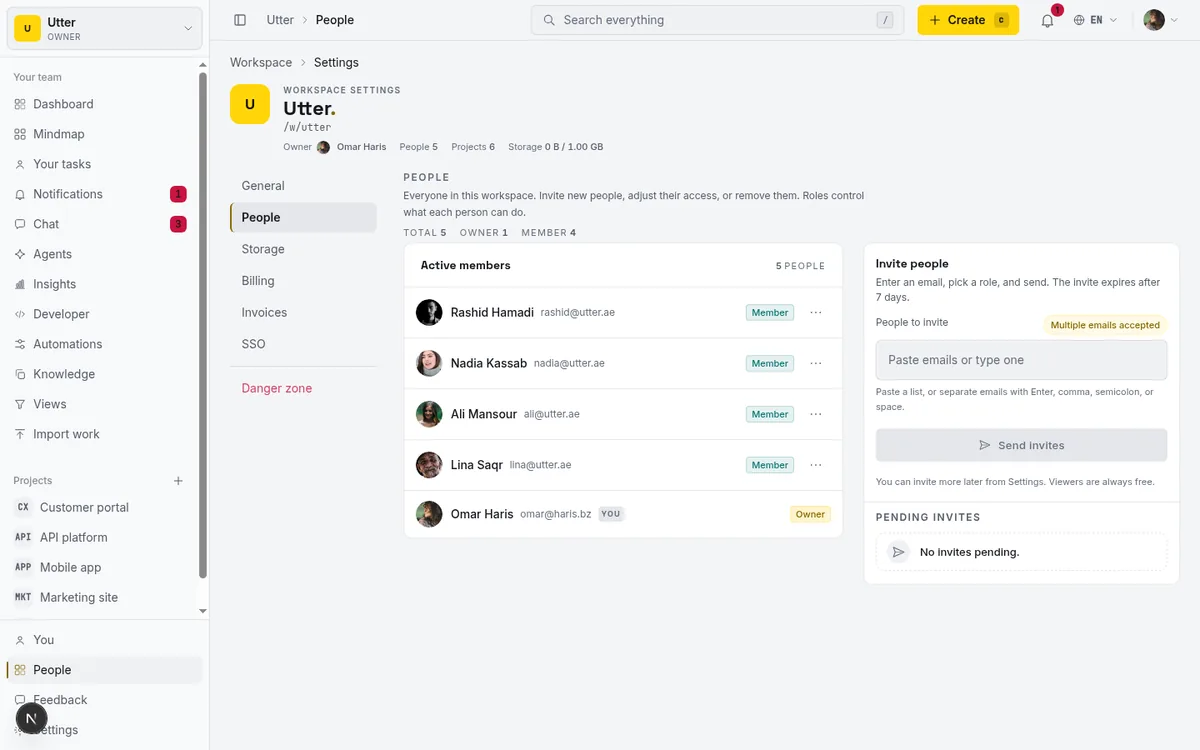
The seat difference is the core of it. On Utter, a 7-person team pays for 7 seats, because seats are billed per individual editor (owner, admin, or member roles) with a minimum of one and no bundling. That same team pays for 10 on Asana. The Utter Pro price is $3 per editor per month, or $30 per year per seat. That is the advertised number straight from the plan config, with no invented discount framing.
Viewers are where the internal-versus-external point lands. Asana's unlimited free guests are external collaborators, people outside your email domain. Utter's viewer role is free for anyone, including your own internal staff who only need to watch. If your growing team has a lot of people who read but do not edit, that is a real difference in the math.
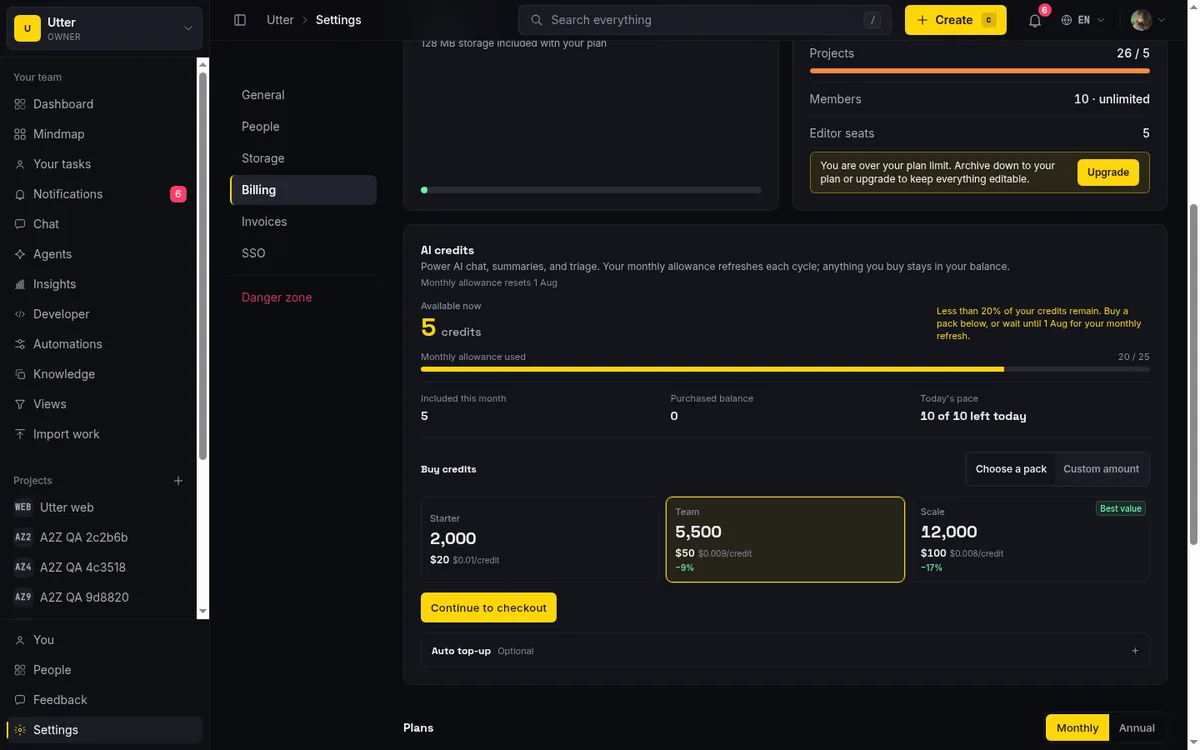
AI credits are counted differently in a way worth reading twice. Asana's AI Studio Basic credits are per billing account: 50K a month on Starter, 75K on Advanced (as of July 2026). Utter's credits are per workspace: 25 on Free, 5,000 on Pro, 20,000 on Business. Different denominators, so compare against your actual usage rather than the raw numbers.
Now the honest part. Utter is the younger, smaller product, and it does not match Asana's depth. There is no equivalent of Asana's portfolios, goals and OKRs, workload and capacity planning, or approvals and proofing at Advanced depth. Storage is small: Free is 128 MB with a 1 MB per-file cap, Pro is 1 GB. If you keep large files inside your tracker, that will pinch. This is a cheaper, lighter tool, not a feature-for-feature Asana clone. If you want the same comparison shaped against Jira instead, the per-seat breakdown for Jira alternatives walks the same ground.
Where the AI actually lives: chat sidebar vs team member
This is the part that gets oversimplified in most comparison posts, so let me be precise and fair.
Asana has agents. Do not let anyone tell you otherwise. It ships an official remote MCP server at mcp.asana.com that lets an AI client connect to your Asana account, and it has native AI Teammates, a set of 30 pre-built agents across marketing, ops, and IT (as of July 2026). The contrast is not presence versus absence. It is about identity and packaging.
Three specifics, all from Asana's own documentation as of July 2026:
- The MCP server acts as the human. Asana's MCP server requires authentication with your Asana account over OAuth, and the AI client acts as that authenticated user, inheriting that person's access. There is no separate agent identity; the work shows up under the human whose token was used. Enterprise+ admins can allow or block specific MCP clients.
- AI Teammates are a sales-led add-on. They are sold as an add-on to Starter, Advanced, Enterprise, and Enterprise+ plans, with a contact-sales motion to get started. They reached general availability for sales-led enterprise customers in early 2026, with self-serve availability still pending as of mid-2026.
- The credits are metered per billing account. AI Studio Basic credits are 50K on Starter, 75K on Advanced, 200K on Enterprise, all per account. AI Studio Plus is a paid annual add-on at roughly $150 a month for 100,000 credits that reset monthly, with more bought in 100K increments, and AI Studio Pro (5M credits a quarter) is contact-sales.
None of that is bad. It is a mature, metered, enterprise-oriented way to sell AI. It is just a costed sidebar model: the AI is a capability you meter and pay for, and when it acts, it acts as one of your people.
Utter draws the line in a different place. An agent is a user and a member. It has the is_agent flag, its own workspace_agents profile, and its own API key whose created_by points at the agent user itself. That key is the attribution, so every change the agent makes is recorded under the agent by name, not folded into a human's session. Agents are free and never billed as seats (the code treats connected coding agents as a product surface, not billable humans). The first-party MCP tools derive from the 180-plus-operation v1 public API, and the agent authenticates with its own key.
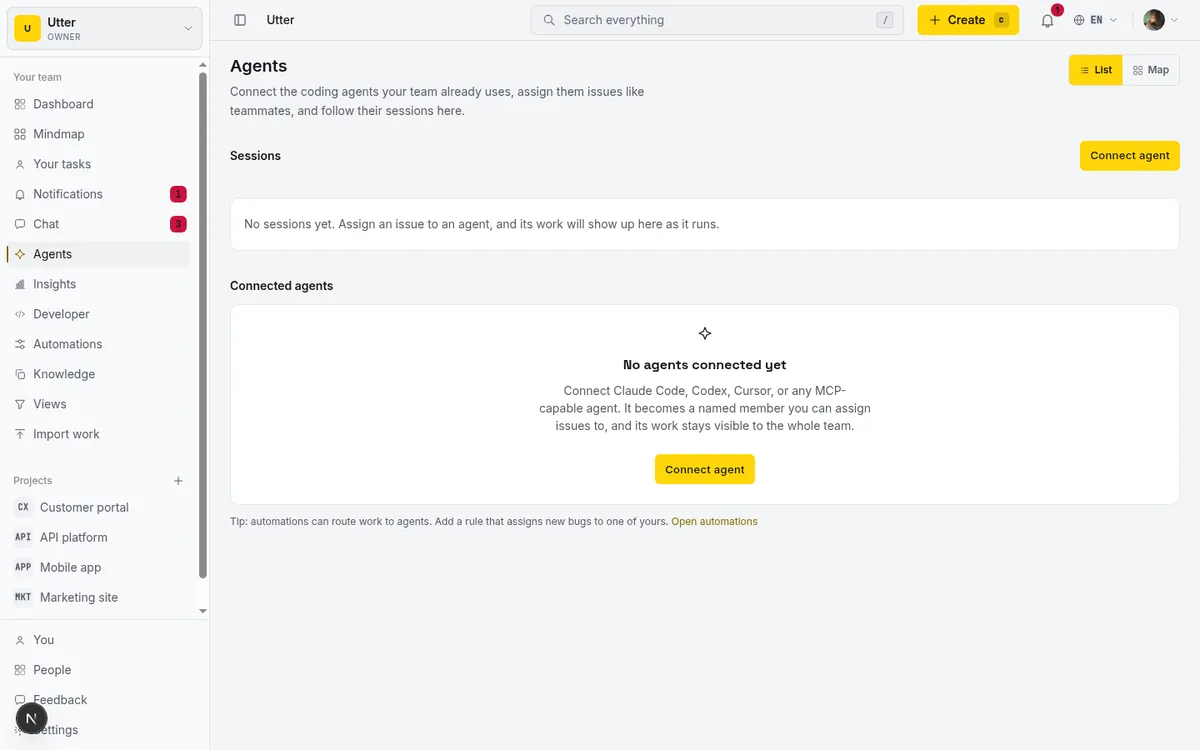
So the fair framing is this: both have agents. The difference is whether the agent is a metered sidebar that borrows a human's identity, or a free named teammate with its own. If you want the deeper version of the seat question specifically, whether AI agents count as paid seats covers it end to end.
What changes when agents are real members (with the API call)
The "agent as member" claim is easy to say and worth making concrete, because it changes day-to-day mechanics.
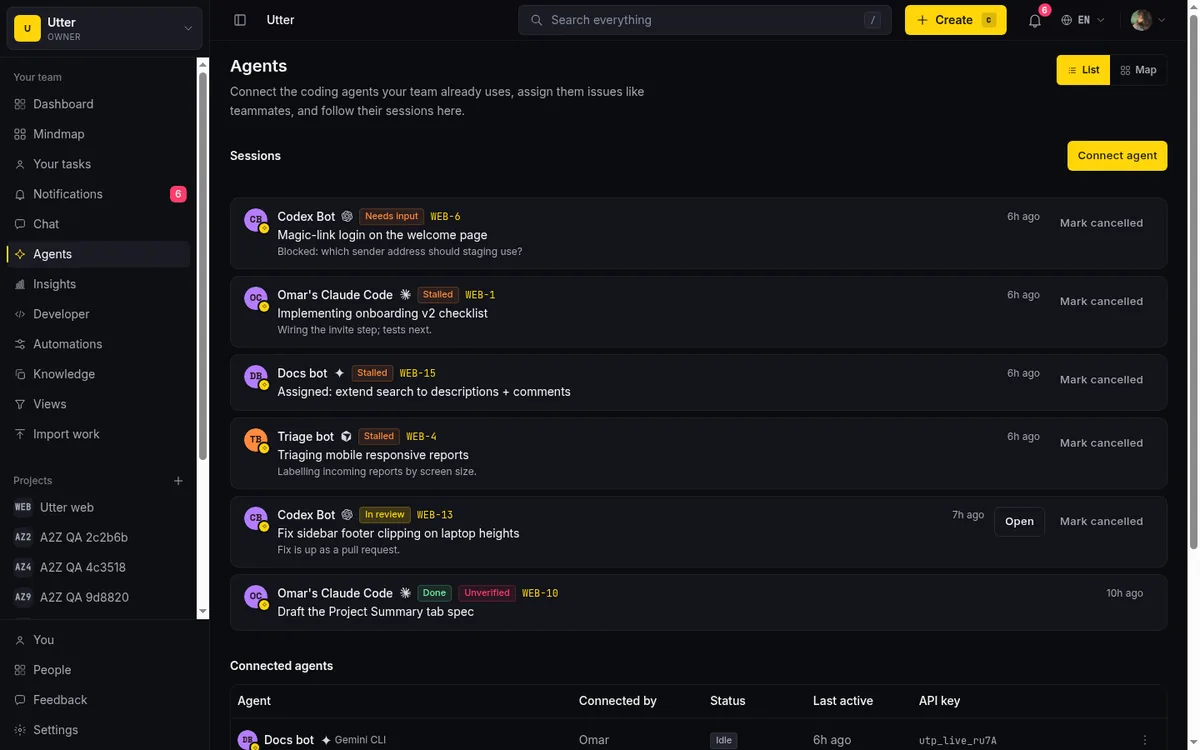
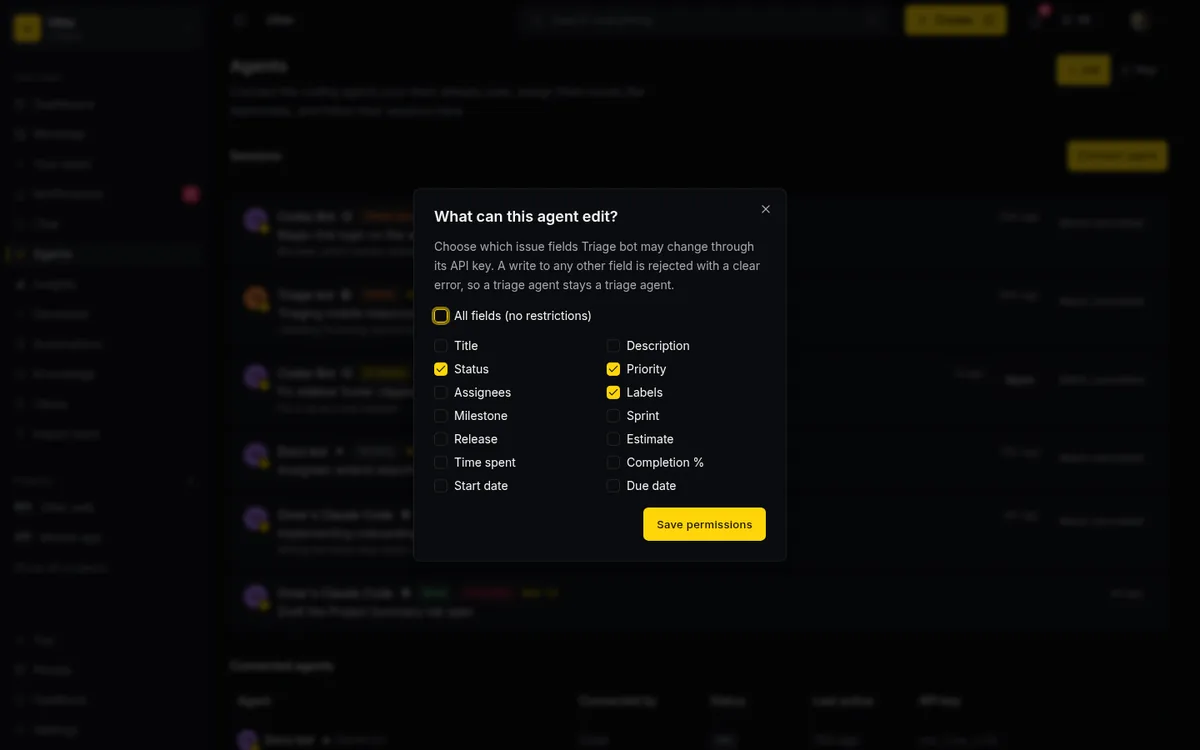
You assign work to an agent through the exact same People and Agents picker you use for a human. That assignment auto-creates a pending delegation session (this is the DELEGATE-01 flow). The agent claims that pending session to start running. If it goes quiet, a stalled state is derived after 30 minutes with no heartbeat, and a worker cancels a session nobody claimed after 7 days. When a session reaches review or done but left no attributed activity or comment on the issue, an unverified badge (VERIFY-01) flags it, so a session that closed without doing visible work does not quietly pass as finished. You can also restrict what an agent is allowed to touch: a per-agent field allowlist (FIELD-POLICY-01) controls which issue fields it may write, enforced at a single API choke point (updateIssueViaApi) that covers REST, transitions, and MCP alike. And an automation rule can wake an agent directly with the notify_agent action.
The main write an agent makes is creating an issue. It calls the v1 API with its own bearer key. Here is that call in three languages.
curl -X POST \
  "https://utter.ae/api/v1/workspaces/acme/projects/WEB/issues" \
  -H "Authorization: Bearer $UTTER_API_KEY" \
  -H "Content-Type: application/json" \
  -d '{
    "type": "task",
    "title": "Add rate limiting to the public form endpoint",
    "description_md": "Cap anonymous submissions at 5/min per IP.",
    "priority": "high",
    "assignee": "[email protected]"
  }'
const res = await fetch(
"https://utter.ae/api/v1/workspaces/acme/projects/WEB/issues",
{
method: "POST",
headers: {
Authorization: `Bearer ${process.env.UTTER_API_KEY}`,
"Content-Type": "application/json",
},
body: JSON.stringify({
type: "task",
title: "Add rate limiting to the public form endpoint",
description_md: "Cap anonymous submissions at 5/min per IP.",
priority: "high",
assignee: "[email protected]",
}),
},
);
const issue = await res.json();import os, requests
res = requests.post(
"https://utter.ae/api/v1/workspaces/acme/projects/WEB/issues",
headers={"Authorization": f"Bearer {os.environ['UTTER_API_KEY']}"},
json={
"type": "task",
"title": "Add rate limiting to the public form endpoint",
"description_md": "Cap anonymous submissions at 5/min per IP.",
"priority": "high",
"assignee": "[email protected]",
},
)
issue = res.json()The response comes back as the created issue, attributed to the agent's key:
{
  "id": "018f3a2b-7c41-7e90-9b2a-1d5e6f7a8b90",
  "key": "WEB-142",
  "url": "https://utter.ae/w/acme/p/web/WEB-142",
  "number": 142,
  "type": "task",
  "title": "Add rate limiting to the public form endpoint",
  "description_md": "Cap anonymous submissions at 5/min per IP.",
  "status": "todo",
  "status_id": "018f3a2b-1111-7e90-9b2a-000000000001",
  "status_name": "To do",
  "priority": "high",
  "assignee_id": "018f3a2b-agnt-7e90-9b2a-abcdef012345",
  "assignees": ["018f3a2b-agnt-7e90-9b2a-abcdef012345"],
  "reporter_id": "018f3a2b-agnt-7e90-9b2a-abcdef012345",
  "parent_id": null,
  "epic_id": null,
  "labels": [],
  "estimate_minutes": null,
  "rank": "0|hzzzzz:",
  "created_at": "2026-07-16T09:14:22.000Z",
  "updated_at": "2026-07-16T09:14:22.000Z"
}
Because the key belongs to the agent, reporter_id and the assignment both trace back to it. You can watch the delegation sessions move through their states from the agents view.
And you set the field allowlist per agent from the policy dialog, so an agent can be allowed to move status and comment but blocked from, say, reassigning or changing priority.
If you are comparing on the AI-and-agents axis more broadly, the roundup of AI project management software puts this next to other tools.
Moving your work over: the Asana importer and what it drops
If you decide to try it, here is the honest account of what moving over actually gets you, stated up front so nothing surprises you.
Utter has a direct Asana importer. You paste a personal access token and a numeric Asana project ID, and it pulls tasks from that one project. What comes across per task: the task name, the notes and description, the due date, the completed status (mapped to done or todo), the assignee's email, and the Asana tags, which map to Utter labels. It paginates 100 tasks per page up to your plan's import-row cap, which is 1,000 rows per run on Free, 10,000 on Pro, and 50,000 on Business.
Now the limits, because they are the whole story with any importer:
- One project per run. You point it at a single project ID each time.
- No comments. Task discussion does not come across.
- No attachments. Files stay in Asana.
- No custom fields. You rebuild those.
- No sections. The grouping structure is not imported.
- No subtask hierarchy. Parent-child nesting is flattened.
So this is a fast way to get the task list and ownership into Utter, not a full-fidelity clone. That is a fair thing for a young product's importer to be, but you should plan around it.
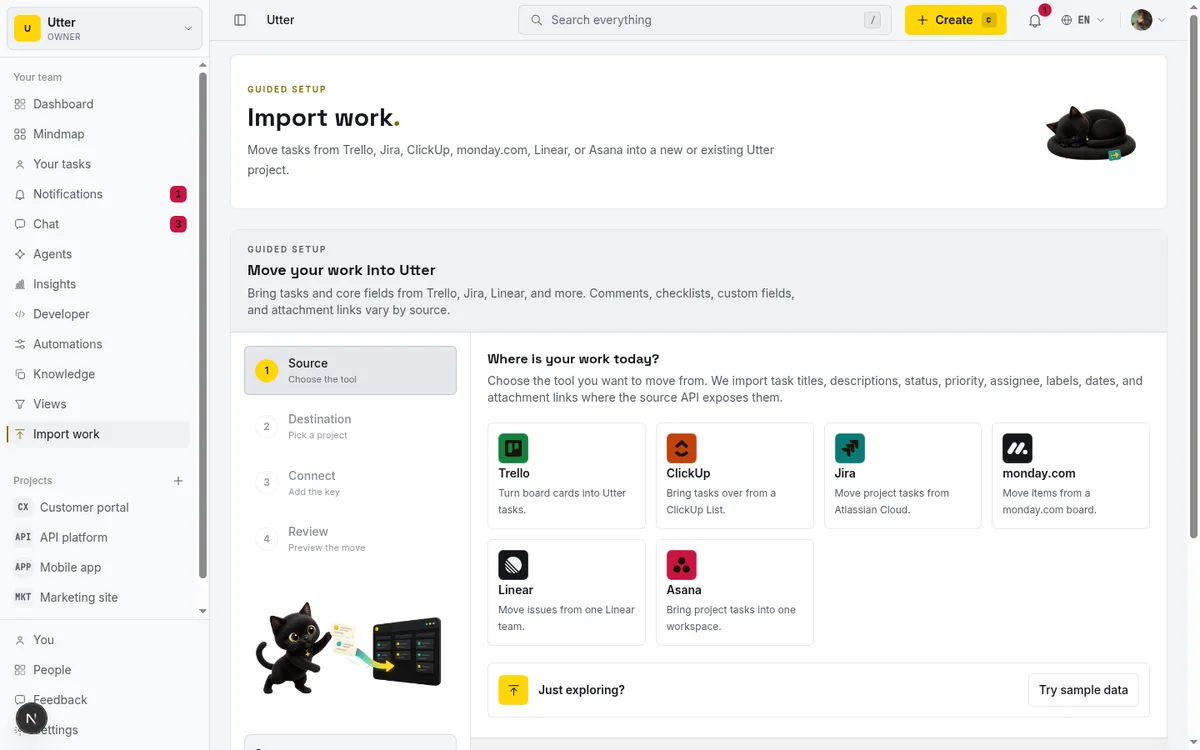
Practical guidance for an actual switch: import project by project rather than expecting one big migration. Expect to rebuild custom fields and any section structure by hand. Keep the Asana workspace read-only during a parallel run so nothing drifts between the two while people get comfortable. The full walkthrough is in the guide to importing a project, and if you are budgeting the move, managing billing and plans covers what you will actually pay once you are in.
When you should stay on Asana
A comparison you can trust has to tell you when not to switch. Here is that section, plainly.
Stay on Asana if you rely on portfolios, goals and OKRs, workload and capacity planning, or approvals and proofing at Advanced or Enterprise depth. Utter has no equivalent for any of these. If your planning cadence runs on portfolios and goals, moving would cost you more than the seat savings are worth.
Stay if you need many UI languages. Utter is English and Arabic only, with full right-to-left support for Arabic. Asana supports a much wider set of interface languages.
Stay if a large third-party integration catalog and a mature ecosystem matter to how your team works. Utter is young and its integration catalog is much smaller.
Stay if you store large files inside the tracker. Utter Free is 128 MB and Pro is 1 GB. That is not where you keep design assets or video.
Where Utter fits, precisely: a growing, builder-heavy team that wants low per-seat cost, free viewers and free agents, the core PM surface (board, sprints, timeline, reporting, and AI) available on the free tier, and agents as first-class members rather than a metered assistant. If that is your team, the math works in your favor. If you are a large Asana org running on its planning depth, it does not, and you should know that going in.
A quick way to decide
If you want a shortcut, route yourself by your actual situation.
flowchart TD
    A[Team growing, re-evaluating the Asana bill] --> B{Need portfolios, goals,<br/>workload, or approvals?}
    B -->|Yes| C[Asana likely stays]
    B -->|No| D{Mostly builders, want free<br/>viewers and agents, low per-seat?}
    D -->|No| C
    D -->|Yes| E{Want agents as named members,<br/>not a costed sidebar?}
    E -->|Yes| F[Try Utter]
    E -->|No| G[Either works, compare on price]
The seat arithmetic is the thing to hold onto. Seven people on Asana is a 10-seat bill. The same seven people on Utter is seven seats at $3 each per month (as of July 2026). And because viewers and agents are free on Utter, the two curves keep diverging as you add non-editors and connected agents, which is exactly the direction a growing team moves. That is the whole case in one line.
The low-risk way to test it is the 14-day Pro reverse trial, which lands on the first workspace you create and is available once per user. Spin one up, import a single project, connect an agent, and see whether the lighter model fits before you touch your Asana subscription. If you are cross-shopping, the per-seat comparison against Jira is the same analysis pointed at a different incumbent.
If the seat rounding is what sent you looking, start a workspace and run one project through it. That is the fastest way to see whether the numbers actually change for your team.
Frequently asked questions
What are the best Asana alternatives for a growing team that costs less?
It depends on what you lean on. If you use Asana's portfolios, goals, workload planning, or approvals, most cheaper tools will feel like a downgrade and you should stay. If you mostly need boards, sprints, timeline, reporting, and want low per-seat cost, a per-person tool like Utter is worth a look: Utter Pro is $3 per editor per month or $30 per year per seat (as of July 2026), viewers are free, and connected AI agents are free members rather than billed seats.
Why does my Asana bill go up faster than the number of people I add?
Asana sells seats in tiers, not per exact person. Per its pricing FAQ (as of July 2026), you add seats one at a time between 2 and 5 users, in blocks of 5 up to 30 users, and in blocks of 10 up to 100. So a 7-person team pays for 10 seats and a 12-person team pays for 15. The empty seats in the tier are still billed, which is why the total rounds up and stops tracking headcount.
Is Asana's free plan still good for a small team?
For new accounts, Asana's free Personal plan is capped at up to 2 users (as of July 2026), so it no longer fits a small team the way the older free tier did. Third-party reporting says accounts created before November 12, 2025 keep a legacy plan with up to 10 seats, but that is corroboration rather than an official pricing-page guarantee, so verify against your own account.
Does Asana support AI agents and MCP?
Yes. Asana ships an official remote MCP server at mcp.asana.com and native AI Teammates, a set of 30 pre-built agents (as of July 2026). Two things to know: the MCP server authenticates with your Asana account over OAuth and the AI client acts as that human user, inheriting their access with no separate agent identity; and AI Teammates are a sales-led paid add-on with credits metered per billing account. It is a metered, enterprise-oriented model rather than a free named-teammate model.
How is Utter's agent model different from Asana's AI?
In Utter an agent is a real workspace member: it has its own user record, its own workspace_agents profile, and its own API key whose created_by is the agent itself, so every change is attributed to the agent by name rather than folded into a human's OAuth session. Agents are free and never billed as seats. You can restrict what fields an agent may write with a per-agent allowlist enforced at a single API choke point, and assignment auto-creates a delegation session you can watch move through its states.
What does Utter's Asana importer bring over, and what does it drop?
It imports tasks from one Asana project per run: the task name, notes and description, due date, completed status (mapped to done or todo), assignee email, and Asana tags mapped to labels, paginating 100 tasks per page up to your plan's import-row cap (1,000 on Free, 10,000 on Pro, 50,000 on Business, as of July 2026). It does not bring comments, attachments, custom fields, sections, or subtask hierarchy. Plan to import project by project and rebuild custom fields and sections by hand.
When should I not switch off Asana?
Stay on Asana if you depend on portfolios, goals and OKRs, workload and capacity planning, or approvals and proofing at Advanced or Enterprise depth, because Utter has no equivalent. Also stay if you need many UI languages (Utter is English and Arabic only), a large integration ecosystem, or if you store large files inside the tracker (Utter Free is 128 MB and Pro is 1 GB, as of July 2026). The seat savings do not offset losing capability your team runs on.
Related reading

Project management for solo founders (you plus a few agents is the team)
Project management for solo founders means capturing everything and letting a few AI agents do real work, at $0, with agents as free members not paid seats.
July 16, 2026 · 11 min read

Jira alternatives in 2026: what you actually pay per seat
Six Jira alternatives compared honestly: Linear, ClickUp, Asana, Monday, Trello, and Utter, with real per-seat math and where each one actually fits.
July 11, 2026 · 8 min read

Free project management software: what the free tiers actually give you
What the free tiers of Trello, Asana, ClickUp, Notion, and Jira actually give you (as of July 2026), which cap stops a small team first, and how Utter Free compares.
July 16, 2026 · 11 min read

Looking for a Linear alternative? Start with who pays
Where teams leaving Linear actually go, Jira, ClickUp, Asana, GitHub Projects, Utter, and the seat math and agent support that should drive the choice.
July 12, 2026 · 8 min read
ClickUp alternatives for teams who want calm, not more features
ClickUp alternatives for teams who want a calm tracker they will actually adopt. Honest July 2026 pricing and AI-cost tables, where ClickUp still wins, and Utter's free agent members.
July 16, 2026 · 15 min read
Do AI agents count as seats? The real cost of running agents on your tracker
Two costs get blurred together: paying a seat per bot, and the tokens the model burns. Here is how to separate them and estimate what agents actually cost.
July 15, 2026 · 6 min read
The best AI project management software in 2026, honestly ranked
Eight AI project management tools ranked with a stated lens: what the AI really does, what it costs on top of the seat price, and who each one fits.
July 15, 2026 · 10 min read

Project management for small agencies (clients in, chaos out)
Project management for agencies without the seat tax: scoped projects isolate each client, guests and viewers are free, and public forms take intake with no account.
July 16, 2026 · 13 min read
How to manage billing and plans
Read the Utter billing page at a glance: how editor seats are counted, why viewers and agents are free, where to upgrade, downgrade, cancel, and buy credits.
July 15, 2026 · 16 min read

The MCP audit: which project tools can AI agents actually use? (July 2026)
We audited the MCP servers of 13 project management tools: who has one, what agents can really do, the call caps, and the gaps nobody mentions.
July 15, 2026 · 7 min read
Add a comment
Start the conversation.