
Do AI agents count as seats? The real cost of running agents on your tracker

The first question a team asks before adding agents to a paid tool is rarely about capability. It is about the bill. If I connect five agents, does each one cost me a seat? If they run all week, what does that do to my invoice?
Fair question, and the answer is confusing mostly because two different costs get squashed into one. There is the price of the agent existing as an account on your tool. And there is the price of the AI actually thinking, the tokens the model burns doing the work. People argue about "AI agent cost" as if it is one number. It is two, and they behave nothing alike.
flowchart TD
    A[Cost of running an agent] --> B[Account cost]
    A --> C[Thinking cost]
    B --> D[Per seat tracker: each bot is a paid seat]
    B --> E[Utter: agent is a member, not a seat]
    C --> F[Utter AI features spend credits]
    C --> G[Connected agent bills its own provider]
Cost one: the seat for the agent as a user
Most trackers model a user the same way whether a human or a script is behind the login. You add an account, you pay for a seat. That is fine when your team is people. It gets strange the moment your team includes bots.
Say you want a triage agent, a spec-drafting agent, and a couple of agents watching specific projects. On a per-seat tool, that is four more paid accounts sitting next to your humans, priced the same as a senior engineer. A modest fleet of agents becomes a real line item, and the more you automate, the more you pay for the privilege of automating. That is a genuinely odd incentive. The tool charges you most exactly when you are leaning on it hardest.
Utter does not do this. An Utter agent is a real workspace member, with a name, a provider identity, and an avatar badge, so it shows up in pickers and in activity like anyone else. But it is not counted as a paid seat. You can connect up to 25 agents in a workspace and none of them touch your seat count. You pay for the humans who build; you do not pay a head tax on the bots that help them.
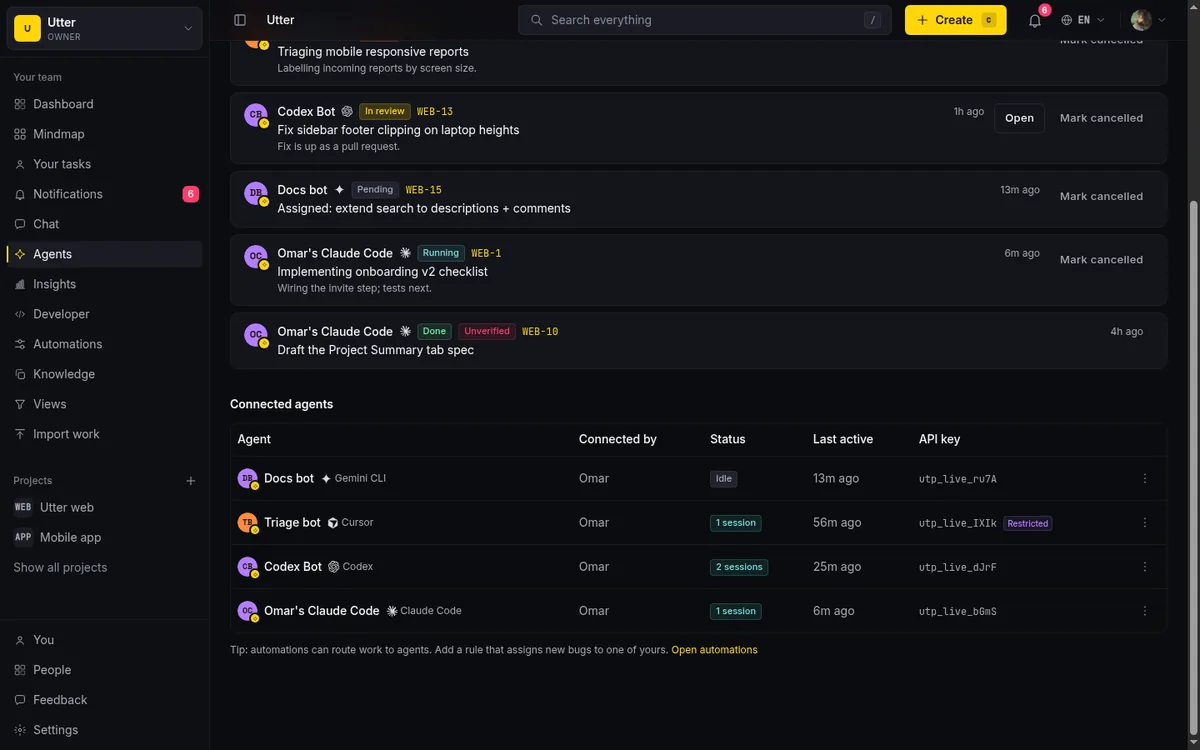
Agents are first-class members on the API too. One call lists every agent in the workspace, who owns it, and whether it is currently running a session:
curl https://utter.ae/api/v1/workspaces/acme/agents \
  -H "Authorization: Bearer utp_live_your_key"
Viewers are free too, which matters more than it sounds for agents. A lot of what an agent does is read: check its column, read an issue, pull the backlog, summarize a thread. Read-mostly access does not rack up seats for a person, and it does not for an agent either. The cost of an agent that mostly watches and occasionally acts is, on the seat side, zero.
Cost two: the tokens the model actually burns
Here is the part nobody gets to skip. The agent still has to think, and thinking costs money. When your agent reads a long issue and drafts a plan, a model somewhere processes those tokens and someone pays for them. That cost is real, it is separate from seats, and pretending otherwise is how people get surprised.
In Utter the AI features run on credits. Every workspace gets a monthly grant of credits by plan, and you can top up when you need more. The built-in AI chat assistant uses credits when it drafts an issue, summarizes a thread, or proposes a change. The optional weekly digest, a Monday email with an AI summary of each project, uses credits too. Heavier use burns more. An agent that triages a handful of tickets a day sips credits; an agent processing hundreds of items an hour drinks them.
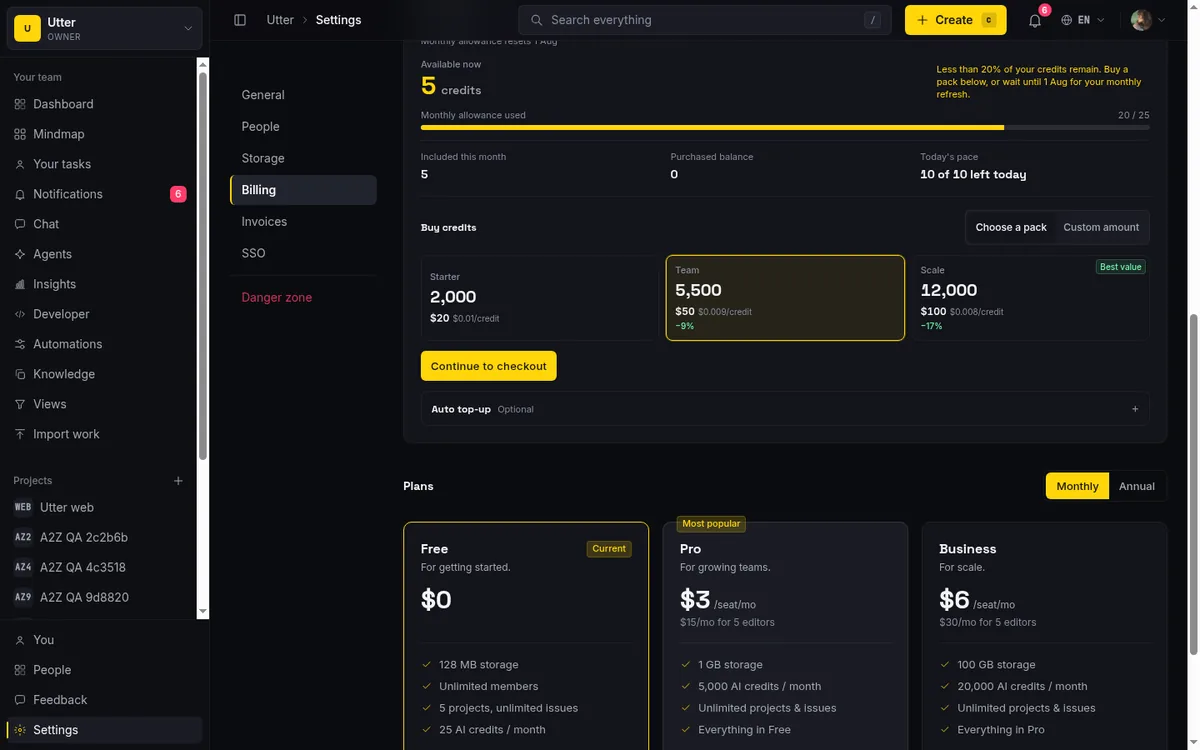
Be clear-eyed about the free grant. It is sized for trying things, not for running a fleet at full tilt. If you connect several agents and point them at real volume, you will move past the monthly grant and into top-ups, and that is the honest cost of the work getting done. The grant lets you prove the loop is worth it before you spend on it. It is not a way to run production automation for free.
One nuance worth knowing: named agents connecting over the API and MCP server are not the same billing surface as the in-app AI chat assistant. The chat assistant is the thing that spends your credits, because it is Utter's model doing the work. A named agent you connect, say Claude Code or Codex, usually runs on its own model and its own provider bill, and talks to Utter over the API. So "how much do my agents cost" often splits again:
- What you pay Utter: seats, which is zero for agents, plus credits for Utter's own AI features.
- What you pay your model provider: the tokens your connected agent burns on its own model.
Keep those apart in your head and the invoice stops being mysterious.
A simple way to estimate your real cost
Skip the per-bot math. It leads you to the wrong number. The cost of running agents on Utter is:
The number of paid human builders, plus your AI usage.
That is the whole formula. Agents do not add seats, so they drop out of the first term entirely. Viewers, human or agent, are free, so read-heavy access drops out too. What is left is the people who actually build, priced per seat, and the credits your AI features consume, which scales with how hard you work them.
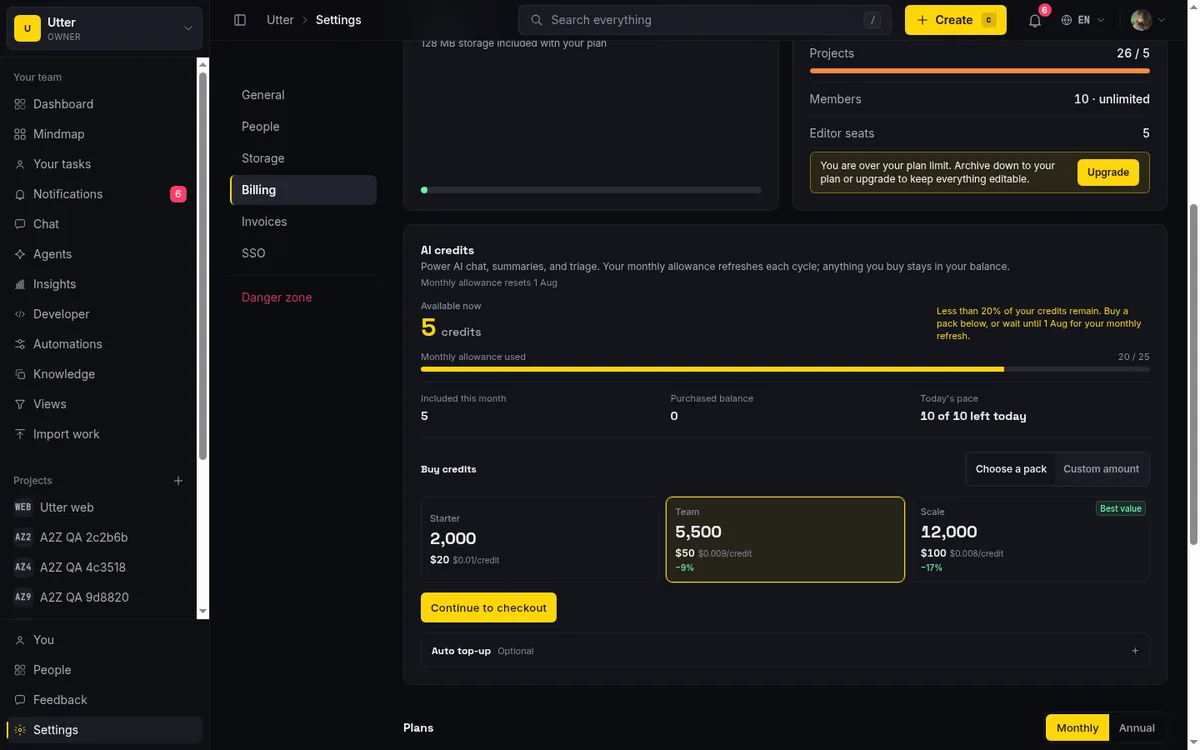
So the questions to actually ask are:
- How many people on my team need to create and edit work? That sets your seat bill.
- Roughly how much AI work will I run each month, chat drafts, digests, agent-driven triage? That sets your credit spend.
Neither one is "count the bots and multiply."
For most teams the shape is friendly. You add agents to take load off the humans, the agents do not cost seats, and your credit use tracks the value you are getting rather than the number of accounts you opened. If your credit use climbs, it is because agents are doing more real work, which is the trade you wanted. The failure mode to avoid is the opposite one: paying per bot on a tool that taxes you for automating, then rationing agents to keep the seat count down. That is optimizing for the wrong thing.
Where to start
Connect one agent, give it a narrow job, and watch two meters instead of one. The seat meter should not move, because agents are not seats. The credit meter will move a little, and that is the real cost of the work, in a form you can see and top up deliberately.
Both meters are one API call away. GET /v1/workspaces/{slug}/usage returns your plan, storage, and AI credit position in a single response:
curl https://utter.ae/api/v1/workspaces/acme/usage \
  -H "Authorization: Bearer utp_live_your_key"
const res = await fetch("https://utter.ae/api/v1/workspaces/acme/usage", {
headers: { Authorization: "Bearer utp_live_your_key" },
});
const { data } = await res.json();
console.log(data.ai_credits.remaining, data.ai_credits.topup_balance);import requests
res = requests.get(
"https://utter.ae/api/v1/workspaces/acme/usage",
headers={"Authorization": "Bearer utp_live_your_key"},
)
credits = res.json()["data"]["ai_credits"]
print(credits["used"], "of", credits["monthly_grant"])The ai_credits block is the meter that moves when AI does work:
{
  "data": {
    "plan": { "plan": "pro", "trialing": false },
    "ai_credits": {
      "monthly_grant": 5000,
      "used": 1240,
      "remaining": 3760,
      "topup_balance": 0
    }
  }
}
You can connect an agent in the Agent Hub, name it, and get a scoped key and an MCP setup command in a couple of minutes. The connect dialog hands you the exact snippet, which looks like this for Claude Code:
claude mcp add utter-product \
  https://utter.ae/api/mcp/v1 \
  --header "Authorization: Bearer utp_live_your_key"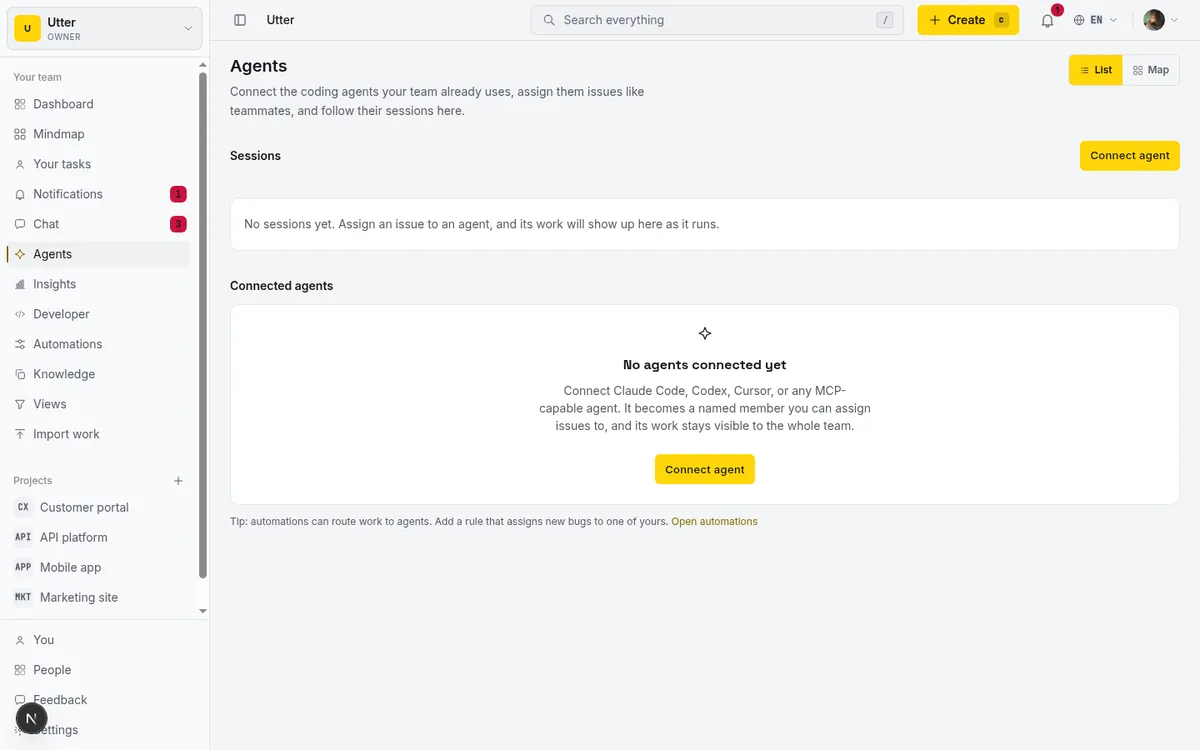
Start there, run it for a week, and read your own numbers before you decide how far to widen it.
Frequently asked questions
Do AI agents count as paid seats?
On most trackers, yes: you add an account, you pay for a seat, whether a human or a script is behind the login. Utter does not do this: an agent is a real workspace member, but it is not counted as a paid seat, and you can connect up to 25 agents without touching your seat count.
What does it actually cost to run AI agents on your tracker?
Two costs get blurred into one: the price of the agent existing as an account on the tool, and the price of the tokens the model burns doing the work. On a per-seat tool, a fleet of agents means extra paid accounts priced like senior engineers. On Utter the formula is the number of paid human builders plus your AI usage; agents do not add seats, and viewers, human or agent, are free.
Do connected agents like Claude Code spend Utter's AI credits?
Usually not. Utter's credits are spent by its own AI features, the in-app chat assistant and the optional weekly digest, while a named agent you connect over the API or MCP server typically runs on its own model and its own provider bill. Keep those two apart and the invoice stops being mysterious.
Is the free monthly credit grant enough to run agents in production?
No. The grant is sized for trying things and proving the loop is worth it, not for running a fleet at full tilt: point several agents at real volume and you will move past it into top-ups, which is the honest cost of the work getting done.
Related reading
How to use AI agents in Utter: connect them, assign work, and follow their sessions
A start-to-finish walkthrough: connect an agent, scope its key, assign it issues, and watch its sessions, without giving up control of the board.
July 15, 2026 · 11 min read

The best AI project management software in 2026, honestly ranked
Eight AI project management tools ranked with a stated lens: what the AI really does, what it costs on top of the seat price, and who each one fits.
July 15, 2026 · 10 min read

How to manage a team of AI agents without losing track of what they're doing
Running several AI agents at once? The day-to-day of a fleet: a roster, live sessions, instant delegation, per-field permissions, and verified work.
July 15, 2026 · 16 min read

Asana alternatives that cost less and speak agent
Asana alternatives for growing teams: how Asana's tiered seats round your bill up, and how Utter's $3 per-editor pricing with free viewers and agents changes the math. As of July 2026.
July 16, 2026 · 12 min read

Project management for solo founders (you plus a few agents is the team)
Project management for solo founders means capturing everything and letting a few AI agents do real work, at $0, with agents as free members not paid seats.
July 16, 2026 · 11 min read
Onboard an AI agent like a new hire: identity, access, and a first task
You already know how to bring on a new hire. Do the same for an AI agent: give it an identity, scoped access, one small task, a review, and an offboarding path.
July 15, 2026 · 8 min read

The MCP audit: which project tools can AI agents actually use? (July 2026)
We audited the MCP servers of 13 project management tools: who has one, what agents can really do, the call caps, and the gaps nobody mentions.
July 15, 2026 · 7 min read
AI agent project management: the complete guide
How to run real projects with AI agents on the board: connecting them, assigning work, keeping review, what breaks, and how to pilot it in a week.
July 15, 2026 · 12 min read

What is agentic project management? A plain-language guide with a working example
A copilot waits for your prompt. An agent acts on an event. Here is the perceive-plan-act-check loop explained, with one real end-to-end run inside Utter.
June 11, 2026 · 11 min read
What you can run in Utter without extra tools
A straight, capability-forward tour of the jobs Utter covers in its core, from a light help desk to integrations, estimation, and roadmaps, and when to pair a dedicated tool.
July 16, 2026 · 8 min read
أضف تعليقًا
ابدأ النقاش.