
Free project management software: what the free tiers actually give you
Every project management tool has a pricing page with a big "$0" column, and every one of those columns is hiding something. If you are searching for free project management software because you are a two-person side project, a five-person startup, or a team that just does not want to talk to procurement yet, the marketing copy will not tell you what actually stops you. The caps will. Asana's free plan now tops out at 2 users. Notion's free tier caps shared workspaces at 1,000 blocks. Trello gives you boards but locks the timeline behind a paywall. This guide reads the fine print on the five big free tiers (verified against their official pricing pages as of July 2026), then puts Utter's free plan under the same light, including the parts that will not flatter us.
The good news is that all of these free plans are real. Nobody is running a bait-and-switch. The bad news is that "free" is the top of a funnel, and the shape of the funnel is the actual product decision. So the useful question is never "is there a free plan." It is "which wall do I hit first, and how soon."
Free plans are real, but the ceilings are the product
Vendors do not offer free tiers out of generosity. A free tier is an acquisition channel: it gets your team in, gets your work inside their walls, and lets the switching cost do the selling later. That is not a criticism. It is the incentive, and knowing it tells you where to look. The interesting part of any free plan is the ceiling, because the ceiling is designed to be exactly high enough to be useful and exactly low enough to make you pay when you grow.
There are three families of ceiling worth watching, and most tools lean on one or two of them.
The first is people caps: how many humans can collaborate before you have to upgrade. This is the fastest killer, because a team is a team the day it forms. If the cap is 2 and you are 4, the free plan is over on day one.
The second is feature caps: which views, which automations, which reports are switched off. This is quieter. Your board works fine for a month, then you need a Gantt for a deadline, the Gantt is a paid feature, and now you are on a sales call.
The third is capacity caps: total storage, per-file size, number of records or blocks. These creep. You do not notice them until an upload bounces or a workspace stops letting you add a page.
Here is the honesty contract for this post. Every rival number below comes from that vendor's official pricing page or help docs as of July 2026, and I have kept the "as of July 2026" framing because these tiers move. When it is Utter's turn, the same numbers get the same scrutiny, and there is a section near the end whose only job is to name where Utter Free is worse than the alternatives. If a comparison cannot survive that treatment, it is not worth publishing.
Free project management software compared, July 2026
Here is the whole field on one screen. Read across for what each free tier gives you, then down to the second block for the first paid step (the moment the "$0" ends).
| Tool (free tier) | People | Storage / per-file | Views included free | Automation | Notable cap |
|---|---|---|---|---|---|
| Trello Free | 10 collaborators / Workspace | Unlimited storage, 10 MB/file | Board only (Timeline, Calendar, Table, Dashboard, Map are paid) | 250 Workspace command runs/mo | 10 boards per Workspace |
| Asana Personal | 2 users (new accounts); legacy accounts grandfathered at 10 | Unlimited storage, 100 MB/file | List, board, calendar (no timeline/Gantt, no dashboards) | None on free | Unlimited tasks and projects |
| ClickUp Free Forever | Unlimited members | 60 MB total | Board, list, calendar; full Gantt, dashboards, custom fields gated | Gated (paid) | 60 MB storage, 1 form |
| Notion Free | 10 guests | 5 MB/file | Docs/database views | n/a | Unlimited blocks solo, but 1,000 blocks with 2+ workspace owners; 7-day history |
| Jira Free | 10 users | 2 GB | Backlog, list, board, timeline, calendar, summary | 100 rule runs/mo | Community-only support |
| Utter Free | Editor seats (viewers free, agents free) | 128 MB total, 1 MB/file | Board, backlog, list, calendar, timeline (Gantt), reports | None on free (paid feature) | 5 active projects, 25 AI credits/mo |
And the first paid dollar for each, so you can see where the ramp starts:
| Tool | First paid plan | Price (billed annually), as of July 2026 |
|---|---|---|
| Trello | Standard | $5 / user / month ($6 monthly) |
| Asana | Starter | $10.99 / user / month ($13.49 monthly) |
| ClickUp | Unlimited | $7 / user / month |
| Jira | Standard | $7.91 / user / month |
| Utter | Pro | $3 / editor seat / month ($30 / year) |
A few things jump out of that grid before we even analyze it. Jira Free is the most feature-complete incumbent free tier: 10 users, 2 GB, and real planning views (including a timeline) with no per-view paywall. Trello and Asana both restrict you to a board or list on free and put the timeline behind money. And the free tiers split hard on capacity: ClickUp's 60 MB and Utter's 128 MB are small numbers, while Jira's 2 GB and the "unlimited storage" claims from Trello and Asana are large, though those unlimited claims come with per-file caps that matter more than the total for most teams.
The caps that actually stop a small team
The table tells you what exists. Experience tells you what bites. Here is which limit tends to end the free ride first, tool by tool.
Asana's 2-user cap is the bluntest. On any account created after November 12, 2025, the free Personal plan tops out at 2 collaborators. If you made your account earlier you are grandfathered onto a Legacy Personal plan that still allows up to 10, which is genuinely generous, but new teams do not get that. So for a brand-new 4-person team, Asana Free is not a team plan at all. It is a two-seat plan with unlimited tasks, which is a strange shape unless you are a pair.
Notion's 1,000-block shared-workspace cap arrives faster than you would expect. A block is a paragraph, a heading, a to-do line, a table row. Solo, you get unlimited blocks. But the moment a workspace has 2 or more workspace owners, the free ceiling drops to 1,000 blocks, after which you cannot create new content until someone upgrades. A few weeks of real note-taking and a couple of databases will clear 1,000 blocks without trying. Notion Free is a fantastic single-player tool and a short-lived multiplayer one.
Three of the five gate the timeline. Trello Free and Asana Personal do not include a timeline or Gantt view at all, and ClickUp gates full Gantt charts and dashboards behind its paid plans. So if "free planning" means anything more than a board, you are down to Jira and Utter on this list. That is the single most surprising thing in the whole comparison: a dependency-aware Gantt on a free plan is rare.
Jira Free is the generous incumbent, with one metered edge. Ten users, 2 GB, and the full set of planning views (backlog, board, timeline, calendar, summary) all work for nothing. The catch is automation: 100 rule runs per month, then it stops until the next cycle or an upgrade. For a small team that is often plenty. For a team that automates aggressively, 100 runs disappear in the first week.
If you want to route yourself quickly, start from the thing that would block you and follow it out.
flowchart TD
  A[What would block you first?] --> B[Need more than 2 people]
  A --> C[Need a Gantt or timeline for free]
  A --> D[Need automation on the free plan]
  B --> E[Skip Asana Personal on a new account]
  B --> F[Trello, ClickUp, Jira, Utter all clear this]
  C --> G[Only Jira Free and Utter Free ship a free timeline]
  D --> H[Trello 250 runs or Jira 100 runs, metered]
  D --> I[Utter Free has no automation, it is a paid feature]
If Jira's paid step is where this leads you, its per-seat pricing is worth weighing carefully against the alternatives. There is a fuller breakdown in Jira alternatives by price per seat, and a broader field survey in the best project management software for 2026.
Where Utter Free sits: every feature on, capacity capped
Most free tiers gate features and keep capacity loose (Trello and Asana both advertise unlimited storage). Utter does the opposite on purpose. On Free, the features are on and the capacity is the ceiling.
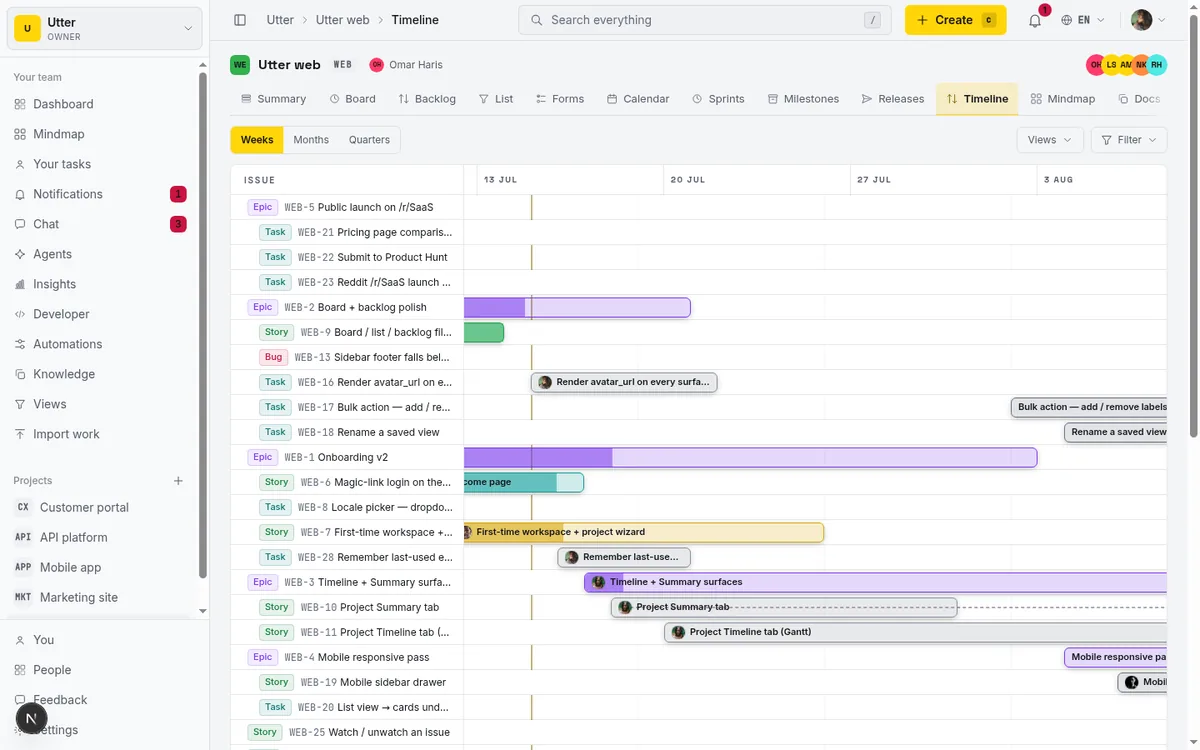
Concretely, Utter Free ships sprints, the timeline (Gantt), reporting, integrations, and AI all working. Nothing in that list is switched off waiting for a credit card. What is capped is how much you can pour into it: 128 MB of total storage, 1 MB per uploaded file, 5 active projects, and a recurring grant of 25 AI credits per month. That is the trade. You get the whole tool at a small scale, rather than a slice of the tool at a large one.
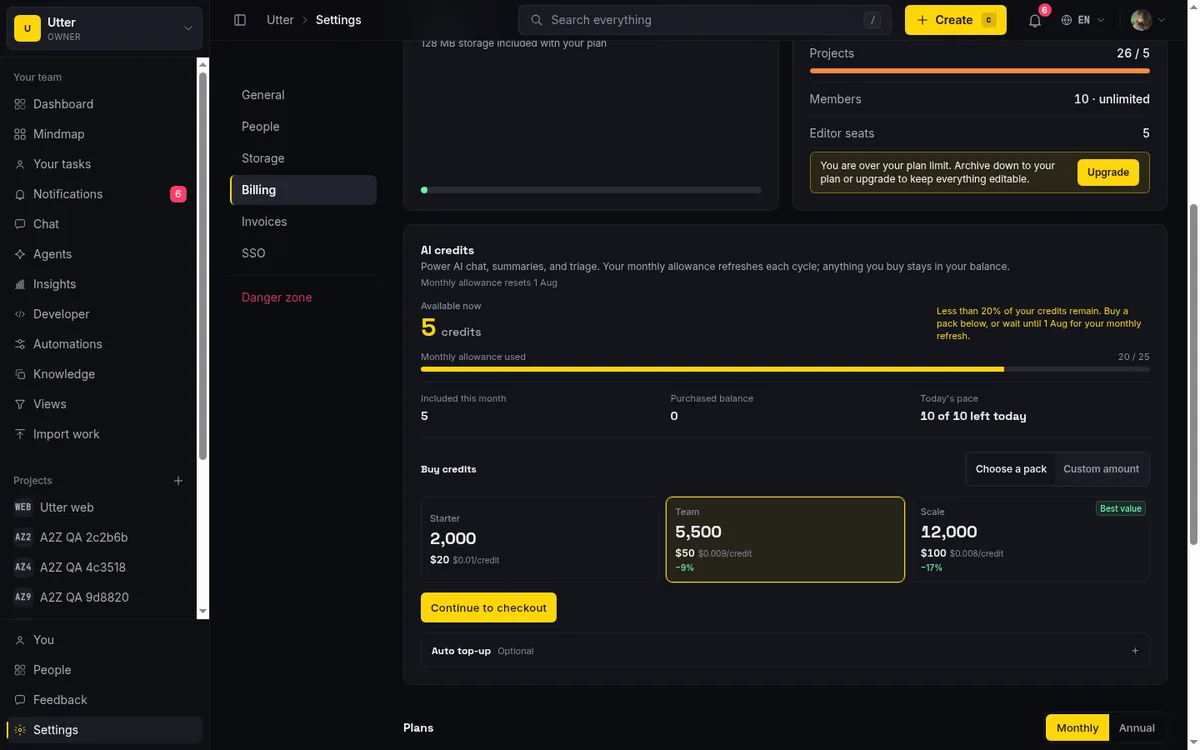
The paid steps are deliberately cheap by the standards of the table above. Pro is $3 per editor seat per month billed annually ($30 a year), and Business is $6 per editor seat per month billed annually ($60 a year). Those are editor seats. Viewers are always free and never counted, so a team of 4 editors and 20 stakeholders who only read pays for 4. And every new user's first workspace starts with a 14-day Pro reverse trial, granted once per user, so you experience the paid ceiling before you decide. Note the wording: that trial is on your first workspace, not on every workspace you create later. The mechanics of upgrading, downgrading, and what happens when the trial lapses are covered in how to manage billing and plans.
What a small team can actually run on Utter Free
Picture a 4-to-6-person product team. On Utter Free they can run 5 active projects at once, each with full sprint ceremonies: a backlog, sprint planning, a running sprint, a burndown. None of that is paywalled.
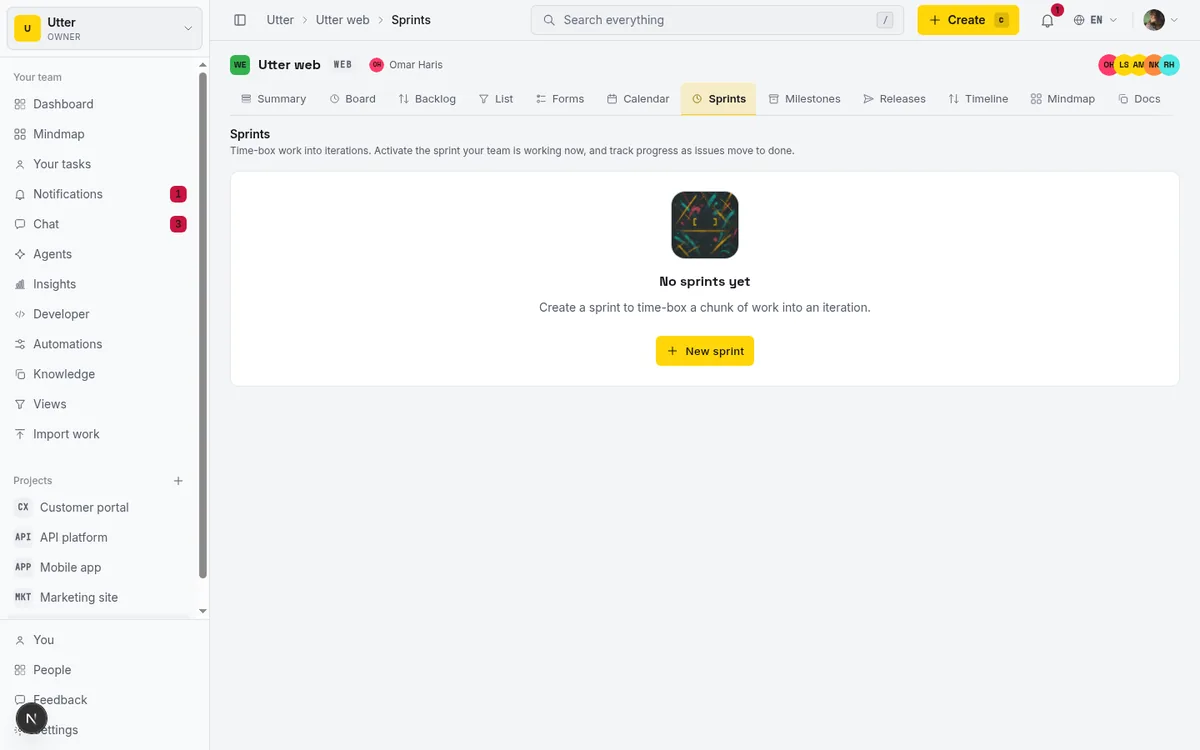
Alongside the sprints, the same free plan gives you a dependency-aware Gantt for the roadmap and real reports on throughput and status. It is the same feature set a paying customer gets, just bounded by the 128 MB and 5-project caps rather than switched off.
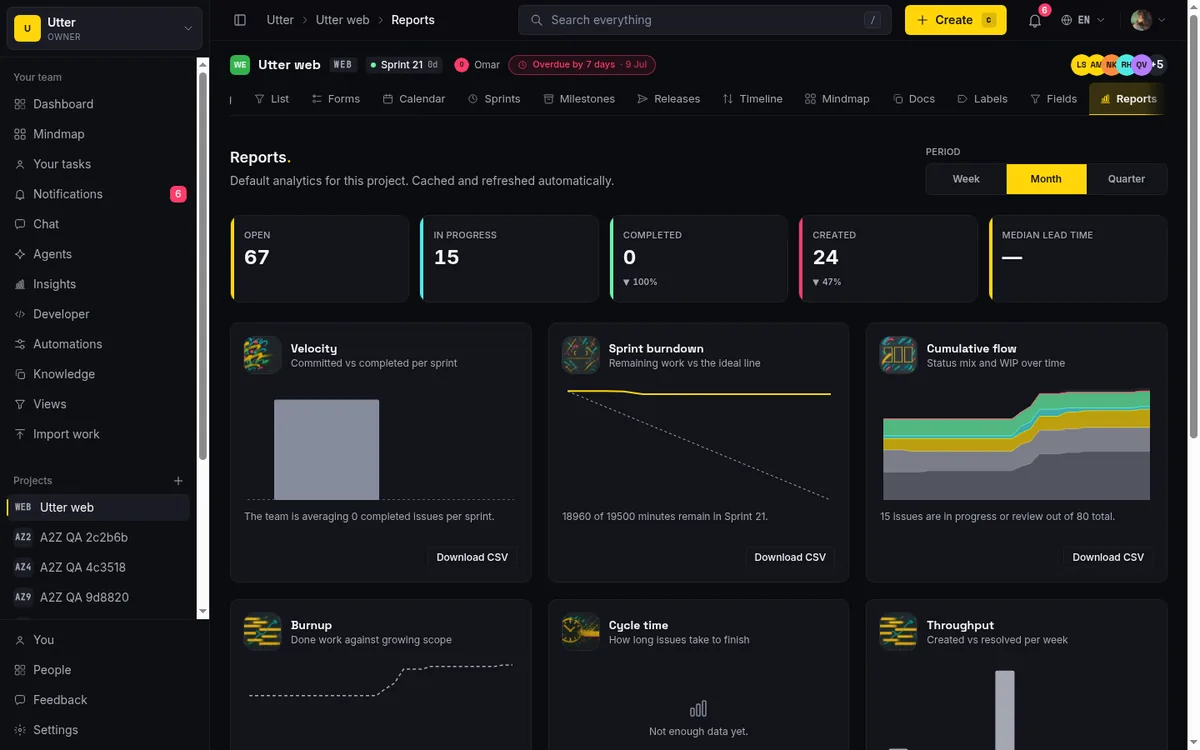
Hold that against the table. Trello Free has no timeline view at all. Asana Personal has no Gantt and no dashboards. ClickUp gates the full Gantt. So the specific combination of a free sprint board plus a free dependency Gantt plus free reports is not something you can assemble on three of the five alternatives at any user count. This is the shot that shows it is the shipped product and not a mock:
Two more free-tier facts that a small team feels day to day. Auth is magic-link only, so there are no passwords for anyone to manage, forget, or leak; you request a link, click it, you are in. And the whole product is bilingual English and Arabic with full right-to-left support (including Hijri calendar formatting in Arabic), which is not an add-on tier, it is just how the app ships. If you are running a small team and would rather spend your energy on the work than on seat math and password resets, that is the point.
The honest limits of Utter Free
Now the part the pricing page glosses and this post will not. Utter Free has real weaknesses, and if any of these match your workload you should know before you commit.
128 MB of total storage is genuinely small. Jira Free gives you 2 GB, roughly sixteen times as much. Trello and Asana advertise unlimited storage (with per-file caps). So if your team traffics in design files, PDFs, or screenshots by the hundred, 128 MB is a real constraint that you will hit, not a theoretical one.
1 MB per file is the tightest per-file cap in the comparison. Trello allows 10 MB per file, Notion 5 MB, Asana 100 MB. Utter Free caps a single upload at 1 MB. That is fine for a screenshot or a small doc and painful for anything richer. Attachment-heavy teams will feel this immediately, and it is the first limit I would flag for a design-adjacent team. (Paid plans lift the per-file ceiling; Free does not.)
Automation is a paid feature on Utter, full stop. This is worth stating plainly because it is a place where two rivals are more generous on free: Trello includes 250 command runs a month and Jira includes 100 rule runs a month, both metered but real. Utter Free includes zero. Sprints, the Gantt, integrations, reporting, and AI work on Free; automation rules do not. Do not read "features on" as "everything on."
25 AI credits a month is a taste, not a working allowance. It is enough to try the AI features and understand them, not enough to lean on them daily. The larger 100-credit grant exists only during the one-time 14-day Pro trial, so it is a first-run experience, not a standing free budget.
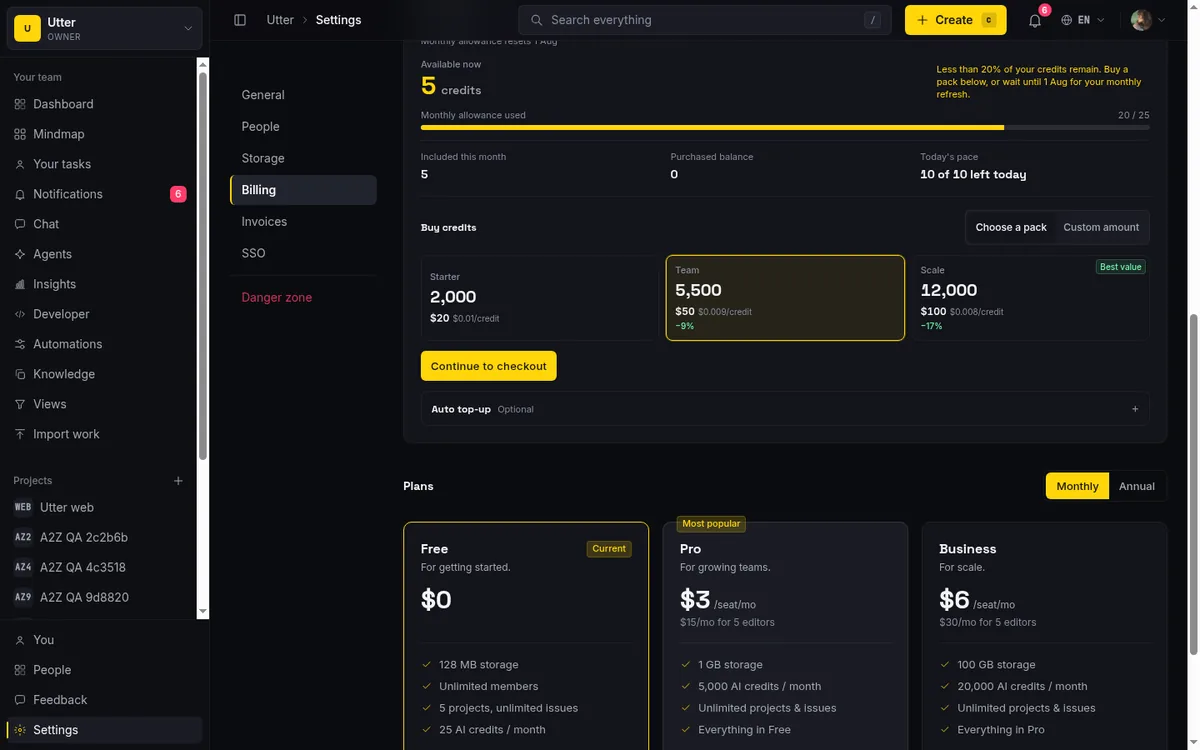
A few structural caps bound what a Free workspace can hold. Imports run at up to 1,000 rows per service-import run on Free (Pro raises this to 10,000). Custom roles beyond the basic four, SSO/SAML/SCIM, and the audit log are paid-plan features. And you cannot game the free tier by minting workspaces: one user may own at most 3 live unpaid workspaces, and paid workspaces plus memberships in other people's workspaces do not count toward that. So Free capacity is Free capacity; you cannot multiply it three times over and call it a plan.
And the honest meta-point: Utter is a young product. Trello has a deep Power-Ups marketplace and Jira has a large app ecosystem built over more than a decade. Utter does not have that ecosystem breadth yet, and pretending otherwise would be the exact kind of pricing-page fiction this post is arguing against. If your workflow depends on a specific third-party integration that only exists as a Jira app or a Trello Power-Up, that is a real reason to stay where you are.
AI agents are free members on every plan
Here is the one place Utter Free is not just competitive but clearly ahead. Connected AI agents (Claude Code and other coding agents) are treated as real workspace members: each gets a profile, per-agent field-write permissions so you control exactly which issue fields it may touch, sessions with review states, and a read-time verification badge on its work. And they are never counted as billed seats, on any plan, including Free. The seat count filters agent members out entirely, so an agent that opens issues, moves cards, and comments costs you nothing in seats.
On top of that, the first-party MCP server exposes over 180 v1 operations, and it is available with an API key on any plan, Free included. The agents endpoint is read-only by design: you list a workspace's connected agents over the API, but you connect one from the dashboard (Agents hub, Connect agent), because minting an agent also mints an attributed API key and that is a human-approved act, not an API call. Listing the connected agents looks like this:
curl https://utter.ae/api/v1/workspaces/acme/agents \
  -H "Authorization: Bearer utp_live_XxXxXxXxXxXxXxXxXxXxXxXxXxXxXxXx"
const res = await fetch(
"https://utter.ae/api/v1/workspaces/acme/agents",
{ headers: { Authorization: "Bearer utp_live_XxXxXxXxXxXxXxXxXxXxXxXxXxXxXxXx" } },
);
const { data } = await res.json();import requests
res = requests.get(
"https://utter.ae/api/v1/workspaces/acme/agents",
headers={"Authorization": "Bearer utp_live_XxXxXxXxXxXxXxXxXxXxXxXxXxXxXxXx"},
)
data = res.json()["data"]The response lists each connected agent with its live session count and last activity:
{
  "data": [
    {
      "agent_id": "018f9c21-7a3e-7b2a-9c10-2e4d6f8a1b33",
      "name": "Claude Code",
      "kind": "claude_code",
      "owner_user_id": "018f9b04-1c2d-7e5f-8a90-11223344aabb",
      "running_sessions": 1,
      "last_activity_at": "2026-07-16T09:42:11.000Z",
      "created_at": "2026-07-02T14:08:55.000Z"
    }
  ]
}
That is the agent hub with a live connection, the same thing the API is reporting:
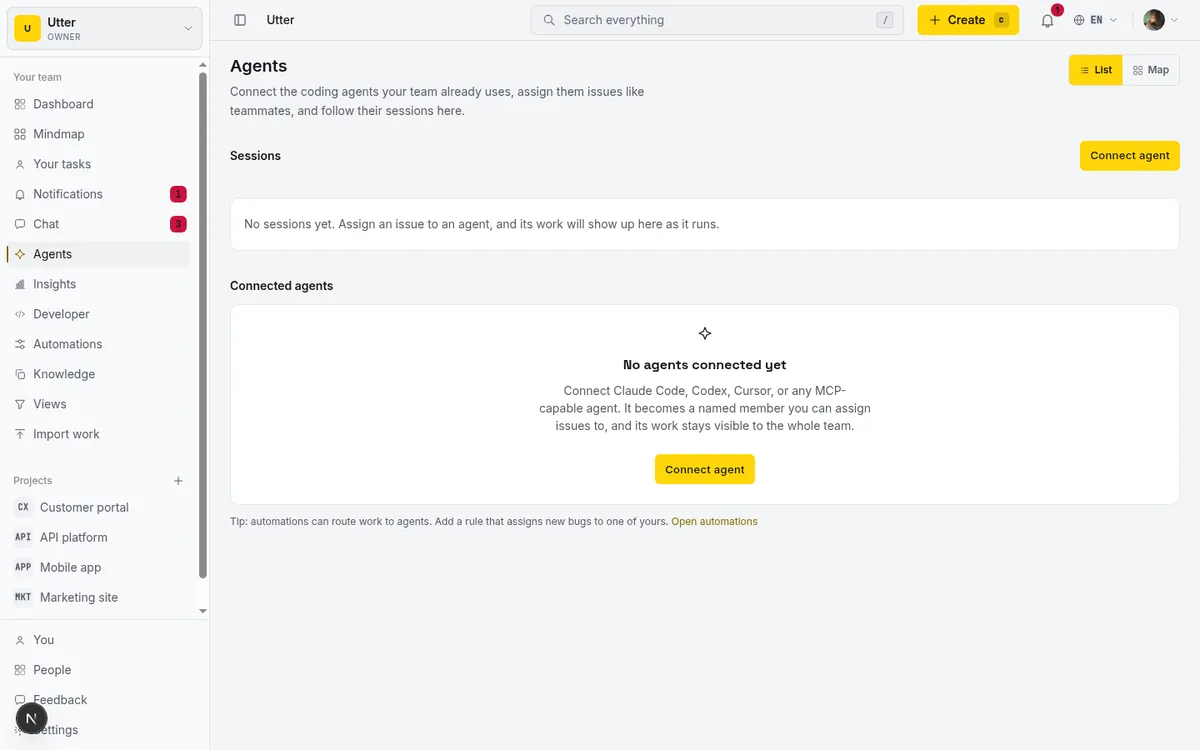
If the "do agents eat seats" question is the one you actually care about, there is a dedicated answer in do AI agents count as seats.
How to choose your free plan (and when to pay)
No single free plan wins for everyone, so match the plan to the shape of your team.
Stay on Jira Free if you are under 10 users and already living inside Atlassian. It is the most feature-complete free incumbent tier here (10 users, 2 GB, real planning views including a timeline), and if your team is in Confluence and Bitbucket already, the integration gravity is real. Just watch the 100-runs-a-month automation meter.
Pick Trello Free if boards are genuinely all you need. Ten boards, 10 collaborators, unlimited cards, and 250 automation runs a month is a lot of Kanban for nothing. The moment you need a timeline, though, you are paying, because that view is not on the free plan.
Use Notion Free only if one person owns the workspace. Solo, the unlimited-blocks tier is excellent. Add a second workspace owner and the 1,000-block ceiling turns it into a trial. For a real multi-person team, budget for the upgrade from the start.
Choose Utter Free if you want sprint, Gantt, and report features working on day one, your attachments are light (remember the 1 MB per file and 128 MB total), and you like that connected AI agents cost nothing in seats. Five active projects and the full feature set is a lot of tool for a small team that does not need to store much. If you are weighing it against a board-only tool, Utter versus Trello walks the same trade in detail.
On when the first paid dollar makes sense: the prices, as of July 2026, are genuinely far apart. Utter's first step is $3 per editor seat, against Asana's $10.99 Starter seat and Jira's $7.91 Standard seat. So if you are going to pay eventually, the cost of eventually is very different depending on where you start. For a small team, the pragmatic move is to run Free until a specific wall stops you (a sixth project, a file bigger than 1 MB, a need for automation) and then pay for exactly that.
Getting started is quick: your first workspace ships with the 14-day Pro trial so you can feel the full ceiling, and if you are migrating, imports run up to 1,000 rows per run on Free. Walk through the first steps in how to create your first workspace.
If a feature-complete free plan with a free Gantt and free AI agents fits your team, try Utter's free plan and see how far 5 projects gets you.
Frequently asked questions
What is the best free project management software for a small team in 2026?
It depends on which ceiling you hit first. As of July 2026, Jira Free is the most feature-complete incumbent free tier (10 users, 2 GB, real planning views including a timeline), Trello Free is the strongest board-only option, and Utter Free is the one that ships sprints, a dependency Gantt, reports, and AI with capacity caps instead of feature gates. A brand-new team should avoid Asana Personal, which caps new accounts at 2 users.
How many users does Asana's free plan allow now?
As of July 2026, Asana's free Personal plan allows up to 2 users on accounts created after November 12, 2025. Accounts created before that date are grandfathered onto a Legacy Personal plan that still allows up to 10 users. New teams get the 2-user cap.
Does any free project management tool include a Gantt or timeline view?
Two on this list do, as of July 2026: Jira Free includes a timeline view, and Utter Free includes a dependency-aware Gantt. Trello Free and Asana Personal do not include a timeline at all, and ClickUp gates the full Gantt behind its paid plans. A free timeline is genuinely uncommon.
What are the limits of Jira's free plan?
As of July 2026, Jira Free supports up to 10 users, 2 GB of storage, 100 automation rule runs per month, and community-only support. It does include unlimited projects and the full set of planning views (backlog, list, board, timeline, calendar, summary), which makes it the most generous incumbent free tier in this comparison.
Is Utter's free plan actually free forever, and what is the catch?
Yes, Utter Free is $0 with no time limit. The catch is capacity, not features: 128 MB total storage, 1 MB per file, 5 active projects, and 25 AI credits a month, plus no automation rules (automation is a paid feature). The features themselves (sprints, Gantt, reports, integrations, AI) all work on Free.
Do AI agents cost money on Utter's free plan?
No. Connected AI agents are real workspace members but are never counted as billed seats, on any plan including Free. The seat count excludes agent members entirely, and the first-party MCP server with over 180 operations is available with an API key on Free.
How much storage do free project management plans give you?
As of July 2026 it ranges widely: Jira Free gives 2 GB, ClickUp Free 60 MB total, and Utter Free 128 MB total. Trello and Asana advertise unlimited storage but cap individual files (Trello at 10 MB, Asana at 100 MB). Utter Free caps individual files at 1 MB and Notion Free at 5 MB, so the per-file limit often matters more than the total.
What happens when a shared Notion free workspace hits the 1,000 block limit?
As of July 2026, a Notion workspace with 2 or more workspace owners is capped at 1,000 blocks on the free plan. Once you reach it, you cannot create new content (new blocks) until the workspace upgrades to a paid plan. A single-member workspace keeps unlimited blocks.
Related reading

Project management for solo founders (you plus a few agents is the team)
Project management for solo founders means capturing everything and letting a few AI agents do real work, at $0, with agents as free members not paid seats.
July 16, 2026 · 11 min read

Jira alternatives in 2026: what you actually pay per seat
Six Jira alternatives compared honestly: Linear, ClickUp, Asana, Monday, Trello, and Utter, with real per-seat math and where each one actually fits.
July 11, 2026 · 8 min read
A Trello alternative for when a board stops being enough
Trello alternative comparison: what breaks when a board stops being enough, an honest Trello vs Utter pricing and feature comparison as of July 2026, and how to keep the board while adding sprints, a ranked backlog, and reports.
July 16, 2026 · 12 min read

Looking for a Linear alternative? Start with who pays
Where teams leaving Linear actually go, Jira, ClickUp, Asana, GitHub Projects, Utter, and the seat math and agent support that should drive the choice.
July 12, 2026 · 8 min read

Asana alternatives that cost less and speak agent
Asana alternatives for growing teams: how Asana's tiered seats round your bill up, and how Utter's $3 per-editor pricing with free viewers and agents changes the math. As of July 2026.
July 16, 2026 · 12 min read
ClickUp alternatives for teams who want calm, not more features
ClickUp alternatives for teams who want a calm tracker they will actually adopt. Honest July 2026 pricing and AI-cost tables, where ClickUp still wins, and Utter's free agent members.
July 16, 2026 · 15 min read
Project management for small agencies (clients in, chaos out)
Project management for agencies without the seat tax: scoped projects isolate each client, guests and viewers are free, and public forms take intake with no account.
July 16, 2026 · 13 min read

The MCP audit: which project tools can AI agents actually use? (July 2026)
We audited the MCP servers of 13 project management tools: who has one, what agents can really do, the call caps, and the gaps nobody mentions.
July 15, 2026 · 7 min read
The best AI project management software in 2026, honestly ranked
Eight AI project management tools ranked with a stated lens: what the AI really does, what it costs on top of the seat price, and who each one fits.
July 15, 2026 · 10 min read
Monday.com alternatives built for software teams, not marketing ops
Monday.com alternatives for software teams: real pricing (3-seat minimum vs $3/$6 per builder seat), category-backed statuses, sprints with carryover, and agents as free members not billed integrations.
July 16, 2026 · 12 min read
أضف تعليقًا
ابدأ النقاش.