
How to organize work with epics and subtasks
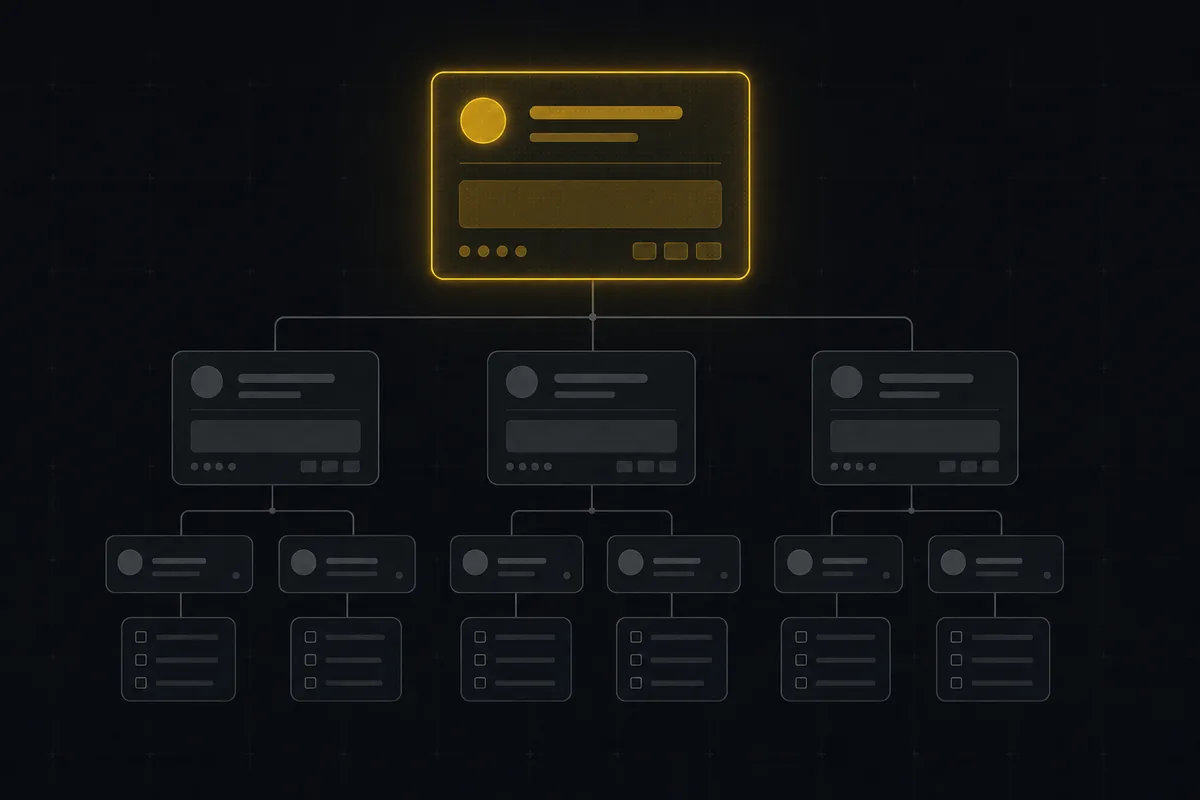
You shipped a feature last week. It touched the upload flow, the settings page, and two API routes, so you made a ticket for each part. Eight tickets later, they are scattered across the backlog like loose change, and when someone asks "how's the attachments work going," nobody can answer without opening all eight and reading them.
That is the exact pain the epics stories tasks subtasks hierarchy in Utter is built to fix. But it only helps if you know which relationship does which job, and that is where most people get it wrong.
Utter gives you five issue types and two ways to connect them. That is the whole model. It is deliberately shallow, and by the end of this you will be able to group related work under an epic, break a single ticket into a checklist of subtasks, read the progress at a glance, and climb back up the chain without losing your place. You will also know the handful of things the model refuses to do, so you do not fight it.
The problem: five types, two relationships, one place people get lost
Here is the mess we are fixing. You have a flat pile of tickets. Some are big ("Attachments upload"), some are small ("Add the presigned PUT endpoint"), some are bugs ("Progress bar sticks at 99%"), and no visible line connects any of them. Everything sits at the same level. The board shows twenty cards and not one of them tells you which belong together.
Utter has exactly five issue types: epic, story, task, bug, and subtask. That is the complete list. There is no "feature" type, no "initiative," no custom hierarchy levels you can invent. Five.
And the entire hierarchy rests on two relationships, which are independent of each other:
- Subtask to parent (stored as
parent_id). A subtask points at exactly one parent issue. - Any non-epic to epic (stored as
epic_id). A story, task, or bug can point at one epic that groups it.
That is it. Two links. They live in two separate database columns and they never merge into a single chain. Once you internalize that these are two different tools for two different jobs, the whole thing clicks. Miss it, and you will spend your afternoon trying to force an "epic to story to subtask" tree that Utter was never designed to enforce.
This is flat grouping, not a deep tree. Keep that in your head as we go.
What each issue type is actually for
Types are not decoration. They tell everyone reading the board what kind of thing a ticket is, and they change what the issue can do. The one-screen version:
| Type | Job | Example from the WEB demo project |
|---|---|---|
| Epic | Container for a real initiative, groups other issues | "Timeline + Summary surfaces" |
| Story | User-facing slice of an epic | "Drag and drop a file onto an issue" |
| Task | Build work that is not itself user-facing | "Add the presigned PUT endpoint" |
| Bug | Something broken that needs fixing | "Progress bar sticks at 99%" |
| Subtask | Checklist step inside one of the above | "Write the migration" |
Here is how I actually use each one.
Epic. A big body of work that takes more than one ticket to finish. "Attachments upload" is an epic. "Reporting" is an epic. An epic is a container for related work, and it is the only type that groups other issues. If you can describe a chunk of work as a project-within-the-project, it is probably an epic. Do not spin up epics for small things. One epic per real initiative is the right density.
Story. A user-facing slice of an epic. Something a person will notice when it ships. "Drag and drop a file onto an issue" is a story. "See an upload progress bar" is a story. Stories are how you cut an epic into shippable pieces that each mean something to a user.
Task. Build work that is not, by itself, user-facing. "Add the presigned PUT endpoint" is a task. "Wire the R2 CORS allowlist" is a task. Tasks are the engineering steps behind a story. Sometimes a task stands alone with no story or epic above it, and that is fine.
Bug. Something is broken and needs fixing. "Progress bar sticks at 99%" is a bug. Bugs behave like tasks structurally. They can sit under an epic, they can hold subtasks. The type just tells everyone this is a defect, not new work.
Subtask. A checklist step inside one of the above. Not a standalone unit of work. A step. "Write the migration," "add the test," "update the docs" are subtasks of a task or story. A subtask exists only in service of its parent.
If you are unsure which type a new piece of work should be, this is the decision in practice:
flowchart TD
    A[New piece of work] --> B{Bigger than one ticket}
    B -->|yes| C[Epic]
    B -->|no| D{A step inside an existing ticket}
    D -->|yes| E[Subtask on that parent]
    D -->|no| F{Something broken}
    F -->|yes| G[Bug]
    F -->|no| H{Users will notice it ship}
    H -->|yes| I[Story]
    H -->|no| J[Task]
Now the part that surprises people. When you open the New issue dialog, you can only pick four of the five types: Task, Story, Bug, and Epic. There is no Subtask option in that dialog, on purpose. A subtask is born from a parent, not created loose. You make one from inside the ticket it belongs to, which we will do in a minute. The reasoning is simple: a subtask with no parent is a contradiction, so Utter never gives you a way to create one adrift.
How the hierarchy really links: epic_id vs parent_id
This is the load-bearing section. Read it twice if you need to, because everything else depends on it.
Two relationships, two columns, two different jobs:
epic_idgroups a story, task, or bug under an epic. This is a flat grouping. The story does not become a child of the epic in a nesting sense. It gets tagged as belonging to that epic. Think of it as a folder label, not a branch on a tree.parent_idpoints a subtask at its one parent. This is the parent-child link, and it is what makes something a subtask in the first place.
The whole model fits in one picture:
flowchart TD
    S[Story] -->|epic_id| E[Epic]
    T[Task] -->|epic_id| E
    B[Bug] -->|epic_id| E
    SB[Subtask] -->|parent_id| S
These two fields are indexed separately in the database (issues_epic_idx and issues_parent_idx) and they never collapse into each other. A story under an epic has an epic_id and a null parent_id. A subtask under that story has a parent_id and (usually) a null epic_id. Different columns, different meanings.
Here is the misconception I want to kill right now. Utter does not enforce an "epic to story to subtask" chain as one rigid tree. A subtask does not automatically inherit its grandparent's epic, and you should not model your work as if there is a single deep enforced hierarchy. What you actually have is two independent links you use as needed.
One more thing that trips people up. A subtask's parent can be a story, a task, a bug, or even an epic. The parent_id link does not care about the parent's type (with one exception we will cover in the rules section). So "epic with direct subtasks" is a legal shape. It is just usually not the shape you want, because subtasks are for checklist steps and epics are for big grouping. But the model allows it, and it will not stop you.
Group a new story or task under an epic
Let's do the grouping first, because it is the more common daily move. Say you are building out the Reporting epic and you need a story for the new "Timeline + Summary tab."
Click New issue. In the dialog, pick your Work type: Task, Story, Bug, or Epic. For our example, pick Story. Now look for the Parent epic picker. It shows for every non-epic type (epics cannot go under an epic, so the picker hides the moment Work type is Epic). Open it, and it lists the project's existing epics. You would pick "Reporting" here.
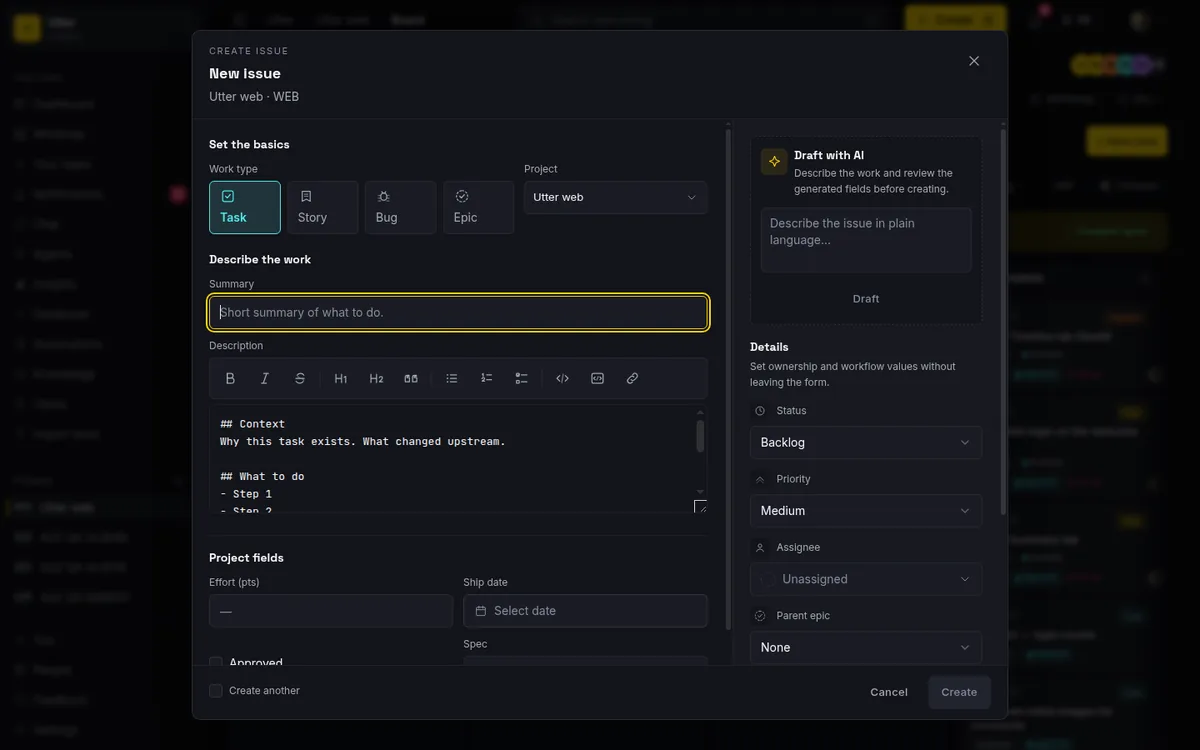
A few things worth knowing about this picker. It lists non-deleted, non-archived epics from the current project, capped at 200. If your project has no epics yet, you see a No epics yet state instead of a list, which is your cue to create the epic first and come back to file work under it. The default, when you pick nothing, is None, meaning the issue belongs to no epic.
Here is the critical part, and it ties straight back to the previous section. The Parent epic picker writes epic_id. It does not write parent_id, and it does not make your new story a subtask. Your "Timeline + Summary tab" story stays a story. It just now carries a label saying it belongs to the Reporting epic. Grouping under an epic and parenting a subtask are two separate operations, and this dialog does the first one only. If you came here hoping to create a subtask, wrong place. That is the Subtasks card, next.
The same grouping works over the REST API. The create endpoint takes epic as a plain KEY-NUM string (the key needs the issues:write scope):
curl -X POST "https://utter.ae/api/v1/workspaces/utter/projects/WEB/issues" \
  -H "Authorization: Bearer utp_live_a1b2..." \
  -H "Content-Type: application/json" \
  -d '{"type": "story", "title": "Timeline + Summary tab", "epic": "WEB-1"}'
const res = await fetch(
"https://utter.ae/api/v1/workspaces/utter/projects/WEB/issues",
{
method: "POST",
headers: {
Authorization: "Bearer utp_live_a1b2...",
"Content-Type": "application/json",
},
body: JSON.stringify({
type: "story",
title: "Timeline + Summary tab",
epic: "WEB-1",
}),
},
);
const { data } = await res.json();import requests
res = requests.post(
"https://utter.ae/api/v1/workspaces/utter/projects/WEB/issues",
headers={"Authorization": "Bearer utp_live_a1b2..."},
json={"type": "story", "title": "Timeline + Summary tab", "epic": "WEB-1"},
)
data = res.json()["data"]A successful create returns 201 with the new issue, and you can see both link columns sitting side by side in the response (trimmed here):
{
  "data": {
    "key": "WEB-31",
    "type": "story",
    "title": "Timeline + Summary tab",
    "status": "backlog",
    "parent_id": null,
    "epic_id": "0197a3c2-...",
    "url": "https://utter.ae/w/utter/p/web/WEB-31"
  }
}
epic_id is set, parent_id is null. A story under an epic, exactly as the picker would have made it.
For a refresher on the create dialog itself (templates, assignees, the rest of the fields), see how to create an issue.
Break an issue into subtasks from the Subtasks card
Now the other relationship. Open any issue that is not itself a subtask, and scroll its detail page to the Subtasks card. This is where subtasks are born.
If the issue has none yet, you see a dashed placeholder and No subtasks yet. Click + Add subtask, and an inline row appears with a Subtask title... input and Add / Cancel buttons. Type a title (up to 255 characters), then press Enter or click Add to create it. Change your mind mid-type? Press Escape and the draft clears. A Subtask added. toast confirms each one landed.
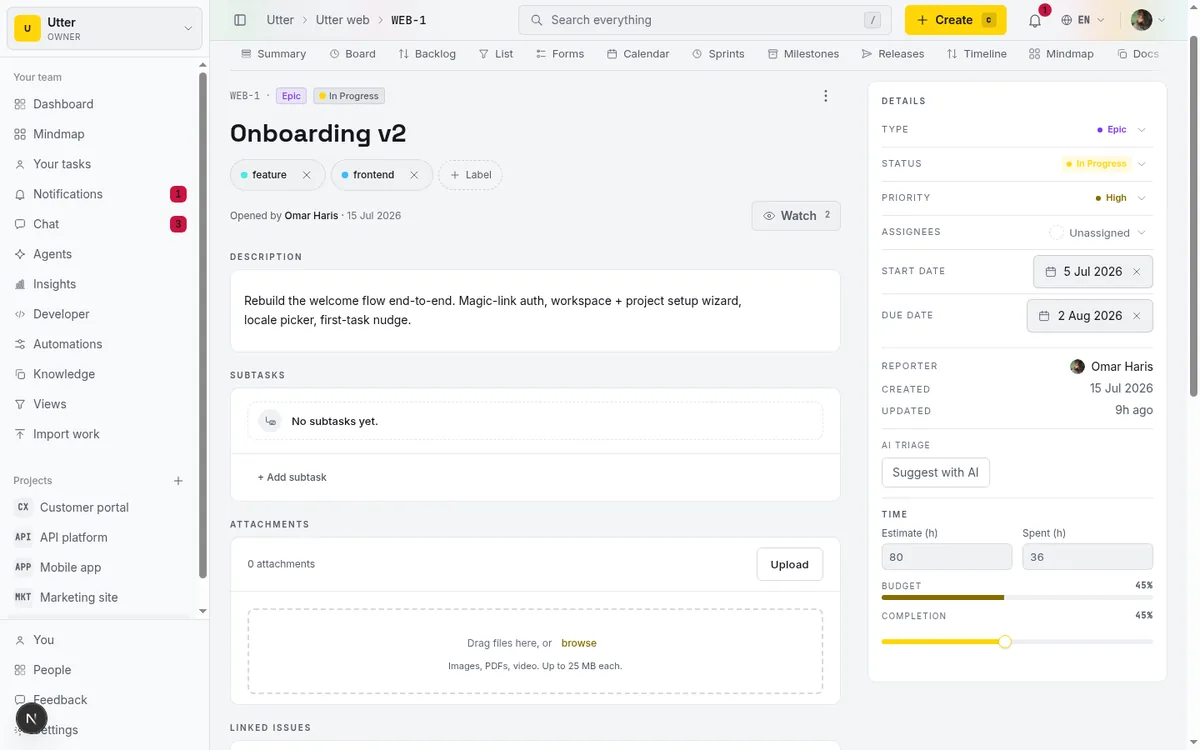
Under the hood this calls createSubtask, a thin wrapper over the normal issue-create logic that sets the type to subtask and stamps the current issue as the parent_id. So a subtask is a real issue with its own key, its own detail page, its own everything. It is just typed as a subtask and pointed at its parent. That is why subtasks are missing from the New issue dialog: the only correct place to make one is from the parent that will own it, and this card is that place.
Over the API, the same shape is type: "subtask" plus parent as a KEY-NUM string:
curl -X POST "https://utter.ae/api/v1/workspaces/utter/projects/WEB/issues" \
  -H "Authorization: Bearer utp_live_a1b2..." \
  -H "Content-Type: application/json" \
  -d '{"type": "subtask", "title": "Write the migration", "parent": "WEB-7"}'
Adding subtasks needs the same permission as creating any issue (issue.create), so if you are a viewer, the add affordance will not show.
The classic use is breaking a story into its real steps. Take the seeded "attachments upload" story in WEB, which ships with five subtasks. Instead of one vague story that sits half-done for a week, you get: write the migration, add the presigned intent action, wire the browser PUT, add the commit-and-verify step, write the test. Five concrete steps you can check off one at a time, all inside one ticket, so the board still shows one story card and not five loose ones.
Read the progress bar and check subtasks done
Once a card has subtasks, it earns a progress bar, and this is where the whole thing pays off.
The card header reads {done} of {total} done with a live percentage next to it, and a bar underneath. The bar fills yellow while there is work left and turns green the moment you hit 100%. So a story with three of five subtasks done shows "3 of 5 done," 60%, and a yellow bar. Finish the last two and it flips green. It is the fastest read on "how far along is this really" that Utter gives you.
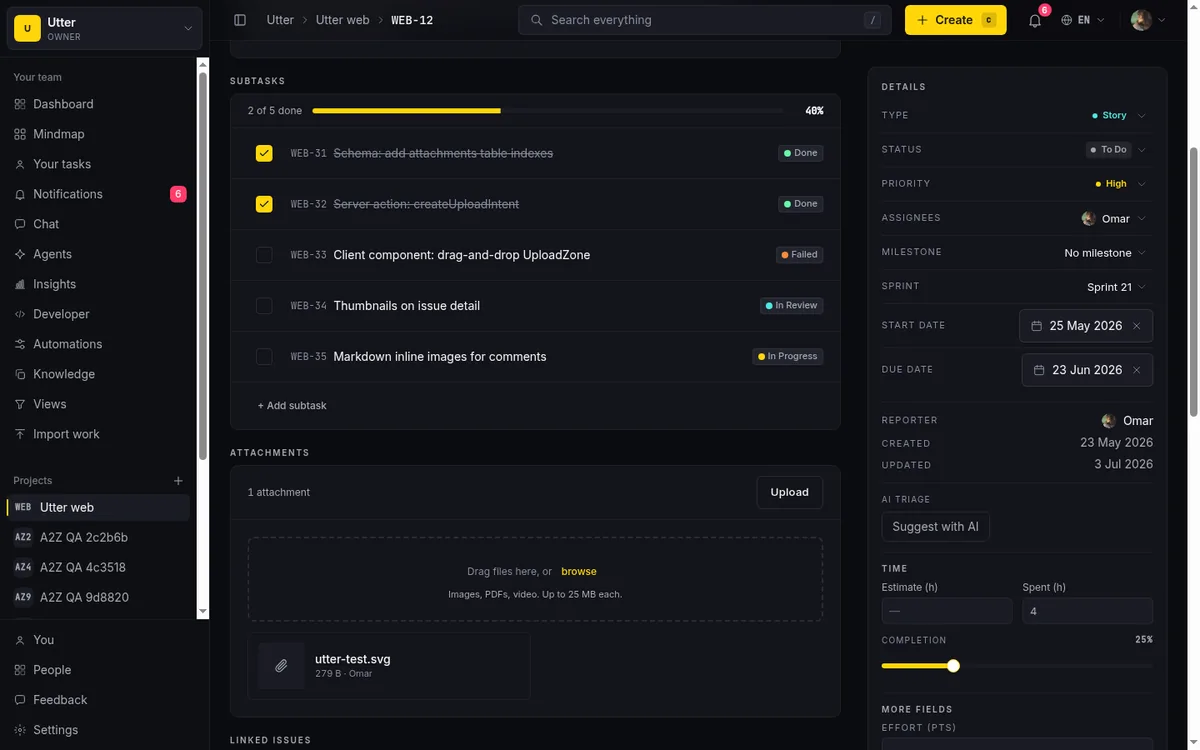
The math is simple: percent is round(done / total * 100). The definition of "done" has a sharp edge worth understanding, though. A subtask counts as done only when its status category is exactly done. Not "in review." Not "cancelled." Done. We come back to what that excludes in the limits section, because it matters more than it looks.
Checking things off is the satisfying part. Each subtask row has a checkbox:
- Check a subtask that is not done, and it moves to the
donecategory (the toggle reads Mark as done). - Uncheck a done subtask, and it moves to
todo(labelled Mark as not done). - The toggle is optimistic, so the bar updates the instant you click; if the server write fails, it reverts.
Watch one behavior: unchecking always lands the subtask on todo. It does not restore whatever in-progress or in-review column the subtask sat in before it was marked done. The checkbox is binary. Done or todo, nothing between.
Each row also links out. You get the monospace KEY-NUM key (like WEB-42), the title (struck through when done), and a status badge resolved from the project's custom board status. Click the key and you land on that subtask's own detail page. A subtask is never a dead line of text. It is a full issue you can assign, comment on, and track like any other.
Navigate up with the Epic and Parent context chips
You have built the hierarchy. Here is how it surfaces when you are three tickets deep and need to climb back out.
Open any issue's detail page and look at the header. If the issue has an epic_id, you see an Epic chip. If it has a parent_id, you see a Parent chip. Both are links, and both point up the chain.
This is the two-relationship model made visible. Standing on a subtask, the Parent chip takes you to the story or task that owns it. Standing on a story, the Epic chip takes you to the epic it belongs to. Because the two links are independent, an issue can show one chip, both, or neither. A story grouped under an epic shows Epic. A subtask shows Parent. A subtask whose parent story is itself under an epic could show both, depending on how it was created. Read the chips and you always know where you are and how to get back up. No breadcrumb hunting, no "which epic was this again."
The rules Utter enforces (and the four mistakes it blocks)
Utter guards the hierarchy so it cannot land in an incoherent state. Four containment rules are checked at create time, and they fire identically whether you create the issue in the UI or through the v1 API. You hit these as error messages if you try to break them:
- A subtask must have a parent. "Subtasks need a parent issue." You cannot create a subtask floating in space. (This is also why the New issue dialog has no Subtask option: there is no parent to attach it to.)
- Only a subtask may have a parent. "Only subtasks can have a parent. For stories under an epic, set epicId." This is the rule that keeps
epic_idandparent_idfrom getting confused. Want a story under an epic? Use the epic link, not the parent link. - A parent cannot itself be a subtask. "Parent cannot itself be a subtask." Subtasks are leaves. They do not get their own children, so you cannot point a new subtask at an existing subtask.
- An epic cannot be nested under another epic. "An epic cannot be nested under another epic." Epics are the top of the grouping. No epic-of-epics.
Over the API these come back as a 400 with a validation error envelope. Try to give a plain task a parent and you get:
{
  "error": {
    "code": "validation",
    "message": "Only subtasks can have a parent. For stories under an epic, set epic.",
    "details": { "field": "parent" }
  }
}
On top of the create-time rules, the edit path adds two guards. You cannot change an existing issue's type to subtask through editing ("Cannot change type to subtask here"), and you cannot re-type a subtask to something else without first detaching it from its parent ("Cannot change the type of a subtask"). These stop you sneaking an issue into an illegal shape after the fact.
None of these are arbitrary. They are the guardrails that keep the two-link model honest, so every subtask really has a parent and no epic ever ends up buried under another. Notice what is not on the list. No rule against a bug having subtasks (it can). No depth cap beyond epic-under-epic. No cross-type restriction past the four above. Do not invent constraints that are not there.
Limits worth knowing before you lean on this
The model is deliberately shallow, and being honest about where it stops saves you frustration later.
No arbitrary depth. Subtasks cannot have their own subtasks. The Subtasks card does not even render on a subtask's detail page. So there is no epic-to-story-to-subtask-to-sub-subtask tree. Two levels of grouping is the ceiling: an epic groups issues, and an issue holds subtasks. If you feel yourself wanting a third level, that is a signal to promote a subtask into a full story or task and put it under the epic instead.
The card shows at most 50 subtasks. Beyond 50 it stops listing inline and shows "Showing the first {n} subtasks." with a link to view all in the list view. If one ticket has more than fifty subtasks, that is usually a ticket that should have been an epic with several stories under it.
"Done" is exact, and cancelled does not count. The progress bar counts a subtask as done only when its status category is precisely done. A cancelled subtask still shows, with its badge, but it counts as not done for the percentage. The practical consequence: a parent can read under 100% even when there is genuinely no open work left, because a cancelled subtask is dragging the number down. Do not read the bar as "everything is resolved." Read it as "everything reached the done category." If you want a clean 100%, you may need to actually mark the abandoned subtask done rather than cancelled, or just accept the number.
The checkbox is binary. As covered above, unchecking a done subtask always sends it to todo, never back to whatever in-progress column it was in. If you need finer control over a subtask's status, open the subtask itself and move it on the board.
No reparenting, no convert-to-subtask. There is no drag-to-reparent, no "move this subtask to a different parent," and no way to turn an existing task into a subtask. The Subtasks card only creates new subtasks and toggles them done. If you filed a task by mistake and wanted it as a subtask, the honest path today is to create the subtask fresh under the right parent and close or delete the original. Not elegant, but it is what exists.
A workflow that holds up
Here is the playbook I would hand a new teammate.
One epic per real initiative. "Attachments upload," "Reporting," "Billing v2." Not one epic per week, not one per person. One per genuine body of work. Create the epic first so the Parent epic picker has something to point at.
File stories, tasks, and bugs under that epic using the Parent epic picker as you create them. A story for each user-facing slice, tasks for the build steps that nobody sees, bugs as they surface. This is your grouping layer, and it is what makes the epic a useful lens weeks later when you need to answer "how's the attachments work going" in one click.
Use subtasks only for genuine checklist steps inside a single ticket. "Write the migration, add the test, update the docs." If a subtask starts to feel like its own unit of work that someone would assign and track on its own, stop. Promote it to a task or story under the epic instead. The tell is dead simple: if you want to give a subtask its own subtask, it should not have been a subtask.
Day to day, this pairs with the rest of the product cleanly. The kanban board shows your stories and tasks moving across columns while their subtasks track quietly inside. The backlog is where you rank the stories and tasks under each epic before they get pulled into work. And when the structure gets big enough that a flat list stops helping, the mindmap draws the whole tree so you can see the shape of it at once.
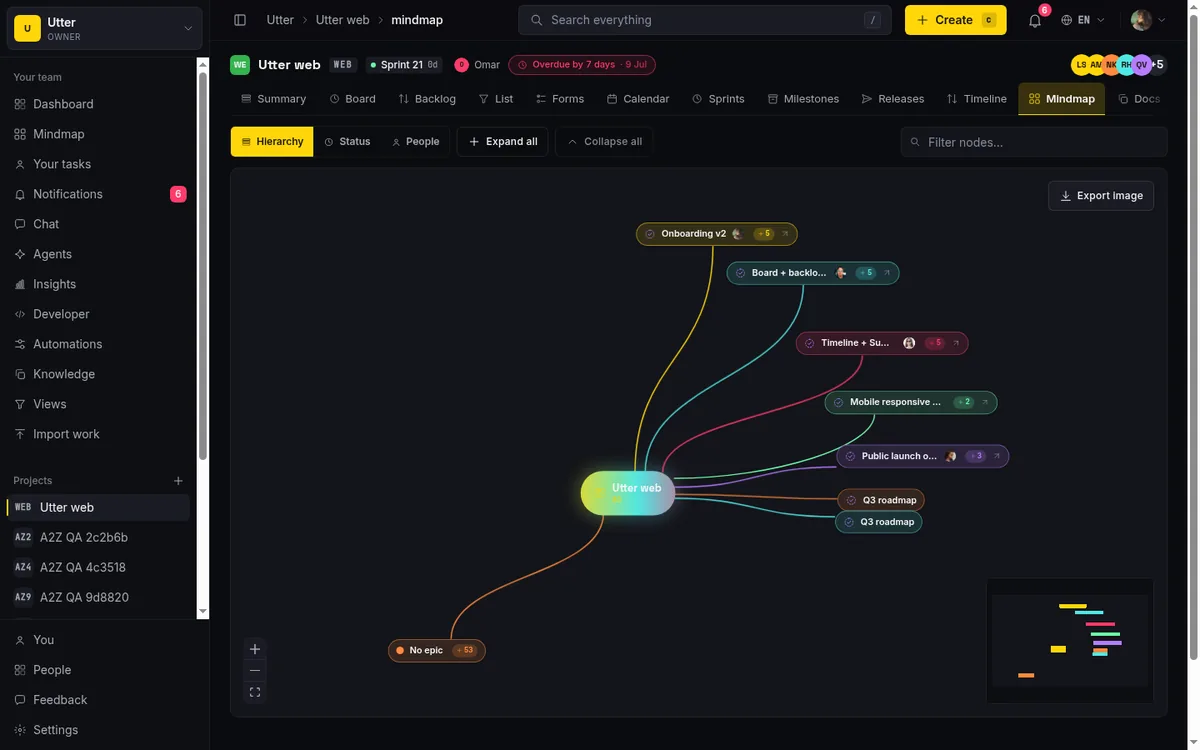
Get the two relationships right, epic grouping for related work and subtasks for checklist steps, and eight loose tickets become one epic with three clear stories, each with its own steps ticking toward green. That is the whole point of the epics stories tasks subtasks hierarchy. Not more structure for its own sake, but exactly enough that anyone can look at the board and know what belongs to what.
Open your busiest project, find the initiative that is currently a pile of loose tickets, make it an epic, and file the rest underneath it.
Frequently asked questions
What is the difference between an epic, a story, a task, and a bug in Utter?
An epic is a big body of work that groups other issues (like "Attachments upload"). A story is a user-facing slice of that work, a task is build work that is not itself user-facing, and a bug is something broken that needs fixing. Structurally, stories, tasks, and bugs sit at the same level and can be grouped under an epic; the type just says what kind of work it is. The fifth type, subtask, is a checklist step inside one of these.
How do I add a subtask to an issue?
Open the issue's detail page (it must not itself be a subtask), scroll to the Subtasks card, and click "+ Add subtask." Type a title up to 255 characters, then press Enter or click Add, and a "Subtask added." toast confirms it. This is the only place subtasks are created; they cannot be made from the New issue dialog.
Why is there no Subtask option in the New issue dialog?
Because a subtask must have a parent, and the New issue dialog creates loose issues. A subtask with no parent is not a valid state in Utter, so the only place to create one is from inside the parent it belongs to, via that parent's Subtasks card. The dialog offers the four types that can exist independently: Task, Story, Bug, and Epic.
Does putting an issue under a Parent epic make it a subtask?
No. The Parent epic picker writes the epic_id field, which groups the issue under an epic. It does not touch parent_id and it does not change the issue's type, so your story stays a story and just belongs to that epic. Epic grouping and subtask parenting are two separate relationships.
Can a subtask have its own subtasks?
No. Subtasks are the bottom of the hierarchy, and the Subtasks card does not even appear on a subtask's detail page. If you need another level, promote the subtask into a full task or story and put it under the epic instead.
How is the subtask progress bar calculated, and do cancelled subtasks count?
The percentage is round(done / total * 100), and a subtask counts toward "done" only when its status category is exactly done. Cancelled subtasks are shown with their badge but do not count as done, so a parent can read under 100% even when no open work remains. The bar reflects "reached the done category," not "all resolved."
Can I convert an existing task into a subtask, or move a subtask to a different parent?
No. There is no convert-to-subtask flow and no reparenting; the edit path explicitly blocks changing an issue's type to subtask and blocks re-typing a subtask without detaching it first. To fix a mis-filed issue, create the subtask fresh under the correct parent and close the original.
How many subtasks can one issue show, and what happens beyond that?
The Subtasks card lists up to 50 subtasks inline. Beyond that it shows "Showing the first {n} subtasks." with a link to view all in the list view. If a single ticket is accumulating dozens of subtasks, that is usually a sign it should be an epic with several stories under it.
Related reading
How to create an issue
Learn how to create an issue in Utter three ways, pick the right type, fill the dialog, roll up to an epic, and make subtasks. With the real limits named.
July 15, 2026 · 16 min read
See your whole project as a mind map (and when it beats a nested list)
A nested list hides how work relates. A mind map shows it. When a map of your epics and stories helps, when a list is better, and how Utter's does it.
July 5, 2026 · 7 min read
How to use a kanban board: a complete guide with a real example
Learn how to use a kanban board in Utter: read cards, drag tasks between columns, add and reorder custom columns, set WIP limits, filter, and save views.
July 15, 2026 · 20 min read
How to filter and sort issues
Filter issues by assignee, label, and status in Utter's list view, then sort, group, save a view, and share the exact filtered list as a URL.
July 15, 2026 · 16 min read
How to set up automations
Set up project management automation rules in Utter: the when/if/then model, six triggers, conditions, nine actions, run history, plan caps, and real limits.
July 15, 2026 · 18 min read

Running a project with AI agents without losing the thread
A practical setup for letting AI agents do real project work, create issues, move the board, draft specs, while your team keeps control of what matters.
July 11, 2026 · 5 min read
How to plan releases and milestones
Plan software releases and milestones in Utter: create releases and milestones, attach issues, read the progress meter, draft AI release notes, and set permissions.
July 15, 2026 · 14 min read
Custom workflow statuses
Build custom Jira-style board columns in Utter and enforce status transition rules across the board, API, bulk edits, and automations. With the honest limits.
July 15, 2026 · 18 min read
A bug tracking workflow that runs from report to fix
Bug tracking workflow that runs report to fix in one tool: public intake form, AI triage, a board review gate, GitHub commit links, and auto-shipped releases.
July 16, 2026 · 12 min read
Auto-triage new issues with AI: a setup that actually assigns, labels, and prioritizes
How to set up AI issue triage automation that classifies severity, labels, and routes new bugs and requests, with an honest line on what to let AI decide.
May 27, 2026 · 8 min read
أضف تعليقًا
ابدأ النقاش.