
Onboard an AI agent like a new hire: identity, access, and a first task
Most advice about "deploying an agent" skips the part your HR team already got right years ago. You do not hand a new hire root access and a vague mandate on day one. You give them a name badge, a login with the right permissions, one small task you can check, a review after they do it, and a clean way to end things if it does not work out. An AI agent deserves the same lifecycle, for the same reasons.
We built the agent side of Utter around that idea, so this is not a metaphor we are stretching. Identity, access, a first task, a review, an offboarding path. Each step maps to something real in the product. Here is the whole arc.
Give it an identity, not a token
The first mistake people make is treating an agent as a script holding a shared password. That agent shows up in the audit trail as "someone with the API key," which is nobody. When it files a bad ticket, you cannot tell it apart from the human whose credentials it borrowed.
In Utter, an agent is a real workspace member. You open the Agent Hub, click Connect agent, pick a provider (Claude Code, Codex, Cursor, Copilot, Gemini, and a few others, or a generic custom one), and give it a name between 2 and 60 characters. That is the equivalent of the badge and the desk.
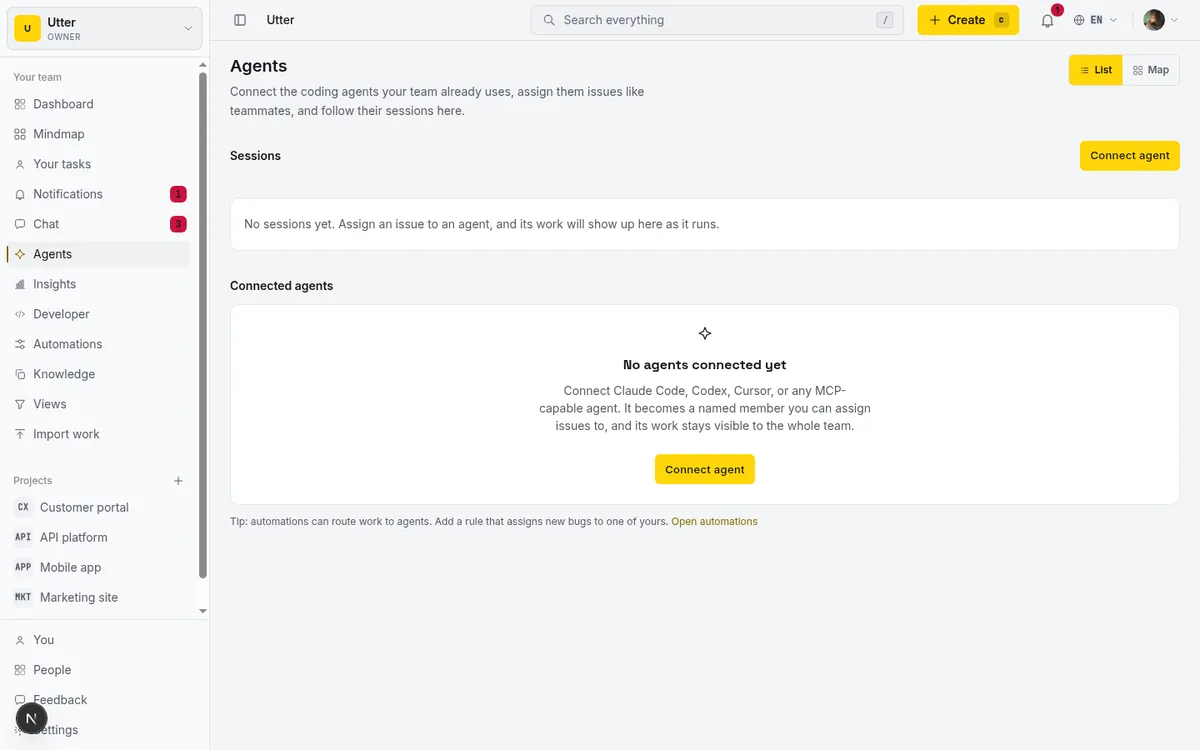
From then on the agent has a face: it shows up in the assignee picker under an Agents section with its own badge, it appears in activity, and it can be assigned an issue exactly the way a person can. You can connect up to 25 agents per workspace, and none of them count as a paid seat.
Who gets to do this matters, same as hiring. Owners, admins, and members can connect an agent; viewers and guests cannot. Owners and admins can manage any agent in the workspace, and a plain member manages the agents they personally own. So the permission to bring on an agent is itself scoped, which is the point.
Give it the right access, read broad and write narrow
A new hire gets read access to a lot and write access to very little on the first day. That instinct is correct, and it is exactly how you should provision an agent.
When you connect one, Utter mints a one-time API key, shown once, scoped to member-level write. Read broadly, write narrowly is the whole philosophy. The write scope grants member-level writes and nothing more; admin, which grants everything, is deliberately kept out of plain write so you cannot hand it over by accident. There are agent-specific scopes too (agents:read and agents:write), and if your client prefers it, OAuth 2.0 with PKCE and dynamic client registration works as well.
One key per agent. This is the part people cut corners on, and it is the part that saves you later. A separate key means every action the agent takes is attributed to that agent alone, and when you want it gone you revoke one key without disturbing anyone else. Sharing a key across two agents is the digital version of two employees badging in on one card. Do not do it.
The agent then reaches the product through whichever door fits it:
- A first-party MCP server at
/api/mcp/v1, where one tool is generated per REST operation and the tools are filtered by the key's scopes, so a read-only key literally cannot see the write tools. - The REST API underneath, better for scripts and cron jobs.
- An agent skill for Claude Code or Codex, which ships a per-workspace file listing your projects, labels, members, and custom fields so the agent starts grounded instead of guessing.

Hooking Claude Code up to the MCP server is one command:
claude mcp add utter-product \
  https://utter.ae/api/mcp/v1 \
  --header "Authorization: Bearer $UTTER_API_KEY"
The skill install is the same shape, a single curl. Here is the Codex variant:
mkdir -p ~/.codex/skills/utter-product
curl -fsSL "https://utter.ae/api/skill/utter-product.skill.md?workspace=acme" \
  -H "Authorization: Bearer $UTTER_API_KEY" \
  -o ~/.codex/skills/utter-product/SKILL.md
Expose all three doors and let each agent use what suits it.
Restrict what it is allowed to change
A scope answers "can this agent write issues at all?" The next question a good manager asks is narrower: "which fields is it allowed to touch?" A triage agent should re-label and re-prioritise, but it has no business rewriting a title or reassigning tickets to people. Utter has a per-agent field policy for exactly that.
Each agent's profile carries an allowlist of the issue fields its key may write: title, description, status, priority, assignee, labels, milestone, sprint, release, estimate, spent, completion, start_at, due_at. Leave the policy empty and the agent can write any field, the same as a person. Tick a subset and that is all it can change. You set it in the Agent Hub, per agent.
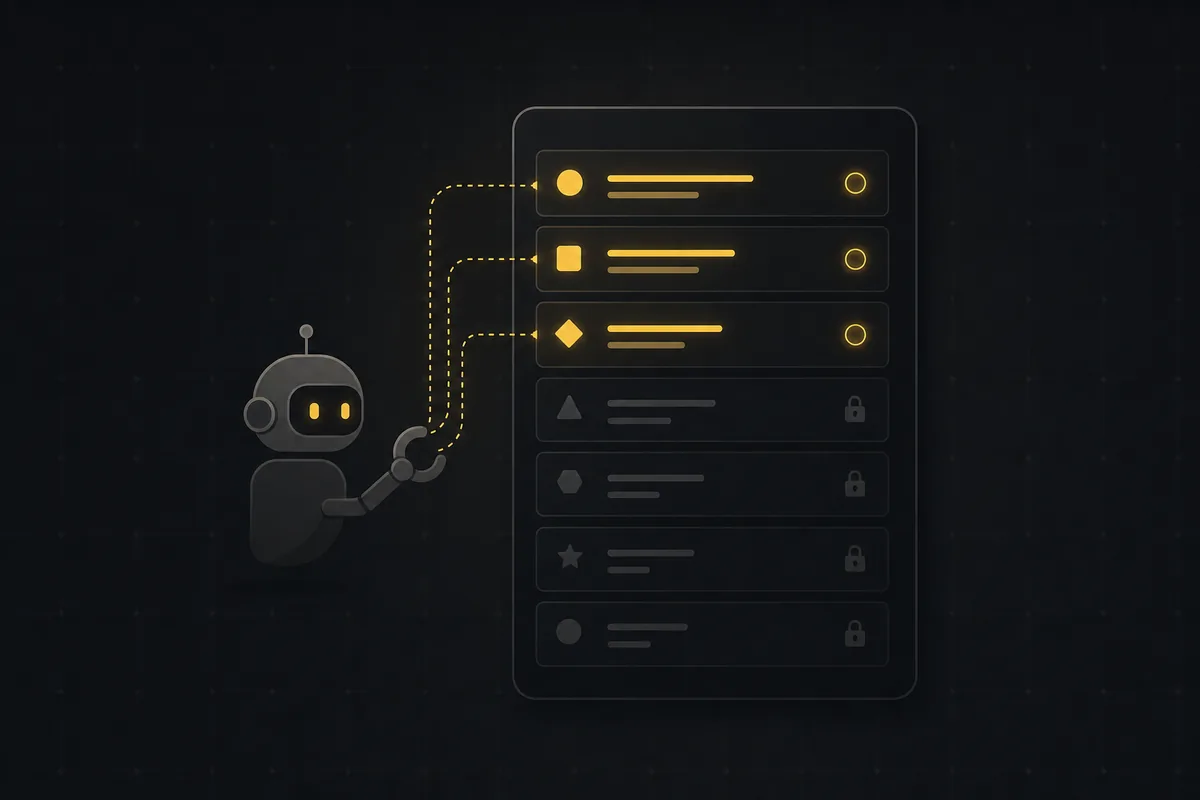
The enforcement is not a UI courtesy. It sits at the single write choke point every agent request passes through, REST, MCP tool call, and the transition and time-tracking endpoints alike, so there is no back door. If a policy-limited agent tries to write a field outside its allowlist, the request is refused with a 403 that names the field it was not allowed to touch. Two honest limits: the policy is per-field, not per-value (you can allow "status" but not pin it to one column), and it governs writes to existing issue fields, not creating or deleting issues, which stay under scopes and role. It only ever applies to agents; humans are never gated by it.
Give it the context to do the job
A new hire who cannot find the wiki writes confident, wrong tickets. An agent is no different, so give it something to read. The MCP server and REST API expose your docs the same way they expose issues: a docs:read scope lets an agent list and open the knowledge base and project docs, so it can ground an answer in what your team already wrote down instead of guessing from the ticket title. Pair that with the agent skill, whose per-workspace file already lists your projects, labels, members, and custom fields, and the agent starts a task oriented rather than cold. This is the part that separates an agent that files useful tickets from one that hallucinates them: the model matters less than whether it can see your actual context.
Give it one small first task
You would not put a new hire on the quarterly board close in their first hour. You would give them something narrow and checkable, and you would watch.
So assign the agent a single issue. Not a project, not a queue, one ticket, the same way you assign work to a person. The agent picks it up and opens a session, which is how it reports what it is doing. Starting one is a single POST:
curl -X POST "https://utter.ae/api/v1/workspaces/acme/agent-sessions" \
  -H "Authorization: Bearer $UTTER_API_KEY" \
  -H "Content-Type: application/json" \
  -d '{
    "title": "Fix flaky login test",
    "issue_key": "WEB-12",
    "note": "picked up, reproducing locally"
  }'
const res = await fetch(
"https://utter.ae/api/v1/workspaces/acme/agent-sessions",
{
method: "POST",
headers: {
Authorization: `Bearer ${process.env.UTTER_API_KEY}`,
"Content-Type": "application/json",
},
body: JSON.stringify({
title: "Fix flaky login test",
issue_key: "WEB-12",
note: "picked up, reproducing locally",
}),
},
);
const session = await res.json();import os
import requests
res = requests.post(
"https://utter.ae/api/v1/workspaces/acme/agent-sessions",
headers={"Authorization": f"Bearer {os.environ['UTTER_API_KEY']}"},
json={
"title": "Fix flaky login test",
"issue_key": "WEB-12",
"note": "picked up, reproducing locally",
},
)
session = res.json()A session has a state: running, needs input, review, done, failed, or cancelled. It carries a title, a note (a plain status line like "blocked on env var"), and an external URL, which in practice is usually a pull request link. It can be anchored to a specific issue like WEB-12 and its project, or run at the workspace level.
stateDiagram-v2
    [*] --> running
    running --> needs_input: agent asks
    needs_input --> running: human answers
    running --> review: work ready
    review --> done
    running --> failed
    running --> cancelled
    done --> [*]
    failed --> [*]
    cancelled --> [*]
The agent updates its session with a PATCH to the same resource. Every PATCH doubles as a heartbeat, and moving to a terminal state stamps the end time:
curl -X PATCH "https://utter.ae/api/v1/workspaces/acme/agent-sessions/$SESSION_ID" \
  -H "Authorization: Bearer $UTTER_API_KEY" \
  -H "Content-Type: application/json" \
  -d '{
    "state": "review",
    "external_url": "https://github.com/acme/web/pull/311"
  }'
Those sessions surface on the Agent Hub and on the issue itself, so the work is visible where the rest of the team already looks.
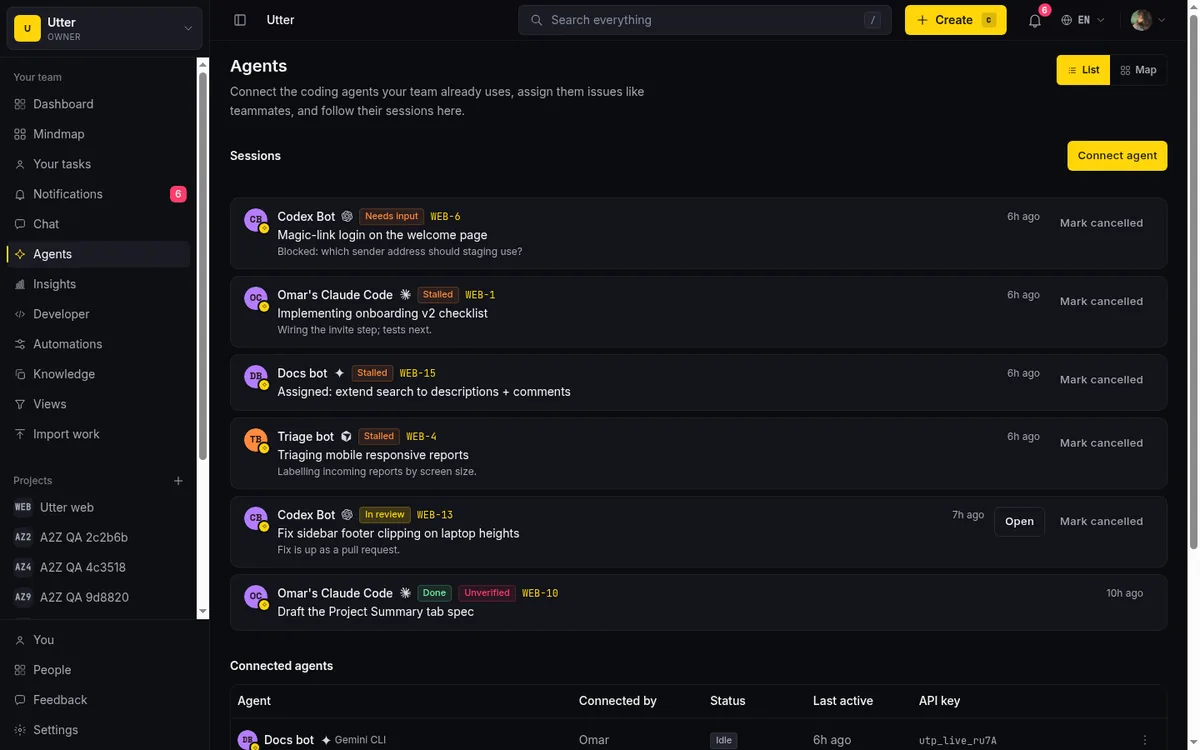
Two honest caveats belong here. There is no real-time push to agents in Utter today; they poll, checking their assigned column or their open sessions on an interval. And a session that runs 30 minutes with no heartbeat is shown as "stalled," which is a signal to go look, not proof that anything broke. Treat stalled the way you would treat a new hire who has gone quiet: check in, do not assume the worst.
You do get told when it matters. When a session moves into needs input or done, Utter notifies the agent's owner plus the issue's reporter, assignee, and watchers. Those notifications are in-app only, no email, which keeps a busy agent from turning into an inbox problem.
Review the work, because the trail is right there
The review is the whole reason the identity step mattered. Every comment, status change, and issue update the agent made is recorded in the issue's activity history as that agent. Not as a system event, not as an anonymous key. You read the ticket the way you would read a junior colleague's first piece of work, and the attribution tells you exactly who did what.
The session record backs that up. You can see the title it gave the work, the note it left, and the pull request it linked, so the review is grounded in artifacts rather than vibes. If the agent proposed a change that carries real risk, this is where a human makes the call. Agents propose; people approve the high-stakes moves. That split is not a limitation we expect to remove; it is the design.
Utter also flags the gap between what an agent says and what it did. When a session claims review or done, is anchored to an issue, and carries no pull request link, the hub reconciles it against the trail: if the agent left no attributed comment or change on that issue during the session, the session is marked unverified. It is the tell of a session that reported success without leaving a mark. Read it as a prompt to look, not a verdict, since it proves an attributed change exists, not that the change was correct. A new hire who says "done" with nothing to show gets the same follow-up question.
If the first task goes well, widen the leash. Give it a second narrow job, then a queue, then a standing responsibility. Trust is earned one checkable task at a time, with an agent exactly as with a person. The mistake is skipping ahead because the model clearly can do more. It can. The question was never capability.
The whole loop, in one picture:
flowchart TD
    C["Connect: a named agent, a real member"] --> K["Scoped key: read broad, write narrow"]
    K --> T["One small, checkable task"]
    T --> R["Review the attributed trail"]
    R -->|"went well"| W["Widen the leash: next job, then a queue"]
    W --> T
    R -->|"not working out"| O["Disconnect: key revoked, history stays"]
Keep a clean offboarding path
Every good onboarding process has an exit that is just as clean, and this is where the "agent as real member" model pays off again. When you disconnect an agent, its API key is revoked and its membership is removed. It stops being able to act immediately.
What does not vanish is the record. Its past comments, status changes, and updates stay attributed to it in the activity history, exactly as a departed employee's work stays in the log under their name. You get a full stop on new activity without punching a hole in the audit trail. That is the correct behavior, and it is a deliberate choice: an agent you no longer run should not become an unexplained gap in six months of project history.
What to be honest about
None of this is frictionless, and pretending otherwise would be the AI-demo version of the truth. The rough edges today:
- The MCP spec is young and client support across tools is uneven.
- The field policy is per-field but not per-value, so you can say "this agent may change status" but not "only to In review." It also covers issue fields, not creating or deleting issues, which are governed by scopes and role.
- Grounding quality depends on good search and fresh docs, not just a strong model, so if your workspace context is stale the agent will confidently answer the wrong question.
These are real, and they are the kind of thing you plan around rather than wish away.
But the shape holds. You already know how to bring someone onto a team without handing them the keys to everything on day one. Do that with your agents: a real identity, access that starts narrow, one task you can check, a review with the trail intact, and an exit that keeps the record. Any agent, any model, one team, sharing the same board as the humans.
If you want to try it, open the Agent Hub, connect one agent with a scoped key, and assign it a single ticket this afternoon. Judge it the way you would judge a new hire after their first task.
Frequently asked questions
How do you onboard an AI agent?
Like a new hire: give it a real identity, access that starts narrow, one small task you can check, a review of the work, and a clean way to end things if it does not work out. You would not hand a person root access and a vague mandate on day one, and an agent deserves the same lifecycle for the same reasons.
Why should each AI agent have its own identity and API key?
A script holding a shared password shows up in the audit trail as "someone with the API key", which is nobody. A named agent with its own key means every action is attributed to that agent alone, and you can revoke one key without disturbing anyone else; sharing a key across two agents is the digital version of two employees badging in on one card.
What should an AI agent's first task be?
A single issue, not a project or a queue: give it something narrow and checkable and watch its session. If the first task goes well, widen the leash, a second narrow job, then a queue, then a standing responsibility. Trust is earned one checkable task at a time.
Can I limit which issue fields an AI agent is allowed to change?
Yes. Each agent's profile carries a writable-field allowlist you set in the Agent Hub, covering fields like status, priority, assignee, and labels. Leave it empty and the agent can write any field; tick a subset and that is all it can touch. Enforcement sits at the single write choke point every agent request passes through (REST, MCP, and the transition and time endpoints), so a write outside the allowlist is refused with a 403 that names the field. It applies to agents only, never to humans.
How do I give an AI agent the context to do a task well?
Give it something to read. A key with the docs:read scope lets an agent list and open your knowledge base and project docs over the API, so it can ground answers in what your team wrote down. Pair that with the agent skill, whose per-workspace file already lists your projects, labels, members, and custom fields. Grounding quality depends on fresh docs and good search, not just a strong model.
What happens when you disconnect an AI agent?
Its API key is revoked and its membership is removed, so it stops being able to act immediately. Its past comments, status changes, and updates stay attributed to it in the activity history, the way a departed employee's work stays in the log under their name, so you stop new activity without punching a hole in the audit trail.
Related reading
How to use AI agents in Utter: connect them, assign work, and follow their sessions
A start-to-finish walkthrough: connect an agent, scope its key, assign it issues, and watch its sessions, without giving up control of the board.
July 15, 2026 · 11 min read

How to manage a team of AI agents without losing track of what they're doing
Running several AI agents at once? The day-to-day of a fleet: a roster, live sessions, instant delegation, per-field permissions, and verified work.
July 15, 2026 · 16 min read
Let AI agents run your board over the REST API: authentication, scopes, and safe writes
A developer guide to giving an AI agent a scoped Utter API key so it can move cards and file issues without a big blast radius.
June 26, 2026 · 7 min read

Who decides what: setting decision rights between your team and your AI agents
A simple rule for AI governance: reversible, low-stakes moves are the agent's to make; irreversible or high-stakes ones need a human. How to draw the line.
July 15, 2026 · 7 min read

What is agentic project management? A plain-language guide with a working example
A copilot waits for your prompt. An agent acts on an event. Here is the perceive-plan-act-check loop explained, with one real end-to-end run inside Utter.
June 11, 2026 · 11 min read

Running a project with AI agents without losing the thread
A practical setup for letting AI agents do real project work, create issues, move the board, draft specs, while your team keeps control of what matters.
July 11, 2026 · 5 min read

AI agent governance for project teams: seven controls your tracker can enforce
Governance for AI agent teams is not a policy PDF. Seven controls your tracker can enforce, from identity to offboarding, and what tooling cannot fix.
July 15, 2026 · 10 min read

How to delegate work to an agent
Assign a task to an AI agent in Utter using the same assignee picker you use for people, and understand the pending session, claim flow, and real limits.
July 15, 2026 · 16 min read

Why we gave Utter an MCP server, and what it changes
What the Model Context Protocol is in plain terms, why a project tracker is a good fit for it, and how an agent picks up your workspace without any glue code.
July 11, 2026 · 5 min read
AI agent project management: the complete guide
How to run real projects with AI agents on the board: connecting them, assigning work, keeping review, what breaks, and how to pilot it in a week.
July 15, 2026 · 12 min read
أضف تعليقًا
ابدأ النقاش.