
Project management for small agencies (clients in, chaos out)

You run five client projects. Then eight. Then twelve, if the quarter is good. And somewhere in there, on a Tuesday, a client emails you three words that quietly break your project management tool: "Can I see?"
Because now you have to answer honestly. Option one: you send them a login that can browse every other client's project, your internal notes, the retainer you're annoyed about, the margins you'd never show them. Option two: you tell them sure, that's another seat, another $8 to $25 a month per person (as of July 2026 that's roughly the paid-seat range across the big tools), and by the way their CMO wants one too, and so does the brand manager who only ever opens it to nod. Client-safe project management for agencies is the actual requirement here, and most tools hand you a bad trade: locked down, or affordable, pick one.
An agency is the worst-case tenancy for a per-seat tool. Client contacts churn (the brand manager leaves, a new one arrives). They multiply (one project, four stakeholders). And most of them just want to watch. Paying a full editor seat for someone who logs in twice a month to check a status is how agencies end up either overpaying or, worse, sharing one shady shared login.
The thesis of this post: the four things an agency actually needs from a PM tool can all be free, and I'll show you exactly where each rival draws the line so you can trust the comparison instead of taking my word for it. Those four things are per-client isolation, free client access, free stakeholder viewers, and self-serve intake without accounts. Utter does all four on the free plan. The honest asterisks (project caps, storage, automation limits) get their own section near the end, because pretending there are none would make the rest less trustworthy.
What breaks when you put agency clients in a normal PM tool
The core problem is tenancy. You have one workspace and many clients, and a general-purpose PM tool was designed for one company with one team. Bolt clients onto that and you hit two failure modes.
The first is over-exposure. You invite the client in, and the tool's default sharing model lets them see more than their project. Other clients' work. Your internal planning. The stuff you write in comments when you assume only your team is reading. Even if nothing is secret, cross-client visibility inside your agency workspace is a professionalism problem: client A should not be able to infer that client B exists, let alone what you're charging them.
The second is the seat bill. Every client contact you add is a line item. Every read-only stakeholder is a line item. The client's project manager, their designer who wants to comment, their CMO who wants a dashboard, the account person on their side, all seats. A single mid-size client can add four or five people who, from a billing standpoint, cost the same as your senior engineer, and contribute a fraction of the editing.
So the four requirements fall out naturally:
- Isolation per client. Each client sees their project and nothing else.
- Cheap or free client editors. The people who actually collaborate should not each cost a full seat.
- Free viewers. The people who only watch should cost nothing.
- Intake without accounts. New requests should not require you to provision a login for a stranger.
The rest of this post walks each one, shows how Utter handles it, and states plainly what Jira, Asana, and monday.com do at the same spot (all figures as of July 2026).
Scoped projects: one client, one project, nothing else
Isolation in Utter is a scoped project. Set scoped = 1 on a project and it stops being visible workspace-wide. From that point, access is by explicit membership: only people who hold a project_members row for that project can open it. Owners and admins (that's you and your agency's leads) still see everything, because you need to. But members, viewers, and guests only see a scoped project if they were added to it by name.
This is the isolation boundary, and it's managed on the project's Access tab.
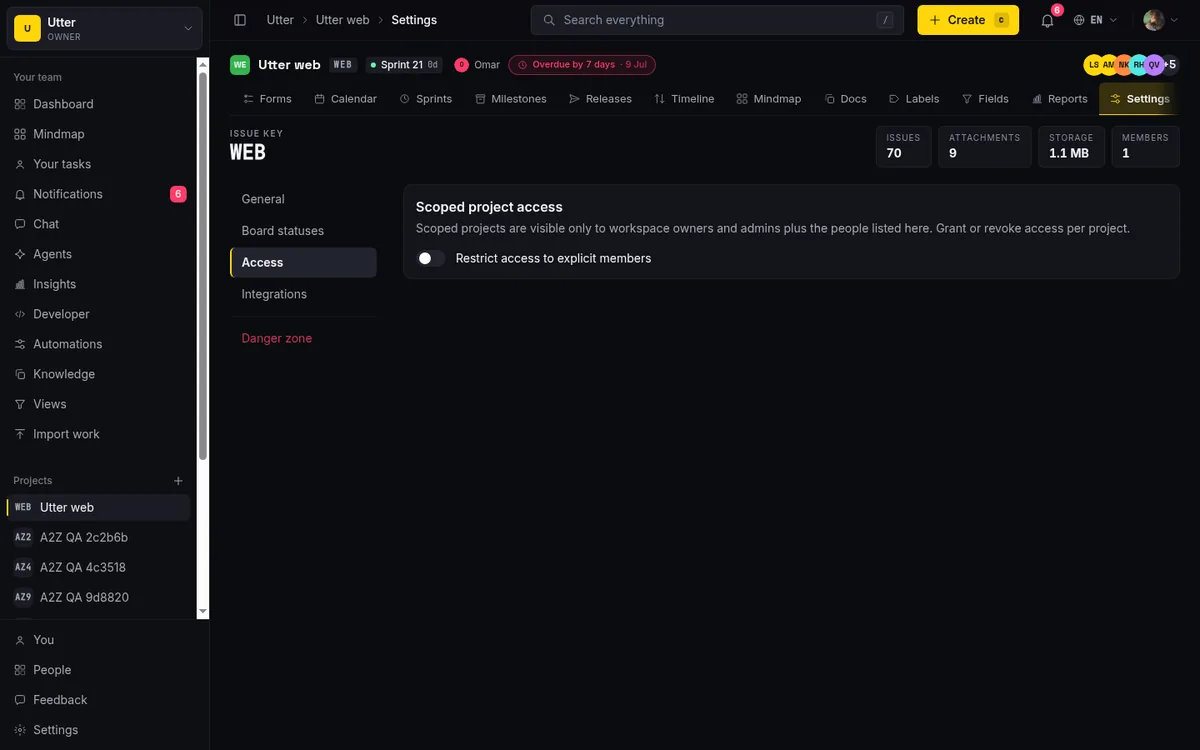
That screenshot shows a project with scoped access off (the default, workspace-visible). Flip it on and the project drops out of the general project list for everyone who isn't a member. Add your client to that one project, and their whole view of your agency is that single project. They cannot browse to client B's board. They cannot even tell it's there. The enforcement runs in requireProjectAccess for every project load and in the visibility layer, which drops the "everyone in the workspace can see it" branch entirely for guests, so there's no accidental leak path around it.
Two honest caveats. First, this is not a separate white-labeled client portal product. It's the normal Utter app, scoped down. Your client signs into the same application your team uses, they just see far less of it. If you were picturing a fully re-skinned per-client portal with your logo replacing Utter's throughout, that isn't what this is (the public request forms do carry per-form branding, more on those later, but the app shell itself is not re-branded per client). Second, a client sees only the project or projects you added them to, never cross-project visibility inside the workspace. There's no "show me everything I'm loosely related to" view for a guest. One client, their project or projects, full stop.
For a deeper walkthrough of the Access tab and how membership resolves, see how to restrict project access.
Guest access that is genuinely free (and where rivals aren't)
Here's the part that changes the math. In Utter, guest is a first-class workspace role, and it is free. Never billed. There is no per-guest fee and no guest-to-seat ratio on any plan, including Free. The seat-sync code that talks to Stripe explicitly skips guests (and viewers) when it counts billable seats, because the set of billed roles is only owner, admin, and member.
A guest is an external collaborator scoped to the projects they were invited into. And the invite mechanism is precise: a guest invite carries the exact list of projects the guest joins on accept. When they click the emailed link and accept, a project_members row is created for each project on that invite. So you invite a client straight into their one project, and that is the entirety of what they can reach.
Inside their scoped project, a guest is a real collaborator, not a spectator. They can create and edit their own issues, comment, and upload attachments. What they cannot do is edit other people's work (editing any issue is owner and admin only), manage labels, docs, or forms, spend your AI credits, create channels or agents, or touch any workspace, project, or member administration. It's exactly the shape you want for a client: they can file and refine their own requests and talk to you, without being able to reorganize your project or run up your AI bill.
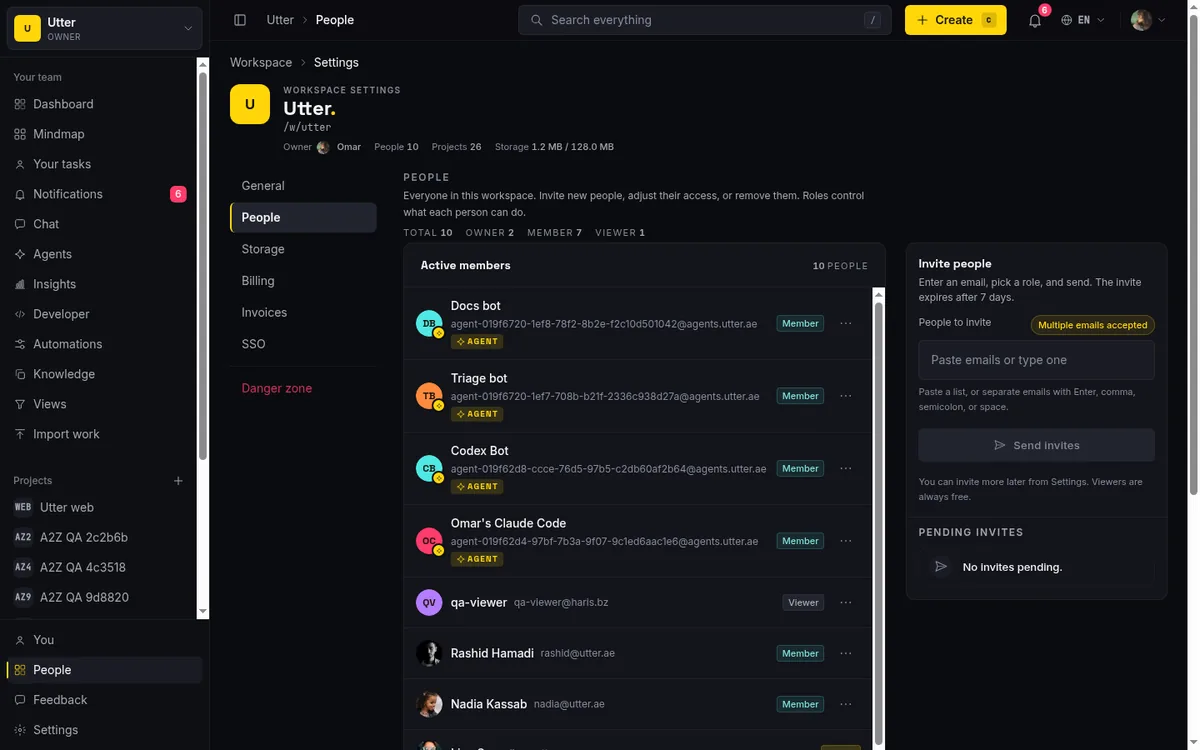
Now the rivals, stated precisely, because this is where the differences actually live (all as of July 2026):
- Jira. Guests are free of charge, up to 5 guests per paid user, and the total of paid users plus guests can't exceed the site's user limit. A guest can access only a single Jira space and can't see anything outside it unless it's explicitly shared. The catch: guest access is available only on Standard, Premium, and Enterprise, not the Free plan. So Jira guests are genuinely free, but you have to be on a paid Standard-or-above subscription first (Standard runs about $7.91 per user per month billed annually, with some sources reporting $8.15).
- Asana. Guests (external collaborators) are free and unlimited on paid plans. But every workspace member is a paid seat on Starter (about $10.99 per user per month annual) and Advanced (about $24.99 per user per month annual), and a paid plan is required. Free guests, paid floor.
- monday.com. Guests are billed on the Standard plan: every 4 guests count as 1 billed seat, so 3 guests ride free and the 4th tips you into another paid seat. Guests are unlimited on Pro and Enterprise. And monday's paid plans carry a 3-seat minimum, so even a two-person shop pays for three.
None of these is a scam, and I'm not going to lump them together as "they all charge for guests," because they don't all do the same thing. Jira and Asana give you free guests but gate them behind a paid plan. monday meters guests into fractional seats. Utter's difference is that free guests work on the free plan, with no seat math attached.
For the mechanics of inviting people and choosing roles, see how to invite team members and how to manage roles and permissions.
The pricing math for an agency with 8 client contacts
Abstract rules are hard to feel. Let's price a concrete agency.
Say you're a small studio: 3 internal builders (people who create and edit work all day), 8 client contacts across your active projects (people who file and discuss their own requests), and 4 client stakeholders who only ever watch (a couple of CMOs, an account lead, a brand manager). That's 15 humans touching the tool. How many do you pay for?
Here's the shape across the four tools, using their published per-seat pricing as of July 2026. For the rivals I'm using the entry paid tier where guest or viewer access first becomes possible, since that's the real floor an agency hits.
| Tool | Who you pay for (3 builders + 8 contacts + 4 watchers) | Entry per-seat price (as of July 2026) | Notes on the client-facing 12 |
|---|---|---|---|
| Utter | 3 (builders only) | Free $0, Pro $3/mo, Business $6/mo per builder | 8 client contacts = free guests; 4 watchers = free viewers. Works on Free. |
| Jira | Depends on plan; guests free up to 5 per paid user within the site user limit | Standard ~$7.91/user/mo annual | Guests need a paid Standard+ plan first; guest count is capped relative to paid users. |
| Asana | Every member is a seat; guests free | Starter ~$10.99/user/mo annual | Client contacts as guests are free, but a paid plan is required to have them at all. |
| monday.com | 3-seat paid minimum; guests billed 4:1 on Standard | Basic ~$9, Standard ~$12, Pro ~$19/seat/mo annual | 8 guest contacts on Standard is roughly 2 extra billed seats; viewers free but only on a paid plan. |
Read the Utter row plainly: you pay for 3 seats. Your 8 client contacts are guests (free), your 4 watchers are viewers (free). On the free plan that's $0 for all 15 people. On Pro it's 3 x $3 = $9 a month total, with the 12 client-side people still free. On Business it's 3 x $6 = $18 a month total.
I'm deliberately not putting an exact dollar total on the rival rows, because their totals swing on plan choice, site user limits, and how the guest ratios land for your specific headcount, and I'd rather under-claim than pin a number the research doesn't support. What the research does support is the structure, and the structure is the point: in Utter, only your builders are billable, and viewers are always free. In the others, the client-facing dozen either sits behind a paid plan you must adopt first (Jira, Asana) or gets metered into fractional seats (monday). For a business whose client contacts churn and multiply, "only builders are billable" is the line that keeps the invoice flat as you add clients.
Free viewers for the stakeholders who only need to watch
Guests are for people who work in the project. Viewers are for the person who only needs a window into it. That's the client's CMO, the account director, the stakeholder who wants to glance at progress and never touch anything.
The viewer role in Utter is free and never counted as a billed seat (again: only owner, admin, and member are billable). And it's strictly read-only. A viewer can read the project, including chat, but cannot comment, cannot upload attachments, cannot edit anything, and cannot post in chat either. It is a pure watching role.
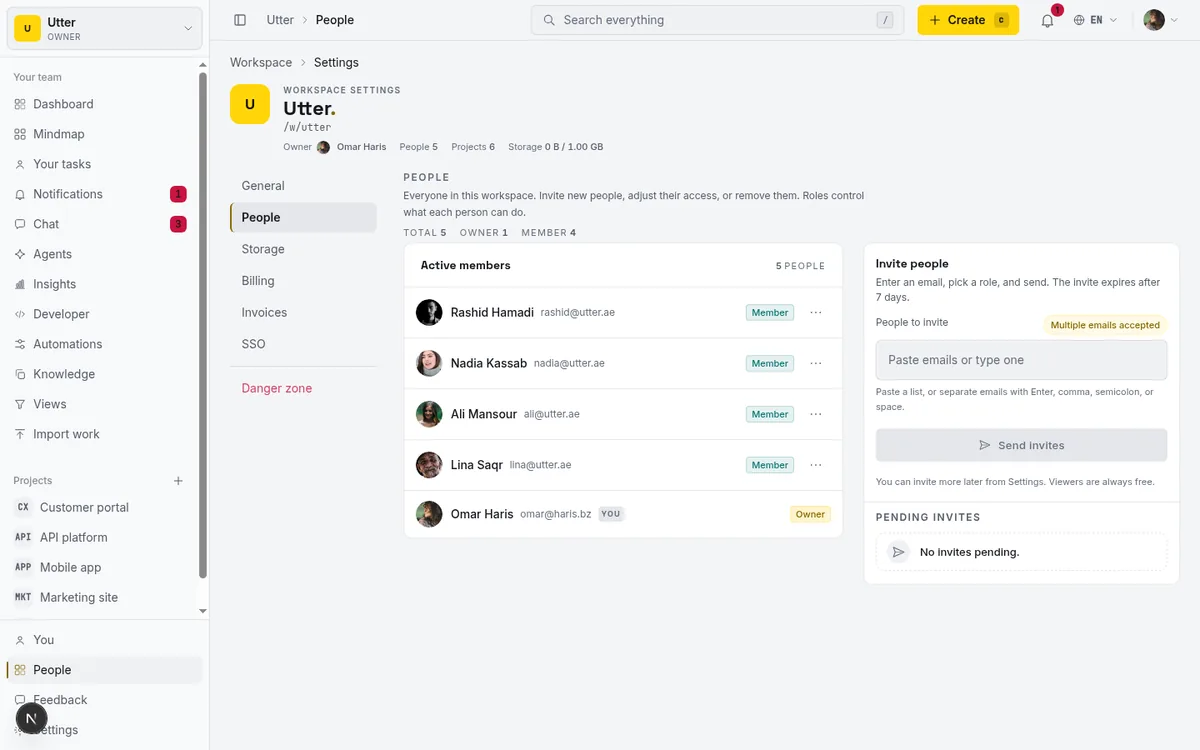
The distinction between guest and viewer is worth keeping straight, because it maps cleanly onto two kinds of client people:
- Guest is an external collaborator who does work inside their project. Use it for the client contact who files requests, comments on tickets, and uploads the brief.
- Viewer is a stakeholder who only observes. Use it for the client executive who wants read-only visibility and nothing else.
One factual note on the rivals so this isn't one-sided: monday.com viewers are also unlimited and free, on paid plans. So monday and Utter agree that read-only watchers shouldn't cost money. The difference is the same as everywhere else in this comparison: monday's free viewers assume you're already on a paid plan carrying its 3-seat minimum, whereas Utter's free viewers work on the free plan with no minimum underneath them.
Public request forms: client intake without a single account
The fourth requirement is intake. A client, or a client's colleague you've never met, needs to send you a request, and you do not want to provision a login for them to do it.
Utter's answer is public request forms. A branded, unauthenticated form lives at a URL like /f/<token>, where the token is an unguessable string 16 to 64 characters long. The form is reachable only if it's both published and public-enabled, and the token is the whole gate. Anyone with the link can submit. They need no account, and they are not a seat.
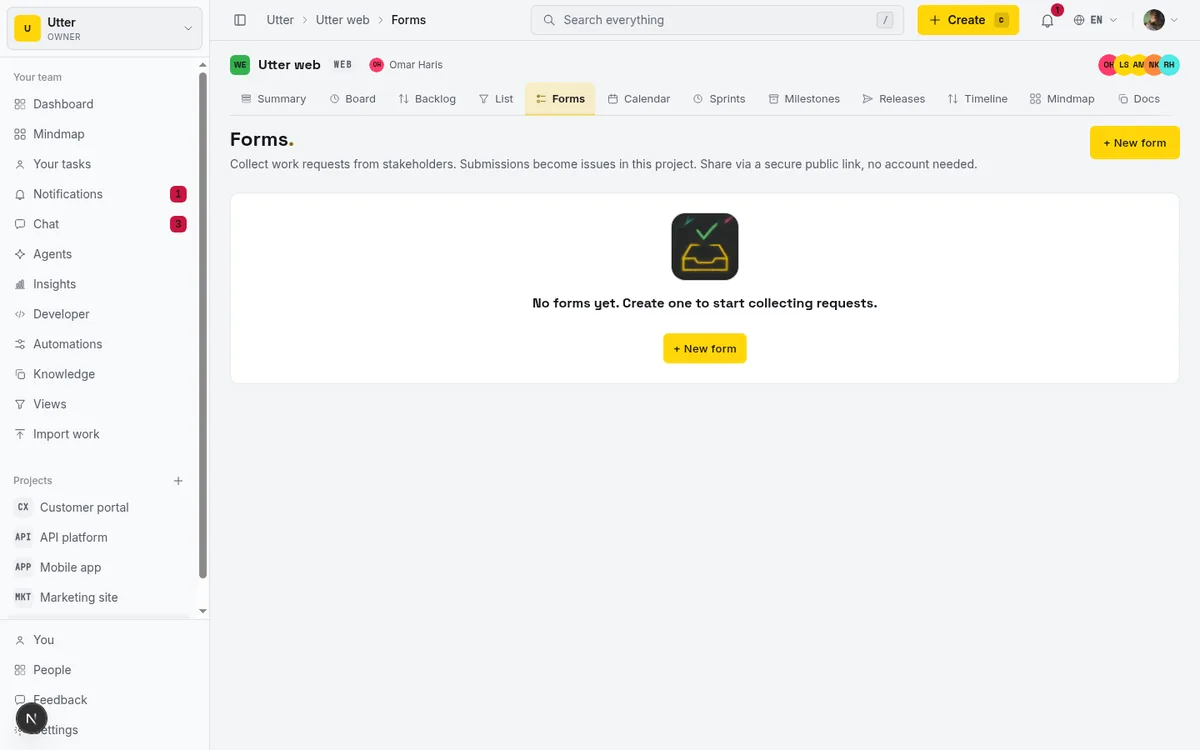
The forms are not toy contact boxes. There are 14 field kinds: short text, long text, email, url, phone, number, select, multi-select, radio, checkbox, date, file, section, and rating. That's enough to build a real intake brief. And anonymous submitters can upload files (a client can attach their logo, a PDF brief, reference screenshots), with those uploads metered against your workspace storage cap.
The part that saves you time is what happens after submit. A submission auto-creates an issue in the target project, with your routing defaults applied (assignee, labels, sprint, status), and it fires the project's issue.created automations. So a client request doesn't land in an inbox for you to re-key, it lands as a pre-triaged issue in the right project, already assigned and labeled. The routing ids are tenant-checked against the project, so a form can't be tricked into filing into someone else's client project.
Here's the flow, end to end:
flowchart LR
  A[Client opens /f/token] --> B[Fills fields, uploads brief]
  B --> C[Submit, no account]
  C --> D[Issue auto-created in project]
  D --> E[Routing defaults applied]
  E --> F[issue.created automations fire]
  F --> G[Pre-triaged ticket for your team]
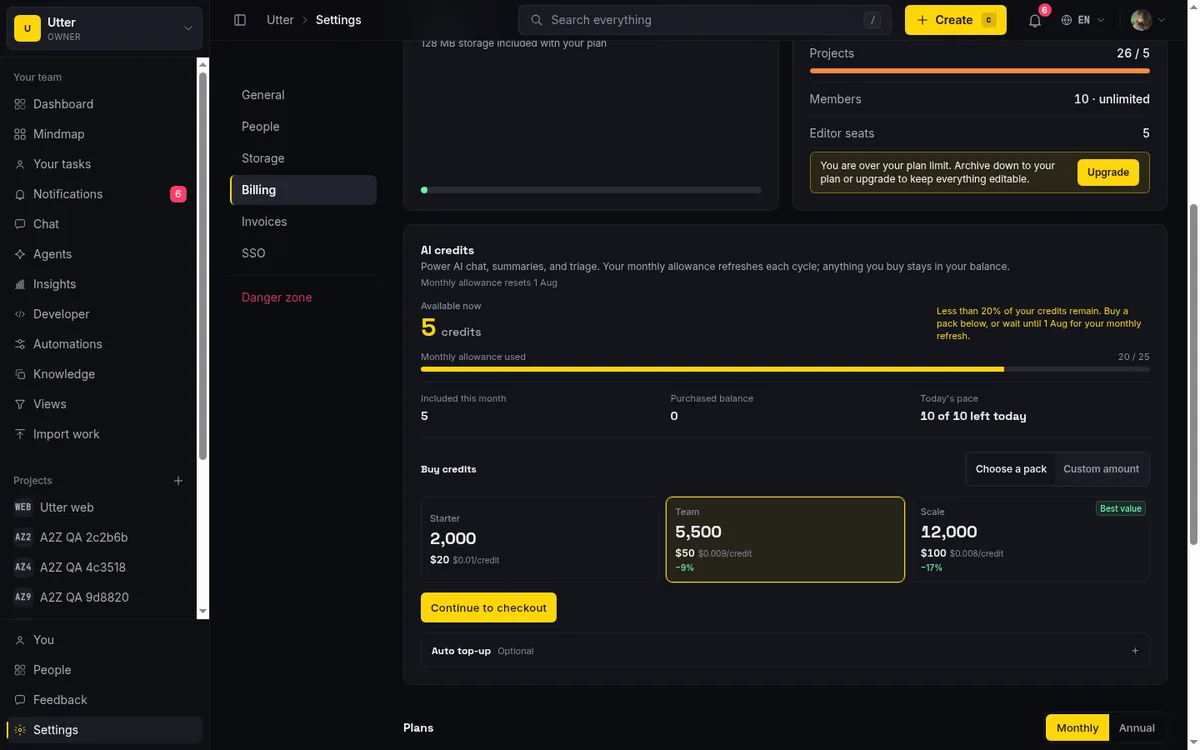
Two honest caps to flag before you lean on this at volume. First, automated routing beyond the basics is a paid feature: the free plan allows only 2 automation rules, so if you want elaborate "if the request type is X, assign to Y and add label Z and notify the channel" logic across many forms, that's Pro or Business territory. Second, anonymous uploads and guest attachments both count against your workspace storage, and the free ceiling is 128 MB total with a 1 MB per-file limit, so high-volume client file intake (lots of clients each dropping large assets) will hit that ceiling and push you to a paid tier for the headroom.
Full setup walkthrough: how to set up a request form.
When Free is enough, and when an agency needs to pay
I've said "free" a lot, so let me be exact about where free ends, because that's the part a comparison usually hides.
Free is feature-complete for core project management. Sprints, timeline, integrations, reporting, and AI are all in the base feature set on the free plan. None of them is paywalled. And the four client-safe pieces this whole post is about (scoped projects, free guests, free viewers, public forms) all work on Free. That is not a stripped trial. It's the real product.
What Free caps is scale and a handful of governance features:
- 5 active projects. This is the one most likely to pinch an agency, because active client projects is exactly the number that grows. Past 5 concurrent client projects, you need to pay.
- 128 MB storage, 1 MB per file. Fine for a light shop, tight if clients dump large assets.
- 2 automation rules. Enough for simple routing, not enough for elaborate per-form intake logic at volume.
- 25 AI credits a month.
- Custom roles beyond the built-in matrix, SSO, and audit logging are paid. Free gives you the owner, admin, member, viewer, and guest roles, which cover the agency case well, but bespoke role definitions and enterprise controls are not on Free.
So the decision is genuinely simple:
| Your situation | Plan |
|---|---|
| 5 or fewer active client projects, light storage, simple intake | Free ($0), and it's a real product, not a trial |
| More than 5 concurrent client projects, or you want automated intake routing at volume | Pro ($3 per builder / month) |
| The above plus SSO, audit, custom roles for a bigger operation | Business ($6 per builder / month) |
Two governance facts worth knowing before you set up. A single user may own at most 3 unpaid workspaces, so you can't spin up an unlimited fleet of free agencies under one login. And the 14-day Pro reverse trial is granted once per user, on the first workspace you create, so later workspaces start on Free directly rather than each getting a fresh trial.
The plan grid above carries the rest of the numbers, but if you want the walkthrough, see how to manage billing and plans.
Where agents fit (and why they don't cost you a seat)
One more thing, because it's adjacent to the whole "who costs a seat" question and it matters if your team codes.
AI agents in Utter are real workspace members (they have is_agent = 1), but they are free, never billed as seats, filtered out by the same billable-roles rule that exempts guests and viewers. So each engineer on your team can connect their own coding agent to a client project without adding a cent to your bill. Ten engineers, ten agents, still zero agent seats. There are guardrails too: per-agent field-write permissions let you constrain what an agent is allowed to change, and human-review session states let a person sign off on an agent's work before it's treated as done.
The practical shape is that an agent files work into a client project through the API, using an API key with the issues:write scope and a Bearer token. Here's the one call that matters, creating an issue in a project, shown in three languages (they render as tabs):
curl -X POST \
  https://utter.ae/api/v1/workspaces/acme/projects/WEB/issues \
  -H "Authorization: Bearer utp_live_your_key_here" \
  -H "Content-Type: application/json" \
  -d '{
    "type": "task",
    "title": "Fix broken link in client footer",
    "description_md": "Reported via the intake form.",
    "priority": "high"
  }'
const res = await fetch(
"https://utter.ae/api/v1/workspaces/acme/projects/WEB/issues",
{
method: "POST",
headers: {
Authorization: "Bearer utp_live_your_key_here",
"Content-Type": "application/json",
},
body: JSON.stringify({
type: "task",
title: "Fix broken link in client footer",
description_md: "Reported via the intake form.",
priority: "high",
}),
},
);
const issue = await res.json();import requests
res = requests.post(
"https://utter.ae/api/v1/workspaces/acme/projects/WEB/issues",
headers={"Authorization": "Bearer utp_live_your_key_here"},
json={
"type": "task",
"title": "Fix broken link in client footer",
"description_md": "Reported via the intake form.",
"priority": "high",
},
)
issue = res.json()The response comes back as a created issue (HTTP 201), scoped to that one project:
{
  "data": {
    "id": "0191f7a2-6b3c-7e11-9a4d-2f8c1e0b9d55",
    "key": "WEB-142",
    "url": "https://utter.ae/w/acme/p/website/WEB-142",
    "number": 142,
    "type": "task",
    "title": "Fix broken link in client footer",
    "description_md": "Reported via the intake form.",
    "status": "backlog",
    "status_id": "0191f7a2-6b3c-7e11-9a4d-2f8c1e0b0001",
    "status_name": "Backlog",
    "priority": "high",
    "assignee_id": null,
    "assignees": [],
    "reporter_id": "0191f7a2-6b3c-7e11-9a4d-2f8c1e0b7a20",
    "labels": [],
    "created_at": "2026-07-16T09:30:00.000Z",
    "updated_at": "2026-07-16T09:30:00.000Z"
  }
}
Because that agent is a member of that scoped project only, it can file into that client's project and nowhere else, the same isolation boundary that governs your human guests. For the full breakdown of what does and doesn't consume a seat, see do AI agents count as seats.
If you're an agency tired of choosing between "the client sees everything" and "the client costs another seat," the honest test is whether the free plan carries your first few clients, and for most small studios it does: scoped projects for isolation, free guests for the contacts who collaborate, free viewers for the ones who watch, and public forms for intake. Start a workspace and put one real client project behind a scoped invite to see how it feels before anything's billed.
Frequently asked questions
What is the best project management tool for small agencies with clients?
The requirement that matters for an agency is client-safe tenancy: each client isolated to their own project, and client contacts who don't cost a full editor seat. Utter handles this on its free plan with scoped projects (one client, one project, nothing else), free guest access for client collaborators, free read-only viewers for stakeholders, and public request forms for intake without accounts. As of July 2026, Jira and Asana also offer free guest access but require a paid plan first, and monday.com meters guests into fractional seats (4 guests = 1 billed seat on Standard). So the differentiator is not whether guests exist but whether they are free on a free plan.
Can clients see other clients' projects if I invite them into my workspace?
Not if you use a scoped project. Setting a project to scoped removes it from workspace-wide visibility, so only people with an explicit membership row for that project can open it. When you invite a client as a guest into their one project, that single project is the entirety of what they can reach. They cannot browse to another client's board and cannot even tell it exists. The enforcement runs on every project load, and the guest role never has cross-project visibility inside the workspace.
Do I have to pay for client contacts and stakeholders in Utter?
No. Guests (external collaborators who file and discuss their own requests) and viewers (read-only stakeholders) are both free and never counted as billed seats, on every plan including Free. Only owner, admin, and member roles are billable. So a studio with 3 internal builders, 8 client contacts, and 4 read-only stakeholders pays for 3 people, not 15. On the free plan that is $0 for everyone; on Pro it is 3 x $3 = $9 a month total.
How is Utter's guest access different from Jira, Asana, and monday.com?
As of July 2026: Jira guests are free (up to 5 per paid user, limited to a single space) but require a paid Standard-or-above plan first, with Standard around $7.91 per user per month annual. Asana guests are free and unlimited but every member is a paid seat and a paid plan is required (Starter about $10.99 per user per month annual). monday.com bills guests, counting every 4 guests as 1 seat on Standard, and carries a 3-seat paid minimum. Utter's difference is that free guests work on the free plan with no paid floor and no seat ratio.
Can clients submit requests without creating an account?
Yes, through public request forms. A branded form lives at a URL gated by an unguessable token 16 to 64 characters long, and anyone with the link can submit once the form is published and public-enabled. Submitters need no account and are not seats. Forms support 14 field kinds and file uploads, and each submission auto-creates a pre-triaged issue in the target project with your routing defaults (assignee, labels, sprint, status) applied and the project's issue.created automations fired.
What are the limits of Utter's free plan for an agency?
Free is feature-complete for core project management (sprints, timeline, integrations, reporting, AI, plus scoped projects, free guests, free viewers, and public forms all work). The caps are on scale: 5 active projects, 128 MB storage with a 1 MB per-file limit, 2 automation rules, and 25 AI credits a month. The 5-project cap is the one most likely to pinch an agency, since active client projects grow. Custom roles beyond the built-in matrix, SSO, and audit logging are paid. Pro is $3 per builder per month and Business is $6.
Do AI agents count as billed seats in Utter?
No. AI agents are real workspace members but are free and never billed as seats, exempted by the same rule that exempts guests and viewers. Each engineer can connect their own coding agent to a client project without adding to your bill. Agents file work through the API using an API key with the issues:write scope and a Bearer token, and per-agent field-write permissions plus human-review session states let you constrain and sign off on what an agent changes.
Related reading

Free project management software: what the free tiers actually give you
What the free tiers of Trello, Asana, ClickUp, Notion, and Jira actually give you (as of July 2026), which cap stops a small team first, and how Utter Free compares.
July 16, 2026 · 11 min read

Project management for solo founders (you plus a few agents is the team)
Project management for solo founders means capturing everything and letting a few AI agents do real work, at $0, with agents as free members not paid seats.
July 16, 2026 · 11 min read

The MCP audit: which project tools can AI agents actually use? (July 2026)
We audited the MCP servers of 13 project management tools: who has one, what agents can really do, the call caps, and the gaps nobody mentions.
July 15, 2026 · 7 min read

Jira alternatives in 2026: what you actually pay per seat
Six Jira alternatives compared honestly: Linear, ClickUp, Asana, Monday, Trello, and Utter, with real per-seat math and where each one actually fits.
July 11, 2026 · 8 min read
How to restrict project access
Restrict project access to specific members in Utter: flip the scoped toggle, add the right people, and understand what the project role does not do.
July 15, 2026 · 14 min read
What you can run in Utter without extra tools
A straight, capability-forward tour of the jobs Utter covers in its core, from a light help desk to integrations, estimation, and roadmaps, and when to pair a dedicated tool.
July 16, 2026 · 8 min read
ClickUp alternatives for teams who want calm, not more features
ClickUp alternatives for teams who want a calm tracker they will actually adopt. Honest July 2026 pricing and AI-cost tables, where ClickUp still wins, and Utter's free agent members.
July 16, 2026 · 15 min read

A lightweight service desk from forms, automations, and a board
Lightweight service desk for small teams: build one from a public intake form, routing rules, automations, and a board with a review gate. Honestly costed vs JSM.
July 16, 2026 · 12 min read

Asana alternatives that cost less and speak agent
Asana alternatives for growing teams: how Asana's tiered seats round your bill up, and how Utter's $3 per-editor pricing with free viewers and agents changes the math. As of July 2026.
July 16, 2026 · 12 min read

Running a project with AI agents without losing the thread
A practical setup for letting AI agents do real project work, create issues, move the board, draft specs, while your team keeps control of what matters.
July 11, 2026 · 5 min read
أضف تعليقًا
ابدأ النقاش.