
Story points or hours, and parallel sprints when squads share a project
Two things people assume a calm, opinionated tracker cannot do: estimate in story points, and run more than one sprint at a time. Utter used to prove them right on both counts, on purpose. It does not anymore. Both are here, both are opt-in, and neither one turns the tool into an everything-suite. Here is how they work and, just as important, where the defaults still point.
Estimate in points or hours, your call
Estimation is a per-project setting now. Open a project's settings and pick how it estimates work: time, story points, or none. Time is still the default, so nothing changes for the teams that never wanted points. Flip a project to points and its estimation surface changes to match.
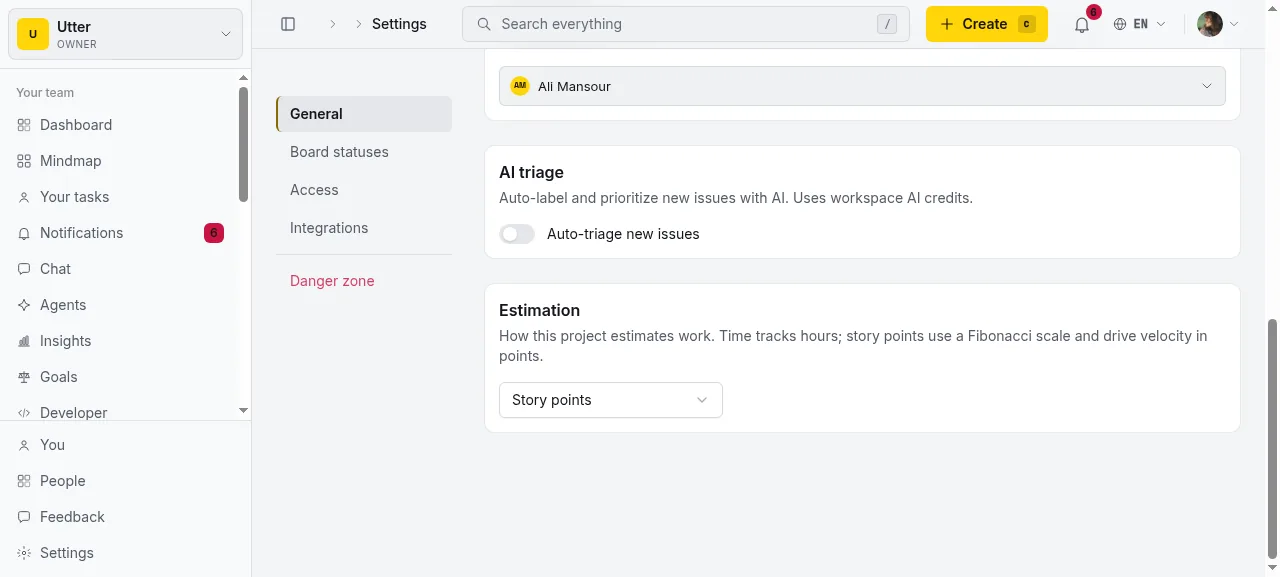
That per-project choice matters more than it looks. A design team can run on time while the platform squad runs on points, in the same workspace, without either one bending to the other. The switch is not global and it is not permanent; change it whenever the team's practice changes.
The Fibonacci pick, right on the issue
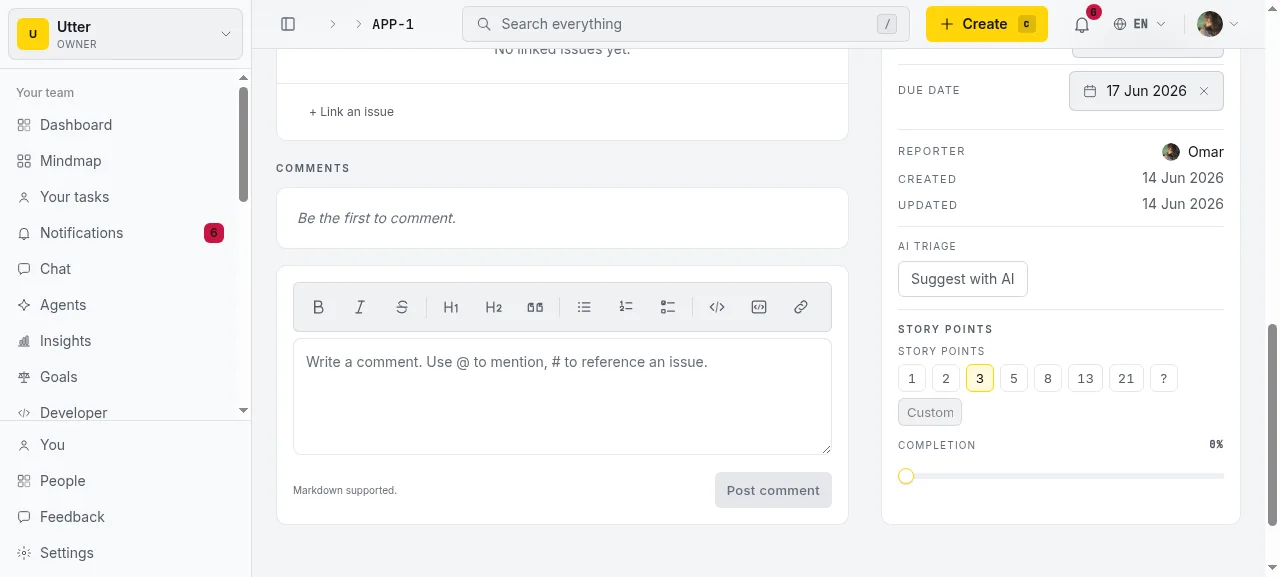
When a project uses points, the estimate on an issue becomes a Fibonacci quick-pick: 1, 2, 3, 5, 8, 13, 21, and a "?" for "not estimated yet." One click sets it. There is a custom field next to the scale for the rare estimate that does not fit the ladder, but the scale is what you will reach for.
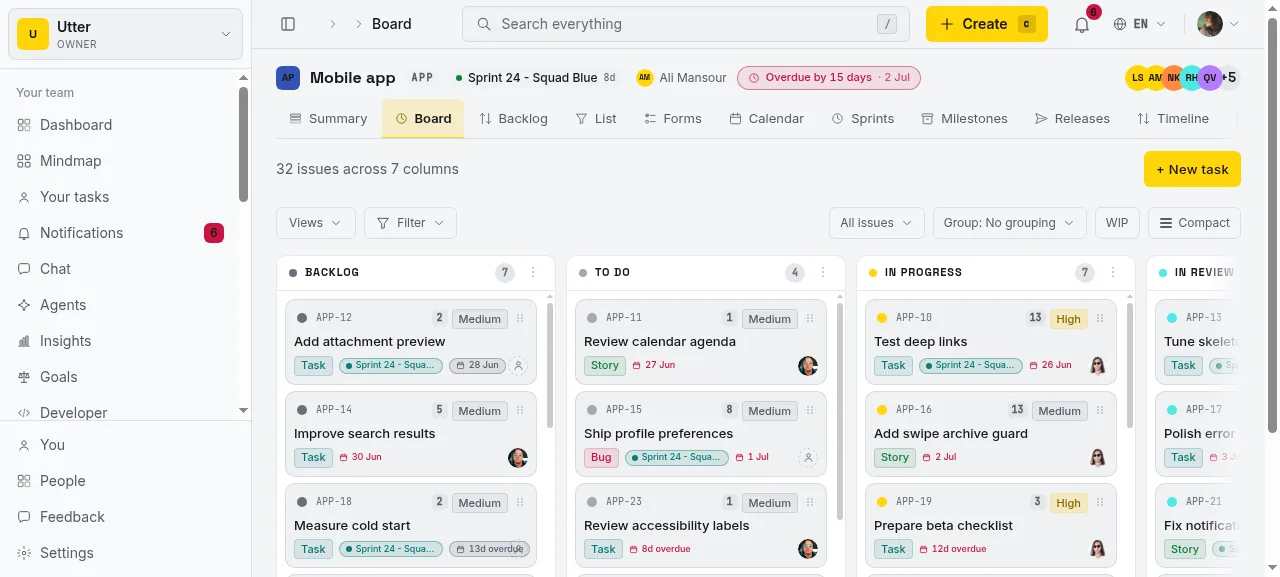
Points ride along everywhere the issue goes. On the board, each card wears its points, so you can read the weight of a column at a glance without opening anything.
Velocity and burndown follow the unit
This is the part that makes points real rather than decorative. A points project reports velocity and burndown in points, not issue count. A sprint reads "committed 34, burned 29" in points; the burndown line falls by the weight of each card as it closes, not by one per issue. A time project keeps its issue-count velocity, exactly as before, so the switch never changes the numbers for teams that did not ask for it. The unit is chosen once, per project, and every report downstream respects it.
Flow metrics are the same either way. Cycle time and lead time with percentiles are computed from each issue's own history, so they do not care whether you estimated in points, hours, or nothing at all.
Parallel sprints when squads share a project
The other old limit was one active sprint per project. Starting a sprint used to quietly pause any other running one. That is gone. A project can now run several active sprints at once, so two squads sharing a codebase each keep their own sprint running side by side.
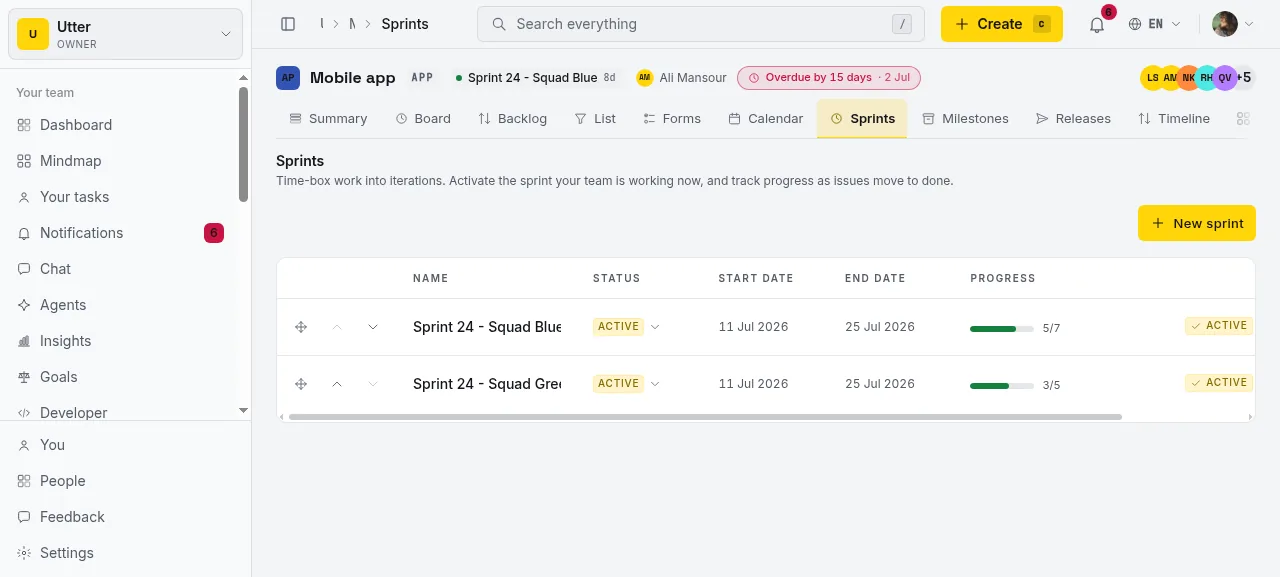
Start a sprint and it goes active without touching the others. The board's sprint switcher scopes the columns to whichever sprint you are looking at and marks every active one, so "which board am I on" stays a one-click answer even with two or three running. Burndown gets a small sprint picker for the same reason: pick the squad, read its line.
Still time-first by default
Being honest about the defaults is the whole point of a calm tracker. Time estimation is still the default, and a fresh project runs one sprint at a time until you decide otherwise. Nothing here forces planning poker on a team that never wanted it, and nothing forces two squads onto one project when one sprint is plenty. These are options you turn on when the shape of your team calls for them, not ceremony bolted onto every project.
If your team never trusted point inflation, keep the default and let issue-count velocity be blunt in a good way. If you run on poker, turn the project to points and estimate in the scale you already know. Both are first-class; neither is the tax.
In the API too
Everything above has a programmatic twin. A project's estimation unit and an issue's story points are both in the REST v1 API, and because the MCP server derives from the same spec, an agent can set them in natural language. Turning a project to points and pointing an issue is two calls:
curl -X PATCH https://utter.ae/api/v1/workspaces/acme/projects/APP \
  -H "Authorization: Bearer $UTTER_API_KEY" \
  -H "Content-Type: application/json" \
  -d '{"estimation_unit":"points"}'

curl -X PATCH https://utter.ae/api/v1/workspaces/acme/projects/APP/issues/APP-1 \
  -H "Authorization: Bearer $UTTER_API_KEY" \
  -H "Content-Type: application/json" \
  -d '{"story_points":8}'
const base = "https://utter.ae/api/v1/workspaces/acme/projects/APP";
const headers = {
Authorization: `Bearer ${process.env.UTTER_API_KEY}`,
"Content-Type": "application/json",
};
await fetch(base, { method: "PATCH", headers, body: JSON.stringify({ estimation_unit: "points" }) });
await fetch(`${base}/issues/APP-1`, { method: "PATCH", headers, body: JSON.stringify({ story_points: 8 }) });import os, requests
base = "https://utter.ae/api/v1/workspaces/acme/projects/APP"
h = {"Authorization": f"Bearer {os.environ['UTTER_API_KEY']}"}
requests.patch(base, headers=h, json={"estimation_unit": "points"})
requests.patch(f"{base}/issues/APP-1", headers=h, json={"story_points": 8})Try it on a real project
Open a free workspace, set one project to points and estimate a sprint in the Fibonacci scale, or start a second sprint on a project two squads already share. Both are on every plan, and both are the kind of thing you only miss until it is there.
Frequently asked questions
Does Utter support story points?
Yes, per project. Each project picks how it estimates work in its settings: time (the default), story points, or none. Points use a Fibonacci quick-pick (1, 2, 3, 5, 8, 13, 21, plus a custom value), and the choice is per project, so different teams in one workspace can estimate differently.
Story points or hours, which should I use?
Both are first-class; it is a per-project choice. Time is the default and stays blunt-but-honest with issue-count velocity. If your team runs on planning poker, switch the project to story points and estimate in the scale you already use. You can change the unit whenever your practice changes.
What point scale does Utter use?
A Fibonacci scale: 1, 2, 3, 5, 8, 13, 21, with a '?' for unestimated and a custom field for the rare estimate that does not fit the ladder. Points are stored as a number so velocity and burndown can sum them.
Does velocity in Utter use story points?
For a points project, yes: velocity and burndown report in points, not issue count (a sprint reads 'committed 34, burned 29' in points). A time project keeps its issue-count velocity, unchanged, so switching a project to points never alters the numbers for teams that did not opt in.
Can Utter run parallel or overlapping sprints?
Yes. A project can have several active sprints at once, so two squads sharing one project each keep their own sprint running. Starting a sprint no longer pauses the others. This used to be a hard one-active-sprint limit; it is now removed.
How do multiple active sprints work on the board?
The board's sprint switcher scopes the columns to whichever sprint you pick and badges every active sprint, so it is a one-click answer even with two or three running. The burndown chart gets a small sprint picker so you can read each squad's line separately.
Are story points and parallel sprints on the free plan?
Yes. Both ship on every plan, including Free, and both are opt-in per project. You can also set a project's estimation unit and an issue's story points through the REST v1 API and the MCP server, so agents can manage them too.
Related reading
AI sprint planning: what actually works in 2026
Where AI genuinely helps plan a sprint, drafting, sizing, capacity checks, and where letting it decide is a mistake. A working setup, honestly described.
July 15, 2026 · 5 min read
How to run a sprint
Learn how to run a sprint in Utter: plan from the backlog, start and complete a sprint, carry over incomplete issues, and read the burndown and velocity.
July 15, 2026 · 13 min read
How to run sprints without drowning in ceremony
A lightweight sprint process for small teams: what to keep, what to cut, and how to get the value of planning and review without the meeting tax.
July 12, 2026 · 5 min read
How to track time on issues
How to track time on issues in Utter: set estimates and spent hours, read the budget bar, set completion, and roll it all up on the project summary.
July 15, 2026 · 14 min read
A Notion alternative for project management (keep the docs, gain a real tracker)
A Notion alternative for project management that keeps your docs and adds a real tracker: category-backed statuses, native sprints with carryover, computed burndown, agents over MCP.
July 16, 2026 · 14 min read
How to plan releases and milestones
Plan software releases and milestones in Utter: create releases and milestones, attach issues, read the progress meter, draft AI release notes, and set permissions.
July 15, 2026 · 14 min read
Scrum vs kanban: choose per project, not per religion
Scrum vs kanban: choose the methodology per project, not per team religion. The one mechanic that actually differs, when each fits, an honest Utter vs Jira/Linear/Trello price and feature comparison (as of July 2026), and how to switch a project between the two with zero migration.
July 16, 2026 · 11 min read
Project reports and insights
Read Utter's project reports and dashboards: Summary KPIs, sprint burndown, cycle time, throughput, workload, and workspace Insights, with the honest limits on each.
July 15, 2026 · 16 min read
Will AI agents replace project managers? What actually changes
Agents already handle the mechanical parts of project management. The judgment part is harder, and it is not going anywhere. An honest look at the shift.
July 15, 2026 · 7 min read
How to read the project summary
Read the Utter project Summary tab like a pro: what every card shows, how each number is computed, what good looks like, and where the dashboard stops.
July 15, 2026 · 16 min read
أضف تعليقًا
ابدأ النقاش.