
Scrum vs kanban: choose per project, not per religion
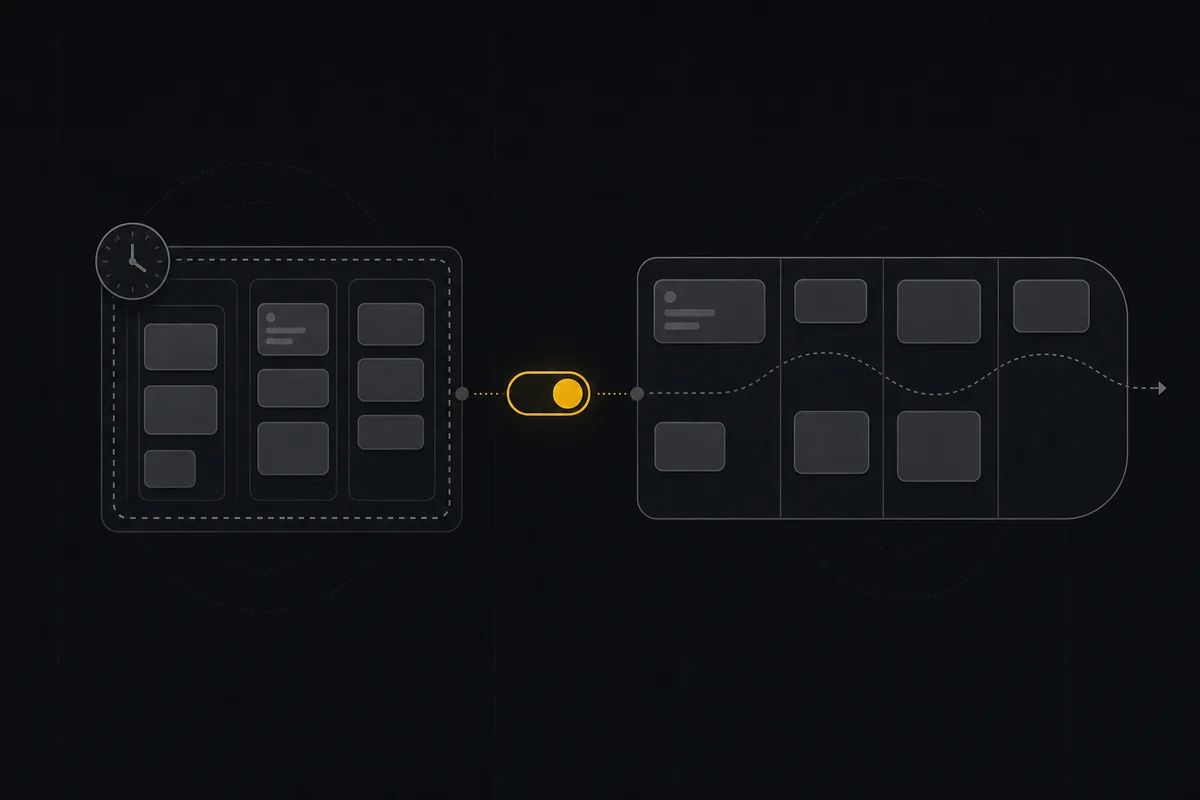
Watch a team spend a full week on the scrum vs kanban question and you start to notice the argument is never really about scrum or kanban. It's about identity. Someone read a book, someone else got burned by a bad standup, and now the whole team is picking a tribe. Then they buy a tool that bakes the choice in at project creation, discover three weeks later that the other approach fit better, and find out the board type can't be changed without rebuilding the project. That is the actual trap. Not "which is right," but a tool that makes the decision permanent and expensive to undo.
The methodology is a per-project call. Your support queue is not your feature roadmap, and neither one should be forced to run the same way just because they live in the same workspace. More importantly, whatever you pick should be reversible, because you will get it wrong sometimes, and the cost of being wrong should be zero.
Scrum vs kanban, without the religion
Here is the scrum vs kanban difference that actually matters, stripped of the ceremony: scrum is timeboxed, cyclical work, and kanban is continuous flow. That's it. Everything else people fight about is decoration on top of that one mechanic.
Scrum runs in fixed-length sprints. You commit to a batch of work at the start of the window, you work only that batch, and you ship (or don't) at the end. The sprint is a container with a lid. Kanban has no container. Work flows in, moves across the board, and flows out, with no iteration boundary telling you when to stop and reset. As Parabol puts it (and it matches every practitioner I trust), scrum limits work implicitly through sprint capacity, while kanban limits it explicitly with per-column work-in-progress caps.
That is the real fork in the road. Batched commitment with an implicit limit, versus continuous flow with an explicit limit.
graph TD
  A[Does work arrive as a stream or in batches?] -->|Batches you can commit for a fixed window| B[Scrum: timeboxed sprints]
  A -->|A stream that shifts mid-week| C[Kanban: continuous flow]
  B --> D[Limit work implicitly via sprint capacity]
  C --> E[Limit work explicitly via per-column WIP]
Standups, retrospectives, board colors, whether you call the meeting "planning" or "grooming," none of that is the framework. Those are team rituals you can bolt onto either approach or skip entirely. A daily standup does not make you scrum. A physical board with sticky notes does not make you kanban. When a team burns a week on the decision, they are almost always arguing about ceremonies, not about the one mechanic that actually differs. Settle the mechanic first, and most of the heat leaves the room.
The question that actually decides it: does your work arrive in batches or as a stream?
Skip the generic pros-and-cons list. There is exactly one question that decides this, and it is about the shape of your work intake, not your personality.
Scrum fits when work can be scoped and committed for a fixed window. If you can sit down on Monday, agree on a set of issues, and say "this is what we're shipping in the next two weeks" with a straight face, scrum earns its keep. This is the home for feature teams working a roadmap, teams where planning cadence genuinely matters, and any situation where stakeholders want a predictable answer to "what ships this sprint." The commitment is the point: it creates a rhythm, and the rhythm creates trust with people outside the team. A product squad on a Q3 roadmap, a platform team shipping infrastructure in planned increments, an agency running client deliverables against milestones, all of them can freeze scope for two weeks without lying to anyone.
Kanban fits when priorities shift mid-week and work is a continuous intake. If a two-week freeze is a fiction, if the thing that's urgent Monday is irrelevant Thursday because a customer escalated, you are not a scrum team no matter what your calendar says. This is support, ops, bug triage, content pipelines, incident response, anything where new work lands constantly and gets reprioritized on the fly. A support team clearing tickets, a DevOps rotation handling whatever breaks, a content team moving pieces through draft, edit, and publish. Kanban's continuous flow matches the reality: pull the next most important thing, cap how much is in flight, ship, repeat.
Now the opinion, because a decision framework without one is just a menu: if you cannot answer "what did we commit to" at sprint start, you don't have scrum. You have kanban with meetings. A lot of teams run "scrum" that is really a two-week status-report cycle with no real commitment, no scope freeze, and a backlog that gets reshuffled every day. That is fine, it's just kanban wearing a costume, and you'd be happier dropping the ceremony and admitting it.
| Your situation | Lean toward |
|---|---|
| You can freeze scope for a fixed window and commit to it | Scrum |
| Stakeholders want "what ships this sprint" | Scrum |
| Planning cadence and predictability matter | Scrum |
| Priorities change several times a week | Kanban |
| Work arrives as a continuous stream you can't forecast | Kanban |
| You reshuffle the plan daily anyway | Kanban (stop pretending) |
| You can't say what you committed to at sprint start | Kanban (with meetings you should cut) |
How the two feel on a board (WIP limits vs sprint capacity)
Let's get concrete about the kanban side. In Utter, a kanban project is just the board with continuous columns and no sprint involved. You define your columns (more on that below), work flows left to right, and you cap how much sits in the middle so the team doesn't start ten things and finish none.
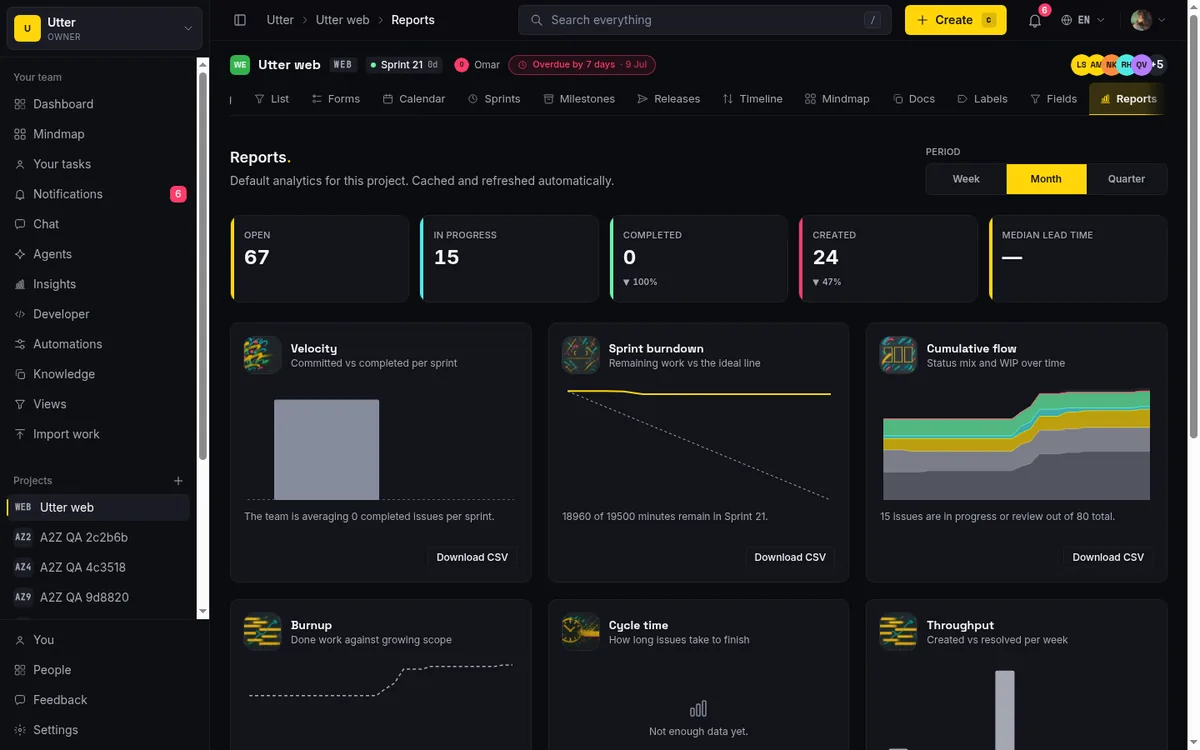
That cap is a per-column WIP soft-limit toggle. Turn it on and each column can carry a limit. The defaults are deliberately small: In Progress is capped at 4, In Review at 3, while Backlog and Done stay uncapped (a backlog is supposed to be big, and you never want to discourage finishing). When a column goes over its limit, it shows a warning chip, an "n/limit" count that turns your attention to the pileup.
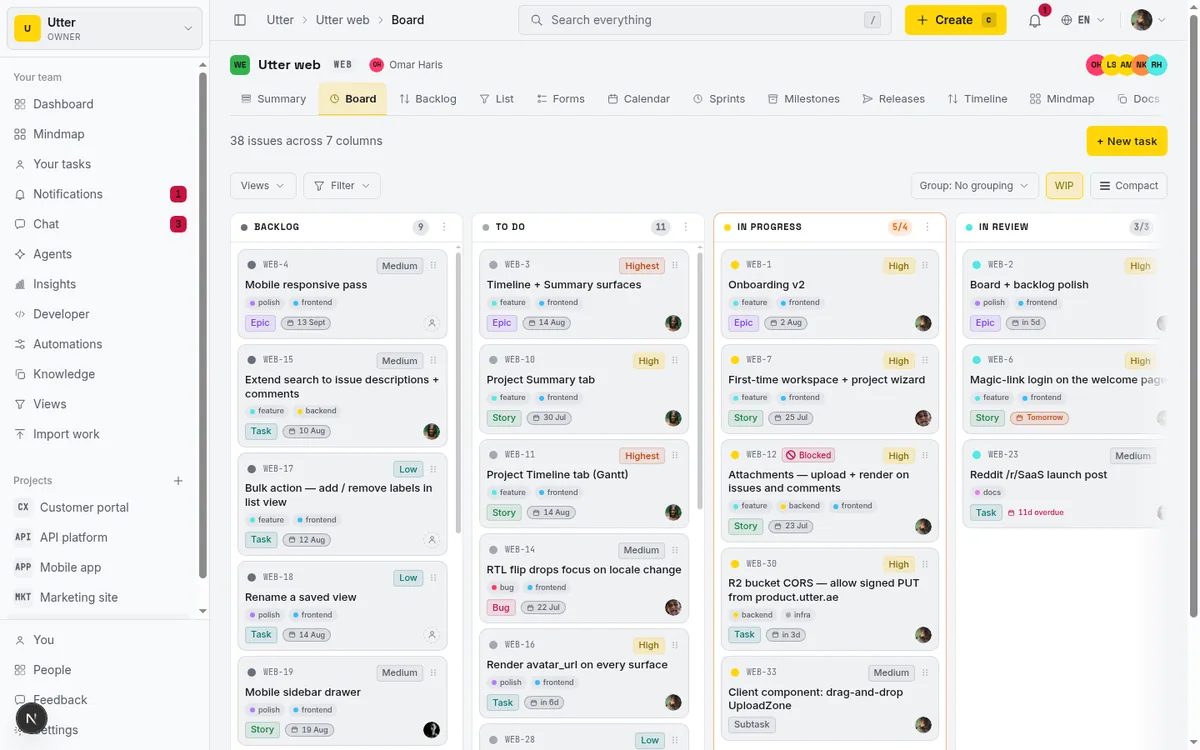
Here is the honest part, and I'd rather you hear it from me than discover it later: WIP limits in Utter are soft. The over-limit chip warns you. It does not block the drop. You can drag a sixth card into an In Progress column capped at 4, and the tool will let you, then flag it.
Is that a bug or a feature? For a small team, it's usually the right call. A hard block that refuses the drop interrupts you at the exact moment you're trying to move fast, and small teams tend to have enough context to know when breaking their own limit is justified (the production incident that jumps the queue, the two-minute fix that isn't worth ceremony). A nudge respects that judgment while still making the pileup visible, which is most of the value of a WIP limit anyway. The point of a cap is to start a conversation about flow, not to play traffic cop. If you want to go deeper on that, we wrote a whole piece on WIP limits that actually help.
Where a hard block does matter is larger teams, or teams where WIP discipline is the whole point of adopting kanban and people won't self-enforce. If your practice depends on the tool physically stopping over-commitment, that's a real requirement Utter doesn't meet today, and I'll come back to it in the "when to stay" section.
How scrum runs: sprints, carryover, and issue-count velocity
Now the scrum side. In Utter, a scrum project uses sprints plus a ranked backlog you pull from.
Sprints are project-scoped, timeboxed iterations with a name, a goal (written in markdown), start and end dates, and a state that moves planned to active to completed. One property worth knowing: a project can run several sprints at once. Starting a sprint flips it to active without demoting the others, so squads that share a project each keep their own.
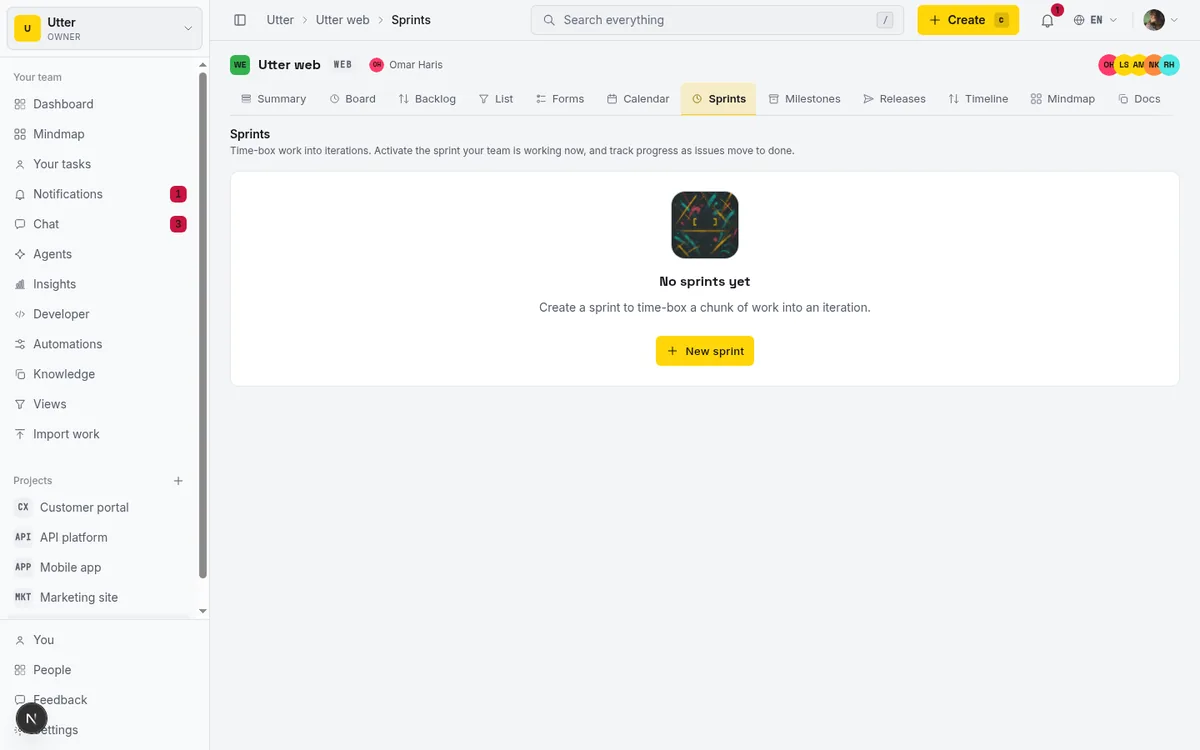
You build a sprint by pulling issues from the backlog. The backlog is a dedicated, ranked view per project, drag-ordered with LexoRank, and you move issues into a sprint either by dragging them or using a per-row sprint picker. Standard stuff, and it works the way you'd expect.
Carryover is where a lot of tools get vague, so here is exactly what completing a sprint does in Utter. When you complete a sprint, every non-done issue (anything still in backlog, todo, in progress, in review, or failed) moves either to a target sprint you choose or back to the backlog with its sprint cleared. Resolved issues (done or cancelled) stay put on the completed sprint, so its record is preserved and your velocity math stays honest. You can optionally notify the assignees and watchers of carried-over issues so nobody wakes up to work that silently teleported. That's the whole model: unfinished work moves forward or drops back, finished work stays as history.
One knob to set up front: story points are optional. Turn a project to points for Fibonacci estimating and points-based velocity, or leave it time-based. If your scrum runs on planning poker, that's a hard gap. Estimation in Utter is time-based only: each issue carries estimate minutes, spent minutes, and a completion percentage. Velocity and burndown are computed by issue count, not points. Sprint burndown tracks issue count remaining for the active (or most recent) sprint, and velocity tracks committed versus completed issues across the last eight sprints.
So if you're used to "we committed 34 points and burned 29," Utter instead tells you "we committed 18 issues and completed 15." For teams that never fully trusted the point-inflation game, issue count is refreshingly blunt. Teams that run on planning poker can switch a project to story points and estimate in the scale they already use. It's a real tradeoff, not a footnote. If you're the kind of team that wants sprints but hates the overhead, running sprints without the ceremony is the lighter path.
You don't pick a tool per methodology. You pick per project.
This is the whole pitch, so I'll say it plainly. In Utter, methodology is not a property of the tool or even the workspace. It's just which features a given project happens to use.
Every project exposes the same routes: board, backlog, list, sprints, reports, summary, settings. There is no "create a scrum project" versus "create a kanban project" fork at creation. Utter never asks you to pick a template. You make a project, and it comes with all of it.
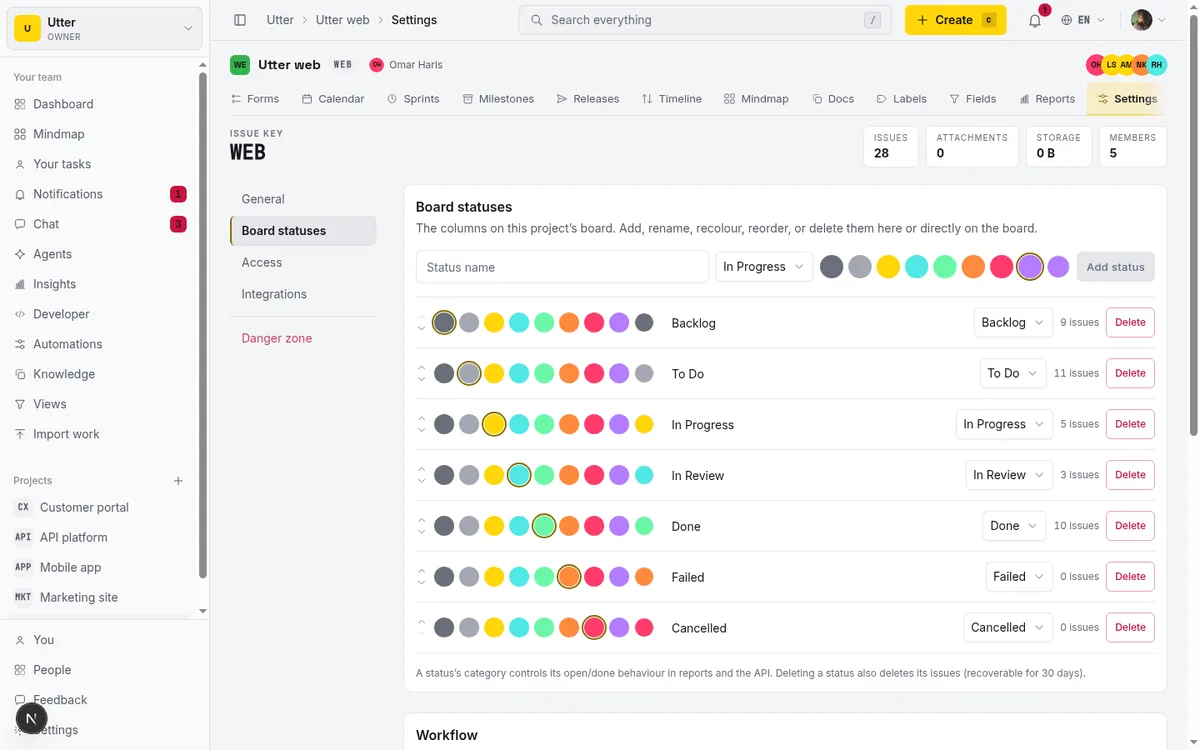
That means you can run pure kanban on one project (ignore the sprints tab entirely, live on the board, turn on WIP limits) and full scrum on another (use sprints, pull from the backlog, watch velocity) inside the same workspace, with the same members and the same billing. Your support project runs kanban. Your product project runs scrum. Nobody had to spin up a second tool or a second account. They just lean on different tabs of the identical feature set.
Here's the honest contrast with the tools you might be coming from, and I want to be fair because they're good products. As of July 2026, Jira makes you choose a Scrum or Kanban template when you create a project, and the difference is baked into the backlog: scrum projects get a separate sprint backlog and use story points inside a timeboxed sprint, while kanban projects use per-column WIP limits and continuous flow. The catch is that company-managed Jira projects can't switch board type after creation. Team-managed projects let you toggle the Sprints feature on and off, which is closer to Utter's model, but company-managed ones lock it in. Linear takes a cleaner-but-still-opinionated line: its sprint equivalent is Cycles, fixed-length iterations on an automated cadence, alongside a kanban board view, a list, and a timeline. Cycles are a first-class concept you frame your work around.
And now the limit I owe you, because a fair comparison cuts both ways: in Utter, each project runs one style at a time. It's a single board per project, tied to that project's custom statuses. You do not get two parallel boards inside one project (a "scrum board" and a "kanban board" side by side on the same issues). "Kanban vs scrum per project" means each project picks a lane. What Utter does instead is remove the wall between the two styles across projects, and make switching a project from one to the other cost nothing.
The honest comparison, including price (as of July 2026)
Prices and limits move, so everything here is as of July 2026, drawn from each vendor's published pricing and third-party pricing writeups. I'm going to be generous and factual. None of these tools is bad; they're aimed at different bets.
| Utter | Jira | Linear | Trello | |
|---|---|---|---|---|
| Free plan | $0, feature-complete (sprints, timeline, reporting, AI in base) | $0, up to 10 users | $0, limited to 2 teams and 250 issues | $0, un-opinionated boards |
| Paid entry | Pro $3/editor/mo | Standard $7.91/user/mo | Basic $10/user/mo (annual) | Paid tiers via Trello plans |
| Higher tier | Business $6/editor/mo | Premium $14.54/user/mo | Business $16/user/mo (annual) | Power-Ups for analytics |
| Viewers | Free, never counted | Counted as users | Counted as users | n/a |
| Agents/bots as members | Free, unbilled seats | n/a | n/a | n/a |
| Native sprint + velocity | Yes (issue-count or story-point velocity) | Yes (story points) | Yes (Cycles) | No, needs Power-Ups like Corrello |
| Native burndown | Yes | Yes | Yes | No, needs a Power-Up |
| Methodology at project creation | No template, same routes for every project | Choose Scrum or Kanban template | Cycles are the iteration model | Un-opinionated, no built-in framework |
| Switch board type after creation | Free, just start/stop using sprints | Company-managed: no; team-managed: toggle Sprints | Cycles baked in | n/a |
A few honest notes on that table. Utter's Free plan is genuinely feature-complete rather than a trial that hides sprints behind a paywall: sprints, timeline (Gantt), reporting, integrations, and AI are all in the base feature set. The Free caps are capacity limits, not feature locks: 5 active projects, 128 MB storage, 1 MB per-file upload, 2 automation rules, 1,000 import rows, and 25 AI credits a month. Utter's prices are advertised per editor seat; only editor roles (owner, admin, member) bill, while viewers and AI agents are free and never counted. Stripe is the billing source of truth.
On the others: Jira's Free plan covers up to 10 users, with per-user rates stepping down as you cross seat thresholds near 100, 250, and 500 seats, and Standard drops to about $6.52/user/mo on annual billing for up to 300 users. Linear's Free plan is real but capped at 2 teams and 250 total issues, and the Basic and Business rates shown require annual billing. Trello is the un-opinionated one: it runs boards happily but has no native burndown charts, velocity tracking, or sprint dashboards. Those come from third-party Power-Ups such as Corrello. That's not a knock, Trello just aims at a different job.
When to stay on what you have
I'd rather you stay put than switch and regret it, so here's the section that talks you out of Utter where it should.
Story points are a per-project switch. Turn a project to points for Fibonacci estimating and points-based velocity, or keep it time-based; velocity follows the unit. If your team's estimation, forecasting, and sprint commitment all hang on point-based velocity, moving to issue count is a real loss of fidelity. It's not a plugin gap here, it's a design choice.
Stay if you need hard-enforced WIP that blocks drops. Utter's WIP limits warn with an over-limit chip; they don't stop the card from landing. If your kanban discipline depends on the tool physically refusing over-commitment, Utter won't enforce that today.
Stay if you need two independent boards over the same issues in one project. Utter now runs parallel sprints, so several squads can share a project and each keep a live sprint. What it does not do is show two separate boards over one issue set inside a single project: each project has one board, one backlog, and one sprints page.
Stay if you need built-in ceremony scaffolding. Utter gives you mechanics: sprints with carryover, a ranked backlog, WIP limits, burndown, velocity. It does not ship standup tooling, retro boards, or planning-poker widgets. If you want the tool to run your ceremonies, bring your own.
None of these are apologies. They're decision inputs. Utter trades story-point machinery and ceremony scaffolding for a simpler, reversible per-project model, and if the machinery is what you need, the trade isn't worth it for you.
Set it up either way (and switch when you're wrong)
Here's the practical part, and the payoff of the whole per-project idea.
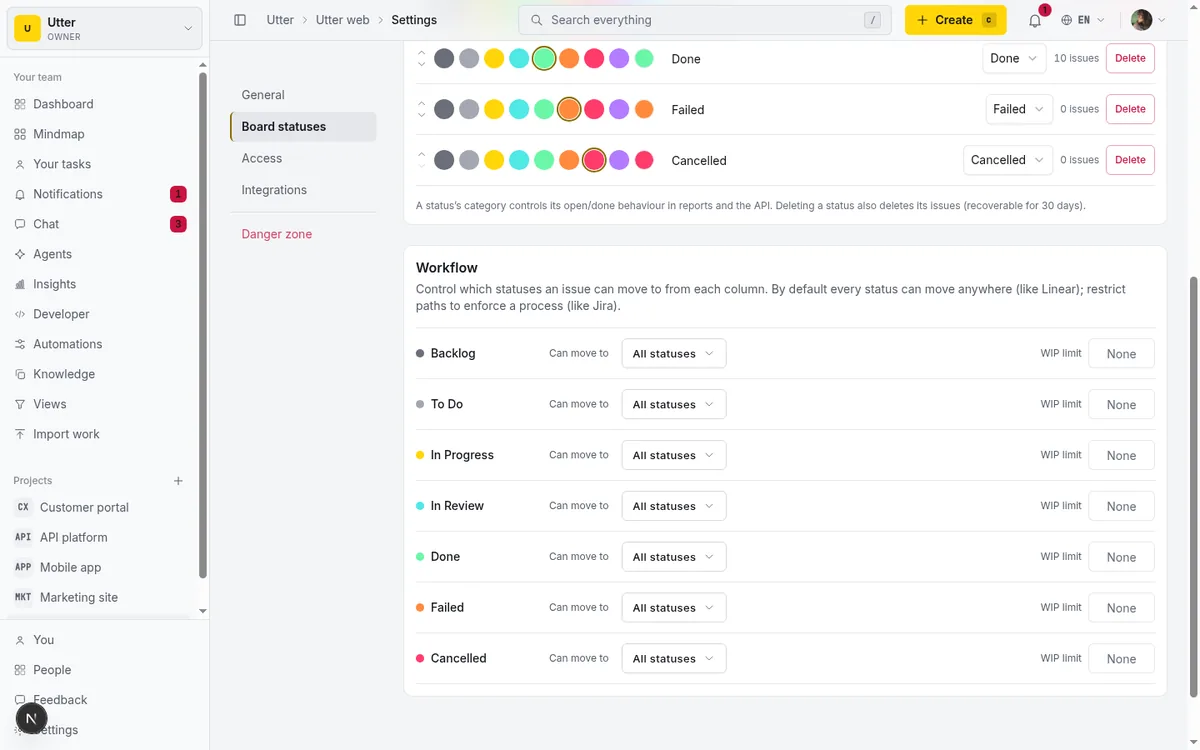
To run kanban: define your custom columns on the project (each project sets its own named, colored, ordered statuses, each mapped to one of the fixed status categories that drive open/closed and reporting). Add, rename, recolor, recategorize, and reorder columns straight from the board (the trailing "+" and each column's kebab menu) or from project settings; columns also reorder by dragging the header. Then flip on the WIP toggle and set your caps. Ignore the sprints tab. That's a kanban project.
To run scrum: create your sprints, pull issues from the backlog into a sprint, start it, and check burndown and velocity in reports. That's a scrum project.
The reversible part is the point. Switching a project from kanban to scrum (or back) involves zero migration. It's the same board, the same issues, the same data. You just start using sprints, or stop. No template to rebuild, no board to recreate, no export-and-reimport dance. Decide you were wrong about a project three weeks in, and you fix it in the time it takes to create a sprint or archive one.
If you drive Utter from code or hand a project to an agent, the same two moves are two API calls. Create a sprint, then attach an issue by setting its sprint_id. Every endpoint below is real v1 REST.
Create a sprint:
curl -X POST \
  "https://utter.ae/api/v1/workspaces/acme/projects/WEB/sprints" \
  -H "Authorization: Bearer $UTTER_API_KEY" \
  -H "Content-Type: application/json" \
  -d '{"name":"Sprint 12","goal":"Ship the billing revamp","status":"planned","start_at":"2026-07-20","end_at":"2026-08-03"}'
const apiKey = process.env.UTTER_API_KEY;
const res = await fetch(
"https://utter.ae/api/v1/workspaces/acme/projects/WEB/sprints",
{
method: "POST",
headers: {
Authorization: "Bearer " + apiKey,
"Content-Type": "application/json",
},
body: JSON.stringify({
name: "Sprint 12",
goal: "Ship the billing revamp",
status: "planned",
start_at: "2026-07-20",
end_at: "2026-08-03",
}),
},
);
const sprint = await res.json();import os, requests
res = requests.post(
"https://utter.ae/api/v1/workspaces/acme/projects/WEB/sprints",
headers={
"Authorization": f"Bearer {os.environ['UTTER_API_KEY']}",
"Content-Type": "application/json",
},
json={
"name": "Sprint 12",
"goal": "Ship the billing revamp",
"status": "planned",
"start_at": "2026-07-20",
"end_at": "2026-08-03",
},
)
sprint = res.json()The response gives you the sprint id:
{
  "data": {
    "id": "0192f0a3-7b21-7c44-9f10-2a6f3d5e8c11",
    "name": "Sprint 12",
    "goal": "Ship the billing revamp",
    "status": "planned",
    "start_at": "2026-07-20T00:00:00.000Z",
    "end_at": "2026-08-03T00:00:00.000Z",
    "rank": "0|hzzzzz:"
  }
}
There's no sprint-membership table. Adding an issue to a sprint means setting its sprint_id; removing it means setting sprint_id to null. Attach WEB-42 by PATCHing the issue:
curl -X PATCH \
  "https://utter.ae/api/v1/workspaces/acme/projects/WEB/issues/WEB-42" \
  -H "Authorization: Bearer $UTTER_API_KEY" \
  -H "Content-Type: application/json" \
  -d '{"sprint_id":"0192f0a3-7b21-7c44-9f10-2a6f3d5e8c11"}'
await fetch(
"https://utter.ae/api/v1/workspaces/acme/projects/WEB/issues/WEB-42",
{
method: "PATCH",
headers: {
Authorization: "Bearer " + process.env.UTTER_API_KEY,
"Content-Type": "application/json",
},
body: JSON.stringify({
sprint_id: "0192f0a3-7b21-7c44-9f10-2a6f3d5e8c11",
}),
},
);requests.patch(
"https://utter.ae/api/v1/workspaces/acme/projects/WEB/issues/WEB-42",
headers={
"Authorization": f"Bearer {os.environ['UTTER_API_KEY']}",
"Content-Type": "application/json",
},
json={"sprint_id": "0192f0a3-7b21-7c44-9f10-2a6f3d5e8c11"},
){
"data": {
"key": "WEB-42",
"title": "Rework invoice line items",
"status": "in_progress",
"sprint_id": "0192f0a3-7b21-7c44-9f10-2a6f3d5e8c11",
"assignee_id": "0192e8b1-3c02-7a55-b7de-9f4411a2d0c8"
}
}To go back to kanban, PATCH sprint_id to null (or just let the sprint complete and stop making new ones). Same data, different tab. That's the reversibility, made literal.
One line on agents, since they run this exact flow: AI agents are free, unbilled members in Utter, and they hit the same REST endpoints. An agent can create a sprint or attach an issue whether the project is kanban or scrum, because there is no methodology flag for it to care about.
What changes when agents do the work
Here's the forward-looking bit, kept short. The scrum-versus-kanban debate is a human debate. It's about how people coordinate, commit, and stay sane. An agent doesn't have that problem.
In Utter, AI agents are real workspace members, free and unbilled, with a first-party MCP server and the public v1 REST API. They come with per-agent field-write permissions (so you scope exactly which fields an agent may touch) and human review states on agent sessions (so a person can check the work before it counts). An agent reads the backlog, moves cards, and opens sessions through the same endpoints you just saw, and it does not care one bit whether the project is running sprints or pure flow. The methodology is a lens for the humans. To the agent, it's all the same board, the same issues, the same API.
That's the quiet argument for a tool that treats methodology as a per-project choice rather than a permanent identity: it scales down to a two-person team picking kanban for support and scrum for features, and it scales into a workflow where agents do part of the moving. Neither one should have to argue about the framework.
If you want to feel the difference instead of reading about it, spin up two projects in one workspace, run one on the board and one on sprints, and switch either one the moment it stops fitting. Start a workspace and try it both ways.
Frequently asked questions
Is kanban or scrum better for a small team?
Neither is universally better; it depends on how your work arrives. A small team with a continuous, shifting intake (support, ops, a mix of small requests) usually runs smoother on kanban, because there's no scope to freeze and priorities move too fast for a two-week commitment. A small team building features against a roadmap often does better with scrum, because the sprint rhythm creates predictability. The honest answer for most small teams: run kanban by default, adopt scrum only when you actually need to commit scope to a window, and pick a tool that lets you do both without recreating the project.
What is the actual difference between a scrum board and a kanban board?
One mechanic. A scrum board is scoped to a timeboxed sprint: it shows the work you committed to for a fixed window, and it resets when the sprint ends. A kanban board is continuous: work flows across it with no iteration boundary, and it's capped by per-column WIP limits instead of sprint capacity. Everything else (columns, colors, card layout, standups) is shared or optional. If the board resets on a cadence and holds a committed batch, it's scrum. If it flows continuously with column caps, it's kanban.
Can you use scrum and kanban together in the same tool?
Yes, and in Utter you can use them together in the same workspace. Every project exposes the same routes (board, backlog, sprints, reports, and more), with no methodology template at creation, so one project can run pure kanban while another runs scrum, sharing members and billing. What Utter does not do is run two separate boards over the same issues inside a single project; each project runs one style at a time.
Does Utter support sprints and velocity, or just a kanban board?
Both. Utter has project-scoped timeboxed sprints (planned to active to completed, and a project can run several at once), a ranked backlog to pull from, sprint carryover, sprint burndown, and velocity across the last eight sprints. Estimation is a per-project switch: turn a project to story points for Fibonacci estimating and points-based velocity, or leave it on time (estimate and spent minutes) where velocity reads as issue counts.
Do I have to choose scrum or kanban when I create a project?
No. Utter never asks you to pick a scrum-or-kanban template at project creation. Every project comes with the full route set, and you decide the methodology by which features you use: turn on WIP limits and live on the board for kanban, or create sprints and pull from the backlog for scrum. This is different from Jira, which (as of July 2026) asks you to choose a Scrum or Kanban template up front.
Does Utter use story points?
Yes. Story points are an optional per-project estimation unit: turn a project to points and you estimate on a Fibonacci scale, with points-based velocity and burndown. Leave it on time instead and each issue tracks estimate minutes, spent minutes, and a completion percentage, with velocity by issue count. A live planning-poker voting UI is not built in, but the point scale it produces is.
Are WIP limits enforced or just a warning?
In Utter they're a warning, not a hard block. Turn on the per-column WIP toggle and each column can carry a soft limit (In Progress defaults to 4, In Review to 3; Backlog and Done are uncapped). Go over the limit and the column shows an "n/limit" warning chip, but the tool still lets you drop the card. It nudges; it doesn't stop you. If you need a hard block that refuses over-limit drops, Utter doesn't enforce that today.
How do I switch a project from kanban to scrum without redoing everything?
You just start using sprints. In Utter, switching between kanban and scrum on a project involves zero migration, because it's the same board and the same data either way. To go scrum, create a sprint and pull issues from the backlog into it. To go back to kanban, stop creating sprints (or set issues' sprint_id back to null) and work off the board. There's no template to rebuild and nothing to export. That reversibility is the whole point of picking methodology per project instead of per tool.
Related reading
How to run sprints without drowning in ceremony
A lightweight sprint process for small teams: what to keep, what to cut, and how to get the value of planning and review without the meeting tax.
July 12, 2026 · 5 min read
Monday.com alternatives built for software teams, not marketing ops
Monday.com alternatives for software teams: real pricing (3-seat minimum vs $3/$6 per builder seat), category-backed statuses, sprints with carryover, and agents as free members not billed integrations.
July 16, 2026 · 12 min read
A Trello alternative for when a board stops being enough
Trello alternative comparison: what breaks when a board stops being enough, an honest Trello vs Utter pricing and feature comparison as of July 2026, and how to keep the board while adding sprints, a ranked backlog, and reports.
July 16, 2026 · 12 min read

Story points or hours, and parallel sprints when squads share a project
Utter now estimates in story points or hours per project (Fibonacci scale, points-based velocity) and runs parallel sprints when squads share a project. Both opt-in, on every plan.
July 17, 2026 · 7 min read
A Notion alternative for project management (keep the docs, gain a real tracker)
A Notion alternative for project management that keeps your docs and adds a real tracker: category-backed statuses, native sprints with carryover, computed burndown, agents over MCP.
July 16, 2026 · 14 min read
AI sprint planning: what actually works in 2026
Where AI genuinely helps plan a sprint, drafting, sizing, capacity checks, and where letting it decide is a mistake. A working setup, honestly described.
July 15, 2026 · 5 min read
Cycle time vs lead time (and how to actually measure both)
Cycle time vs lead time explained: what each measures, how to compute both from issue history, reading p50/p75 and the histogram, and how Utter, Jira, and Linear compare.
July 16, 2026 · 11 min read

How to automate project management with AI, and what to leave manual
The right order to automate project management with AI: reporting first, intake second, execution agents last, and the decisions that should stay human.
July 15, 2026 · 8 min read
Custom workflow statuses
Build custom Jira-style board columns in Utter and enforce status transition rules across the board, API, bulk edits, and automations. With the honest limits.
July 15, 2026 · 18 min read

Will AI agents replace project managers? What actually changes
Agents already handle the mechanical parts of project management. The judgment part is harder, and it is not going anywhere. An honest look at the shift.
July 15, 2026 · 7 min read
Add a comment
Start the conversation.