
A GitHub Issues alternative for when projects outgrow a repo
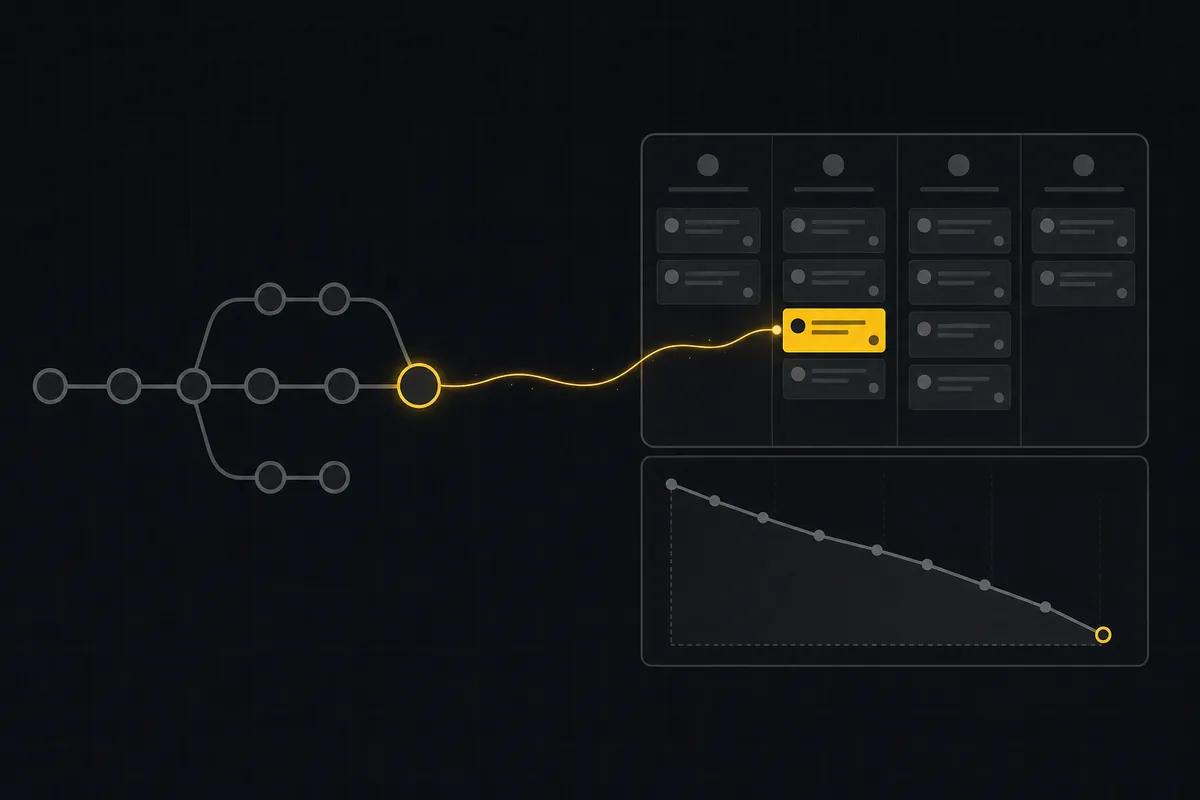
Your team ships from GitHub. Pull requests, review, milestones, the whole loop lives next to the code, and for a long time that is enough. Then one week you are staring at a board with fourteen labels, three of which are status: labels that only half the team applies, you cannot tell which of the eleven open bugs is actually next, and the person running standup has opened four browser tabs to reconstruct what "in progress" means. That is the moment people start searching for a GitHub Issues alternative, and it is worth being precise about what you are actually looking for, because most of what gets recommended is a code host you do not need or a heavyweight tracker you will resent.
This post is for a team that already loves GitHub for code and has no intention of leaving it. You are not trying to replace GitHub. You outgrew Issues as the place you plan and report, and you want a tracker that sits next to the repo without throwing away the commit history you rely on. The honest answer, which the rest of this post argues, is a dedicated tracker beside your repo rather than a GitHub replacement. Utter does not host code and is not trying to. All prices and product facts below are stated as of July 2026.
The point where GitHub Issues stops being enough
GitHub Issues is genuinely excellent at what it was built for. Issues sit next to the code, they link to pull requests, review happens in the same place, milestones group work, and on the Free plan you get unlimited public and private repos with unlimited issues, labels, and milestones (as of July 2026). For a solo project or a small repo, nothing beats the friction of zero context switching.
The trouble starts when Issues has to behave like a project tracker instead of a code-adjacent list. Three specific pains show up, in roughly this order.
First, your workflow lives in labels. You add a blocked label, an in review label, maybe needs design. But a label is not a status. It does not gate anything. Nothing stops an issue from carrying done and blocked at the same time, nothing forces a card to pass through review before it closes, and none of it feeds a report, because to GitHub a label is a tag, not a state the work is in.
Second, there is no ranked backlog. Priority becomes a thing you eyeball. You drag issues around a milestone, you star the important ones, you keep a mental model of what is next, and that model lives in one person's head. Ask five people what the top of the backlog is and you get five answers.
Third, planning and reporting stay thin even after you bolt on Projects. You can build a board, but the questions a planning meeting actually asks (are we on track to finish the sprint, how fast is this team, where does work pile up) do not have first-class answers.
None of this means GitHub Issues is bad. It means you have asked it to be a tracker, and a tracker is a different tool. The fix is not to abandon GitHub. It is to put a real tracker next to it.
What GitHub Projects fixed, and what it left thin
Before going further it is worth being fair, because a comparison you cannot trust is worthless. GitHub Projects is a real step up from raw Issues, and if you have not looked at it recently you should.
As of July 2026, per the GitHub docs, Projects is an adaptable table, board, and roadmap that integrates with your issues and pull requests. You get three view types: a spreadsheet-style table, a kanban board, and a timeline-style roadmap. It has an iteration field that lets you plan work week by week, including breaks, which is a legitimate lightweight sprint mechanism. You can add up to 50 custom fields per project across date, number, single-select, text, and iteration types. And Insights gives you current and historical charts.
GitHub also raised the ceiling on project size. The maximum items per Project went from 1,200 to 50,000, announced as a public preview on 2025-02-26 and rolling out incrementally; projects in the rollout show an "Increased items preview" indicator. So the old "Projects falls over on a big backlog" complaint is being addressed.
Do not let anyone tell you GitHub has no planning. It does.
Here is the honest "but." The gap is depth, not absence.
Insights ships a "Burn up" chart by default, and the documentation does not mention a burndown chart. If your planning meetings run on burndown, that is a real difference. Status in Projects is still effectively a single-select field or a label. There is no category backbone underneath it, so there is nothing that enforces which transitions are legal, nothing that caps work-in-progress per column, and nothing that ties a column to an is-open or resolved meaning that the rest of your reporting can rely on. The ranked backlog, and the deeper reporting a team leans on (velocity, cycle time, cumulative flow), are not there. And cross-repo or monorepo work stays awkward, because a Project is oriented around items that mostly belong to one repo.
So the frame for the rest of this post is not "GitHub cannot plan." It is: GitHub Projects gives you planning that is broad and shallow, and a growing team eventually wants it deeper.
What to look for in a GitHub Issues alternative
Here is a buyer's checklist, written as criteria rather than a pitch. If you are evaluating anything (Utter or not) score it against these.
Keep the commit-to-issue trace you already rely on. A linked commit should be one click from the ticket. If moving your planning off Issues means losing the connection between a bug and the commit that fixed it, that is too high a price. The tool should ingest your commit references, not ask you to abandon them.
Real statuses, not labels. You want a status model that actually drives is-open and resolved semantics and feeds reporting. Ideally that means a fixed category backbone plus custom named columns on top, transition rules that say which moves are legal, and per-column work-in-progress limits.
A ranked backlog, a board, and sprints. A backlog you order deliberately (so priority is an explicit sequence, not a vibe), a kanban board for flow, and a sprint mechanism for time-boxing.
Reports that answer real questions. Burndown and burnup. Velocity. Cycle time. Throughput. Cumulative flow. Not one default chart, but the set a planning meeting reaches for.
Handles monorepos and cross-repo work. One repo should be able to feed more than one project, and work that spans repos should not fight the tool.
Fair pricing and agent support. Viewers and stakeholders should not cost a full seat. And increasingly, your AI coding agents should be able to join as members without each one billing like a human.
That is the rubric. The rest of this post scores Utter against it and is honest about where it falls short.
Keeping commit-to-issue linking when you move planning off Issues
The first fear anyone has when they move planning off GitHub is: if I plan somewhere else, do I lose my commit history? The answer is no, and it is worth explaining exactly how, because vague reassurance is not enough.
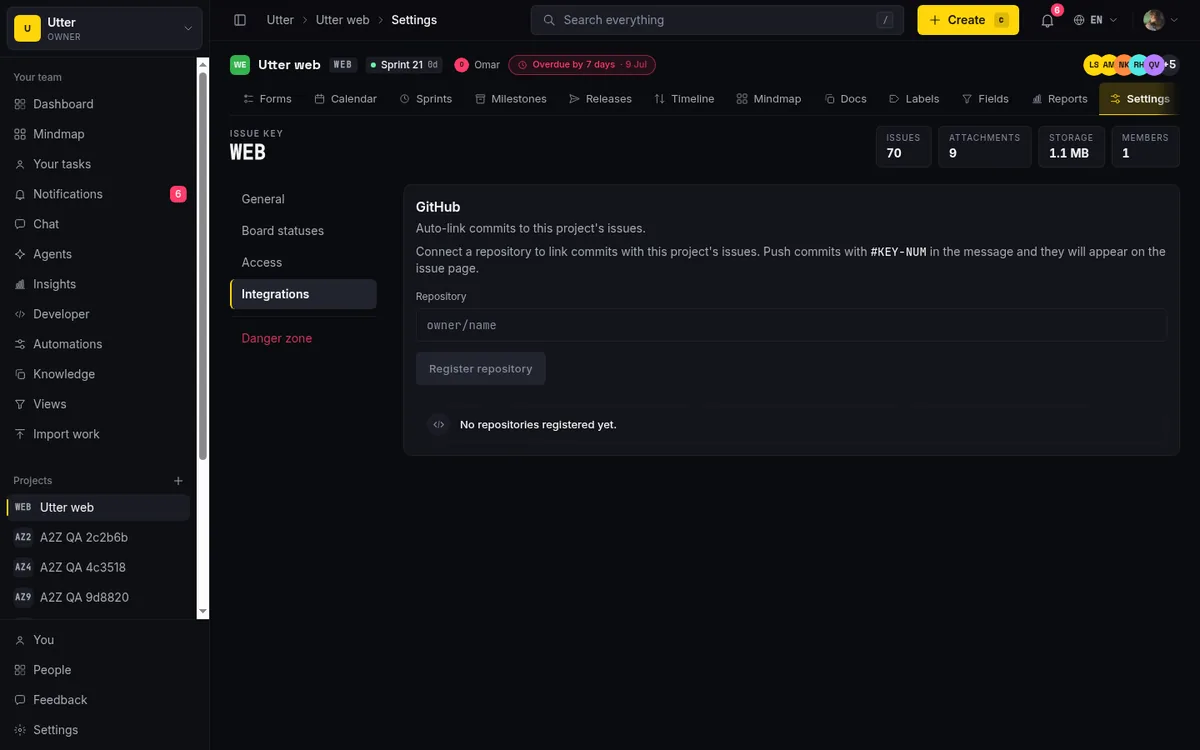
Utter has a first-party GitHub integration. You connect a repo, GitHub sends a push webhook, and Utter verifies it. The signature check is an HMAC SHA-256 verification (verifyGithubSignature in src/lib/integrations/github.ts), so forged payloads do not get in. On each push, Utter parses your commit messages and pulls out #KEY-NUM references using the regex [A-Z][A-Z0-9]{1,5}-\d+ (extractIssueRefs). For every reference it finds, it records a commit_refs row against the matched issue: the repo, the commit SHA, the message, the URL, the author, and the commit timestamp. That row is unique on (issueId, repo, sha) so the same commit never doubles up, and because it stores the commit URL, each linked commit is one click away from the issue. That is the same commit-to-work trace GitHub gives you, kept in the tracker instead.
#KEY-NUM is Utter's native cross-reference syntax, and it works in commits and in comments. Write #WEB-42 in a commit message and it links. Write it in a comment and it renders as a styled chip and records an issue_links row of kind relates_to. One honest caveat here: #KEY-NUM auto-linking in comments currently resolves against the current project's slug. Cross-project reference rendering is deferred, so do not expect a comment in one project to seamlessly chip-link an issue in another yet.
Two more things this integration does, both useful for exactly the team this post is about. First, one repo can connect to multiple Utter projects in the same workspace. The repo_integrations unique key includes the project id, so a single monorepo can feed several projects at once, which is the awkward cross-repo case GitHub Projects handles poorly. Second, a git tag push can advance an Utter release. Push refs/tags/v1.4.0, Utter matches it to a release version (resolveAutoShipTag / tagMatchesRelease), and the release moves forward. Shipping a tag ships the release.
Now the critical honesty, because this is where a lot of "GitHub alternative" pitches lie. This is one-directional ingestion. Utter reads commits that carry #KEY-NUM and reads tag pushes. It does not sync your issues back to GitHub, it does not mirror pull requests, and it is GitHub-only today (no GitLab, no Bitbucket). GitHub keeps living for code, PRs, and review. Utter is the planning and reporting layer beside it. If you were hoping for a full two-way sync of issues and PRs, this is not that, and you should know it before you commit.
If you want the step-by-step on connecting a repo, see how to connect GitHub.
Statuses that mean something, not labels-as-workflow
This is the single biggest upgrade over Issues, so it gets its own section.
Utter uses a two-level status model. Underneath, seven fixed status categories carry the semantics: backlog, todo, in_progress, in_review, done, failed, cancelled. That is the issues.status enum, and it is what drives is-open, the resolved timestamp, every report, and the public API's status field. On top of those categories sits a table of per-project board columns: unlimited named, colored, ordered columns, each one mapping to exactly one category. This is the same split Jira draws between a status and its status category, and it is the difference between a workflow and a label you hope everyone respects.
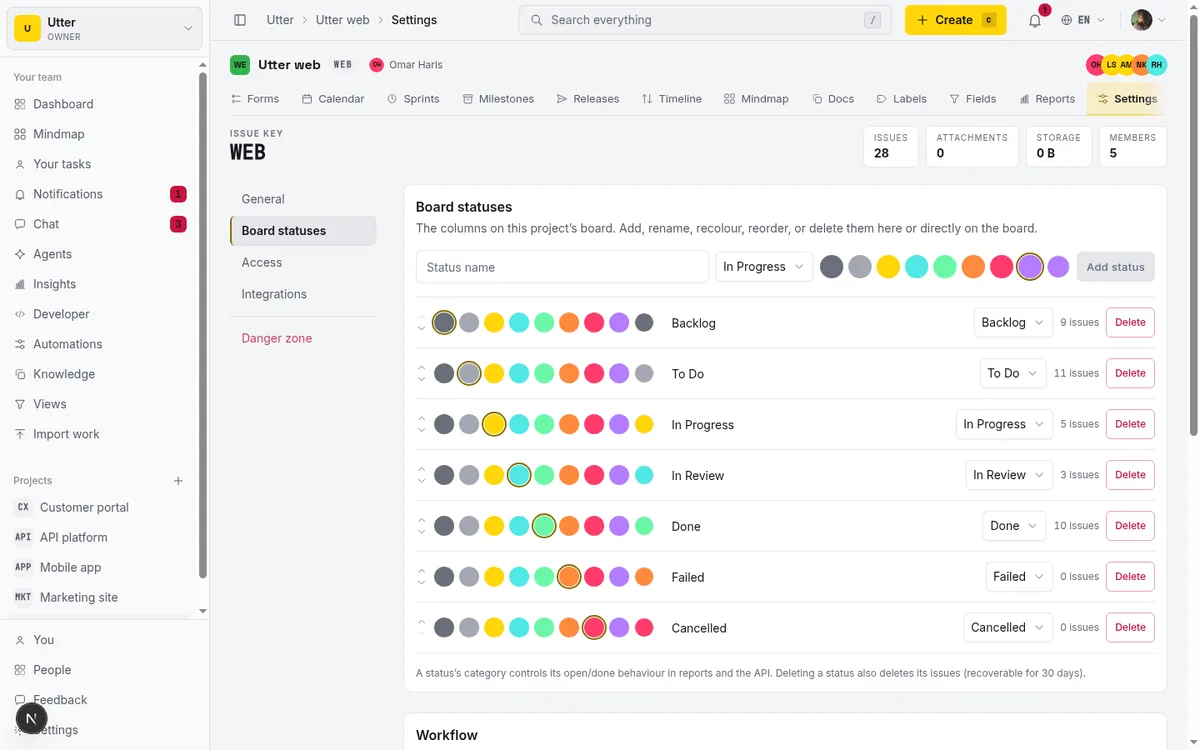
In practice, every project starts with seven default columns. You add a column with the trailing +, and from the column kebab you rename it, recolour it, recategorise it, reorder it, or delete it. You can also reorder columns by dragging the column header directly. Because each column is pinned to a category, a card sitting in your custom "Code review" column is understood by the whole system as in_review, so it counts as open, it shows up correctly in cycle-time, and it behaves consistently in reports. A label can never do that.
On top of the columns, Utter supports workflow transition rules (an allowed_transitions model that says which moves are legal) and per-column work-in-progress limits. So you can enforce that nothing jumps from todo straight to done, and you can cap how many cards live in "In progress" at once.
Contrast that with GitHub. A single-select field or a label has no category backbone, no transition gating, and no WIP cap. It is a tag, and tags do not have opinions about how work flows. For a deeper walkthrough, see custom workflow statuses.
Sprints, a ranked backlog, and the reports GitHub does not draw
Planning and reporting are the core of "we outgrew Issues," so I will take them together.
On the planning side, Utter gives you a ranked backlog, a board, and sprints. The backlog is ordered with LexoRank, a base-62 lexicographic ranking (rankBetween), which means priority is a deliberate sequence you set, not a guess you re-derive every Monday. The board is a kanban with optimistic drag (built on @dnd-kit) that persists the card's status_id and its rank as you move it. Sprints run as real time-boxes. Issue types cover the flat agile vocabulary (epic, story, task, bug, subtask), with parent/child subtasks and a subtasks progress card so a story shows how far its children have gotten.
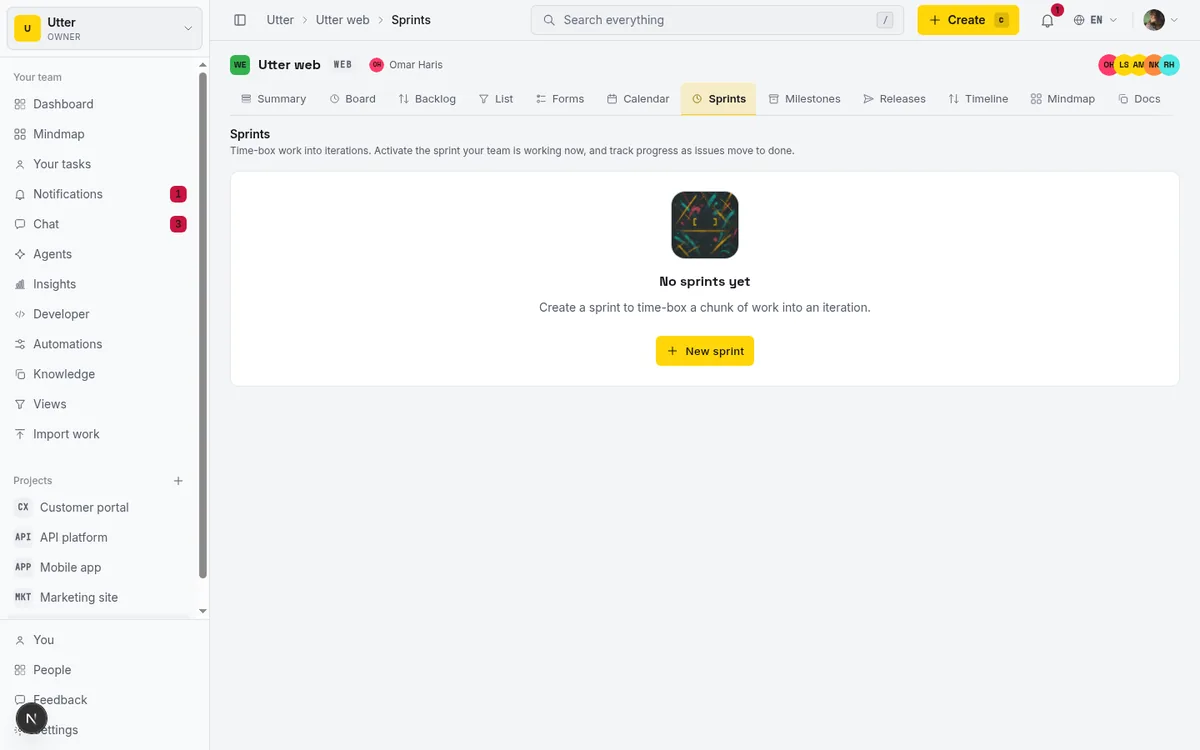
Then the reporting, which is the sharpest contrast in this whole comparison. Utter ships a full reports suite (src/lib/analytics/reports.ts plus the project Reports page): velocity, burndown, burnup, cumulative flow, cycle time, throughput, status breakdown, type breakdown, and workload, all over selectable 7-day, 30-day, and 90-day windows. The project Summary page adds a sprint burndown and a status donut on top.
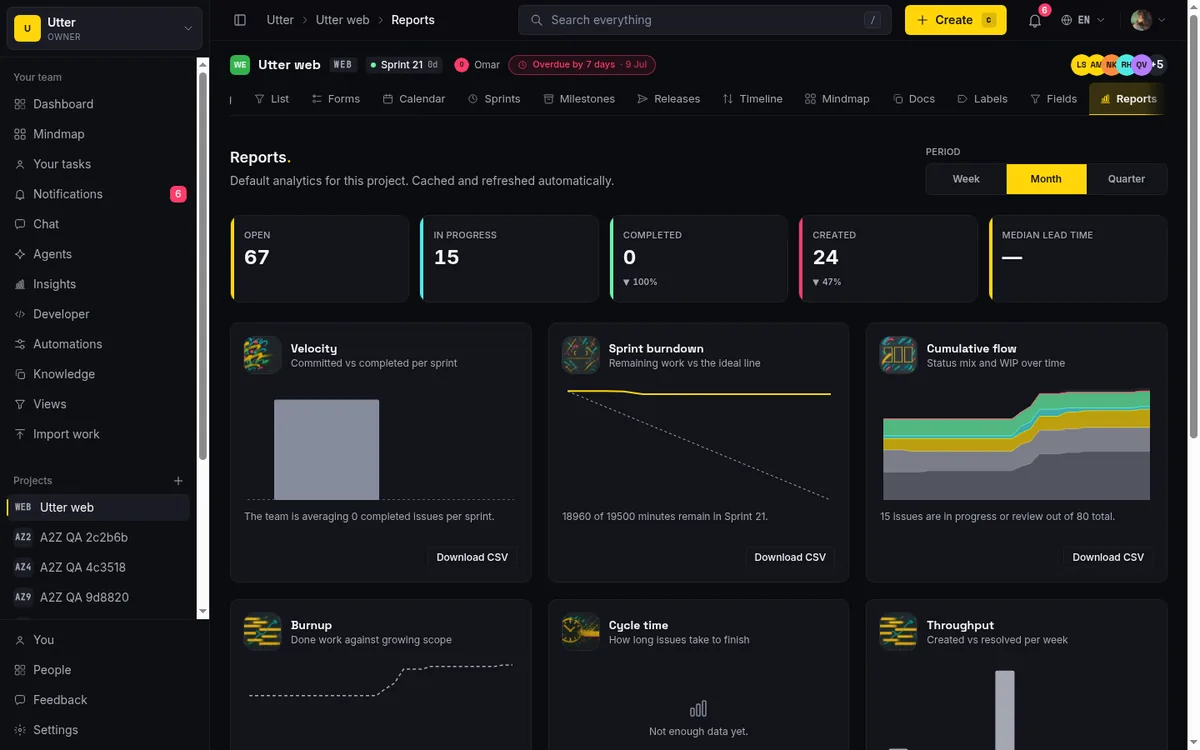
Put that next to GitHub Projects Insights, which as of July 2026 ships a burn up by default and, per its docs, no burndown. If your team runs sprint planning on a burndown, or asks "what is our velocity" before committing to a sprint, you get those natively in Utter and you have to build around their absence in GitHub. That is not a knock on GitHub's engineering. It is a scope difference: Insights is a light reporting layer, and a dedicated tracker's reporting is deeper. For the full tour see how to run a sprint and project reports and insights. If ordering the backlog is your immediate pain, how to prioritize your backlog covers the ranked-list workflow specifically.
The honest comparison, including price
Here is the side-by-side. Everything below is drawn from the verified facts, and all prices are as of July 2026.
| GitHub Issues + Projects | Utter | |
|---|---|---|
| Workflow model | Labels / single-select fields | Category-backed statuses + transition rules + WIP limits |
| Backlog | Drag within a milestone, eyeball priority | Ranked backlog (LexoRank ordering) |
| Sprints | Iteration field (week-by-week) | Sprints + board + ranked backlog |
| Reports | Burn up by default, no burndown | Velocity, burndown, burnup, cumulative flow, cycle time, throughput |
| Custom fields | Up to 50 per project | Custom fields, 10 field kinds |
| Max items | 50,000 (in preview rollout) | No stated cap |
| Cross-repo / monorepo | Awkward | One repo can feed many projects |
| AI agents as members | Not applicable | Free, non-seat members |
| Hosts code | Yes | No (sits beside your repo) |
| Price | Free $0, Team $4/user/mo, Enterprise $21/user/mo | Free $0, Pro $3/editor seat/mo, Business $6/editor seat/mo (viewers free) |
Now the prices in prose, because the shape matters more than the sticker.
GitHub's plans, as of July 2026, are Free at $0/user/month, Team at $4/user/month (about $48/user/year), and Enterprise at $21/user/month (about $252/user/year). One thing worth calling out: all three tiers include the same core Issues and Projects capabilities, with no feature distinction between tiers on the pricing table. You are paying the higher tiers for security, access controls, and enterprise administration, not for a better tracker. And GitHub Free is generous on the code side: unlimited public and private repos with unlimited issues, labels, and milestones, though it does not include team-level access controls or protected branches on private repos.
Utter's shape is different. Free is $0, Pro is $3 per editor seat per month (about $30/year), and Business is $6 per editor seat per month (about $60/year), with viewers free. The important part is what sits on Free: sprints, timeline, integrations, reporting, and AI are on every plan including Free. What is reserved to paid plans is automation, roles, SSO, and audit. The Free caps are 128 MB storage, 5 active projects, 2 automations, 1 MB per-file upload, and 25 AI credits a month. Pro lifts that to 1 GB, unlimited projects, 20 automations, and 5,000 AI credits. Business goes to 100 GB, unlimited projects and automations, and 20,000 AI credits.
The practical read: with GitHub you pay per user and every collaborator is a user; with Utter your read-only stakeholders cost nothing and your paid seats are cheaper per editor. If the per-seat argument is what you are wrestling with, Jira alternatives and price per seat makes the case in full.
When you should just stay on GitHub Issues
A comparison you can trust has to tell you when not to switch. Here is when I would stay on Issues and Projects and not add another tool.
Stay if your work maps cleanly to one repo and milestones are enough to group it. Stay if you do not run sprints and do not need burndown or velocity in planning meetings, because then GitHub's iteration field and burn up cover you. Stay if you want everything (code, PRs, and the tracker) under one login and one bill, and the mental tax of a second tool is not worth it. Stay if a label-based workflow genuinely works at your team's size, which for a small, high-trust team it often does. And stay if you are heavily invested in GitHub Actions automation wired to issue events, because that automation lives where the issues live.
And to keep this fair in both directions, here are the limits of moving to Utter, restated plainly. It does not host code, so GitHub stays for code, PRs, and review. The integration is one-directional commit and tag ingestion, so issues do not sync back to GitHub and pull requests are not mirrored. Provider support is GitHub-only today. The #KEY-NUM auto-link in comments resolves against the current project's slug, so cross-project reference rendering is not there yet. And only English and Arabic ship today (with full RTL for Arabic), so if you need another interface language, that is a gap.
If any of that lands on a dealbreaker for you, the right move is to stay put. That is a better outcome than switching and regretting it.
What changes when your coding agents join the tracker
There is one thing Utter does that GitHub Issues has no equivalent for, and it is worth ending on because it is where the tooling is heading.
Your AI coding agents can be real members of the workspace, and they are not billed as seats. An agent member is flagged (workspace_members.isAgent = 1) and filtered out of the billed-seat count in src/lib/billing/seats.ts, so a connected coding agent costs $0. Under the hood an agent is a user and a member with its own workspace_agents profile and its own API key, which is how its actions get attributed.
Agents drive the tracker through the same surface humans do. Utter has a first-party MCP server plus a v1 REST API of over 180 operations covering the full product, and the MCP tools derive from the same OpenAPI registry as the REST routes, so an agent talking over MCP and a script hitting REST are calling the same operations. Writes go through a single choke point (updateIssueViaApi), and per-agent field-write permissions (field_policy_json) are enforced there for REST, MCP, and transitions alike, so you can let an agent move status but not reassign, or edit description but not touch priority. Agent sessions carry human-review states (pending, review, done), and Utter derives an "unverified" badge at read time for a session that closed without leaving attributed activity, so you can see when an agent claimed to finish work it did not visibly do.
Here is the actual call an agent (or your own script) makes to open an issue, on the real endpoint. Body fields are type, title, description_md, priority, assignee, and labels.
curl -X POST \
  "https://utter.ae/api/v1/workspaces/acme/projects/WEB/issues" \
  -H "Authorization: Bearer $UTTER_API_KEY" \
  -H "Content-Type: application/json" \
  -d '{
    "type": "bug",
    "title": "Login retry loop on expired magic link",
    "description_md": "Repro: open a stale sign-in link twice.\n\nFixed in #WEB-40.",
    "priority": "high",
    "assignee": "[email protected]",
    "labels": ["auth", "regression"]
  }'
const res = await fetch(
"https://utter.ae/api/v1/workspaces/acme/projects/WEB/issues",
{
method: "POST",
headers: {
Authorization: "Bearer " + process.env.UTTER_API_KEY,
"Content-Type": "application/json",
},
body: JSON.stringify({
type: "bug",
title: "Login retry loop on expired magic link",
description_md: "Repro: open a stale sign-in link twice.\n\nFixed in #WEB-40.",
priority: "high",
assignee: "[email protected]",
labels: ["auth", "regression"],
}),
},
);
const issue = await res.json();import os, requests
res = requests.post(
"https://utter.ae/api/v1/workspaces/acme/projects/WEB/issues",
headers={"Authorization": f"Bearer {os.environ['UTTER_API_KEY']}"},
json={
"type": "bug",
"title": "Login retry loop on expired magic link",
"description_md": "Repro: open a stale sign-in link twice.\n\nFixed in #WEB-40.",
"priority": "high",
"assignee": "[email protected]",
"labels": ["auth", "regression"],
},
)
issue = res.json()The response comes back as the created issue, with its stable key and the assignee resolved to a user id:
{
  "id": "0192f4c1-6a3b-7c2e-9f10-2b8d4e6a1c33",
  "key": "WEB-42",
  "url": "https://utter.ae/w/acme/p/web/WEB-42",
  "number": 42,
  "type": "bug",
  "title": "Login retry loop on expired magic link",
  "status": "todo",
  "priority": "high",
  "assignee_id": "1c9d2f7a-4b6e-7a10-8c33-9e2b4d6a1f55"
}
Now tie it back to the theme of this whole post. That agent commits its fix with #WEB-42 in the message, GitHub sends the push, and Utter records a commit_ref against WEB-42. So the agent's code trace and its tracker activity line up on the same ticket, the same way a human's would. The commit-to-issue link you refused to give up is exactly the thread that stitches an agent's work to the board.
If you already love GitHub for code and just need planning and reporting that grew with your team, start a free Utter workspace and connect your first repo. It stays next to the code you are not leaving.
Frequently asked questions
Is there a free GitHub Issues alternative?
Yes. Utter has a Free plan at $0 (as of July 2026) that includes sprints, a kanban board, a ranked backlog, the GitHub integration, and the full reports suite, with viewers free. The Free caps are 128 MB storage, 5 active projects, 2 automations, 1 MB per-file upload, and 25 AI credits a month. Reporting and integrations are not held back for paid tiers.
Can I keep my GitHub commit links if I plan somewhere other than GitHub Issues?
Yes. Utter's GitHub integration ingests your push webhooks, extracts #KEY-NUM references from commit messages, and records each matched commit (SHA, message, URL, author, timestamp) against the issue, so a linked commit is one click from the ticket. You keep the commit-to-work trace while planning in Utter. It is one-directional though: commits and tags flow in, but issues do not sync back to GitHub and pull requests are not mirrored.
Does GitHub Projects have a burndown chart?
As of July 2026, per the GitHub docs, Projects Insights ships a Burn up chart by default and the documentation does not mention a burndown chart. If you plan on burndown, that is a gap. Utter ships burndown alongside burnup, velocity, cycle time, throughput, and cumulative flow.
Does GitHub Projects support sprints?
Sort of. GitHub Projects has an iteration field that lets you plan work week by week, including breaks, which is a lightweight sprint mechanism (verified July 2026). It does not carry the ranked backlog and sprint-specific reporting, like a sprint burndown or velocity, that a dedicated tracker gives you.
What is the difference between statuses and labels in an issue tracker?
A label is a tag with no semantics: nothing stops contradictory labels, nothing enforces an order, and it does not feed reporting. A status done properly is a state the work is in, backed by a category that drives is-open and resolved meaning, can enforce which transitions are legal, and can cap work-in-progress. Utter uses seven fixed status categories with unlimited custom columns mapped onto them; GitHub uses labels and single-select fields.
How many items can a GitHub Project hold?
GitHub raised the maximum from 1,200 to 50,000 items per Project, announced as a public preview on 2025-02-26 and rolling out incrementally (projects in the rollout show an Increased items preview indicator). Utter has no stated per-project item cap.
Does moving to Utter mean I stop using GitHub?
No. Utter does not host code. GitHub keeps living for your code, pull requests, and review. Utter sits next to your repo as the planning and reporting layer and pulls in your commit and tag activity. It is next to your repo, not a GitHub replacement.
How much does Utter cost compared to GitHub?
As of July 2026: GitHub is Free $0, Team $4/user/month, Enterprise $21/user/month, and every tier bills per user. Utter is Free $0, Pro $3/editor seat/month, Business $6/editor seat/month, with viewers free and AI agents not billed as seats. So read-only stakeholders and connected agents cost nothing on Utter, and paid editor seats are cheaper per head.
Related reading
Monday.com alternatives built for software teams, not marketing ops
Monday.com alternatives for software teams: real pricing (3-seat minimum vs $3/$6 per builder seat), category-backed statuses, sprints with carryover, and agents as free members not billed integrations.
July 16, 2026 · 12 min read
A Notion alternative for project management (keep the docs, gain a real tracker)
A Notion alternative for project management that keeps your docs and adds a real tracker: category-backed statuses, native sprints with carryover, computed burndown, agents over MCP.
July 16, 2026 · 14 min read
A Trello alternative for when a board stops being enough
Trello alternative comparison: what breaks when a board stops being enough, an honest Trello vs Utter pricing and feature comparison as of July 2026, and how to keep the board while adding sprints, a ranked backlog, and reports.
July 16, 2026 · 12 min read

Looking for a Linear alternative? Start with who pays
Where teams leaving Linear actually go, Jira, ClickUp, Asana, GitHub Projects, Utter, and the seat math and agent support that should drive the choice.
July 12, 2026 · 8 min read

Claude Code task management: give your agent a real tracker, not a markdown file
Give Claude Code persistent, attributed task management by connecting a real tracker over MCP instead of a markdown file. Honest comparison to Task Master, as of July 2026.
July 16, 2026 · 12 min read
ClickUp alternatives for teams who want calm, not more features
ClickUp alternatives for teams who want a calm tracker they will actually adopt. Honest July 2026 pricing and AI-cost tables, where ClickUp still wins, and Utter's free agent members.
July 16, 2026 · 15 min read

Free project management software: what the free tiers actually give you
What the free tiers of Trello, Asana, ClickUp, Notion, and Jira actually give you (as of July 2026), which cap stops a small team first, and how Utter Free compares.
July 16, 2026 · 11 min read

Keep team chat next to your issues, not in another app
The case for project management with built-in chat: why splitting discussion from the tracker loses the thread, and how linking chat to issues fixes it.
July 9, 2026 · 6 min read
Story points or hours, and parallel sprints when squads share a project
Utter now estimates in story points or hours per project (Fibonacci scale, points-based velocity) and runs parallel sprints when squads share a project. Both opt-in, on every plan.
July 17, 2026 · 7 min read

Jira alternatives in 2026: what you actually pay per seat
Six Jira alternatives compared honestly: Linear, ClickUp, Asana, Monday, Trello, and Utter, with real per-seat math and where each one actually fits.
July 11, 2026 · 8 min read
Add a comment
Start the conversation.