
How to track and vote on feedback

You have feature requests scattered across email, Slack DMs, a Notion doc nobody opens, and a running list in your own head. Someone asked for dark mode twice last month and you can't remember if you said yes. Two customers want the same integration and they'll never find out they agree. And when people ask what you're actually building next, you send a screenshot of a spreadsheet or you change the subject.
This tutorial walks you through Utter's feedback community from the inside: how to post an idea, how voting sorts the noise, and how the Tracking board and Changelog work together as a live public roadmap. If you have ever wondered how a product feedback board and roadmap should actually behave once real people are using it, this is the honest tour, including the parts that are locked down and the parts only Utter's own operators can touch.
One thing up front, because it saves confusion later. This is the board for Utter itself. It is not a board you spin up for your own customers. More on that in a moment.
What you'll learn
- Post a feature request, bug, or question to Utter's feedback community and choose whether it's public or private
- Vote and react so the strongest ideas rise to the top of a shared board
- Read the Tracking board and Changelog as a live public roadmap: under review, planned, in progress, shipped
- Filter, sort, and search the feed to find or triage feedback fast
- Know exactly what regular users control versus what only Utter operators can do
What the product feedback board and roadmap actually is
Let's be precise, because the phrase "product feedback board and roadmap" gets used for two different things and mixing them up will frustrate you.
This is one platform-wide board about Utter, the product. Every Utter workspace shares it. You reach it at /feedback, which works even when you're logged out, or from inside your workspace at /w/[workspace]/feedback, which renders the same portal with the same global content. The workspace URL only gates access to the app shell around it. The feedback itself is the same pool of posts everyone else sees. So when you post "the Timeline view should remember my last sort," that request lands in the same place as every other Utter customer's request, and the Utter team reads it there.
What it is not: a per-workspace board you create to collect feedback from your own users. If that's what you need, Utter has a separate tool for it (request Forms), and we'll come back to it at the end. Don't try to bend the feedback community into a customer portal for your product. You'll end up posting your internal notes into a shared public space.
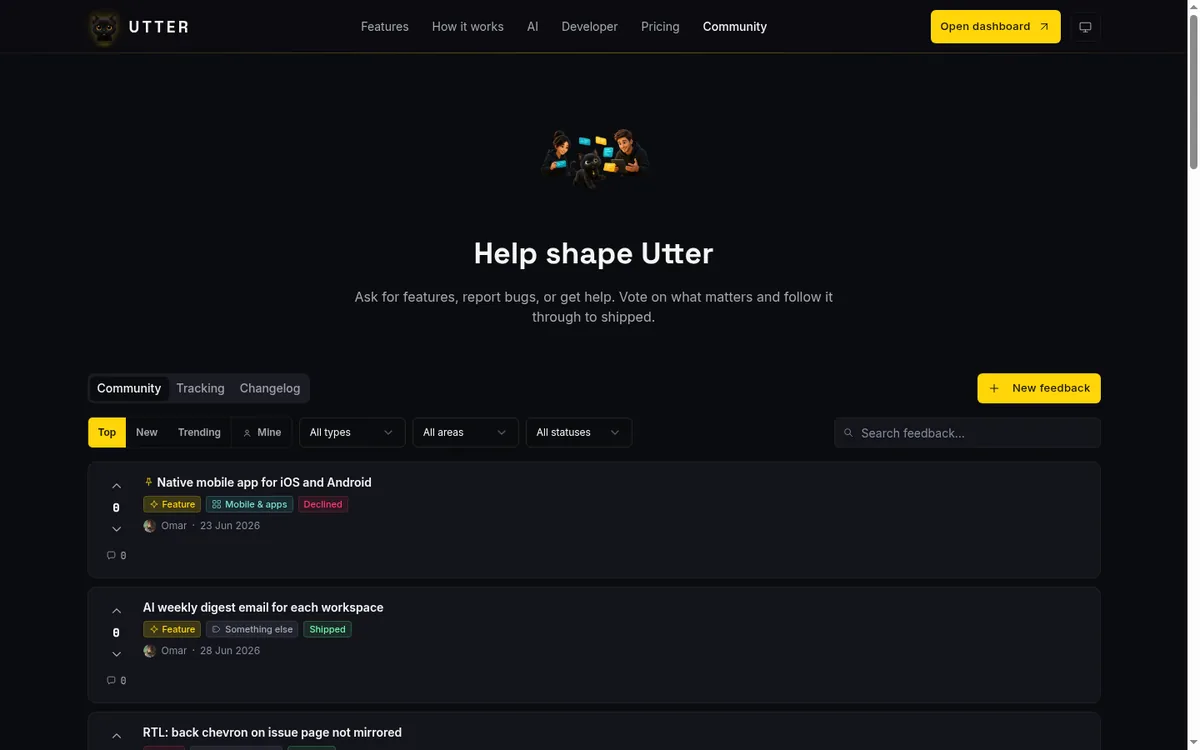
The mental model is a short pipeline, and once it clicks the whole thing makes sense. Feedback comes in through the Community tab. Votes sort it, so the strongest ideas float up instead of the loudest person winning. Status moves each post along a roadmap as the team triages and builds. Then the Changelog closes the loop by showing what actually shipped, linked back to the posts that asked for it.
flowchart LR
    A[Post lands in Community] --> B[Votes rank it]
    B --> C[Team sets status on Tracking]
    C --> D[Release lands in Changelog]
    D --> A
Three tabs carry this: Community (the feed), Tracking (the status board), and Changelog (shipped releases). Hold that shape in your head and every screen below reads naturally.
Reading the community feed and finding what already exists
Before you post anything, look. This is the single habit that keeps a feedback board useful instead of turning it into fifty variations of the same request. Most of the time the thing you want to ask for is already there, and the better move is to upvote it, not to start a duplicate that splits the votes.
The Community feed is a stack of Reddit-style cards. Each card has an up arrow and a down arrow wrapped around a net score. That word "net" matters. A downvote lowers the score, so this is not a raw upvote count. A post sitting at 42 might have collected 50 ups and 8 downs. The number you see is the honest signal: what the community wants, weighed against the people who think it's the wrong call. Next to the score you get a comment count and a row of chips showing the Type (Feature, Bug, or Question), the Area (which part of Utter it's about), and the Status.
At the top of the feed you can sort three ways:
| Sort | How it ranks | When to use it |
|---|---|---|
| Top | Net score across all time | Finding the ideas with the deepest support |
| New | Chronological, the raw firehose | Triage, or seeing what landed today |
| Trending | Bounded top N over the last 30 days | Spotting recent posts gathering momentum |
Trending is the one to understand properly. It's a bounded list, not an infinite feed. It shows recent posts gathering momentum and it deliberately stops rather than scrolling forever. If Trending feels short, that's by design.
Three dropdowns narrow the feed: filter by Type ("All types"), by Area ("All areas"), and by Status ("All statuses"). Chasing every open Bug in the Integrations & API area? Set two dropdowns and you're there. When you're signed in, a Mine toggle strips the feed down to just your own posts, which is how you keep track of what you've asked for.
The search box ("Search feedback...") runs through Typesense, so it's typo-tolerant: search "intergration" and you'll still find the integration requests. Search returns one relevance-ordered page rather than the sortable, paginated feed. On Top and New, the feed loads in pages with a Load more button at the bottom (keyset pagination, so it stays fast as the board grows). No endless scroll quietly re-fetching while you're mid-read.
The payoff for spending two minutes here is real. Vote on the request that already exists and you add weight to something the team is already tracking. Post a duplicate and you scatter the signal across two cards that each look weaker than they are. The feed is a search tool first, a posting surface second.
How to post a feature request or bug
Once you've confirmed your idea isn't already on the board, click New feedback. That opens the "Share your feedback" dialog. Do each field deliberately rather than firing off a one-liner.
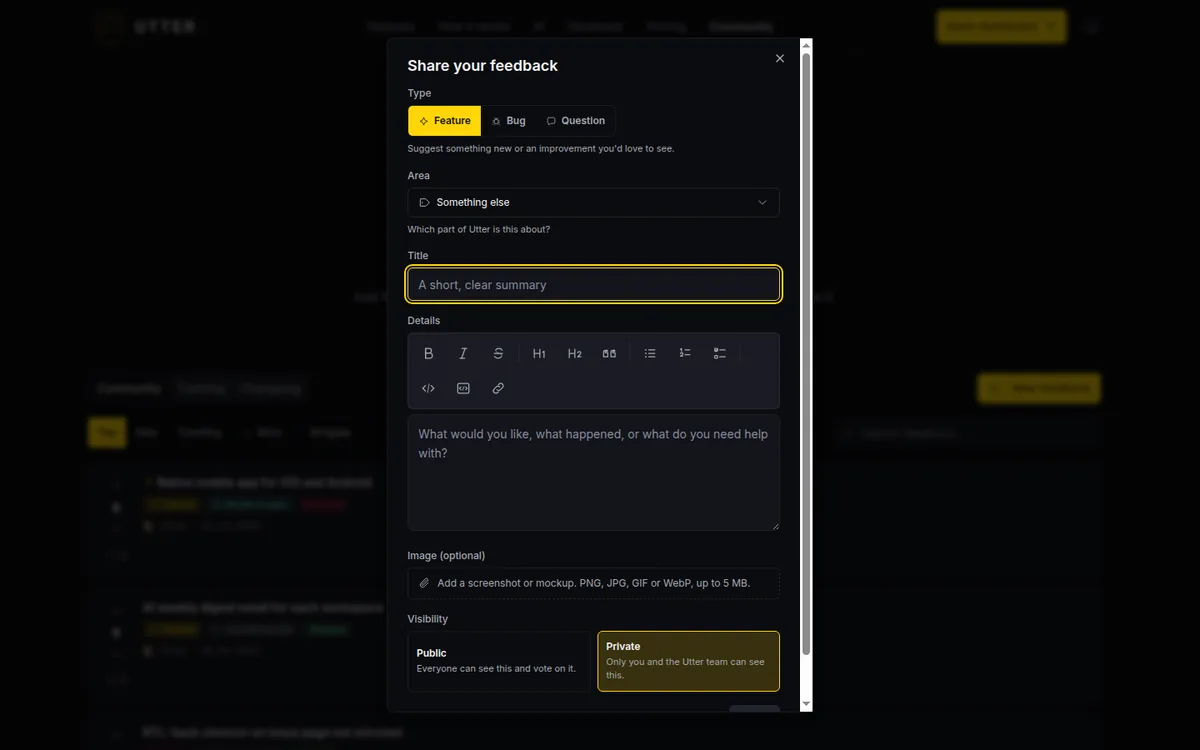
Start with Type, a segmented control with three options: Feature, Bug, or Question. Each carries a small hint so you pick the right one. A Feature is "I wish Utter could do X." A Bug is "Utter does X but it's broken." A Question is "how do I do X, or why does it work this way." Getting this right helps the team triage and helps other users filter to what they care about.
Then Area, a dropdown answering "which part of Utter is this about?" The options are Board & issues, Backlog & sprints, Docs & knowledge, Integrations & API, Automations, Mobile & apps, Billing & plans, and Something else. If your idea is about board columns remembering their state, that's Board & issues. If it's about public API rate limits, that's Integrations & API. Pick the closest one. "Something else" is the honest fallback, not a dumping ground.
Title is capped between 3 and 64 characters, and that constraint is a gift. It forces you to say the one thing. A weak title is "board improvements." A strong one is "Timeline and Summary tabs should remember my last view." Notice the difference: the strong title names the surface, names the behavior, and reads as a single testable request. If you can't fit your idea in 64 characters, you probably have two ideas and should post them separately.
Details is a markdown editor with a 4096-character ceiling, so you have room to explain the why. Write what you're trying to do, what happens now, and what you wish happened instead. In the demo WEB project, a good Details field for that Timeline request might read: "When I switch from the board to the Timeline view and back, it always resets to the default zoom and sort. I'd expect it to remember where I was, the way the List view does." Concrete, specific, one idea.
You can attach an Image (optional): PNG, JPG, GIF, or WebP, up to 5 MB. The upload is presigned and shows a live progress bar as it goes. A bug report with an actual screenshot of the broken state is worth far more than three paragraphs describing it. One honest note: the image is metered to your image storage, so a very large file can hit a quota error. Keep screenshots reasonable.
Two guardrails run behind the scenes, and they're plain to see in the create-post action itself:
// src/lib/feedback/actions.ts (createPost, trimmed)
if (!checkRateLimitWithGc(`fb:post:${user.id}`, 8, 3600).ok)
  return { ok: false, error: "rate-limited" };

const title = input.title.trim().slice(0, TITLE_MAX);   // 64 chars
const bodyMd = (input.bodyMd ?? "").slice(0, BODY_MAX); // 4096 chars
if (!kind || title.length < 3) return { ok: false, error: "invalid" };

// AI safety gate (free, fail-open). Refuse clearly bad content up front.
const mod = await moderateFeedback({ title, body: bodyMd });
if (!mod.allow) return { ok: false, error: "rejected", message: mod.message };
In words: new posts pass an AI safety gate (Haiku moderation) that rejects obvious spam, advertising, harassment, off-topic noise, or gibberish with a friendly "please revise" message. And there are rate limits: 8 posts per hour and 20 comments per hour, per user. The moderation gate is fail-open, which I'll be straight about later, so don't treat it as a wall against all spam.
What good looks like, in one line: one idea per post, concrete, with a screenshot when you can. That's the whole craft of it.
Public versus private posts, and why private is the default
The last choice in the dialog is Visibility, and Utter makes a deliberate decision here worth understanding rather than clicking past.
You get two cards. Public: "Everyone can see this and vote on it." Private: "Only you and the Utter team can see this." Private is pre-selected. That default is intentional friction. Your rough, half-formed, maybe-embarrassing note stays between you and the Utter team until you decide it's ready for the world. You can fire off "the export is confusing and I'm not sure why" without broadcasting it.
The rule is enforced in code, not just hidden in the UI, so a private post genuinely isn't visible to other users. This is the entire visibility model, eight lines:
// src/lib/feedback/status-meta.ts
export function canViewPost(
  viewer: { isOperator: boolean; userId: string | null },
  post: { visibility: "public" | "private"; authorUserId: string },
): boolean {
  if (post.visibility === "public") return true;
  if (viewer.isOperator) return true;
  return viewer.userId != null && viewer.userId === post.authorUserId;
}
Here's the tradeoff. A private post can't collect votes, because nobody else can see it to vote. So private is right for a rough draft, a support-flavored question, or something you're not yet sure is a real idea. Public is right the moment you want other people to pile weight onto it, because votes are the entire mechanism that moves a post up the board and onto the roadmap. If you want your request to actually influence what gets built, it has to be public.
Know the limit too. Visibility is binary. Public or Private, nothing between. There's no "share with just my team" or "show to these three people." It's you-and-the-team, or everyone.
Voting and reacting to push the best ideas up
Voting is the engine of the whole board, so it's worth understanding exactly how it behaves.
Each post has an up arrow and a down arrow around a single net score. One vote per user. The UI is optimistic, so the number moves the instant you click, before the server confirms. Click the up arrow and the score goes up by one. Click it again and your vote toggles off, back to neutral. Click the down arrow when you'd already upvoted and it flips: your up is removed and a down applied, a two-point swing. It behaves the way Reddit voting behaves, so your instinct is probably already right.
That net score isn't decorative. It drives the Top sort in the Community feed, and it ranks the cards inside every column on the Tracking board. So a vote isn't a "like." It's you helping decide the order the Utter team sees things in. Upvote the requests you genuinely want. Downvote the ones you think are a bad direction. Both are real signal.
Reactions are the lighter layer. You can react with emoji on posts and on comments, through a reaction bar with a picker popover, and reactions toggle on and off per user just like votes. A reaction is a quick "same" or "this made me laugh" that doesn't carry the ranking weight a vote does. Use votes to shape the roadmap. Use reactions for texture in the conversation.
If you're signed out, the moment you try to vote, react, comment, or post, a "Join the Utter community" sign-in dialog appears. It's magic-link, no password. The copy reads "Sign in to upvote, comment, and post. It takes a few seconds, no password needed." Reading is open to everyone. Participating asks you to sign in, which is a low bar and keeps voting to one per real person.
Following the roadmap: the Tracking board and status progression
This is the part people mean when they say "public roadmap." Open the Tracking tab.
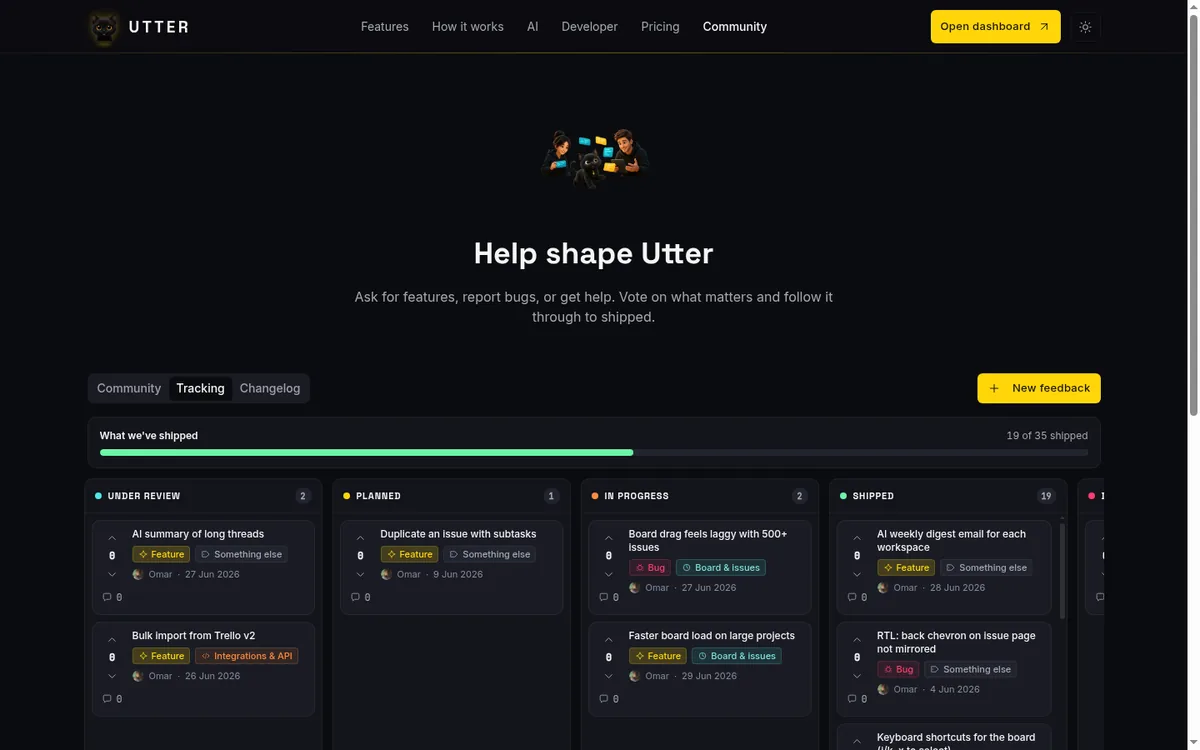
At the top sits a progress bar labeled "What we've shipped," reading something like "18 of 60 shipped." One honest number for how much of the tracked feedback has actually made it out the door. Below it, the board lays out horizontal status columns: Under review, Planned, In progress, Shipped, and Declined. Each column stacks its cards ranked by votes, most-wanted at the top, and each column has its own Load more so a busy column doesn't crowd out the others.
Notice what's missing from the board: the Open status. Untriaged posts, the ones that just landed and haven't been looked at yet, live only in the Community feed. They never appear on the Tracking board. The board is specifically the triaged pipeline, which is why it reads as a roadmap and not a firehose.
The status progression is the roadmap logic, and it's a clean pipeline:
stateDiagram-v2
    state "Under review" as UR
    state "In progress" as IP
    [*] --> Open: post created
    Open --> UR: team acknowledges
    UR --> Planned: team decides to build it
    Planned --> IP: someone picks it up
    IP --> Shipped: released
    UR --> Declined: the answer is no
A post starts at Open (in the feed). When the team acknowledges it, it moves to Under review. If they decide to do it, Planned. When someone picks it up, In progress. When it ships, Shipped. And if the answer is no, it goes to Declined, which is its own kind of honesty. A "no, and here's the column that says so" beats silence.
Now the limits, because this is where expectations usually break. There is no drag-and-drop. There is no manual reordering. You cannot move a card. Cards are auto-ranked by votes within their column, and only Utter operators change a post's status. As a regular user, you influence the board entirely through voting and posting, never by dragging. That's deliberate: the ranking reflects real demand, not whoever touched the board last.
There's also no separate roadmap page or timeline view. The roadmap is these columns plus the Changelog. That's it. If you were expecting a Gantt-style product timeline, adjust. The roadmap here is expressed through status, and it's more honest for it. Prioritizing your own backlog by demand is a related discipline, and if you want the thinking behind ordering work by what people actually want, how to prioritize your backlog covers it.
The post detail page and official responses from the Utter team
Click any post to open its detail page at /feedback/[slug]. This is where a request stops being a card and becomes a conversation.
The layout gives you the vote control, the Type, Area, and Status chips, the full body, an optional image if the author added one, a reaction bar, and the comment thread. Down the right side runs a rail with the facts: Status, Area, Type, Votes, Posted by, Posted (the date), and, when the post has shipped, a Shipped date. It's the at-a-glance record of where this request stands and how it got there.
The comment thread is a real markdown editor, image upload included, so you can reply with a screenshot the same way you posted with one. Threads nest up to depth 3. Past that the reply button hides, which keeps a hot thread from turning into an unreadable staircase. You can edit or delete your own comments. A deleted comment shows as "[removed]" rather than vanishing and leaving replies orphaned. There's a "Load more comments" control when a thread runs long.
The part that makes this feel like a roadmap and not a suggestion box is the official response. When someone from the Utter team replies, their comment renders as an "Official response" from the "Utter Team," a highlighted card with the Utter mascot and a gold accent (it carries an isOfficial flag under the hood). So when the team says "we're planning this for next quarter" or "here's why we declined it," you can tell it apart from a random user agreeing. That's the difference between a board where the team talks and a board where they just watch.
You won't have to refresh obsessively to catch these. Email notifications, best-effort, fire when the Utter team changes your post's status and when someone comments on or replies in your thread. So you post, you go back to work, and Utter emails you when your request moves to Planned or when someone weighs in. Best-effort means don't build a workflow that assumes every email lands, but in practice it's how you stay in the loop without living on the board.
The Changelog: closing the loop on shipped feedback
A Shipped status is a promise kept. The Changelog tab is where that promise becomes public proof.
The Changelog lists released work newest-first. Each release card can carry a version badge and, more usefully, a "Shipped from your feedback" list linking the actual feedback posts that release delivered, each with its vote count. So a customer can look at a release and see, concretely, "this shipped, and here are the 47 votes' worth of posts that asked for it." That's the loop fully closed. A request came in, gathered votes, moved through the board, and here's the receipt that it landed.
This is genuinely the most persuasive part of running a public feedback board and roadmap. It's not the promises in the Planned column that build trust. It's the Changelog showing that Planned columns eventually become Shipped, become released features with a customer's name on the original request. Trust compounds when people can trace an idea from post to product.
The honest limit: releases are seeded by operators. The Utter team creates feedback_releases rows and links the shipped posts to them (via a releaseId). There's no self-serve "publish a release" button, not for you and not for a normal workspace. And if the demo instance you're looking at has no releases seeded, the tab shows "Nothing shipped yet." An empty Changelog isn't broken. It just means nothing has been formally released into it.
Limits, mistakes, and what only operators can do
Let me put all the boundaries in one place so you never go hunting for a button that isn't there.
As a regular user, you cannot change a post's status, pin a post, or mark a comment as official. Those are operator-only. And here's the honest, slightly surprising part: even the operator moderation actions that exist in the codebase (set status, pin, toggle official reply, operator-delete) are not wired into any rendered page. There is no operator control bar sitting on the post detail page waiting for the right account to log in. The functions exist. No component imports them. So don't expect a hidden "set status," "pin," or "mark official" button to appear for anyone in the normal UI.
The only operator surface that actually renders is a read-only triage table at /admin/feedback, titled "Feedback triage," listing all feedback across Utter including private posts, with columns for Title, Author, Votes, Status, and Visibility. It's loopback-only (localhost) and double-gated by an operator email allowlist, so it's unreachable by normal customers or a demo account. And it's read-only: it links out to each post's detail page, with no inline controls. Utter operators triage from there and change status through other paths, not through a shiny button you're missing.
Now the common mistakes, said plainly.
Treating this as a board for your own customers. It isn't. It's Utter's board about Utter. If you want to collect feedback from the people who use your product, that's what request Forms are for. A form turns external input into a triaged issue in your own workspace, which is a completely different and correct tool for the job.
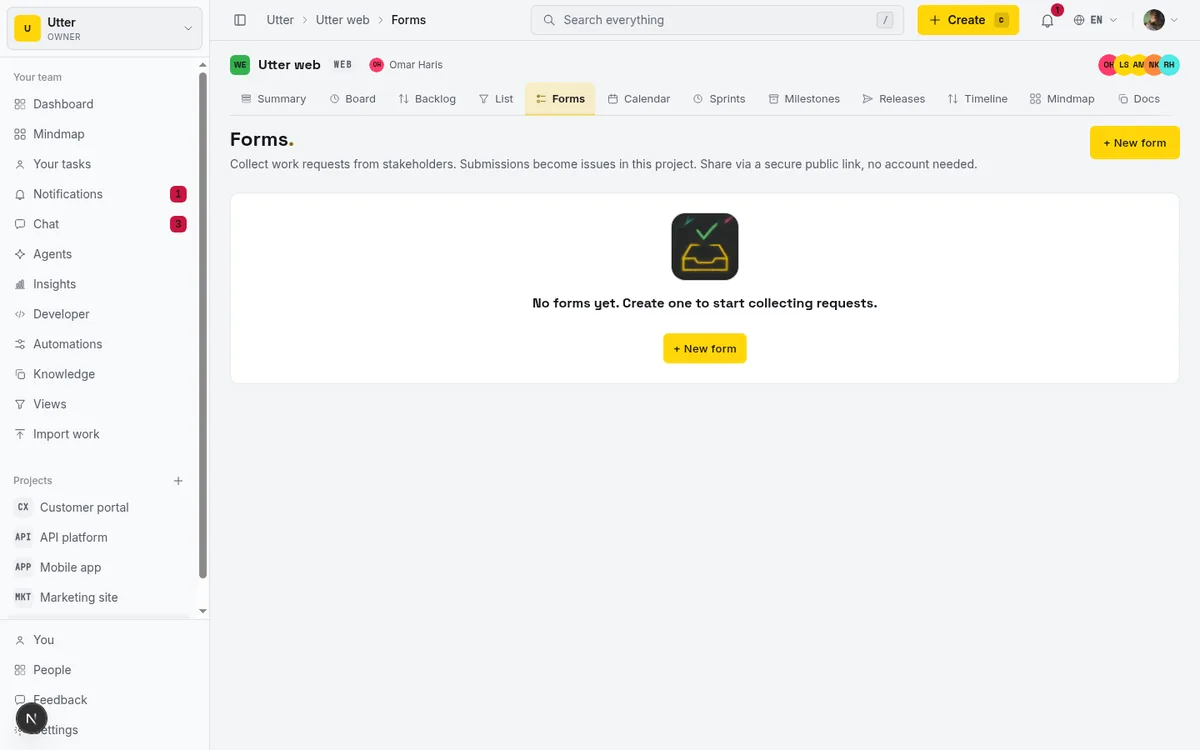
Start with how to set up a request form, and see turn a request form into a triaged issue for the flow from submission to something on your board.
Expecting guaranteed spam filtering. The AI moderation gate is fail-open. If no AI provider is configured, it lets everything through. It catches obvious junk when it's running, but don't treat it as a wall.
Expecting drag-to-reorder. There's no dragging on the Tracking board. Ranking is by votes, and status is operator-set. If you want your idea higher, get it more votes.
A few smaller truths worth holding. Voting is up/down with one net score, so a downvote genuinely lowers a post; it's not a one-way like counter. Comment threads cap at depth 3. Private is private to you plus the team, with no share-with-a-group middle ground. Feedback notifications are email-only and best-effort, covering status changes and comments.
If you take one idea away, take the split. Utter's feedback community is where you shape Utter. Utter's request Forms are where you collect input on your product. Using the right one for each keeps your signal clean. If you want the bigger picture of how agents and humans move that work forward once it's captured, what is agentic project management sets the frame.
Open /feedback, sort by Top, and spend five minutes reading before you post your first request. That habit alone is worth more than any button on the page.
Frequently asked questions
What is Utter's product feedback board and roadmap?
It's one platform-wide board about Utter itself, shared by every workspace, reachable at /feedback (logged out too) or in-app at /w/[workspace]/feedback with the same global content. You post ideas, vote them up or down, and follow their status through the Tracking board and Changelog as a live public roadmap.
Can I use this board to collect feedback from my own customers?
No. This is Utter's board about Utter, not a per-workspace board for your users. To gather input from people who use your product, use request Forms, which turn external submissions into triaged issues inside your own workspace.
Are my feedback posts public by default?
No. Private is pre-selected in the new-post dialog, so a post is visible only to you and the Utter team until you choose Public. The rule is enforced in code (canViewPost), but a private post can't collect votes, so make it public when you want others to add weight.
How does voting work on the feedback board?
Each post has an up arrow and a down arrow around a single net score, one vote per user. A downvote genuinely lowers the score, so it isn't a one-way like counter, and that net score drives the Top sort and the ranking of cards in each Tracking column.
Can I drag cards around on the Tracking board?
No. There is no drag-and-drop and no manual reordering. Cards are auto-ranked by votes within each status column, and only Utter operators change a post's status, so the way to move your idea up is to get it more votes.
How do I know when the Utter team responds to my post?
Team replies render as an 'Official response' from the 'Utter Team' with a highlighted card and gold accent, so they stand out from other users. You also get best-effort email notifications when your post's status changes or when someone comments in your thread.
What is the Changelog and how does it relate to the roadmap?
The Changelog lists released work newest-first, and each release can carry a 'Shipped from your feedback' list linking the posts it delivered with their vote counts. It closes the loop from request to shipped feature, though releases are seeded by operators and show 'Nothing shipped yet' if none exist.
Is there spam filtering on the feedback community?
New posts pass an AI moderation gate (Haiku) that rejects obvious spam, advertising, harassment, off-topic noise, or gibberish, plus rate limits of 8 posts and 20 comments per hour per user. The gate is fail-open, so if no AI provider is configured it lets everything through; don't treat it as a guarantee.
Related reading
How to use a kanban board: a complete guide with a real example
Learn how to use a kanban board in Utter: read cards, drag tasks between columns, add and reorder custom columns, set WIP limits, filter, and save views.
July 15, 2026 · 20 min read

How to use team chat
A practical guide to team chat in a project management tool: channels, DMs, threads, @mentions, file attachments, and the honest limits, all next to your issues.
July 15, 2026 · 16 min read

How to search your workspace
Search issues across projects in Utter from one top-bar field: the / shortcut, live typeahead, WEB-12 key-jump, the full results page with Type/Status/Priority filters, and the real limits.
July 15, 2026 · 14 min read
A Trello alternative for when a board stops being enough
Trello alternative comparison: what breaks when a board stops being enough, an honest Trello vs Utter pricing and feature comparison as of July 2026, and how to keep the board while adding sprints, a ranked backlog, and reports.
July 16, 2026 · 12 min read
How to manage your notification preferences
Manage project management notifications in Utter: read the Email vs In-app matrix, cut noise without going dark, watch issues, and control the weekly digest.
July 15, 2026 · 14 min read
Notifications and watching issues
Set up Utter notifications and watch issues: the four events that notify you, who gets pinged, inbox triage, snooze and archive, and email vs in-app.
July 15, 2026 · 16 min read

Keep team chat next to your issues, not in another app
The case for project management with built-in chat: why splitting discussion from the tracker loses the thread, and how linking chat to issues fixes it.
July 9, 2026 · 6 min read

How to give an AI agent human-in-the-loop approval before it changes your issues
Build an approval gate for AI agents in Utter: let the agent triage into a Needs review column, a human moves it forward, and transition rules stop skips.
May 20, 2026 · 9 min read
Monday.com alternatives built for software teams, not marketing ops
Monday.com alternatives for software teams: real pricing (3-seat minimum vs $3/$6 per builder seat), category-backed statuses, sprints with carryover, and agents as free members not billed integrations.
July 16, 2026 · 12 min read
How to use the ai assistant
How to run your board with Utter's AI assistant: ask grounded questions, create and triage issues from a sentence, and approve every change before it lands.
July 15, 2026 · 14 min read
Add a comment
Start the conversation.