
A Trello alternative for when a board stops being enough
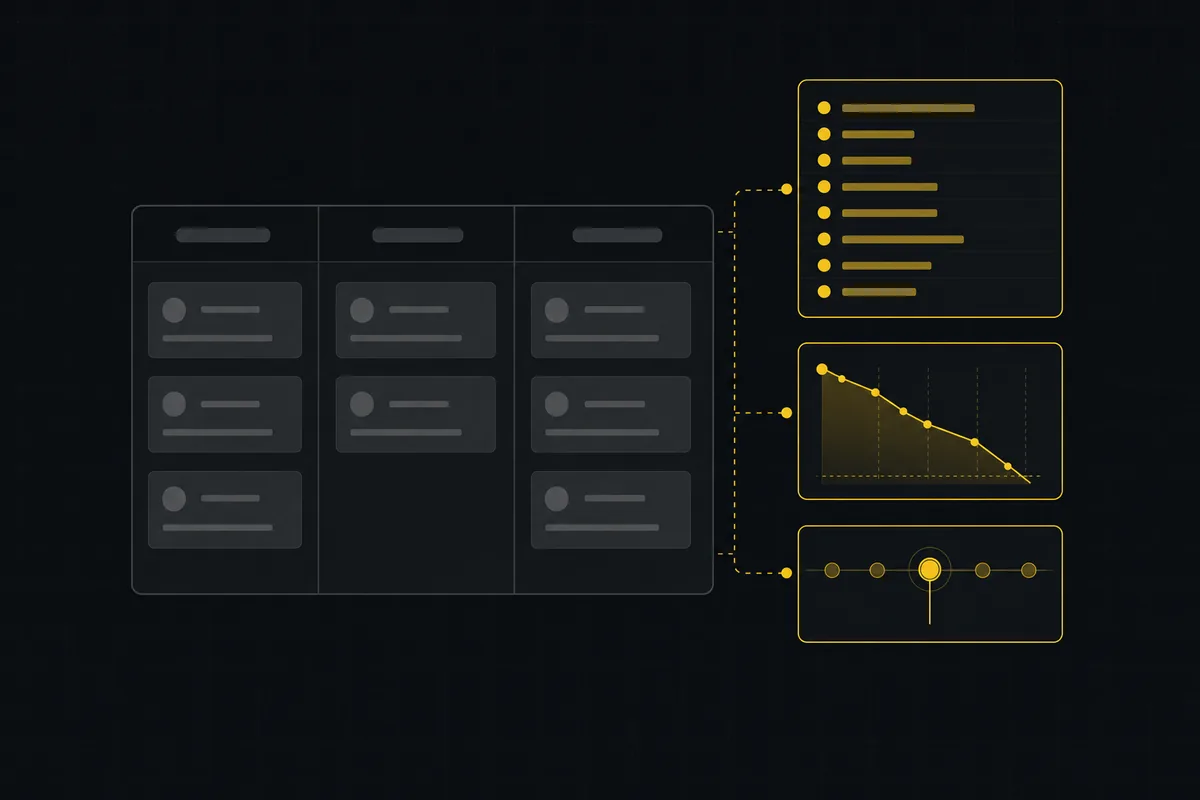
You picked Trello because a board should not need a manual. Cards, lists, drag, done. Then the work grew up around it. Someone asks where the sprint is and there is no sprint, just a list called "This week" that never empties. You want to see what ships by Friday and the Timeline view is behind a paywall. A teammate asks for velocity and the honest answer is a screenshot and a guess.
None of that means Trello is bad. It means you have outgrown the part of it that is free, and the planning depth you now need was never really its job. So this is a practical look for anyone searching for a Trello alternative: what actually breaks when a board stops being enough, an honest Trello vs Utter comparison with current pricing, and how to keep the board's calm while gaining sprints, a ranked backlog, and real reports. Prices and limits below are stated as of July 2026, checked against Trello's official pricing page.
The moment a Trello board stops being enough
A Trello board is one of the best status pictures in software. Anyone can look at it and know what is where. Drag a card, the state changes, everyone sees it. That clarity is why so many teams start there and stay for years.
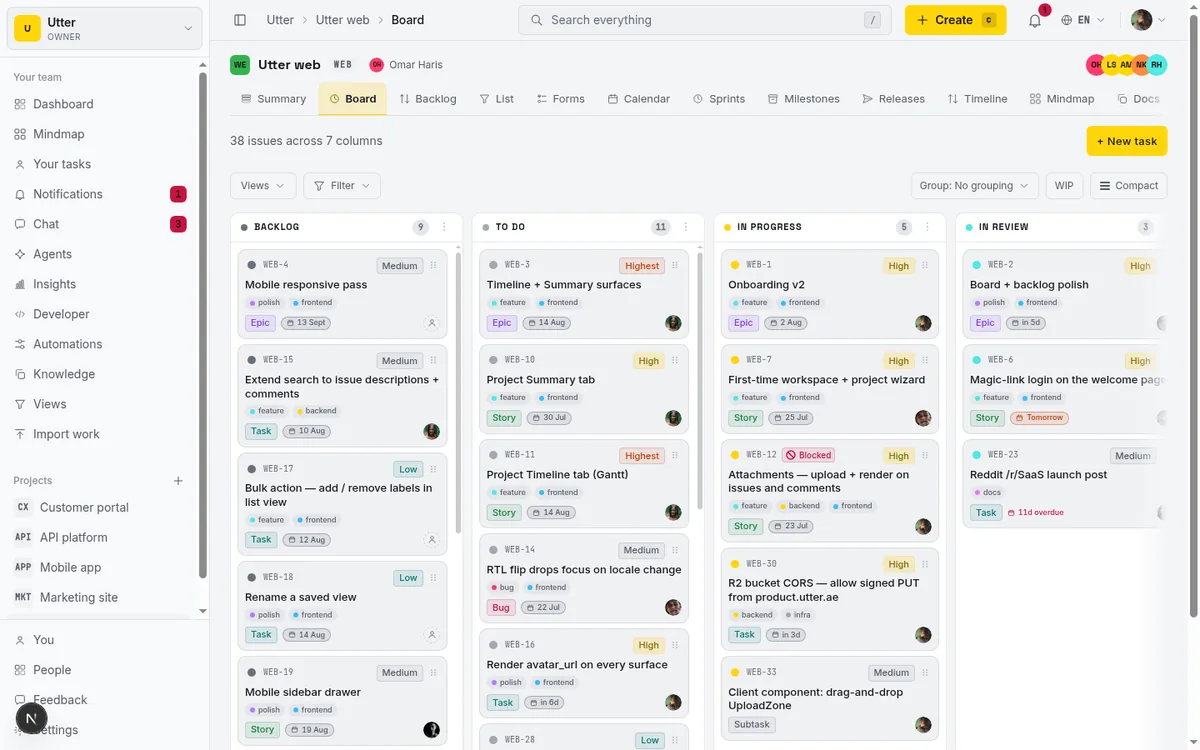
The trouble starts when "what is where" stops being the only question. The board is great at status and weak at planning, and those are different jobs. Planning asks: what are we committing to for the next two weeks, in what order, and did we actually finish it? A board does not answer that on its own.
Look at how teams fake it. There is no sprint object in Trello, so people build a list called "Sprint 14" or "This week" and drag cards into it. It looks like a sprint. It has no start date, no end date, no notion of "these three cards did not get done, carry them forward." When the two weeks are up you manually shuffle the leftovers to the next list and hope you did not drop one. There is no burndown because there is nothing counting down. As of July 2026, this is not a bug in Trello. It is a board tool being asked to be a planning tool.
Reporting is the next wall. The moment someone senior asks "how much did the team actually ship last month" or "are we speeding up or slowing down," a plain board has no answer to give. And the views that would help are gated. As of July 2026, Trello's Calendar, Timeline, Table, Dashboard, and Map views are exclusive to Premium or higher, per Trello's pricing page. On Free and Standard you get the board and not much else to see the same work a different way.
Then there are the Free ceilings. As of July 2026, Trello Free is capped at up to 10 boards per Workspace, up to 10 collaborators per Workspace, and a 10MB per-file attachment limit, with 250 Workspace command runs (Butler automation) per month. For a solo board or a tiny team those numbers are generous. For a team that has grown into multiple projects and wants a real forecast, they start to pinch.
So here is the real question a lot of people are typing into a search box: how do I keep the board I like and add the depth I now need, without moving my whole team to something as heavy as Jira? That is a fair ask, and it has a clean answer. If you want to sharpen the board itself first, how to use a kanban board is a good primer, and the honest guide to free project management software covers the trade-offs of every free tier, Trello's included.
What to look for in a Trello alternative
Before comparing any two products, it helps to know what "depth" actually means in practice. Here is the checklist I would use, whether you land on Utter or something else. Each item is here because it is exactly the thing a board alone stops giving you.
Keep the board. Drag-and-drop, columns you control, and a WIP limit per column. If a tool makes you give up the board to get planning, it has traded away the thing that made Trello pleasant in the first place. You want both, not a swap.
A real ranked backlog, as its own view. Not another list on the board that you scroll. A backlog is a single ordered priority queue: the next thing to pull is at the top, full stop. If your "backlog" is a column, ordering breaks the moment it gets long, because a column is for status, not for rank.
Sprints as first-class objects. A sprint should have a start and an end, hold a set of issues, and know what to do with the ones that did not get finished. Carryover is the tell. If completing a sprint cannot move the leftovers forward for you, you are back to manual dragging.
Reports built in, not bolted on. Velocity, burndown, cumulative flow, throughput, workload. These should ship with the tool and read from the same data your board already has. A reporting add-on you have to configure is a sign the tool was not built to forecast.
Views you can afford. Timeline and the rest should be available at the tier you are actually going to pay for, not dangled two plans up. Paywalling the forecast is a common pattern, and it is worth knowing before you commit.
An import path. You should not retype a single card. A first-class importer for your current tool is the difference between switching this afternoon and never switching at all.
An agent or API story, if you run coding agents. More teams have AI agents opening and updating tickets now. If that is you, the tool needs a real API and ideally an MCP surface, and it should not bill those agents as paid seats. If it is not you, skip this line entirely and do not pay for it.
That is the whole list. Everything below is Utter measured against it, honestly, with the places it loses called out.
The honest Trello vs Utter comparison (pricing and limits)
Here is the side-by-side. Every Trello number is from Trello's pricing page and every figure on both sides is stated as of July 2026. Utter's numbers come from its plan config, which is the single source of truth for its limits and prices.
| Trello Free | Trello Standard | Trello Premium | Trello Enterprise | Utter Free | Utter Pro | Utter Business | |
|---|---|---|---|---|---|---|---|
| Price (as of July 2026) | $0 | $5/user/mo annual ($6 monthly) | $10/user/mo annual ($12.50 monthly) | $17.50/user/mo annual | $0 | $3/mo ($30/yr) | $6/mo ($60/yr) |
| Billed per | n/a | user | user | user | builder seat | builder seat | builder seat |
| Boards / projects | Up to 10 boards | Unlimited | Unlimited | Unlimited | 5 active projects | Unlimited | Unlimited |
| Collaborators / seats | Up to 10 collaborators | Paid per user | Paid per user | Paid per user | Viewers + agents free, builders billed | same | same |
| Storage | Unlimited | Unlimited | Unlimited | Unlimited | 128 MB workspace | 1 GB | 100 GB (+ add-ons) |
| Per-file upload | 10 MB | 250 MB | 250 MB | 250 MB | 1 MB | no per-plan ceiling | no per-plan ceiling |
| Automation runs | 250/mo | 1,000/mo | Unlimited | Unlimited | 2 automation rules | 20 rules | Unlimited |
| Calendar / Timeline / Table / Dashboard / Map | Not included | Not included | Included | Included | Reporting + Timeline in base | same | same |
| Sprints | No native sprint object | No native sprint object | No native sprint object | No native sprint object | First-class, in base | in base | in base |
| Built-in reports | No | No | Dashboard view | Dashboard view | 9 report types, in base | in base | in base |
The shape of the difference is easy to read. Trello sells depth by moving you up the ladder: unlimited boards on Standard, the five extra views on Premium, and per-seat pricing at every paid tier. Utter puts the planning depth (sprints, timeline, reporting, integrations, AI) in the base feature set on every plan, and charges by capacity instead: how many projects, how much storage, how many automations. On Free, capacity is the only ceiling. The paid-only features are the operational ones, automation headroom and roles and SSO and audit, not the planning ones.
Now the honest part, stated plainly because it matters. Utter Free's 128 MB workspace storage and 1 MB per-file cap are much smaller than Trello Free's unlimited storage and 10MB per file. If your team pins big design files, videos, or PDFs to cards, Trello Free is genuinely the better home for that, and Utter Free is not. That 128 MB is a real trade you make in exchange for the deeper planning being free. And the people models differ: Trello counts up to 10 free collaborators per Workspace, while Utter bills builders on paid plans but keeps viewers and agents free. Neither is "more generous" in the abstract. It depends on whether your team is mostly editors or mostly watchers, and whether you run agents.
Keep the board, gain the columns Trello does not give you
If you love the Trello board, the first thing to know is that Utter keeps the board at the center. It is still drag-and-drop, still columns, still a card moving from left to right as work progresses. You are not being asked to trade the board away for a Gantt chart.
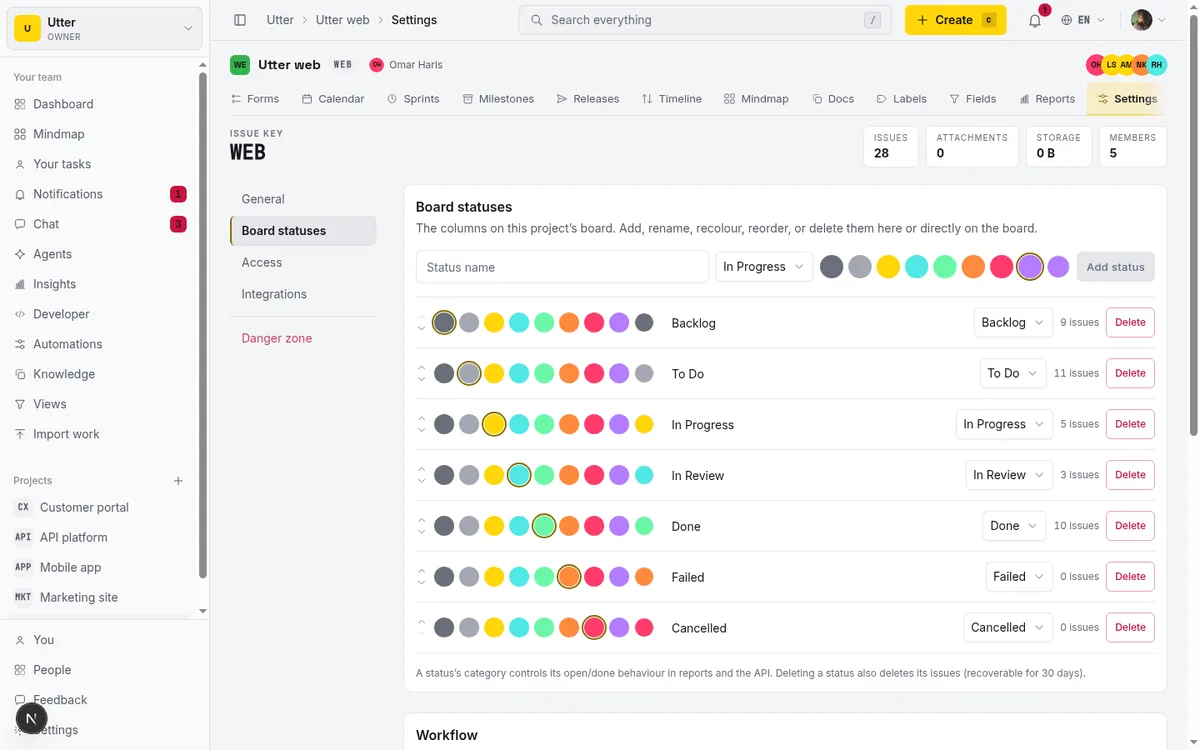
Under the hood the columns are custom per-project statuses, seeded with seven defaults when you create a project: Backlog, To Do, In Progress, In Review, Done, Failed, and Cancelled. Each column maps to a status category, and that category is what drives whether an issue counts as open and how it shows up in reports. So the board is not just visual sugar on top of a single status field. Moving a card actually changes the thing your reports read from. You can add, rename, recolour, recategorise, and reorder columns from the column kebab menu, or just grab a column header and drag it into place.
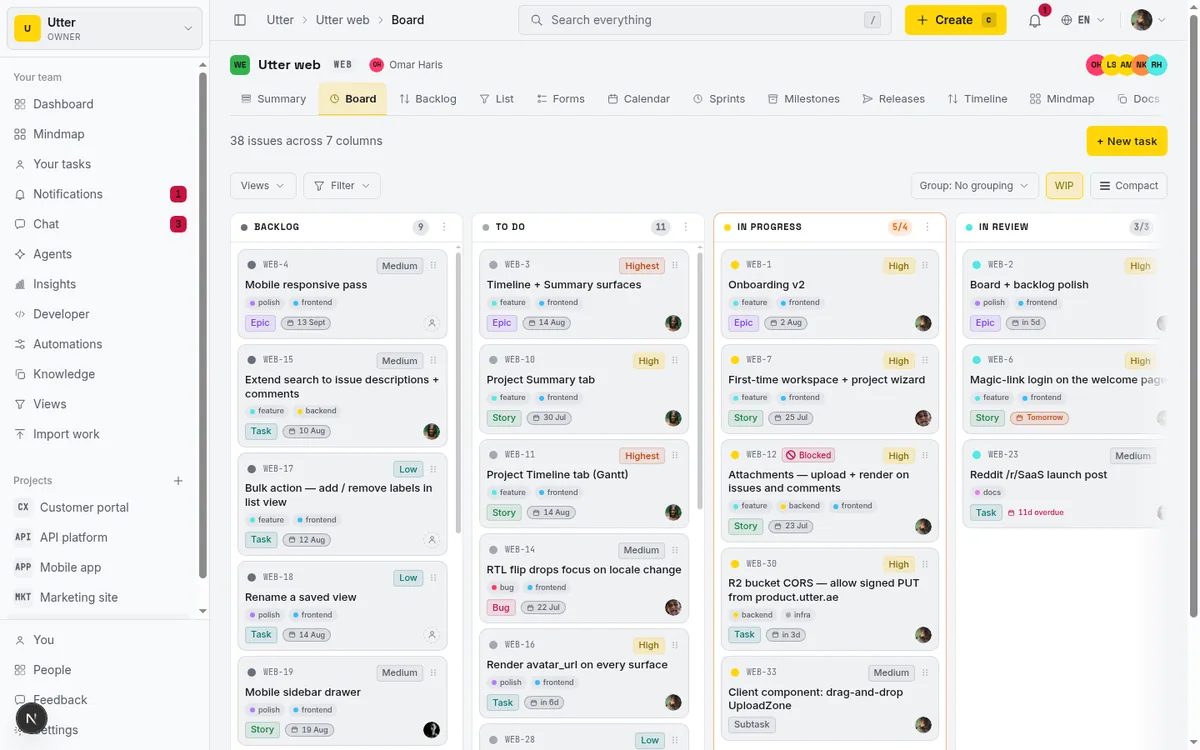
Then there is the thing Trello Free does not do: an optional WIP limit per column, any number from 1 to 999. Set "In Progress" to a limit of 3 and the column stops quietly swelling to fifteen half-done cards. It is a small feature with a big effect on a team that keeps starting things without finishing them, and it is the kind of gentle constraint a board is supposed to give you.
Two honest limits here. First, this is a calmer, darker board than Trello's, not a pixel-for-pixel copy of Trello's UI, so if muscle memory for the exact Trello card back matters to you, expect an adjustment. Second, there is no Power-Ups marketplace and no card-back Butler-style per-card automation panel. Automation in Utter is workspace rules, not card widgets, and the Free plan caps you at 2 rules (Pro raises that to 20). If your Trello setup leans heavily on a shelf of Power-Ups, that specific extensibility is not something Utter reproduces. For the board mechanics themselves, how to use a kanban board walks through columns, WIP, and flow in detail.
The planning depth: ranked backlog, sprints with carryover, real reports
This is the part that was never really Trello's job, and it is the reason to switch. Three pieces.
A ranked backlog that is its own view. Utter's backlog is a dedicated screen, separate from the board, where issues sit in one ordered priority list. The ordering uses LexoRank, so you drag an item and it holds its exact position between its neighbours without renumbering everything else. The point is that priority is a real ordered list, top to bottom, not a column you scroll and eyeball. When someone asks "what is next," the answer is the top row, not a debate.
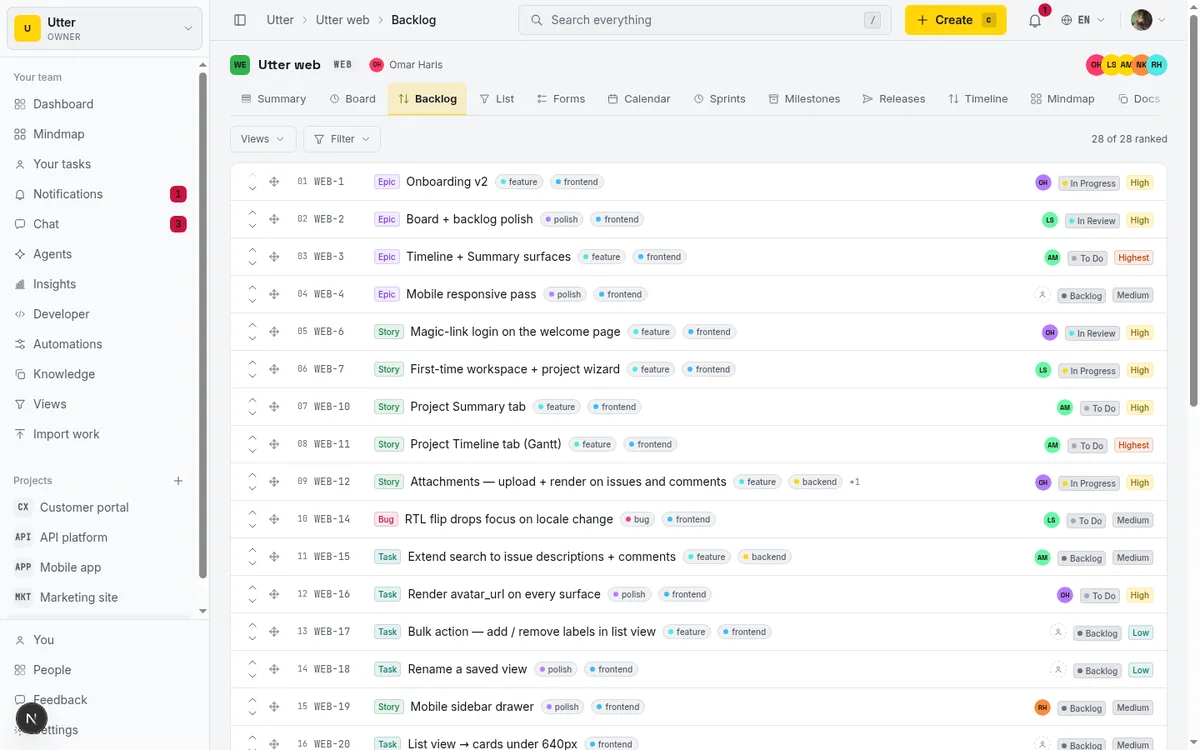
Sprints that actually behave like sprints. You create a sprint, start it, and complete it. When you complete it, the incomplete (non-done) issues do not get stranded on a dead sprint. Utter carries them over to a target sprint you pick, or back to the backlog, and tells you how many moved by returning a carried-over count. Failed issues carry over too, so nothing quietly falls off the edge. This is precisely the sprint object Trello does not have natively, the reason people end up faking sprints with lists. Here you commit to a sprint, run it, close it, and the leftovers land somewhere sensible without you dragging cards by hand. How to run a sprint covers the full cycle, and how to prioritize your backlog covers what to pull into one.
Reports that ship with the tool. Utter has nine project report types built in: velocity, burndown, cumulative flow, burnup, cycle time, throughput, status breakdown, type breakdown, and workload. They are built on the same charting stack the rest of the app uses, they read from the board and sprint data you already have, and they are available on Free. Compare that to Trello, where, as of July 2026, the Dashboard and Timeline views live behind Premium. When your lead asks whether the team is speeding up, you open velocity instead of taking a screenshot and guessing.
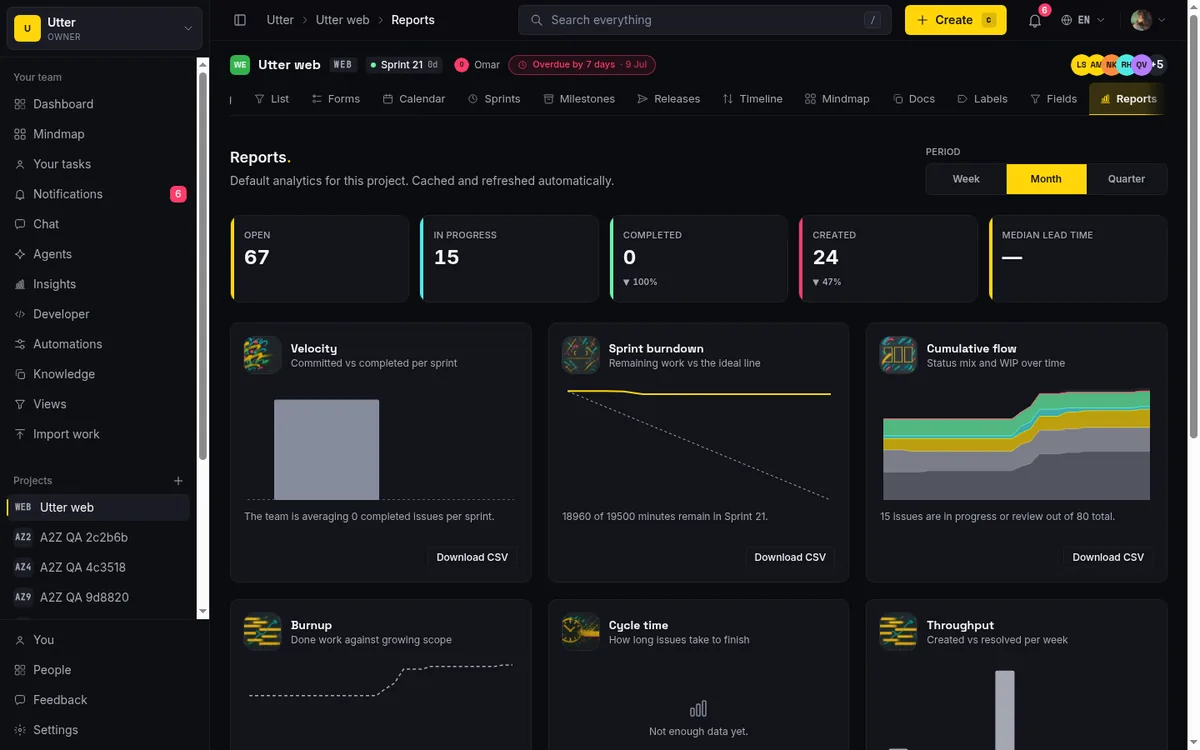
The whole idea is that the board's calm stays, and the forecasting layer that a board cannot provide sits right next to it, on the free tier.
What changes when your board can talk to agents
Here is a capability Trello does not offer, and it only matters if it matters to you. If your team runs coding agents, Utter treats them as first-class.
Agents are real workspace members, with their own attribution on the issues they touch, but they are never billed as seats. The seat count filters agents out, so a connected coding agent costs nothing. That is a deliberate choice: you should be able to point five agents at a project without watching your bill climb.
The surface itself is two things. There is a REST API, and there is a first-party MCP server at /api/mcp/v1 whose tools derive from the same v1 OpenAPI registry the REST API uses, so an MCP client and a plain HTTP client see the same operations. There are per-agent field-write permissions, enforced at a single write choke point, so you can allow an agent to move status but not reassign, for example. Agent sessions also carry human-review states (pending, review, done) and surface an unverified badge when a session closed without leaving a real trace, so an agent marking its own work done does not silently pass as reviewed.
The most common call is creating an issue. Here it is against the real endpoint, POST /api/v1/workspaces/{slug}/projects/{key}/issues, which needs the issues:write scope:
curl -X POST \
  "https://utter.ae/api/v1/workspaces/acme/projects/WEB/issues" \
  -H "Authorization: Bearer $UTTER_API_KEY" \
  -H "Content-Type: application/json" \
  -d '{
    "type": "task",
    "title": "Wire up the export button",
    "description_md": "Add a CSV export to the reports page.",
    "priority": "high"
  }'
const res = await fetch(
"https://utter.ae/api/v1/workspaces/acme/projects/WEB/issues",
{
method: "POST",
headers: {
Authorization: `Bearer ${process.env.UTTER_API_KEY}`,
"Content-Type": "application/json",
},
body: JSON.stringify({
type: "task",
title: "Wire up the export button",
description_md: "Add a CSV export to the reports page.",
priority: "high",
}),
},
);
const issue = await res.json();import os, requests
res = requests.post(
"https://utter.ae/api/v1/workspaces/acme/projects/WEB/issues",
headers={
"Authorization": f"Bearer {os.environ['UTTER_API_KEY']}",
"Content-Type": "application/json",
},
json={
"type": "task",
"title": "Wire up the export button",
"description_md": "Add a CSV export to the reports page.",
"priority": "high",
},
)
issue = res.json()The response comes back with the created issue, including its stable key and a direct URL:
{
  "id": "018f9c2a-7b3d-7e10-9a44-2f6b1c8e0d55",
  "key": "WEB-142",
  "url": "https://utter.ae/w/acme/p/web/WEB-142",
  "type": "task",
  "title": "Wire up the export button",
  "status": "backlog",
  "priority": "high",
  "assignee_id": null,
  "created_at": "2026-07-16T09:14:22.000Z"
}
To be clear about what this is: an API and MCP surface, not a Power-Up. Humans sign in with a magic link (no passwords); agents authenticate with API keys. If you do not run agents, none of this changes your day and you should not weigh it. If you do, it is the difference between an agent that can genuinely operate your tracker and one that cannot.
When to stay on Trello (a straight answer)
A comparison is only worth reading if it will tell you to walk away when walking away is right. So here is where Trello is the better choice, plainly.
Stay on Trello if your team lives on the mobile card-flipping experience. Utter is a responsive web app, and it works on a phone, but it is not a native mobile app, and it does not try to be the thing you flip cards on from the bus. If that daily mobile feel is the heart of how your team works, Trello wins.
Stay if you lean on the Power-Ups marketplace or on per-card Butler automation. That extensibility is a real Trello strength, and Utter's workspace-rule automation is a different, simpler model that does not replace a shelf of Power-Ups.
Stay if you store heavy attachments. As of July 2026, Trello Free gives you unlimited storage and 10MB per file, while Utter Free is 128 MB total and 1 MB per file. For an attachment-heavy team that is not a close call, and it is a genuine trade you would be making for the planning depth.
And stay if a simple personal board with no sprints and no reporting is genuinely all you need. In that case Trello Free is hard to beat, and adding a planning layer you will not use is just weight.
Here is the decision in one flow.
flowchart TD
  A[Need sprints, a ranked backlog, or built-in reports?] -->|No| B[Trello Free is hard to beat, stay]
  A -->|Yes| C[Do you store heavy attachments?]
  C -->|Yes, and it is central| D[Trello Free storage wins, stay or go paid on Trello]
  C -->|No| E[Do you run coding agents?]
  E -->|Yes| F[Utter, agents are free members]
  E -->|No| G[Utter, planning depth is free]
If your honest answer to the first question is "no," you already have the right tool. If it is "yes" and attachments are not your whole world, the rest of this points one direction.
How to move your Trello boards into Utter
If you do decide to switch, moving is meant to take an afternoon, not a weekend. Trello is a first-class import connector, sitting alongside CSV, ClickUp, Jira, Monday, Linear, and Asana. The Trello locator accepts a board ID or short link plus an API key, so you point Utter at the actual board rather than exporting and massaging a file.
The flow in the workspace import wizard is short:
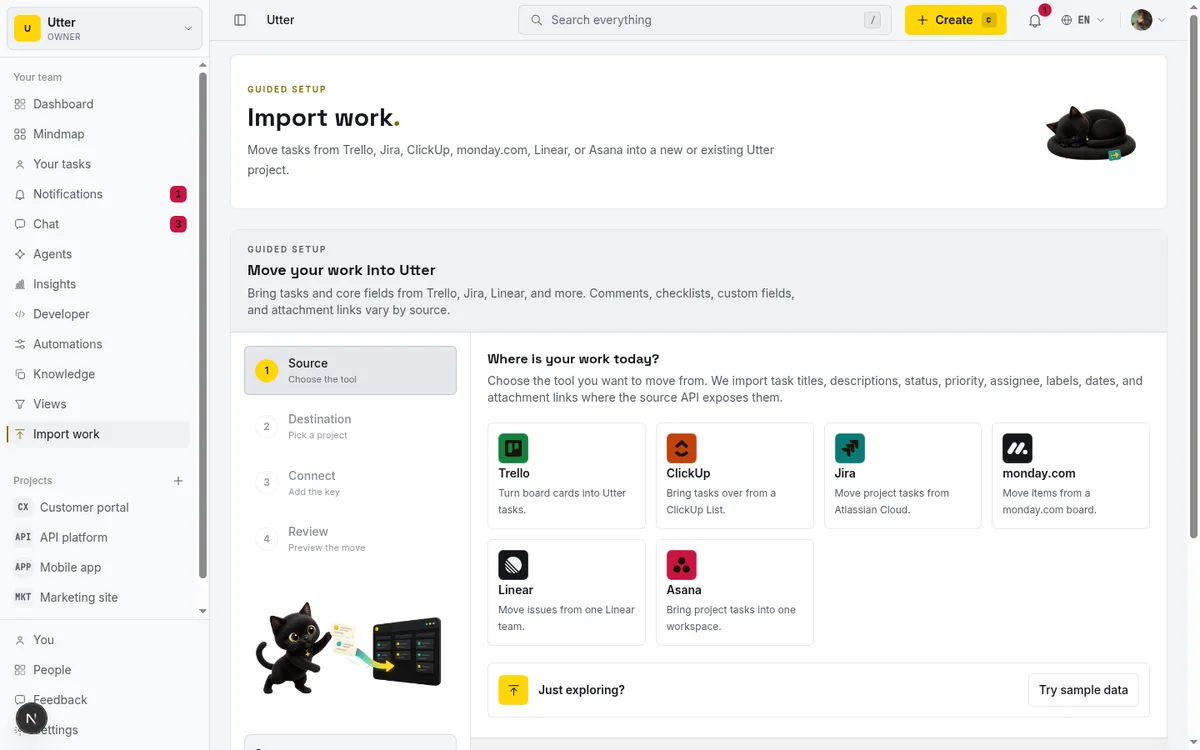
- Open the import wizard and pick Trello as the source.
- Point it at the board with its ID or short link and your Trello API key.
- Map your Trello lists to Utter statuses (your lists become board columns).
- Import. Cards come across as issues.
Two things to set expectations. Import on Free is capped at 1,000 rows, which is plenty for most single boards; Pro raises that to 10,000 and Business to 50,000 if you are bringing over a large archive. And you can start on Free and upgrade only when capacity is the ceiling (more projects, more storage), not to unlock planning features. Sprints, timeline, and reporting are already in the base, so you do not pay to get them.
When it lands, your lists are board columns and your cards are issues, exactly as before, except now there is a ranked backlog in front of them and sprints around them, with reports reading off the same data. That is the whole point of the move: the board you liked, plus the planning it could not do. For a broader walkthrough across tools, see migrating from Jira, Trello, and Asana to Utter.
If the walls in the first section sounded like your week, try Utter's free plan and import a board to see how it feels with a backlog and sprints around it.
Frequently asked questions
Is there a free Trello alternative with sprints and reporting?
Yes. Utter's Free plan includes first-class sprints, a ranked backlog, nine built-in report types, and the timeline view, all in the base feature set as of July 2026. Capacity is the only ceiling on Free (5 projects, 128 MB storage, 2 automation rules). By contrast, as of July 2026, Trello has no native sprint object and gates its Dashboard and Timeline views behind Premium.
How much does Utter cost compared to Trello as of July 2026?
Utter is Free at $0, Pro at $3/month ($30/year), and Business at $6/month ($60/year), billed per builder seat with viewers and agents free. Trello, as of July 2026, is Free at $0, Standard at $5/user/month annual ($6 monthly), Premium at $10/user/month annual ($12.50 monthly), and Enterprise at $17.50/user/month annual. The models differ: Trello charges per user and sells depth by tier, while Utter puts planning depth in every tier and charges by capacity.
Does Trello have sprints and a backlog?
As of July 2026, Trello has no native sprint object. Teams typically build a 'sprint' by making a list and dragging cards into it, which gives no start or end date, no automatic carryover, and no burndown. A backlog is usually improvised as another list. Utter treats both as first-class: a dedicated ranked backlog view and real sprints that carry incomplete issues over when you close them.
Why are Calendar and Timeline views locked in Trello?
As of July 2026, Trello's Calendar, Timeline, Table, Dashboard, and Map views are exclusive to Premium ($10/user/month annual) or higher, per Trello's pricing page. On Free and Standard you have the board view. In Utter the reporting and timeline views are part of the base feature set on every plan, including Free.
Can I import my Trello boards into Utter?
Yes. Trello is a first-class import connector, alongside CSV, ClickUp, Jira, Monday, Linear, and Asana. You give the import wizard a board ID or short link plus your Trello API key, map your lists to Utter statuses, and import; cards become issues. Import on Free is capped at 1,000 rows, with higher caps on Pro (10,000) and Business (50,000).
How is Utter's per-file and storage limit different from Trello's?
As of July 2026, Trello Free offers unlimited storage with a 10MB per-file limit. Utter Free is 128 MB of workspace storage with a 1 MB per-file cap. That makes Trello Free the better home for heavy attachments, and it is a real trade Utter Free makes in exchange for free planning depth. Utter Pro raises storage to 1 GB and Business to 100 GB, both with no per-plan file-size ceiling.
Do connected agents count as paid seats in Utter?
No. Agents are real workspace members but the seat count filters them out, so a connected coding agent costs nothing. Utter also runs a first-party MCP server at /api/mcp/v1 and a REST API, with per-agent field-write permissions, so agents can operate the tracker under real limits rather than as an unrestricted key.
Is Utter a good Trello alternative for a small team that just wants a simple board?
If sprints, a ranked backlog, and reporting are not things you need, then no, and Trello Free is hard to beat for a simple personal or small-team board. Utter earns its place when the board stops being enough and you want planning depth without paying to unlock it. If you only ever need columns and cards, stay where you are.
Related reading
Monday.com alternatives built for software teams, not marketing ops
Monday.com alternatives for software teams: real pricing (3-seat minimum vs $3/$6 per builder seat), category-backed statuses, sprints with carryover, and agents as free members not billed integrations.
July 16, 2026 · 12 min read
ClickUp alternatives for teams who want calm, not more features
ClickUp alternatives for teams who want a calm tracker they will actually adopt. Honest July 2026 pricing and AI-cost tables, where ClickUp still wins, and Utter's free agent members.
July 16, 2026 · 15 min read

Jira alternatives in 2026: what you actually pay per seat
Six Jira alternatives compared honestly: Linear, ClickUp, Asana, Monday, Trello, and Utter, with real per-seat math and where each one actually fits.
July 11, 2026 · 8 min read

Free project management software: what the free tiers actually give you
What the free tiers of Trello, Asana, ClickUp, Notion, and Jira actually give you (as of July 2026), which cap stops a small team first, and how Utter Free compares.
July 16, 2026 · 11 min read
How to use a kanban board: a complete guide with a real example
Learn how to use a kanban board in Utter: read cards, drag tasks between columns, add and reorder custom columns, set WIP limits, filter, and save views.
July 15, 2026 · 20 min read
A Notion alternative for project management (keep the docs, gain a real tracker)
A Notion alternative for project management that keeps your docs and adds a real tracker: category-backed statuses, native sprints with carryover, computed burndown, agents over MCP.
July 16, 2026 · 14 min read
Scrum vs kanban: choose per project, not per religion
Scrum vs kanban: choose the methodology per project, not per team religion. The one mechanic that actually differs, when each fits, an honest Utter vs Jira/Linear/Trello price and feature comparison (as of July 2026), and how to switch a project between the two with zero migration.
July 16, 2026 · 11 min read
A GitHub Issues alternative for when projects outgrow a repo
GitHub Issues alternative for teams that outgrew Issues but keep GitHub for code: real statuses, ranked backlog, burndown, commit linking, and free AI-agent seats.
July 16, 2026 · 13 min read

Looking for a Linear alternative? Start with who pays
Where teams leaving Linear actually go, Jira, ClickUp, Asana, GitHub Projects, Utter, and the seat math and agent support that should drive the choice.
July 12, 2026 · 8 min read

Project management for solo founders (you plus a few agents is the team)
Project management for solo founders means capturing everything and letting a few AI agents do real work, at $0, with agents as free members not paid seats.
July 16, 2026 · 11 min read
أضف تعليقًا
ابدأ النقاش.