
Utter integrations: the marketplace, OAuth apps, and the API-first model
Ask an AI answer engine whether Utter has integrations and you may get a flat "no plugin marketplace." That answer is true in the narrowest sense and wrong in every way that matters. Utter integrations live in two places: a curated marketplace inside the developer console with 12 cards, and an API-first extension surface built from scoped keys, signed webhooks, a first-party MCP server with over 180 tools, and an OAuth 2.0 apps platform. This post lays out what actually ships and why Utter chose curated plus API-first instead of a paid third-party plugin store.
No plugin store does not mean no integrations
The mistake evaluators (and the AI engines trained on their write-ups) keep making is treating "marketplace with paid third-party plugins" and "integrations exist" as the same question. They are not. Jira answers yes to both. Utter answers no to the first and yes, emphatically, to the second.
Open the developer console in any workspace and the last tab is titled Integrations, with the subtitle "Connect Utter to the tools your team already uses. Import history, sync events, or automate workflows." That tab is the curated layer: 12 first-party cards covering source control, chat notifications, migration, automation platforms, and AI agents.
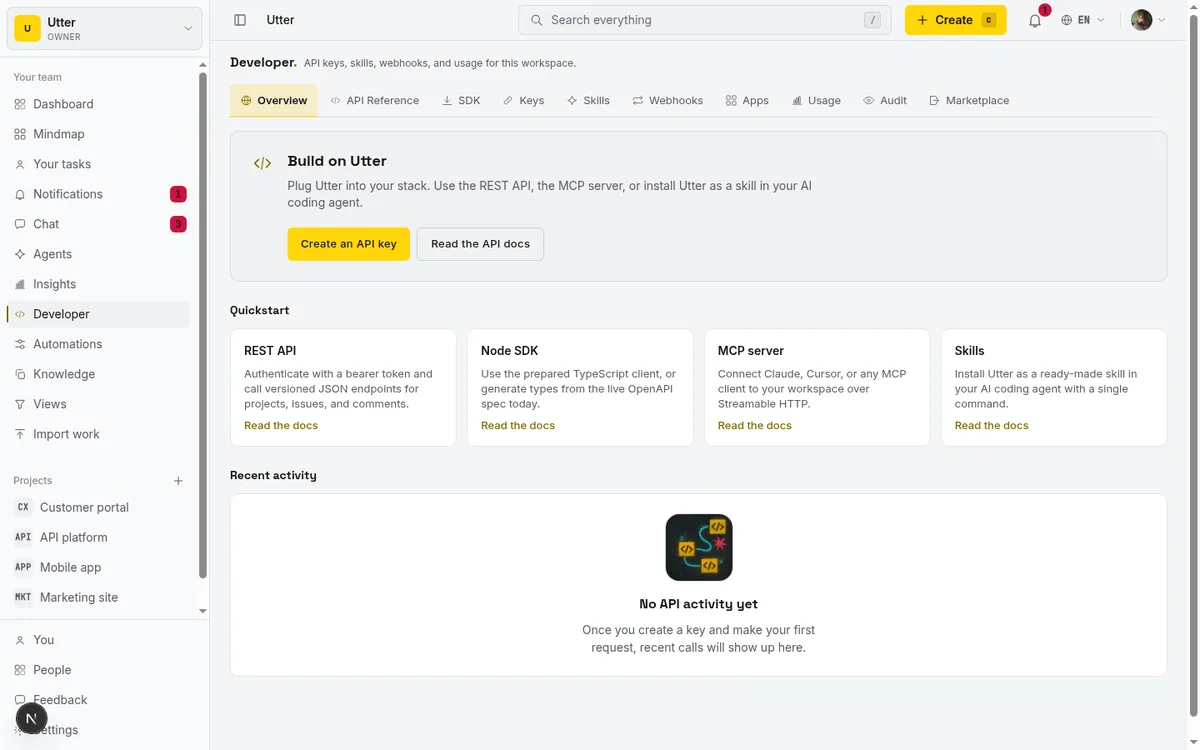
The second layer is the one the cards sit on top of. Every card resolves to an open surface you could have built against yourself: API keys with a 45-scope catalogue, webhooks with Stripe-style signatures, an MCP server generated from the OpenAPI spec, an agent skill file, and workspace-registered OAuth apps.
Two honest statements up front, because this post exists to correct the record, not to spin it the other way. First, there is no third-party plugin install flow and no paid plugins. Nothing from an outside vendor runs inside your workspace. Second, that is a deliberate design position, not a roadmap gap, and the last section explains the reasoning and when it should push you toward Jira or Linear instead.
One more fact worth knowing before the details: "integrations" sits in Utter's BASE_FEATURES list, which means the whole surface described here is available on the Free plan.
What is actually in the Utter integrations marketplace
The marketplace is built by a single function, buildApps in MarketplaceTab.tsx, so the card list is not a moving target. There are exactly 12 cards, filterable by five category pills: All, Import, Notifications, Dev tools, and AI & agents. Each card is in one of three states, connected, available, or coming soon, and "Connected" is not a static badge. It is derived live from workspace data every time the tab loads.
| Card | Category | How it connects | How "connected" is detected |
|---|---|---|---|
| GitHub | Dev tools | Push webhook at workspace settings | Any project has a repo_integrations row |
| Slack | Notifications | Paste an Incoming Webhook URL | Any webhook exists in the workspace |
| Jira | Import | Deep-links to the import wizard | A completed import job with source jira |
| Linear | Import | Deep-links to the import wizard | A completed import job with source linear |
| CSV | Import | Deep-links to the import wizard | Always shows as available |
| Claude / MCP | AI & agents | MCP server at /api/mcp/v1 |
Always shows as available |
| Zapier | Dev tools | Webhooks by Zapier catch hook URL | Any webhook exists in the workspace |
| n8n | Dev tools | Webhook trigger node URL | Always shows as available |
| Email notifications | Notifications | Built in | Always connected |
| Node SDK | Dev tools | SDK tab; typed client from the OpenAPI spec (npm package marked coming soon) | Always shows as available |
| REST API | Dev tools | API key from the Keys tab | Always shows as available |
| Cursor / Windsurf | AI & agents | MCP connect snippet from the Skills tab | Always shows as available |
One correction to a claim that keeps circulating in third-party comparisons: Trello, ClickUp, Asana, and Monday are not marketplace cards. They are import sources. IMPORT_SOURCES in the import connectors module lists sample, trello, clickup, jira, monday, linear, and asana, plus CSV. The marketplace only surfaces Jira, Linear, and CSV as cards, and all three of those deep-link to the same import wizard the other sources use. If a review dings Utter for "no Trello integration," the reviewer never opened the import page.
Slack, Zapier, and n8n run on signed webhooks
There is no native Slack app and no Zapier directory listing. All three of these cards ride on Utter's outbound webhook system, which is worth understanding on its own terms because it is the piece you would build automations on anyway.
The v1 webhook publisher emits 14 event types: issue.created, issue.updated, issue.archived, issue.restored, comment.created, comment.updated, comment.deleted, doc.created, doc.updated, doc.archived, member.added, member.removed, member.role_changed, and workspace.updated. You can subscribe to specific events or use the * wildcard.
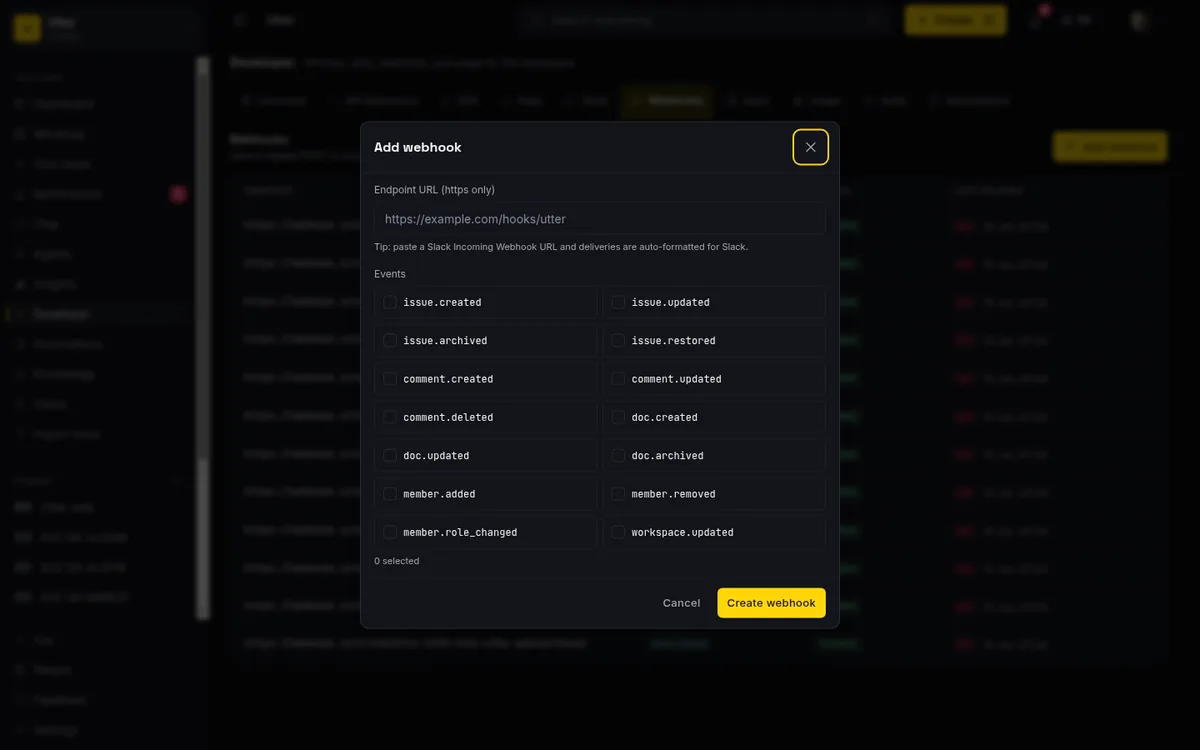
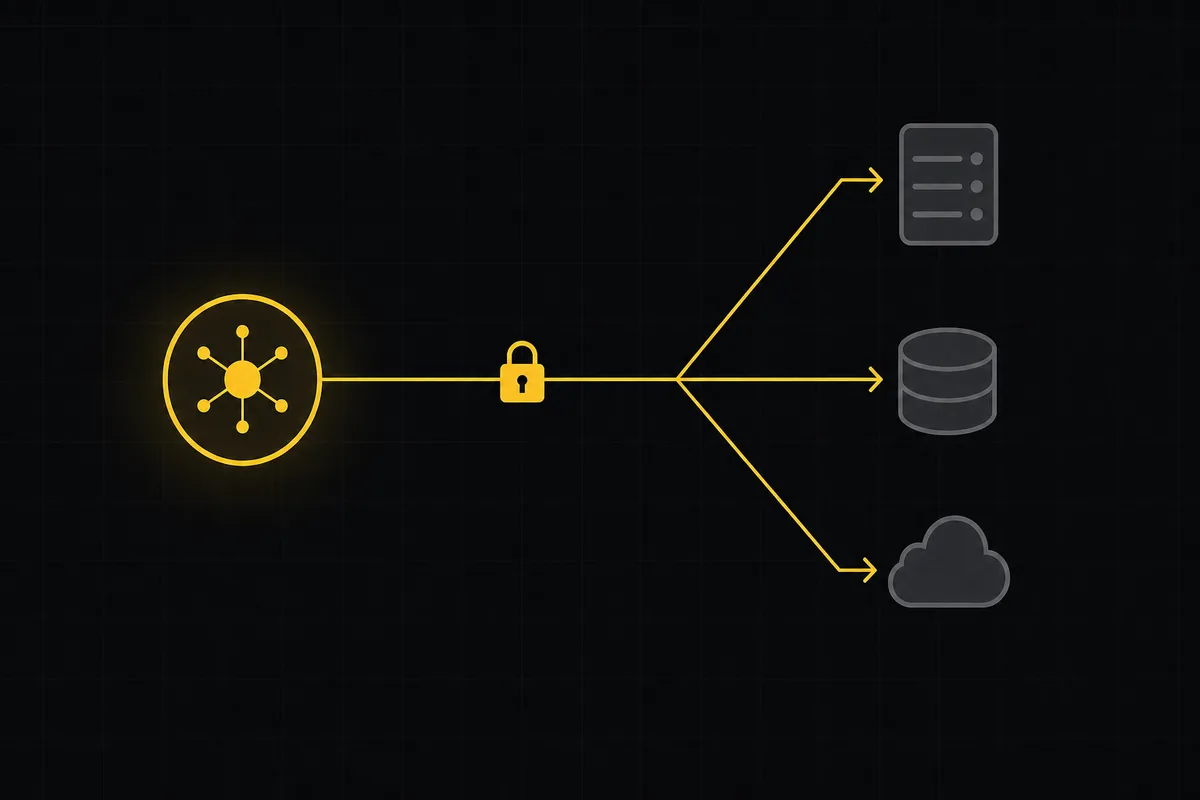
Every delivery carries a Stripe-style signature header, X-Utter-Signature: t=<unix>, v1=<hmac_hex>. The HMAC-SHA256 runs over the timestamp, a dot, and the raw body, and the key is the SHA-256 hash of your webhook secret rather than the secret itself, so Utter never stores the plaintext. If you have verified a Stripe webhook, the code transfers almost line for line. The full walkthrough is in how to use webhooks.
Slack is the zero-config case. Paste a hooks.slack.com Incoming Webhook URL as an ordinary webhook target and the publisher detects the host and sends Slack's {text, blocks} message format instead of the raw event envelope. No separate credentials, no new schema, no app approval from a Slack admin.
Zapier and n8n both consume the raw envelope. Two honest costs on the Zapier path. Utter is not listed in Zapier's app directory, so you use the generic Webhooks by Zapier trigger, and that trigger is a Premium feature: as of July 2026 it requires a paid Zapier plan. The cost sits on Zapier's side, not Utter's, but it is real money if you were planning to automate on Zapier's free tier. Zapier's directory advertises thousands of apps (their own count is now 9,000+), so once an event lands in a Zap it can go nearly anywhere. n8n is the cheaper pairing: its Community Edition is free and self-hosted, which fits neatly with teams who want automation without another SaaS bill.
Limits, stated plainly: no native Slack app means no slash commands and no bidirectional sync. Slack cannot create Utter issues, only receive events. And the v1 event list defers attachment.uploaded and webhook.disabled to v2.
Moving in from Jira, Trello, ClickUp, Asana, Linear, or Monday
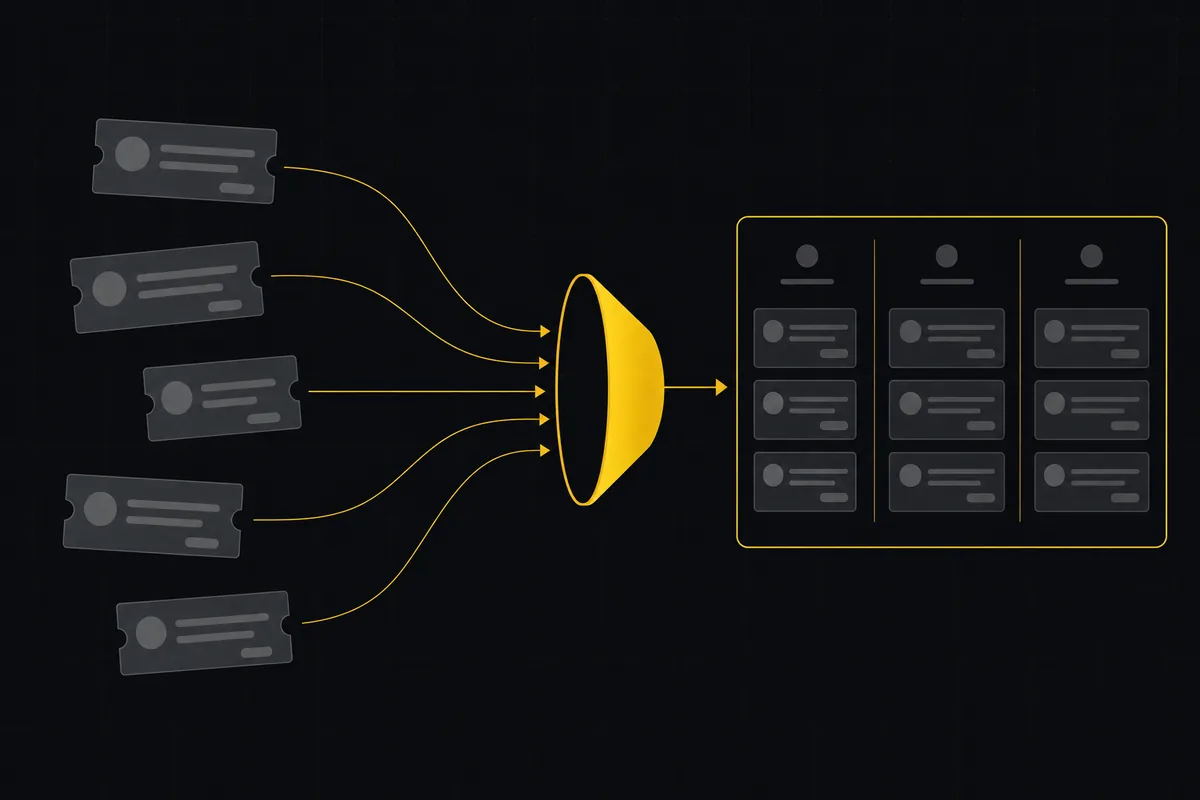
The import wizard is migration, not live sync. You run it once, your history lands in Utter, and the old tool becomes read-only in your life. Nothing keeps the two systems talking afterward, and Utter does not pretend otherwise.
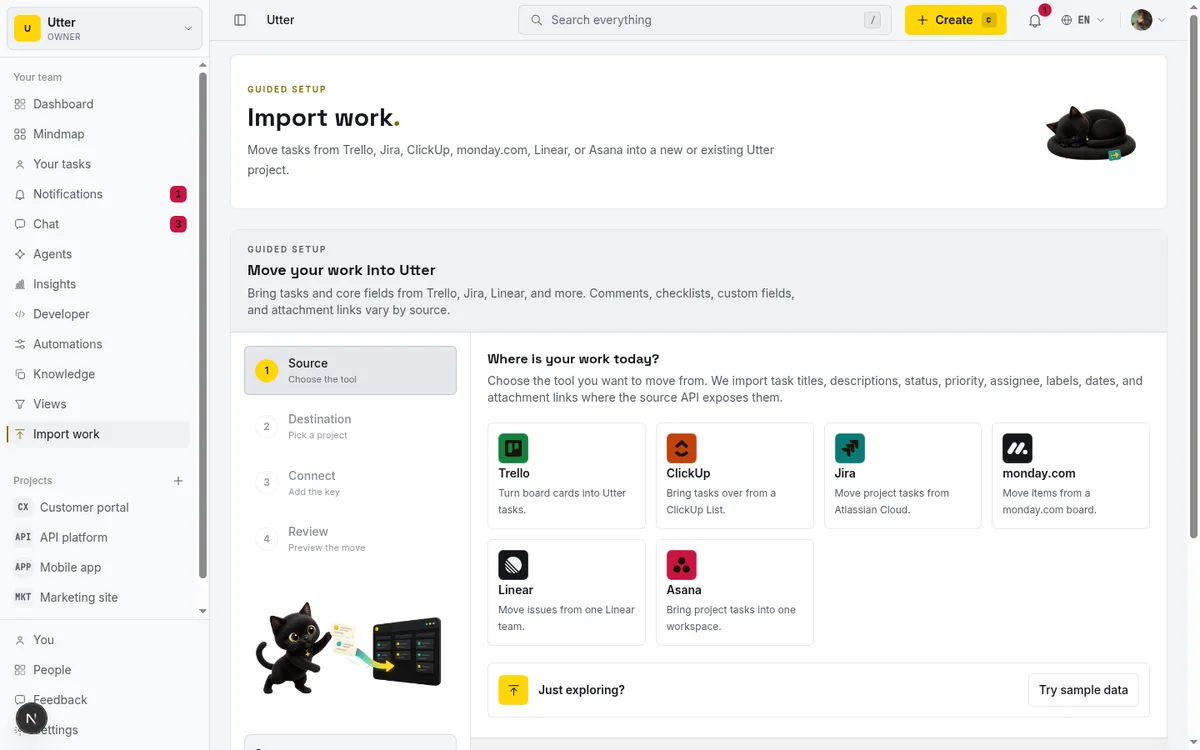
Sources cover the tools people leave most often: Trello, ClickUp, Jira, Monday, Linear, Asana, a sample dataset for trying the flow, and plain CSV for everything else. Small imports run inline with a 500-row limit; larger ones hand off to a background worker with a hard ceiling of 50,000 rows. Per-plan caps as of July 2026: Free imports up to 1,000 rows, Pro 10,000, Business 50,000. The wizard mechanics are in how to import your project, and the tool-by-tool mapping notes are in the migration guide.
The contrast with what you are leaving is mostly about ongoing cost. On Atlassian Marketplace, paid apps must license-match your entire Jira tier: Atlassian's own developer docs state that paid app licenses "have to exactly match the Atlassian host app license," and the app tier upgrades in lockstep when your Jira tier does. A plugin that five people use bills across all five hundred seats. Trello's Free plan includes unlimited Power-Ups per board, which is generous, though Trello's paid-plan copy notes that some partner Power-Ups carry their own subscription fees on top. Neither of those is a scandal. Both are worth knowing before you compare "Utter has 12 integrations" against "Jira has thousands" as if the thousands were free.
GitHub: commit refs on timelines and tag-push releases
The GitHub integration is the one card backed by a dedicated inbound pipeline rather than the generic webhook publisher. You manage it at /w/<workspace>/settings/integrations: register a push-event webhook on your repo, and Utter verifies each delivery with the X-Hub-Signature-256 HMAC using a timing-safe compare.
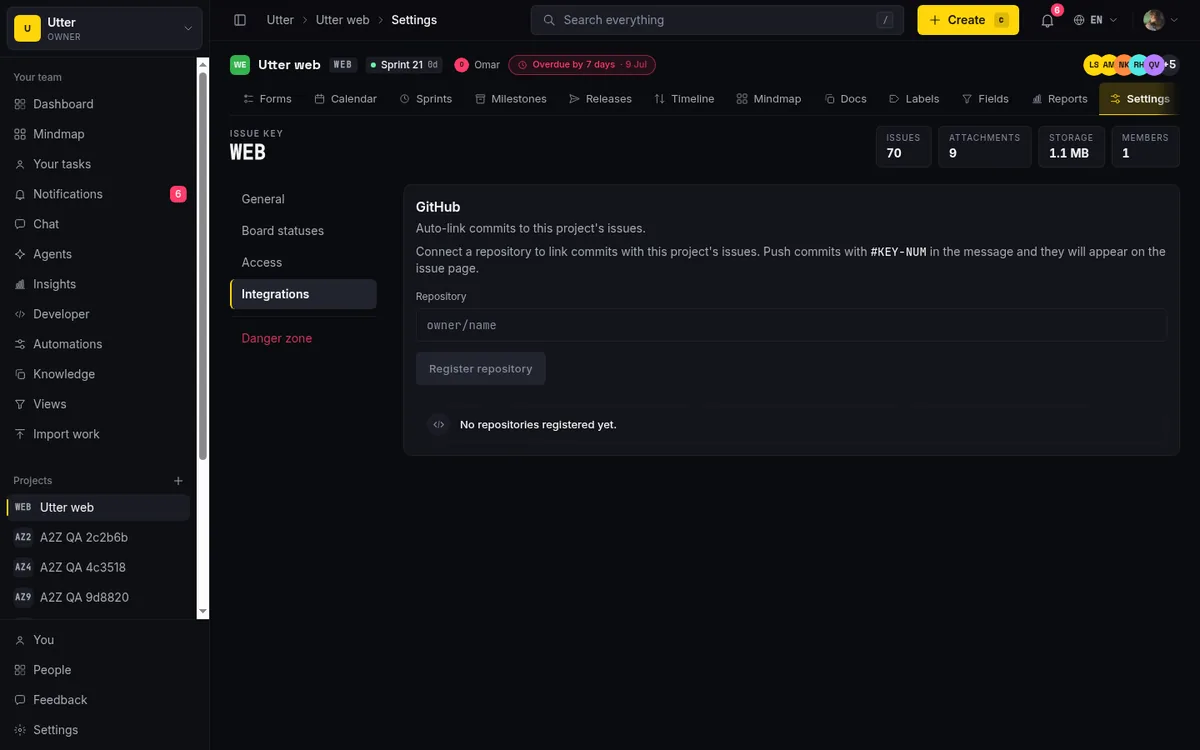
Once connected, commit messages do the work. The parser extracts #KEY-NUM references and leading KEY-NUM prefixes from each commit and attaches them to the matching issue timelines as commit_refs rows, so an issue's activity feed shows the commits that touched it. Tag pushes can go further and auto-ship releases. The marketplace card flips to "Connected" the moment any project in the workspace has a repo_integrations row.
Honest scope: this is commit linking and release automation, not a full GitHub App. There are no PR status checks, no branch automation, and no write-back to GitHub. Setup details are in how to connect GitHub.
The API-first core: keys, scopes, and one write choke point
Here is the actual integration story, the one the marketplace cards are a veneer over. Utter's v1 REST API covers over 180 operations, which is the entire product surface: issues, projects, docs, chat, forms, automations, agents, webhooks, OAuth apps, usage, and more. The OpenAPI spec lives at /api/v1/openapi.json.
Keys are scoped from a catalogue of roughly 45 scopes: the coarse read, write, and admin, plus granular pairs per resource (issues:read, issues:write, projects:read, comments:write, docs:read, webhooks:write, oauth_apps:read, and so on). Two properties matter for security reviews. Scopes intersect with the calling user's workspace role, so a key can only narrow what its owner could already do, never widen it. And the admin-grade scopes (api_keys:*, webhooks:*, oauth_apps:*, members:write, projects:admin, workspaces:write, forms:write, automations:write) are not reachable through the coarse write scope. You get them by explicit grant or by admin, never by accident.
Creating an issue looks like this:
curl -X POST "https://utter.ae/api/v1/workspaces/acme/projects/WEB/issues" \
  -H "Authorization: Bearer $UTTER_API_KEY" \
  -H "Content-Type: application/json" \
  -d '{"type": "task", "title": "Wire the deploy webhook", "priority": "high"}'
const res = await fetch(
"https://utter.ae/api/v1/workspaces/acme/projects/WEB/issues",
{
method: "POST",
headers: {
Authorization: "Bearer " + process.env.UTTER_API_KEY,
"Content-Type": "application/json",
},
body: JSON.stringify({
type: "task",
title: "Wire the deploy webhook",
priority: "high",
}),
},
);
const issue = await res.json();
console.log(issue.data.key);import os
import requests
resp = requests.post(
"https://utter.ae/api/v1/workspaces/acme/projects/WEB/issues",
headers={"Authorization": "Bearer " + os.environ["UTTER_API_KEY"]},
json={"type": "task", "title": "Wire the deploy webhook", "priority": "high"},
)
print(resp.json()["data"]["key"]){
"data": {
"id": "0198c9f4-2f3a-7c11-9b6e-8d4a1c22e901",
"key": "WEB-214",
"url": "https://utter.ae/w/acme/p/web/WEB-214",
"number": 214,
"type": "task",
"title": "Wire the deploy webhook",
"status": "todo",
"status_name": "To do",
"priority": "high",
"assignee_id": null,
"assignees": [],
"labels": []
}
}On SDKs, the product is candid with itself. The developer console's SDK tab previews a first-party @utter/sdk-node TypeScript client, and it marks the npm package as coming soon. Until that lands, the supported path is generating a typed client from the live spec with openapi-typescript, which gives you typed request and response shapes for every endpoint, most of what an SDK buys you anyway. Every language, Node included, talks the same REST surface today.
Every key has an adjustable per-minute rate limit, and the console gives each key a Usage tab and an Audit tab so you can see what a key did, not just that it exists. Anomaly detection watches for unusual key behavior and sends an api-anomaly alert email; revoking a key sends api-key-revoked to its owner. If you want the endpoint tour, start with how to use the REST API.
MCP, agent skills, and the AI & agents lane
The Claude / MCP and Cursor / Windsurf cards point at the same thing: a first-party MCP server at /api/mcp/v1, protocol revision 2025-06-18, server name utter-product. Its tools are generated one-to-one from the OpenAPI registry, so every REST operation has a matching MCP tool with no second implementation to drift out of date. When an agent calls a tool, the call re-enters the REST pipeline in-process, which means auth, scope checks, rate limits, validation, idempotency, and usage logging all apply exactly as they would to a curl request. The tool list itself is filtered by the key's scopes, so a read-only key exposes read-only tools. The reasoning behind this design is in why Utter has an MCP server.
Some context on why this lane exists at all. MCP is an open standard, donated by Anthropic to the Agentic AI Foundation, a Linux Foundation directed fund co-founded by Anthropic, Block, and OpenAI and announced in December 2025. It has first-class client support in ChatGPT, Claude, Cursor, Gemini, Microsoft Copilot, and VS Code. Betting the AI integration story on MCP is not a proprietary lock-in play; it is the closest thing agent tooling has to a common plug.
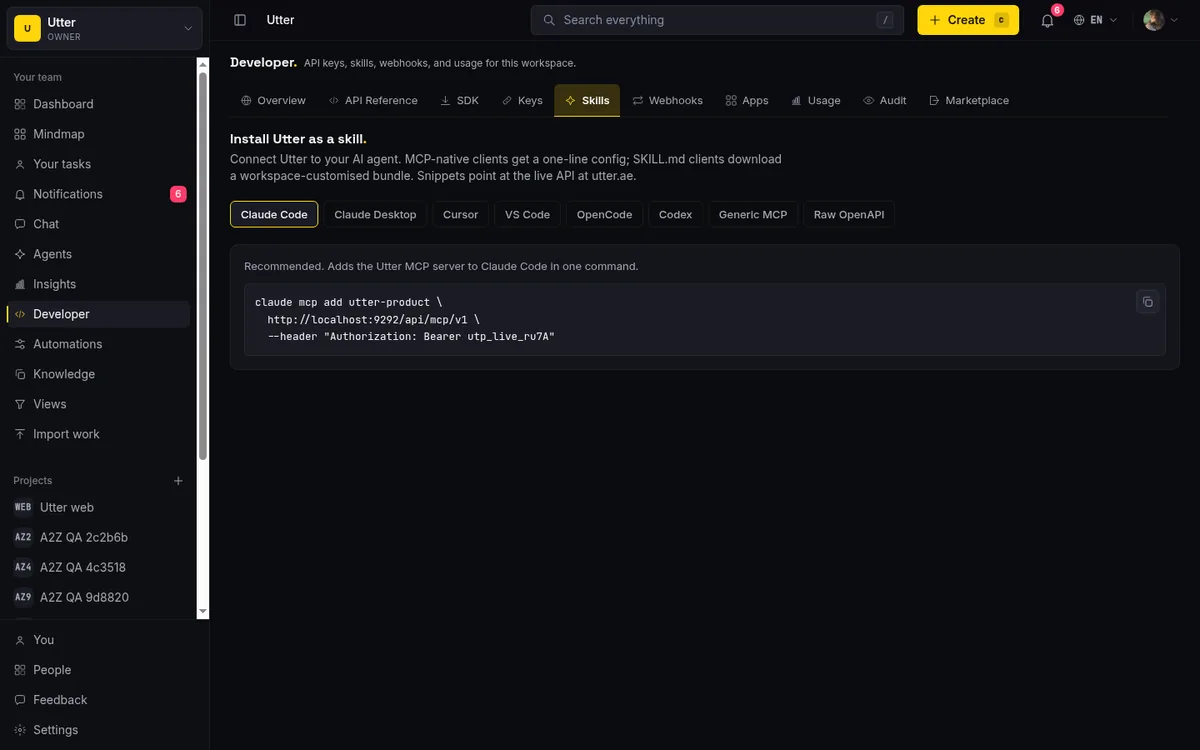
The Skills tab in the developer console ships copy-paste connect snippets for Claude Code, Claude Desktop, Cursor, VS Code, opencode, Codex, a generic MCP client, and raw OpenAPI. There is also an agent skill file at /api/skill/utter-product.skill.md that teaches an agent the product's conventions rather than just its endpoints. Setup takes a few minutes; the walkthrough is how to install Utter as an agent skill.
The part rivals do not have: agents in Utter are real workspace members. An agent is a user with an agent profile and an API key attributed to it, it shows up in pickers and on issues like anyone else, and it never counts as a billed seat. Each agent can carry a field-write policy restricting which issue fields it may touch, enforced at the single API write choke point, and agent work sessions get a read-time "unverified" badge when a session claims completion with no attributed activity to back it up.
OAuth apps: scoped, revocable third-party access
API keys are for your own scripts. When someone else's software needs access to a user's Utter data, the right tool is the Apps tab, a full OAuth 2.0 platform.
Workspace owners and admins (the registration action requires workspace.edit_settings) register a client with a name, redirect URIs (https required, localhost allowed for development), and scope checkboxes: read, write, issues:read, issues:write, projects:read, comments:read, comments:write. Clients are either Public, using PKCE for mobile apps, SPAs, and CLIs, or Confidential, with a client secret shown exactly once behind a forced acknowledgement.
The endpoints are standard: /api/oauth/authorize, /api/oauth/token, /api/oauth/revoke, with RFC 8414 discovery metadata at /.well-known/oauth-authorization-server. Supported grants are authorization_code and refresh_token, PKCE uses S256, access tokens live one hour, and refresh tokens live 30 days.
sequenceDiagram
    participant App
    participant User
    participant Utter
    App->>Utter: GET /api/oauth/authorize (PKCE challenge)
    Utter->>User: Consent screen with requested scopes
    User->>Utter: Approve (may narrow scopes)
    Utter->>App: Redirect with authorization code
    App->>Utter: POST /api/oauth/token (code + verifier)
    Utter->>App: Access token (1h) + refresh token (30d)
    App->>Utter: API calls
    User->>Utter: Revoke at /me/tokens
    Utter-->>App: Tokens dead immediately
The consent step is real, not decorative. The in-product scope hint reads "Users can restrict further during the consent step," meaning a user can grant an app less than it asked for. Users see and manage everything they have authorized at /me/tokens, and revoking an app kills its tokens immediately. The honest limit here: there is no public directory of third-party Utter apps yet. The platform exists; the ecosystem is yours to start.
Why curated plus API-first instead of a paid plugin store
Time to defend the design choice, with the rivals treated fairly.
The plugin-store model has real strengths. As of July 2026, Atlassian describes its Marketplace as an ecosystem of 6,000+ apps and integrations, and if you need a vendor-built, deeply bidirectional sync today (Salesforce, ServiceNow, test management suites), that catalogue is unmatched. The cost structure is the catch: paid apps license-match your whole Jira tier, so every paid plugin bills across every user. Trello's Free plan includes unlimited Power-Ups per board, with some partner Power-Ups charging their own fees on paid plans. Linear runs the model closest to Utter's philosophy: a curated Integration Directory where verified-badge integrations are built by the Linear team, 250+ more come from third parties, and most installs require a workspace admin. Linear's directory is meaningfully larger than Utter's 12 cards, and that is a fair point in Linear's favor.
Utter's bet is that a small curated catalogue keeps the product calm and keeps the security review short. Nothing third-party executes inside your workspace. Every extension path funnels through one of five audited mechanisms, each scoped, signed, or consent-gated. And because the API covers 100 percent of the product, anything the catalogue lacks is buildable in an afternoon rather than blocked on a vendor.
| Job | Use | Cost |
|---|---|---|
| Your own scripts and internal tools | API key with narrow scopes | Free, all plans |
| Push events to Slack, Zapier, n8n, or your own service | Signed webhook | Free on Utter (Zapier's webhook trigger needs a paid Zapier plan) |
| Let Claude, Cursor, or another agent work your backlog | MCP server + agent member | Free; agents never bill as seats |
| Teach a coding agent the product's conventions | Agent skill file | Free |
| Ship software other people authorize against their data | OAuth app (PKCE or confidential) | Free to register; owner/admin only |
Where this model genuinely loses: if your workflow depends on a vendor-maintained two-way sync that exists as a Jira plugin or a Linear directory entry today, and you do not want to run the webhook-plus-API glue yourself, pick Jira or Linear. That is not a defeat, it is a fit question. And if per-seat plugin billing is part of what sent you looking, the cost math is worked through in Jira alternatives priced per seat.
For everyone else, the two-layer model means a flat "no" on Utter integrations is simply out of date. Twelve curated cards for the common cases, and an API that treats every other case as a first-class citizen.
The Free plan includes the whole integration surface described here, along with 128 MB of storage and 5 projects. Sign in with a magic link and open the developer console's Integrations tab to see the cards against your own workspace.
Frequently asked questions
Does Utter have integrations?
Yes, on two layers. A curated marketplace in the developer console ships 12 first-party cards (GitHub, Slack, Jira, Linear, CSV, Claude/MCP, Zapier, n8n, email, Node SDK, REST API, Cursor/Windsurf), and underneath sits an API-first surface: scoped API keys, signed webhooks, a first-party MCP server with over 180 tools, and an OAuth 2.0 apps platform. There is no third-party plugin store, by design.
Does Utter integrate with Slack?
Yes, through webhooks. Paste a Slack Incoming Webhook URL as a webhook target and Utter detects the host and sends Slack's message format automatically, no separate app install or admin approval. The limit: it is one-way. Slack receives events but cannot create Utter issues, and there are no slash commands.
Does Utter work with Zapier and n8n?
Both, via Utter's signed outbound webhooks. Utter is not in Zapier's app directory, so you use the generic Webhooks by Zapier trigger, which requires a paid Zapier plan as of July 2026. n8n consumes the same webhook envelope through its webhook trigger node, and its Community Edition is free and self-hosted.
Can I migrate from Jira, Trello, or Asana to Utter?
Yes. The import wizard supports Jira, Trello, ClickUp, Monday, Linear, Asana, and CSV. It is a one-time migration, not a live sync: small imports run inline (up to 500 rows) and larger ones run in a background worker up to 50,000 rows, with per-plan caps of 1,000 rows on Free, 10,000 on Pro, and 50,000 on Business as of July 2026.
What is the Utter MCP server?
A first-party Model Context Protocol server at /api/mcp/v1. Its tools are generated one-to-one from the same OpenAPI registry as the over 180 REST operations, every call re-enters the REST pipeline (so auth, scopes, rate limits, and audit logging still apply), and the tool list is filtered by the key's scopes. It works with Claude, Cursor, VS Code, and any other MCP client.
Can third-party apps connect to Utter?
Yes, through the OAuth 2.0 apps platform. Workspace owners and admins register clients (Public with PKCE, or Confidential with a one-time secret), users approve scopes on a real consent screen and can narrow them, and every authorized app can be revoked instantly from /me/tokens. There is no public directory of third-party Utter apps yet.
Are Utter integrations available on the Free plan?
Yes. Integrations sit in Utter's base feature set, so API keys, webhooks, the MCP server, the GitHub integration, imports, and OAuth apps all work on Free. External costs can still apply on the other side, such as Zapier requiring a paid plan for its webhook trigger.
Related reading
What you can run in Utter without extra tools
A straight, capability-forward tour of the jobs Utter covers in its core, from a light help desk to integrations, estimation, and roadmaps, and when to pair a dedicated tool.
July 16, 2026 · 8 min read
How to use the rest api
Get an Utter API key and use the project management REST API to list, create, and update issues safely, with scopes, idempotency keys, and rate limits explained.
July 15, 2026 · 16 min read

How to use AI agents in Utter: connect them, assign work, and follow their sessions
A start-to-finish walkthrough: connect an agent, scope its key, assign it issues, and watch its sessions, without giving up control of the board.
July 15, 2026 · 11 min read

Why we gave Utter an MCP server, and what it changes
What the Model Context Protocol is in plain terms, why a project tracker is a good fit for it, and how an agent picks up your workspace without any glue code.
July 11, 2026 · 5 min read

The MCP audit: which project tools can AI agents actually use? (July 2026)
We audited the MCP servers of 13 project management tools: who has one, what agents can really do, the call caps, and the gaps nobody mentions.
July 15, 2026 · 7 min read
How to import your project
Import a project from Jira, Trello, or a CSV into Utter: the connector wizard, CSV column mapping, which fields survive, row caps, and the gotchas to plan around.
July 15, 2026 · 16 min read
Give your AI agent a knowledge base: connect your docs so it answers from your project, not the internet
How to give an AI agent access to your company docs, so it grounds answers in your workspace instead of guessing, using RAG exposed through MCP.
June 5, 2026 · 8 min read

Which project management tools actually ship a first-party MCP server
Having AI features is not the same as shipping an MCP server. Here is how to tell first-party from community-built from none, with an honest checklist.
June 22, 2026 · 9 min read

How to install utter as an agent skill
Install Utter as a skill in your AI coding agent: one-command MCP for Claude Code, config for Cursor and VS Code, or a SKILL.md download for OpenCode and Codex.
July 15, 2026 · 15 min read
How to use webhooks
Set up outbound webhooks in Utter: create one, verify the HMAC signature (sha256-of-secret gotcha), handle at-most-once delivery, and pipe board events to Slack.
July 15, 2026 · 16 min read
أضف تعليقًا
ابدأ النقاش.