
A bug tracking workflow that runs from report to fix
Open the average bug tracker and you find three tabs, not one. A Google Form or Typeform collects reports from customers and QA. A spreadsheet holds the triage columns nobody keeps current. A chat thread is where "did anyone look at BUG-14 yet" actually happens. Each handoff loses context, and the fix, when it lands, has no thread back to the report that started it.
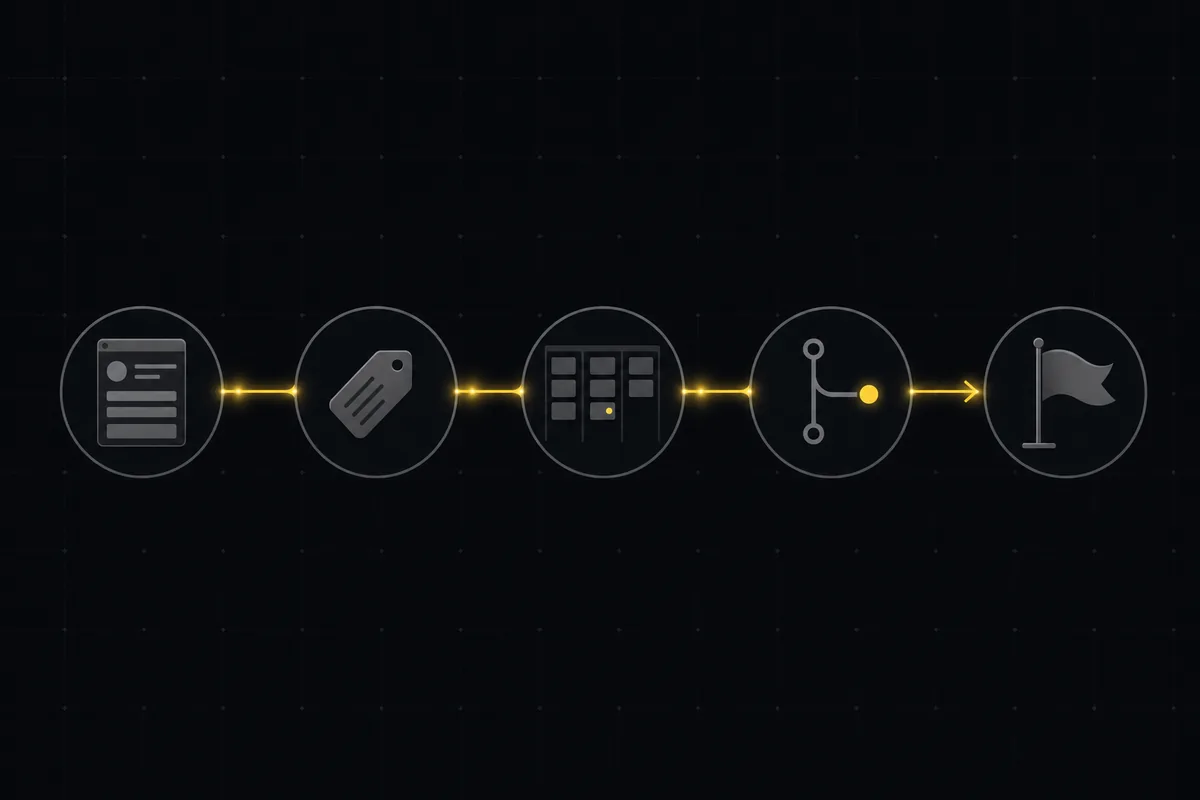
This guide lays out a single bug tracking workflow that runs report to fix in one tool. A public request form feeds AI triage, triage sets priority and labels, the board carries an In Review gate that a ticket cannot skip, a GitHub commit links itself to the issue on push, and the release ships (with drafted notes) when you tag it. Every stage below is a real Utter feature, and the honest limits are called out where they matter.
Why the form-plus-spreadsheet-plus-chat setup keeps breaking
The problem with the usual bug tracking process is not any one of its tools. Each is fine on its own. The problem is the seams between them.
Your intake form lives in a separate product from your tracker, so a report arrives as an email or a row in a Sheet, and someone copies it by hand into an issue. That copy is where the first details go missing: the browser version, the screenshot, the exact steps. Then triage happens in a spreadsheet that drifts out of date within a week, because keeping a second system current is nobody's actual job. Priority ends up set by whoever shouts loudest in the chat thread, not by any consistent rule. And when the fix finally ships, the commit that closed the bug has no link back to the report, so three months later, when it regresses, you cannot find the original context at all.
Every boundary costs you something. Duplicate reports pile up because submitters cannot see what already exists. Triage goes stale. The audit trail from "customer said X" to "we shipped Y" is broken in four places. You are not tracking bugs so much as re-entering them.
The fix is not a better spreadsheet. It is removing the boundaries. One workspace where the report becomes the issue, the issue carries its own triage, the board enforces review, the commit attaches itself, and the release closes the loop. No export step, no second tool, no copy-paste.
The five stages of a bug tracking workflow, end to end
Before the detail, here is the whole pipeline at a glance. Five stages, one workspace, and no handoff between separate products at any point.
flowchart LR
  A[Report<br/>public form] --> B[Triage<br/>AI suggests priority, type, labels]
  B --> C[Board<br/>In Review gate]
  C --> D[Code<br/>GitHub commit auto-links]
  D --> E[Release<br/>auto-ships on tag + AI notes]
Each stage has one job:
- Report. A branded public form at a shareable URL turns an external submission (customer, QA, teammate) into a real issue, screenshots and all.
- Triage. AI reads the new issue and suggests a priority, a type, and labels. A person applies them, or you opt into applying them automatically.
- Board. The issue moves across custom columns, and an In Review gate sits between "in progress" and "done" that a ticket cannot jump over.
- Code. The commit that fixes the bug references the issue key in its message, and the push links itself onto the issue timeline.
- Release. Tagging a version flips the matching release to shipped and drafts the release notes from the issues it contains.
The point is that all five live in the same place. The report, the triage, the board, the commit link, and the release are rows in one workspace, so context never crosses a boundary and nothing needs re-entering.
Stage 1: a public bug intake form that creates issues
The pipeline starts with a bug intake form that outsiders can actually reach. Utter forms publish to a branded public URL at /f/<token>, and a submission there creates an issue directly. No login required for the submitter, which is exactly what you want for a customer bug report.
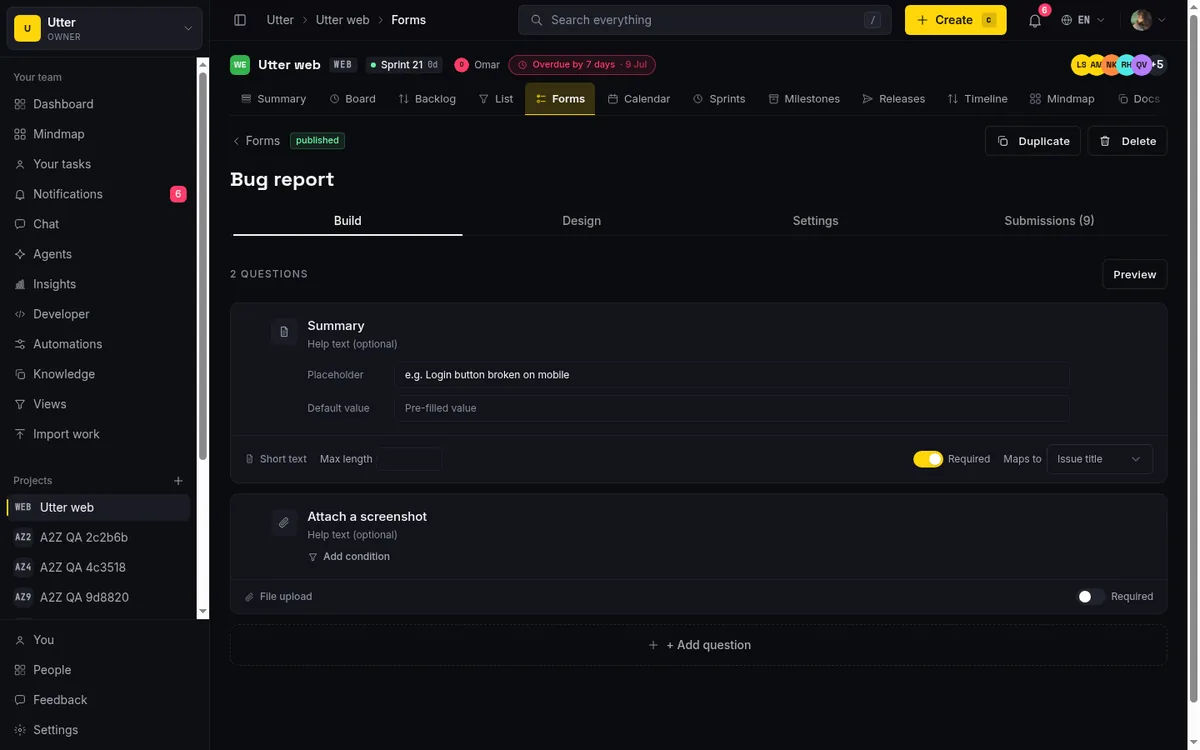
The builder gives you 14 field kinds to shape the report: short text, long text, select, multi-select, number, date, email, radio, phone, URL, rating, section, file, and checkbox. The file field matters most for bugs, because it lets an anonymous reporter attach a screenshot or a log without an account. Every field runs its own validation, so a required repro-steps box stays required and an email field has to look like an email.
The part that makes this a workflow rather than a dumb inbox is routing. A form carries routing defaults that pre-set the assignee, labels, sprint, and board status on every issue it creates. So a "Report a bug" form can drop each submission straight into the Backlog column, tag it bug, and hand it to your triage rotation, with no manual touch. All four of those defaults are re-validated against the project when the issue is made, so a stale or cross-tenant value never gets applied. And only a form that is both published and public-enabled is reachable at its token, which is the single gate on public access.
Two honest limits to weigh here. On the Free plan, uploaded files are capped at 1 MB each and the whole workspace is capped at 128 MB of storage, so a form that collects large video recordings will fill up fast and needs a paid plan. The form builder itself, though, is available on every plan including Free.
For the full walkthrough of building and publishing one, see how to set up a request form.
Stage 2: AI triage sets priority, type and labels
A raw report is not a triaged bug. Someone still has to decide how bad it is, what kind of work it represents, and which area it touches. That is the slow part of any bug triage workflow, and it is where AI earns its place, as an assistant, not an autopilot.
Utter's triage reads an issue's title and description and returns a suggested priority, type, labels, and a short reason for its call. Two things keep it honest. Priority is validated against the real six-value enum, and labels are validated against the project's own label palette, so anything the model invents (a priority that does not exist, a label you never created) is dropped before it reaches you. It also classifies only leaf types, meaning story, task, or bug, and never reclassifies something into an epic or a subtask.
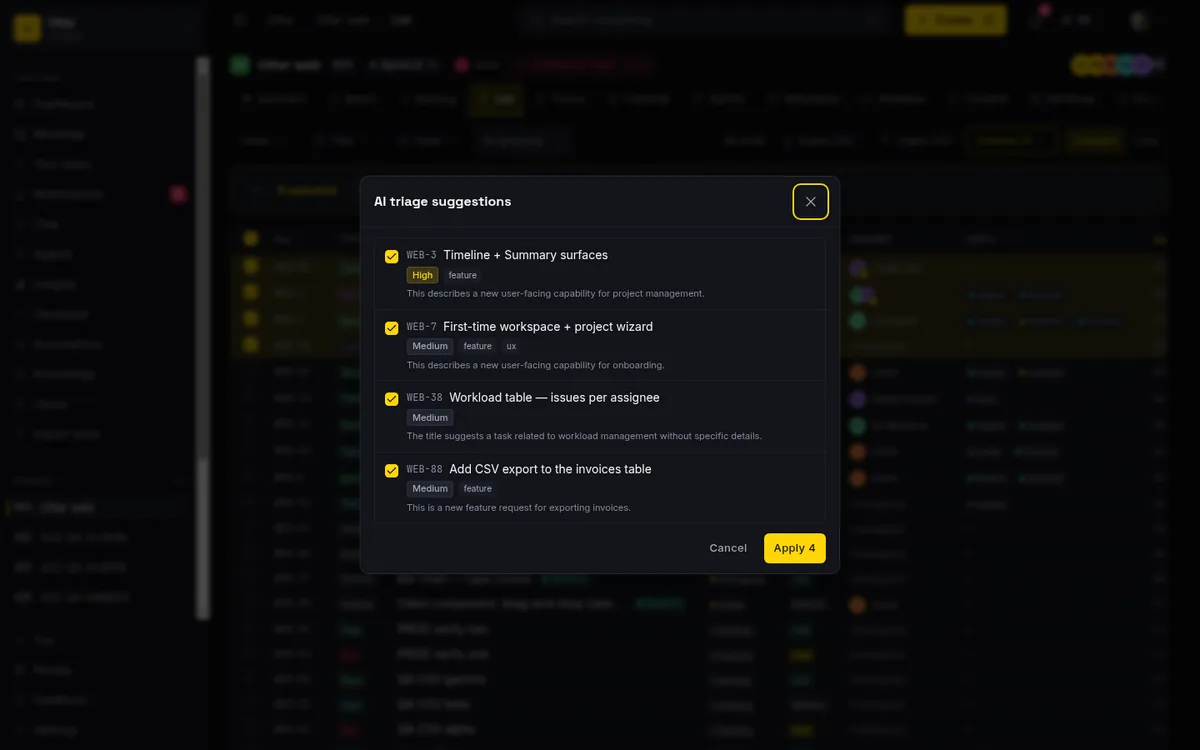
By default this is human-in-the-loop. The AI suggests, and a person clicks to apply. When you have a stack to get through, batch triage runs the same suggestion across up to 15 selected issues in one pass, and you apply the rows you agree with. Triage runs on a cheap, small model and is deliberately not metered against your AI credits, so leaning on it does not burn your monthly grant.
If you want it truly hands-off, that exists too, as an opt-in per-project toggle. Turn on autonomous triage and each newly created issue gets triaged in the background, with labels, priority, and type applied for you (up to five labels a pass). It is storm-guarded: only interactively created issues trigger it (imports, forms, and API writes do not), and there is a per-project rate cap plus the workspace credit gate. Note that this is off unless you switch it on. The default is suggest, not apply.
The limits are worth stating plainly. You must create your labels first, because triage only picks from what already exists. Batch tops out at 15 issues, so this is not a one-click "triage my entire backlog of 400" button. And because form intake fires your issue.created automations, you can make routing fully hands-off through automation rules even without turning on autonomous AI.
More on both paths in AI issue triage that assigns and prioritizes and turn a request form into a triaged issue.
Stage 3: a board with a review gate a ticket cannot skip
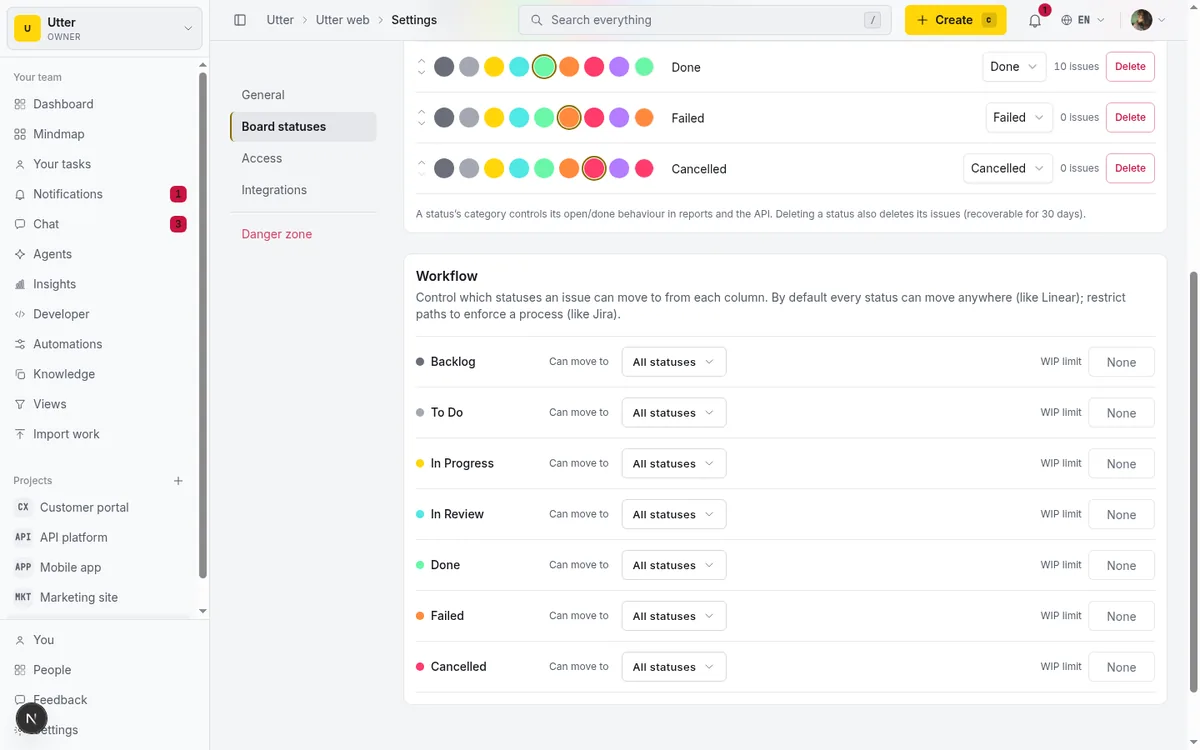
Once an issue is triaged, it moves. Every Utter project seeds seven board columns out of the box: Backlog, To Do, In Progress, In Review, Done, Failed, and Cancelled. Each column maps to a fixed status category underneath, and that category (not the column's display name) is what drives is_open, reporting, and everything else that needs to know whether an issue is truly resolved.
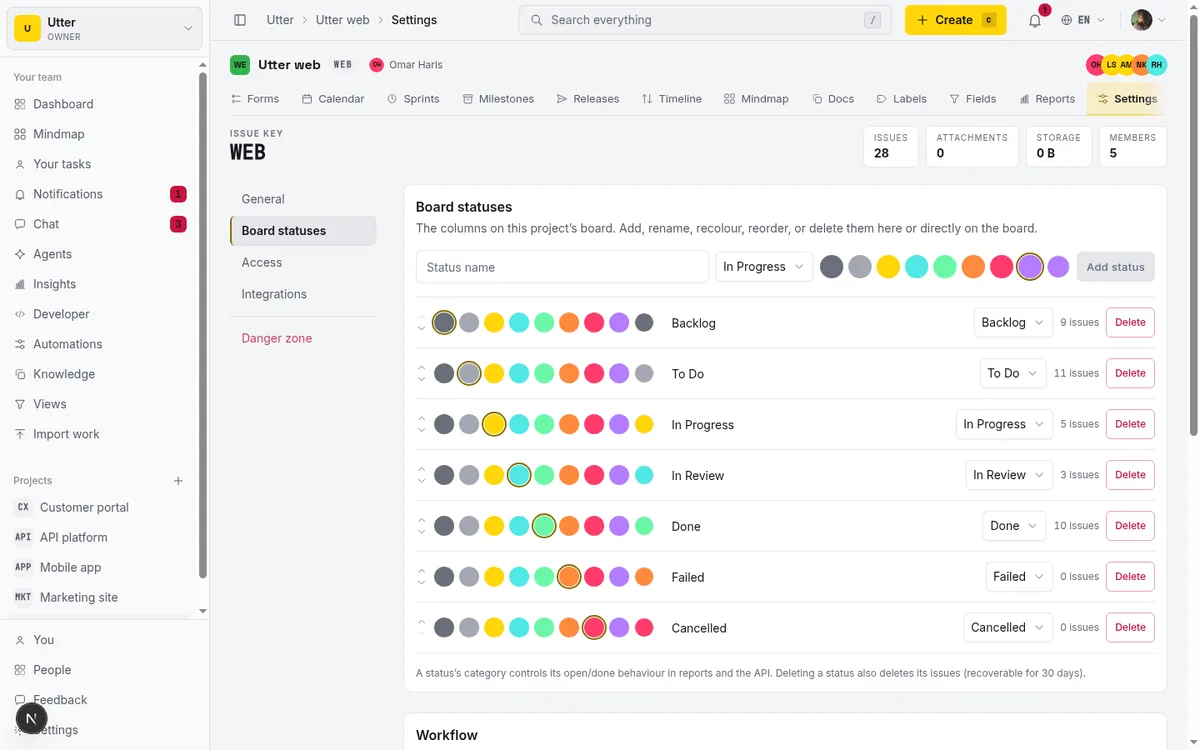
In Review is the built-in gate. On its own, a column is just a column, so the discipline comes from transition rules. Each status can restrict which statuses an issue is allowed to move to next, and that check runs at every write path, not just drag-and-drop on the board. It is enforced in the server actions, in bulk edits, in automation runs, and in the v1 API. So if you configure In Progress to only allow In Review, a bug physically cannot jump straight to Done from a script, a bulk move, or a manual drag. A blocked move surfaces a clear message like "Workflow: In Progress to Done is not allowed" rather than silently failing.
That single rule is the difference between a board that documents your process and a board that holds the line on it. Nobody marks a bug fixed without it passing through review, because the system will not let them.
The columns are yours to shape. Rename them, recolour them, change a column's underlying category, reorder them, add new ones, or delete ones you do not use. You can also set a per-column WIP limit to cap how many issues sit in, say, In Progress at once. The seven defaults are a sensible starting point for a bug tracking system, not a cage.
Stage 4: link the fixing commit back to the bug
Here is the seam that most setups never close: the fix ships, and the code has no visible link to the bug it fixed. Utter closes it with a GitHub integration that attaches commits to issues automatically.
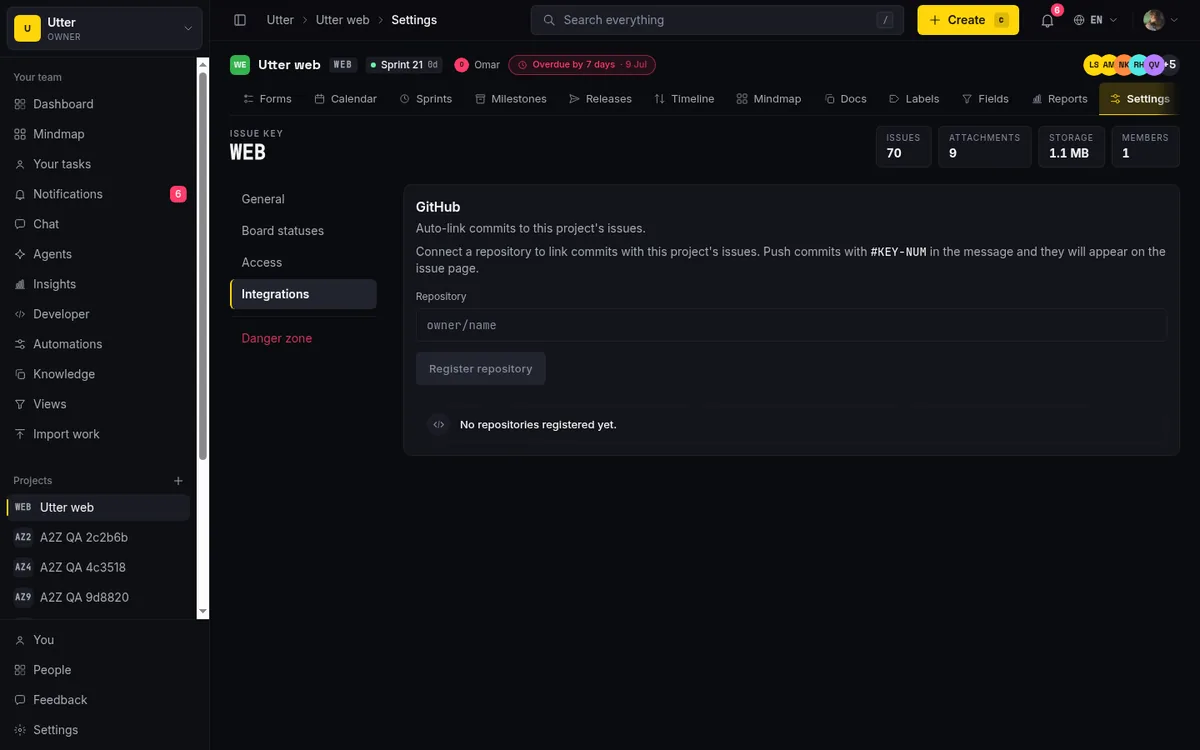
The mechanics are simple and reliable. When you push, a webhook reads your commit messages, finds any #KEY-N references (for example #WEB-42), and for each matched issue it records a commit reference and writes a linked-commit entry onto that issue's timeline. The entry carries the repo, the commit SHA, the author, the message, and a link straight to the commit on GitHub. So on the bug itself, you see the exact commit that touched it, without anyone pasting a link into a comment.
Security is handled properly. Each connected repo has its own secret, every webhook is verified with HMAC-SHA256 against the X-Hub-Signature-256 header, and that secret is stored AES-256-GCM encrypted. One repository can connect to several projects, which matches how a monorepo usually maps to more than one Utter project.
Be clear about what this is and is not. It is push-webhook and message-based, so a commit that does not mention the issue key in its message is not linked. There is no pull-request status sync and no branch tracking. It links commits, full stop. And it does not replace your CI/CD. Your tests and deploys still run wherever they run today. This just gives the bug a permanent thread to the code that fixed it.
Setup is a few minutes: see how to connect GitHub.
Stage 5: ship the release and let AI draft the notes
The last stage closes the loop from fix to shipped. When you tag a release in git, Utter marks the matching release as shipped and offers to write the notes for you.
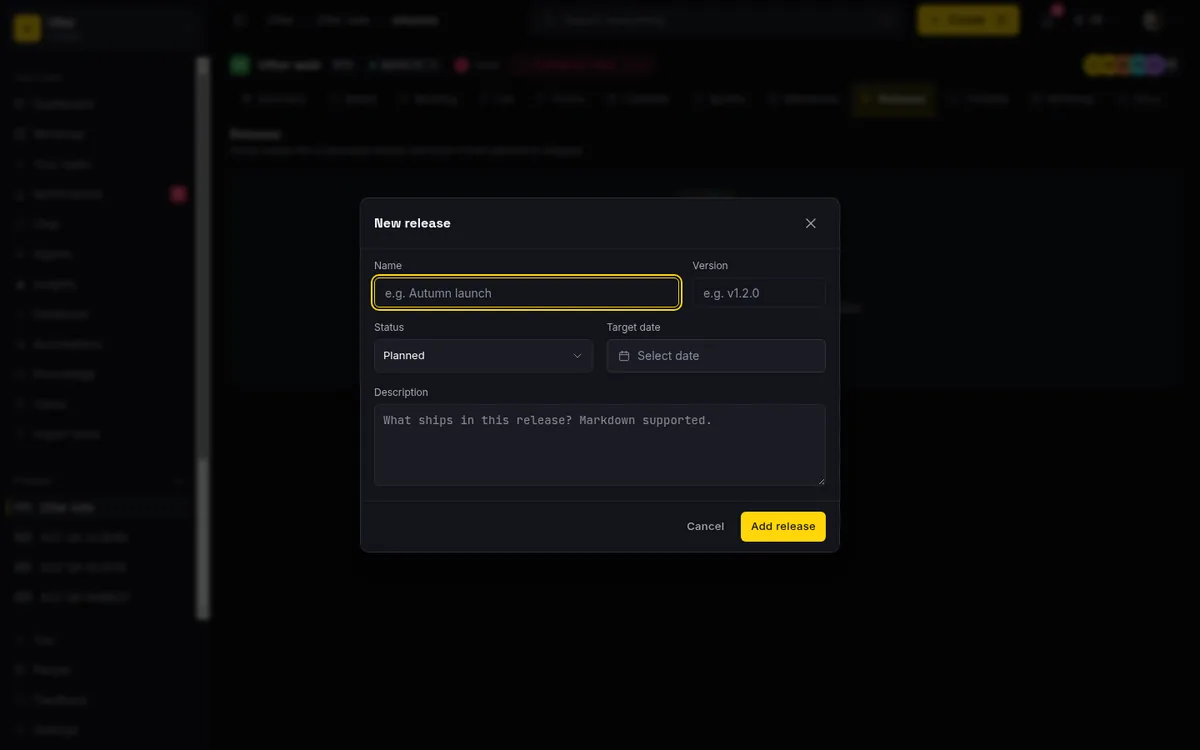
Auto-ship works off your tags. Push a tag like refs/tags/v1.2.0, or publish a GitHub release, and Utter flips the matching planned release in the linked project to "released" and stamps its release date. The version match strips a leading v and is case-insensitive, so v1.2.0 and 1.2.0 both resolve, and it is idempotent, so a redelivered webhook never ships the same release twice.
Then there are the notes. Utter gathers the issues linked to that release and drafts markdown grouped into Features, Fixes, and Other, with each bullet starting with the issue key (like WEB-12) so the notes trace straight back to the work. It only summarizes the issues you actually supply, so it never invents a key, and it writes bilingual headings for English and Arabic. Critically, it returns a draft. You read it, edit it, and save it. It never publishes notes on its own.
The honest limits. Auto-ship needs the tag to match an existing planned release. A tag with no matching release is a silent no-op. It flips a release's status; it does not create the release for you, so you plan the release first, then tag to ship it. And unlike triage suggestions, the AI-drafted notes do consume AI credits, so on Free's small monthly grant, heavy use points toward a paid plan.
Full details in how to plan releases and milestones.
Drive the same pipeline from the API or an agent
Everything above is a UI, but none of it is UI-only. The v1 REST API and the first-party MCP server let a script, or an AI agent, create and move issues on the same board. The main call is creating an issue in a project, POST /v1/workspaces/{slug}/projects/{key}/issues with the issues:write scope:
curl -X POST \
  "https://utter.ae/api/v1/workspaces/acme/projects/WEB/issues" \
  -H "Authorization: Bearer $UTTER_API_KEY" \
  -H "Content-Type: application/json" \
  -d '{
    "type": "bug",
    "title": "Checkout button unresponsive on Safari",
    "description_md": "Steps: 1. add item 2. click checkout. Nothing happens.",
    "priority": "high",
    "labels": ["checkout", "safari"]
  }'
const res = await fetch(
"https://utter.ae/api/v1/workspaces/acme/projects/WEB/issues",
{
method: "POST",
headers: {
Authorization: `Bearer ${process.env.UTTER_API_KEY}`,
"Content-Type": "application/json",
},
body: JSON.stringify({
type: "bug",
title: "Checkout button unresponsive on Safari",
description_md: "Steps: 1. add item 2. click checkout. Nothing happens.",
priority: "high",
labels: ["checkout", "safari"],
}),
},
);
const issue = await res.json();import os, requests
res = requests.post(
"https://utter.ae/api/v1/workspaces/acme/projects/WEB/issues",
headers={"Authorization": f"Bearer {os.environ['UTTER_API_KEY']}"},
json={
"type": "bug",
"title": "Checkout button unresponsive on Safari",
"description_md": "Steps: 1. add item 2. click checkout. Nothing happens.",
"priority": "high",
"labels": ["checkout", "safari"],
},
)
issue = res.json()The response is the created issue resource (HTTP 201):
{
  "data": {
    "id": "018f9c2a-7b1e-7c33-9a4d-2f6b8e1d0c55",
    "key": "WEB-42",
    "url": "https://utter.ae/w/acme/p/web/WEB-42",
    "number": 42,
    "type": "bug",
    "title": "Checkout button unresponsive on Safari",
    "description_md": "Steps: 1. add item 2. click checkout. Nothing happens.",
    "status": "backlog",
    "status_id": "018f9c2a-9001-7000-8000-0000000000a1",
    "status_name": "Backlog",
    "priority": "high",
    "assignee_id": null,
    "assignees": [],
    "reporter_id": "018f9c2a-1234-7000-8000-0000000000ff",
    "parent_id": null,
    "epic_id": null,
    "milestone_id": null,
    "sprint_id": null,
    "release_id": null,
    "rank": "0|i00007:",
    "labels": [
      { "id": "018f9c2a-aa01-7000-8000-000000000001", "name": "checkout", "color": "#ffd60a" },
      { "id": "018f9c2a-aa01-7000-8000-000000000002", "name": "safari", "color": "#4f8cff" }
    ],
    "estimate_minutes": null,
    "spent_minutes": null,
    "completion_pct": null,
    "start_at": null,
    "due_at": null,
    "resolved_at": null,
    "archived_at": null,
    "created_at": "2026-07-16T10:04:22.000Z",
    "updated_at": "2026-07-16T10:04:22.000Z"
  }
}
A couple of things make this genuinely useful for agent-run triage. Utter agents are real workspace members, and they are never billed as seats, so a team of triage and fixing agents adds zero seat cost. A form routed to an agent opens a pending agent session so the agent picks up the report as delegated work, and a notify_agent automation action can wake an agent from a rule when a matching issue lands. Auth is magic-link (no passwords), and the whole surface is bilingual English and Arabic with full RTL.
What it costs, and when this pipeline fits
The reason to run all five stages in one tool is not only tidiness, it is cost. In Utter, the entire pipeline (forms, AI triage, workflow statuses, GitHub, releases) is on every plan including Free. Capacity is the only ceiling. Here is how that lands next to the usual suspects, as of July 2026.
| Tool | Free plan | Next paid tier | Public intake form + AI triage in the box? |
|---|---|---|---|
| Utter | $0, feature-complete (forms, AI triage, workflow gates, GitHub, releases); caps: 128 MB storage, 1 MB/file, 5 projects, 2 automations, 25 AI credits/mo | Pro $3/builder seat/mo ($30/yr); Business $6/mo ($60/yr); viewers free | Yes, both, on every plan |
| Jira | $0, capped at 10 users | Standard ~$7.91/user/mo; Premium ~$14.54/user/mo | No native public bug form or built-in AI triage on Free |
| Linear | $0, unlimited members but capped at 2 teams and 250 issues | Business $16/user/mo (billed yearly) | No public intake form |
| Trello | $0, capped at 10 boards, 10 MB/file, 250 automation runs/mo | Standard $5/user/mo (annual) or $6 monthly | No |
| GitHub Issues | $0, unlimited public and private repos with Issues, Projects, PRs, Dependabot | Team $4/user/mo (Enterprise $21) | No. It is a code-repo tracker with no public intake form or AI triage of its own |
A note on pricing shape, since headline rates hide it. Utter charges only for builder (editor) seats at $3 (Pro) or $6 (Business) per seat per month, and viewers are free. Jira's Standard $7.91 and Premium $14.54 are per-user, with the per-user rate stepping down at larger seat counts. Linear's Free is generous on members but hard-limited to 2 teams and 250 issues, which a busy bug queue outgrows quickly, and its Business tier is $16/user/mo. Trello and GitHub are cheap per seat but neither ships a public bug intake form with AI triage the way this workflow needs.
When should you not switch? Two honest cases. If your team already lives entirely in GitHub Issues and never takes a bug report from outside the repo, the extra intake layer buys you little. And if you specifically need pull-request status or branch sync, Utter does not do that. It links commits and ships releases, but it is not a code-review tool.
If you do adopt it on Free, weigh three constraints up front: 2 active automation rules (so a fully automated intake-to-routing chain is tight, and richer automation wants Pro's 20 or Business's unlimited), 25 AI credits a month (fine for triage suggestions, which are not metered, but limiting for AI release notes, which are), and the 1 MB per-file upload cap on attachments.
Human-in-the-loop, not hands-off by default
One design choice runs through this whole pipeline, and it is worth stating rather than hiding. The AI suggests, and a person decides.
Triage proposes a priority and labels; you apply them. Autonomous triage, the version that applies on its own, is an opt-in per-project toggle, off until you turn it on. AI release notes come back as a draft for you to edit before anything is saved. That is deliberate. A bug tracker is a record of what your team actually decided, and handing every judgment to a model quietly erodes that record. Keeping a human in the loop by default is the feature, not a gap in it.
If you want to run report-to-fix in one place, spin up a free workspace, publish a bug form, and put the first real report through the pipeline. That is the fastest way to see whether the seams are actually gone.
Frequently asked questions
What is a bug tracking workflow?
It is the path a bug takes from first report to shipped fix, and the rules that govern each step along the way. A complete one has five stages: intake (a report comes in), triage (priority, type, and labels get set), a board (the work moves through states, including a review gate), code (the fix is written and linked), and release (the fix ships). The value is in running those stages in one system so context does not get lost at the handoffs.
How do you set up a bug intake form that turns reports into tickets?
In Utter you build a form in the project's form builder, choosing from 14 field kinds (including a file field for screenshots and logs), then publish it and enable public access. It gets a shareable /f/ URL that anyone can submit without logging in. Each submission creates an issue, and the form's routing defaults can pre-set the assignee, labels, sprint, and board status automatically.
Can AI set the priority and labels on a bug automatically?
Yes, two ways. By default it is human-in-the-loop: the AI suggests a priority, type, and labels (validated against your real priority enum and your project's own label palette), and a person applies them, one issue at a time or up to 15 in a batch. If you want it fully automatic, you can turn on autonomous triage per project, and each new issue gets triaged and applied in the background. That mode is opt-in, not the default.
How do you stop a bug from being marked done without review?
Use transition rules on your board statuses. Utter seeds an In Review column and lets each status restrict which statuses it can move to next. That check runs at every write path (manual drag, bulk edit, automations, and the API), so a bug cannot skip from In Progress to Done. A blocked move shows a message like "Workflow: In Progress to Done is not allowed."
How does linking a Git commit to a bug work?
Connect a GitHub repo, then include the issue key in your commit message, like #WEB-42. On push, a webhook reads the message, matches the key, and writes a linked-commit entry onto that issue's timeline with the repo, SHA, author, message, and a link to the commit. Webhooks are HMAC-SHA256 verified and the secret is encrypted. It is push and message based only, so a commit without the key is not linked.
Do I need a paid plan to run the full report-to-fix workflow?
No. Forms, AI triage, workflow statuses with transition gates, the GitHub integration, and releases are all available on the Free plan (as of July 2026). What you hit on Free is capacity: 128 MB of storage, 1 MB per file, 5 active projects, 2 automation rules, and 25 AI credits a month. Heavier use (bigger attachments, more automations, frequent AI release notes) is what moves you to Pro ($3) or Business ($6) per builder seat.
Can AI agents work the bug board through an API?
Yes. The v1 REST API and a first-party MCP server let an agent create and move issues on the same board a human uses, with POST /v1/workspaces/{slug}/projects/{key}/issues to file one. Utter agents are real workspace members that are never billed as seats, so a team of triage and fixing agents adds no seat cost. A form routed to an agent opens a pending session, and a notify_agent automation action can wake an agent from a rule.
Does this replace my CI/CD or issue tracker in GitHub?
No. This workflow links commits to issues and auto-ships releases on a tag, but it does not run your tests, build your code, or sync pull-request status and branches. If you already track everything in GitHub Issues and never take an external bug report, or you specifically need PR and branch sync, this pipeline is not trying to replace that. It sits alongside your CI/CD and gives the bug a thread from report to fix.
Related reading
Turn a request form into a triaged issue automatically (no human inbox in the middle)
How to wire a public intake form to a tracked, classified issue: routing defaults, an issue.created automation, and an AI triage first pass.
June 16, 2026 · 7 min read
How to set up a request form
Build a public intake form in Utter that creates tickets: map fields to issue title, description and priority, route submissions, publish a no-account link.
July 15, 2026 · 14 min read
Auto-triage new issues with AI: a setup that actually assigns, labels, and prioritizes
How to set up AI issue triage automation that classifies severity, labels, and routes new bugs and requests, with an honest line on what to let AI decide.
May 27, 2026 · 8 min read
How to organize work with epics and subtasks
Learn Utter's epics, stories, tasks, subtasks hierarchy: group work under an epic, break issues into subtasks, read the progress bar, and the rules it enforces.
July 15, 2026 · 17 min read

How to create an issue
Learn how to create an issue in Utter three ways, pick the right type, fill the dialog, roll up to an epic, and make subtasks. With the real limits named.
July 15, 2026 · 16 min read

Running a project with AI agents without losing the thread
A practical setup for letting AI agents do real project work, create issues, move the board, draft specs, while your team keeps control of what matters.
July 11, 2026 · 5 min read
Stop chasing status updates: let AI write the weekly project digest
How to automate a weekly status report with AI that reads what actually moved and what stalled, instead of a dumb scheduled dump of ticket counts.
June 1, 2026 · 7 min read
Two agents, one backlog: coordinating a triage agent and a coding agent with issue status as handoffs
A practical multi-agent workflow: custom board columns and status transitions as the handoff bus between a triage agent and a coding agent, with human review in the middle.
July 1, 2026 · 9 min read
How to automate project management with AI, and what to leave manual
The right order to automate project management with AI: reporting first, intake second, execution agents last, and the decisions that should stay human.
July 15, 2026 · 8 min read

How to track and vote on feedback
A hands-on tour of Utter's product feedback board and roadmap: post ideas, vote, and read the Tracking board and Changelog as a live public roadmap.
July 15, 2026 · 17 min read
أضف تعليقًا
ابدأ النقاش.